
Įvadas
This manual provides essential information for the safe and efficient use of your Xiaomi 55-inch 4K UHD Smart Quantum MagiQ S Mini LED Google TV. Please read these instructions thoroughly before operating the device and retain them for future reference.
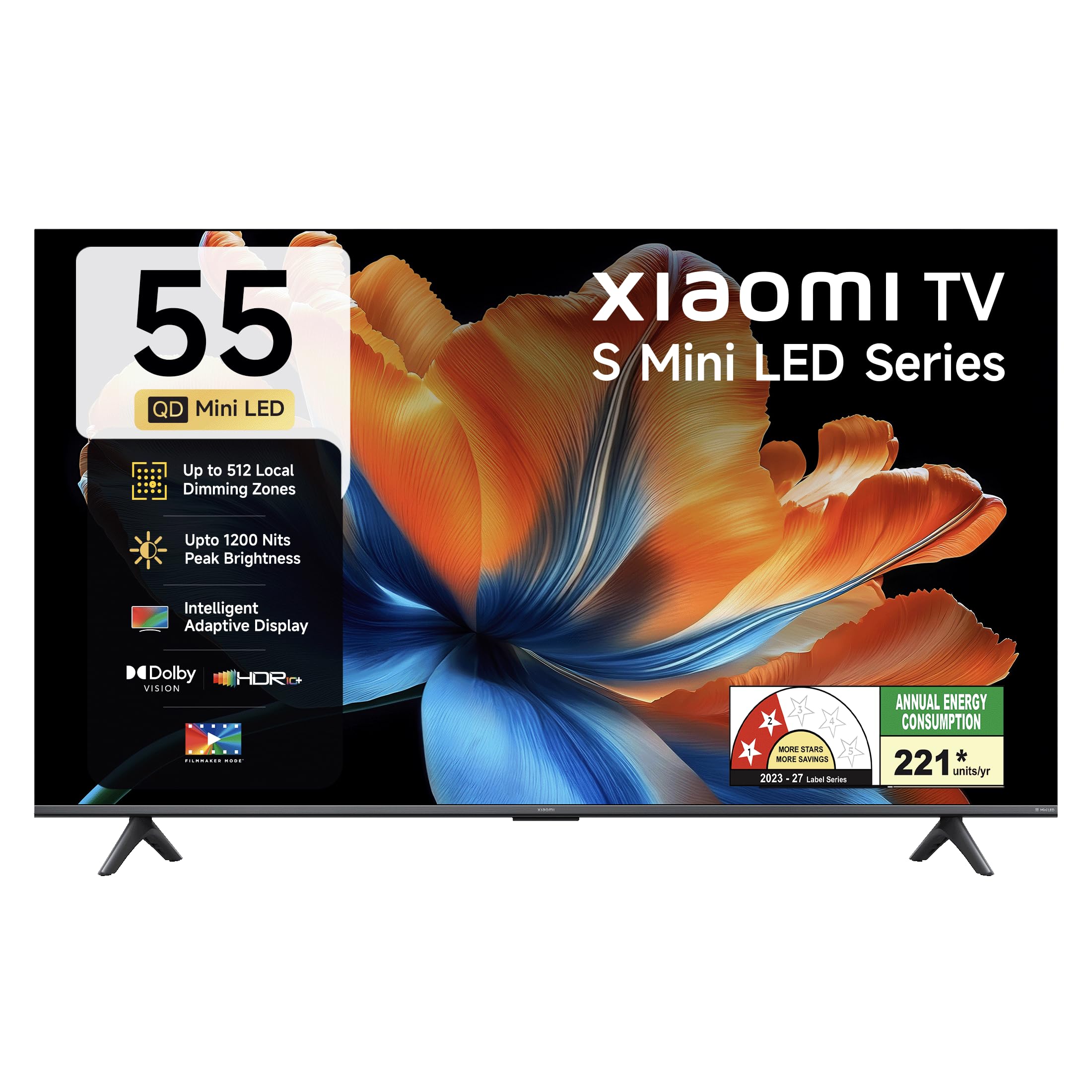
Vaizdas: priekis view of the Xiaomi 55-inch 4K UHD Smart Quantum MagiQ S Mini LED Google TV, showcasindėl savo plono rėmelio dizaino.
Sąrankos vadovas
1. Išpakavimas ir pridedami komponentai
Carefully remove all items from the packaging. Ensure all components listed below are present and undamaged.

Image: Contents of the product box, including the TV unit, remote control, user manual, two stand units, four screws, two AAA batteries, and a power cord.
- 1 LED televizoriaus blokas
- 1 Nuotolinis valdymas
- 1 Naudotojo vadovas (šis dokumentas)
- 2 stovai
- 4 varžtai stovo montavimui
- 2 AAA baterijos (nuotolinio valdymo pultui)
- 1 Maitinimo laidas
2. Stovo montavimas arba tvirtinimas prie sienos
Your television supports both table-top stand installation and wall mounting. Choose the method suitable for your environment.
- Stovo montavimui: Attach the two provided stand units to the bottom of the TV using the four screws. Ensure they are securely fastened.
- Montavimui ant sienos: Use a compatible VESA wall mount (sold separately). Follow the instructions provided with your wall mount kit. Ensure the wall can support the TV's weight.
3. Išorinių įrenginių prijungimas
Connect your external devices such as set-top boxes, gaming consoles, or audio systems to the TV's ports.

Vaizdas: Galinis view of the TV highlighting connectivity ports: Optical, Earphone, AV In, 3 HDMI ports (one with eARC), 2 USB 2.0 ports, Antenna, and Ethernet.
- HDMI prievadai (x3): Connect gaming consoles, Blu-ray players, or set-top boxes. One port supports eARC for enhanced audio return channel functionality.
- USB prievadai (x2): Prijunkite USB atmintines, kad galėtumėte atkurti medijos failus.
- Ethernet prievadas: Laidinio interneto ryšiui.
- Optinė išvestis: Skirta prijungti prie išorinių garso sistemų.
- AV įvestis: Skirta senesniems įrenginiams prijungti naudojant kompozicinį vaizdo ir stereo garsą.
- Antena: Skirta antžeminės arba kabelinės antenos prijungimui.
4. Pradinis įjungimas ir sąranka
After connecting all necessary cables, plug the power cord into an electrical outlet. Press the power button on the remote control or the TV to turn it on. Follow the on-screen instructions for initial setup, which typically includes:
- Kalbos pasirinkimas
- Tinklo ryšys („Wi-Fi“ arba eterneto)
- Prisijungimas prie „Google“ paskyros
- Kanalų nuskaitymas
Operating Your Xiaomi Smart TV
1. Nuotolinio valdymo funkcijos
Pridedamas nuotolinio valdymo pultas suteikia prieigą prie visų televizoriaus funkcijų. Įdėkite dvi AAA baterijas į nuotolinio valdymo pultą, užtikrindami teisingą poliškumą.

Image: Xiaomi remote control, featuring dedicated quick access buttons for popular streaming services and Google Assistant voice control.
- Maitinimo mygtukas: Įjungia arba išjungia televizorių.
- „Google“ asistento mygtukas: Įjungia balso valdymą turiniui ieškoti, išmaniųjų namų įrenginiams valdyti ir kt.
- Naršymo skydelis: Naudojamas naršyti meniu ir pasirinkti elementus.
- Garsumo didinimas / sumažinimas: Reguliuoja garso garsumą.
- Kanalas aukštyn/žemyn: Keičia televizijos kanalus.
- Greitos prieigos mygtukai: Dedicated buttons for Netflix, Prime Video, YouTube, Disney+ Hotstar, SonyLIV, and Live TV.
- Nutildymo mygtukas: Nutildo televizoriaus garsą.
2. Google TV Interface and Applications
Your TV runs on the Android 14 OS with Google TV, offering a personalized content experience. Access a wide range of applications from the Google Play Store.

Image: The PatchWall interface, providing customized content recommendations and curation from various streaming platforms.
- „Content First“ vartotojo sąsaja: Organizes content from all your streaming services in one place.
- Asmeninis profesionalasfiles: Sukurkite individualų profesionaląfiles suasmenintoms rekomendacijoms.
- Palaikomos programos: Pre-installed and downloadable apps include Netflix, Prime Video, YouTube, Zee5, JioCinema, SonyLiv, and more.
- „Google“ padėjėjas: Use voice commands for navigation, search, and smart home control.
3. Vaizdo ir garso nustatymai
Optimizuokite savo viewklausymosi patirtį per įvairius vaizdo ir garso režimus.
Vaizdo nustatymai:
- Kino kūrėjo režimas: Disables post-processing effects to display content as intended by the director.
- Dolby Vision: Enhances HDR content with dynamic metadata for optimized image quality frame by frame.
- HDR10+: Uses dynamic data to enhance every frame, providing an immersive viewpatirtį.
- Akių komforto režimas: Sumažina mėlyną šviesą ir mirgėjimą, kad būtų patogiau viewpatirtį.
- MEMC variklis: Judesio įvertinimo ir kompensavimo technologijos, užtikrinančios sklandesnį judesį greito tempo scenose.
- AI Picture Optimization Engine: Advanced AI algorithms analyze content in real-time to enhance clarity, contrast, and color reproduction.

Image: Filmmaker Mode, designed to preserve original colors, contrast, and motion for an authentic cinematic experience.

Image: Dolby Vision technology, optimizing image quality with deeper blacks and brighter highlights.

Image: HDR10+ dynamic frame-by-frame tuning, ensuring consistent detail across dark and bright scenes.

Image: Eye Care Mode, providing flicker-free visuals with DC Dimming and reduced blue light for comfortable viewing.
Garso nustatymai:
- 34 vatų išėjimo galia: Powerful built-in box speakers.
- Dolby Audio: Perteikia sodrų, aiškų ir galingą garsą.
- DTS-X ir DTS Virtual:X: Užtikrina įtraukiantį, daugiamačio garso kokybę.
- „Xiaomi“ garsas: Preset audio configurations developed for optimal sound quality.

Image: Xiaomi Sound, offering tailored audio experiences through expert-developed configurations.
4. Ryšys ir transliacija
Your TV offers versatile connectivity options for seamless streaming and device integration.
- Dviejų dažnių „Wi-Fi“: Connects to 2.4GHz and 5GHz wireless networks.
- Bluetooth: Connect wireless headphones, speakers, or other Bluetooth accessories.
- Google Cast Built-in: Stream content directly from compatible apps on your smartphone or tablet.
- „Apple AirPlay 2“: Srautuokite turinį iš „Apple“ įrenginių.
- „Miracast“: Belaidžiu būdu atspindėkite „Android“ įrenginio ekraną.

Image: Stream content from your phone using Google Cast or Apple AirPlay 2.
Priežiūra ir priežiūra
Tinkama priežiūra užtikrina jūsų televizoriaus ilgaamžiškumą ir optimalų veikimą.
- Ekrano valymas: Švelniai nuvalykite ekraną minkšta, nepūkuota šluoste. Įsisenėjusioms dėmėms valyti naudokite specialiai ekranui skirtą valymo tirpalą, užteptą ant šluostės, o ne tiesiai ant ekrano.
- Kūno valymas: Wipe the TV's frame and back panel with a soft, dry cloth. Avoid abrasive cleaners or solvents.
- Vėdinimas: Užtikrinkite tinkamą oro cirkuliaciją aplink televizorių. Neužblokuokite ventiliacijos angų.
- Išjungti: Prieš valydami televizorių arba jei jis bus nenaudojamas ilgesnį laiką, visada išjunkite jį ir atjunkite jį nuo elektros lizdo.
- Programinės įrangos atnaujinimai: Periodically check for and install software updates to ensure optimal performance and security.
Įprastų trikčių šalinimas
Refer to this section for solutions to common operational problems.
| Problema | Sprendimas |
|---|---|
| Televizorius neįsijungia | Ensure the power cord is securely plugged into both the TV and a working electrical outlet. Check if the power outlet is active. Try pressing the power button on the TV itself. |
| Nėra vaizdo, bet yra garsas | Check the input source. Ensure the connected device (e.g., set-top box) is turned on and functioning. Try a different HDMI cable or port. |
| Nėra garso, bet vaizdas yra | Check the volume level and ensure the TV is not muted. Verify audio output settings (e.g., internal speakers, external sound system). Check audio cables for external devices. |
| Nuotolinio valdymo pultas nereaguoja | Replace the AAA batteries in the remote control. Ensure there are no obstructions between the remote and the TV. Re-pair the Bluetooth remote if necessary (refer to TV settings). |
| Nepavyksta prisijungti prie „Wi-Fi“. | Ensure your Wi-Fi router is on and working. Re-enter the Wi-Fi password. Try restarting both the TV and the router. Check if other devices can connect to the Wi-Fi network. |
Techninės specifikacijos
Detailed specifications for the Xiaomi 55-inch 4K UHD Smart Quantum MagiQ S Mini LED Google TV (Model L55MC-IN).

Image: Physical dimensions and weight of the Xiaomi 55-inch TV, both with and without the stand.
| Funkcija | Specifikacija |
|---|---|
| Modelio numeris | L55MC-IN |
| Ekrano dydis | 55 colių (138 cm) |
| Ekrano technologija | Mini LED |
| Rezoliucija | 4K Ultra HD (3840 2160 x XNUMX XNUMX) |
| Atnaujinimo dažnis | 60 Hz (DLG 120 Hz) |
| Didžiausias ryškumas | Iki 1200 nitų |
| Operacinė sistema | Android 14 OS with Google TV |
| RAM | 2 GB |
| ROM (vidinė atmintis) | 32 GB |
| Garso išvestis | 34 vatų |
| Garso technologijos | „Dolby Audio“, DTS-X, DTS Virtual:X |
| Ryšys | Dual Band Wi-Fi, Bluetooth, 3 HDMI (1 eARC), 2 USB, Optical, Ethernet, AV In |
| Ekrano veidrodis | Google Cast, Apple AirPlay 2, Miracast |
| Ypatingos savybės | Filmmaker Mode, MEMC, Eye Comfort Mode, AI Picture Optimization Engine |
| Gaminio matmenys (D x P x A) | 31.2D x 31.2W x 76.9H Centimeters (with stand) |
| Item Weight Without Stand | 11.6 kilogramo |
| Energijos suvartojimas | 230 vatų |
| Kilmės šalis | Indija |
Informacija apie garantiją
Your Xiaomi TV comes with a comprehensive warranty provided by the brand from the date of purchase.
- Standartinė garantija: 3-year comprehensive warranty for non-prebook customers (purchases between April 22nd - May 31st).
- Pre-book Customer Warranty: 4-year comprehensive warranty for pre-book customers (purchases between April 22nd - April 30th).
Warranty claims can be made using your Amazon invoice as proof of purchase. For detailed terms and conditions, please refer to the official Xiaomi warranty policy or contact customer support.
Pagalba klientams
For any assistance, service requests, or queries regarding your Xiaomi TV, please contact Xiaomi customer support.

Vaizdas: Viršview of Xiaomi's customer support commitments, including quick installation, prompt call-backs, and swift doorstep solutions.
- Montavimo paslaugos: New TV installations are typically completed within 3 hours of your appointment.
- Service Requests: Expect a call back from the support team within 60 minutes for any service request.
- On-site Support: Experts aim to arrive at your home within 24 hours of your service request.
Please visit the official Xiaomi India websvetainėje arba žr. kontaktinę informaciją, pateiktą jūsų produkto pakuotėje, kad gautumėte naujausią pagalbos informaciją.


