
1. Įvadas
The Senwa Vacuum V100 is an advanced robotic vacuum cleaner designed to provide efficient and effortless cleaning for your home. With powerful suction and intelligent navigation, it effectively cleans various surfaces, from hard floors to carpets, ensuring a spotless environment. Its compact design and user-friendly features make daily cleaning simple and convenient. The V100's effective filtration system captures dust and fine particles, contributing to improved air quality in your living space. This manual provides essential information for the safe and optimal use, maintenance, and troubleshooting of your Senwa Vacuum V100.
Pagrindinės funkcijos:
- Powerful and Efficient Suction: Optimized motor ensures deep cleaning on floors, carpets, and difficult corners, removing dust and dirt in a single pass.
- Lightweight and Maneuverable Design: Easy to transport and use in any space, ideal for quick, effortless cleaning or frequent use.
- Multi-Surface Versatility: Works perfectly on different types of surfaces, adapting to the needs of homes or offices.
- Effective Filtration System: Captures fine particles and helps maintain a cleaner environment, ideal for improving hygiene.
- Easy Maintenance and Durability: Accessible components for quick cleaning and long lifespan, designed for continuous and reliable use.
2. Saugos informacija
Please read all safety instructions carefully before using your Senwa Vacuum V100. Keep this manual for future reference.
- Šį prietaisą gali naudoti vaikai nuo 8 metų ir asmenys, turintys ribotų fizinių, jutiminių ar protinių gebėjimų arba neturintys patirties ir žinių, jei jie yra prižiūrimi arba yra instruktuojami, kaip saugiai naudoti prietaisą ir supranta su tuo susijusius pavojus. .
- Vaikus reikia prižiūrėti, kad jie nežaistų su prietaisu.
- Vaikai negali valyti ir atlikti naudotojo priežiūros darbų be priežiūros.
- Do not use the vacuum cleaner in wet environments or on wet surfaces.
- Do not allow the vacuum cleaner to pick up large objects, liquids, burning or smoking objects (e.g., hot ashes, cigarettes).
- Use only the original charging adapter and charging dock provided by the manufacturer.
- Ensure the charging dock is placed against a wall on a level surface, free from obstacles.
- Prieš valydami, nuimkite nuo grindų visus palaidus laidus, smulkius daiktus ar trapius daiktus, kad jie nesusipainiotų ir nepažeistų jų.
- Do not operate the vacuum cleaner if it is damaged. Contact customer support for assistance.
- Turn off the vacuum cleaner and unplug it from the charging dock before performing any maintenance or cleaning.
3. Pakuotės turinys
Carefully unpack your Senwa Vacuum V100 and check that all items are present and in good condition. If any items are missing or damaged, please contact customer support.
- Senwa Vacuum V100 Robot Vacuum Cleaner (Main Unit)
- Įkrovimo dokas
- Maitinimo adapteris
- Šoniniai šepečiai (2 poros)
- Pagrindinis šepetys (iš anksto sumontuotas)
- Šiukšlių dėžė (iš anksto sumontuota)
- Didelio efektyvumo filtras (iš anksto įdiegtas)
- Valymo įrankis
- Vartotojo vadovas
4. Produktas baigtasview
Familiarize yourself with the components of your Senwa Vacuum V100.
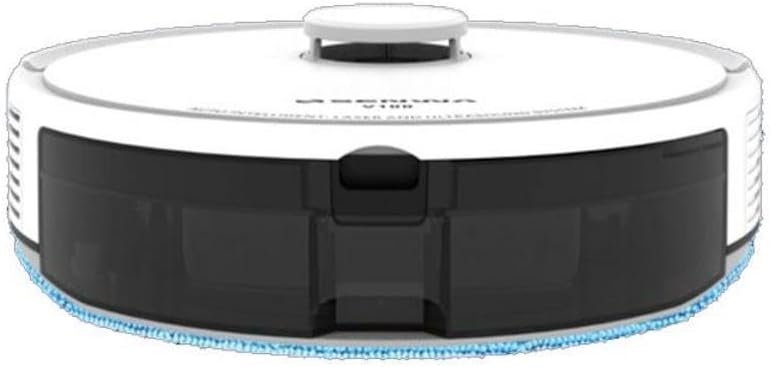
4.1 pav.: Viršus-priekis View of Senwa Vacuum V100
This image shows the top and front of the robot vacuum, highlighting the main body, control button, and dustbin access panel.

4.2 pav.: šonas View of Senwa Vacuum V100
Šiame paveikslėlyje pavaizduotas šoninis profilisfile of the robot vacuum, showing a driving wheel, a side brush, and a ventilation grille.

4.3 pav.: šonas View of Senwa Vacuum V100 with Dustbin Area
This image illustrates another side view, focusing on the area where the dustbin is typically accessed or removed.
Pagrindiniai komponentai:
- Viršutinis viršelis: Apsaugo vidinius komponentus.
- Valdymo mygtukas: Initiates or pauses cleaning, returns to charging dock.
- Šiukšliadėžė: Surenka nešvarumus ir šiukšles.
- Šoniniai šepečiai: Sweep debris from edges and corners into the vacuum's path.
- Pagrindinis šepetys: Sumaišo ir pakelia nešvarumus nuo grindų.
- Varomieji ratai: Leiskite robotui judėti įvairiais paviršiais.
- Įkrovimo kontaktai: Connect with the charging dock for power.
- Jutikliai: Detect obstacles, cliffs, and walls for navigation.
- Įkrovimo dokas: Provides power to recharge the robot.
5. Sąranka
5.1 Išpakavimas ir paruošimas
- Remove the robot vacuum and all accessories from the packaging.
- Nuimkite visas apsaugines plėveles ar lipdukus nuo roboto ir įkrovimo stotelės.
- Pritvirtinkite šoninius šepečius, spausdami juos ant kvadratinių stulpelių roboto apačioje, kol jie spragtelės ir užsifiksuos.
5.2 Įkrovimo stotelės pastatymas
- Padėkite įkrovimo stotelę prie sienos ant kieto, lygaus paviršiaus.
- Įsitikinkite, kad abiejose doko pusėse yra bent 0.5 metro (1.6 pėdos) laisvos vietos, o priešais jį – 1.5 metro (4.9 pėdos).
- Connect the power adapter to the charging dock and plug it into a wall outlet. Ensure the power indicator on the dock lights up.
5.3 Pradinis įkrovimas
- Place the robot vacuum onto the charging dock, ensuring the charging contacts on the robot align with those on the dock.
- The robot will begin charging. Allow it to fully charge before its first use (approximately 4-6 hours). The indicator light on the robot will change to indicate a full charge.
6. Naudojimo instrukcijos
6.1 Valymo ciklo pradžia
- Ensure the robot is fully charged and clear any large obstacles from the cleaning area.
- Press the main control button on the top of the robot once to start an automatic cleaning cycle.
- The robot will automatically navigate and clean your floors.
6.2 Valymo pristabdymas / tęsimas
- To pause cleaning, press the main control button once during operation.
- To resume cleaning, press the main control button again.
6.3 Grįžimas į įkrovimo stotelę
- To send the robot back to its charging dock, press and hold the main control button for a few seconds until the robot indicates it is returning.
- The robot will automatically return to the charging dock when its battery is low or when a cleaning cycle is complete.
6.4 Cleaning Modes (if applicable)
Your Senwa Vacuum V100 may feature different cleaning modes for various needs:
- Automatinis valymas: Robotas išmaniai suplanuoja valymo kelią, kad padengtų visą plotą.
- Vietų valymas: Koncentruoja valymą į konkrečią nešvarią vietą.
- Kraštų valymas: Valo palei sienas ir baldų kraštus.
Refer to the specific instructions for your model on how to activate these modes, typically via a mobile app or remote control (if included).
7. Priežiūra
Regular maintenance ensures optimal performance and extends the lifespan of your Senwa Vacuum V100.
7.1 Šiukšlių dėžės ištuštinimas
Empty the dustbin after each cleaning cycle or when it is full.
- Paspauskite dulkių surinktuvo atlaisvinimo mygtuką ir ištraukite dulkių surinktuvą.
- Atidarykite šiukšliadėžės dangtį ir išpilkite jos turinį į šiukšliadėžę.
7.2 Filtro valymas
Clean the filter weekly or as needed. Replace every 3-6 months.
- Išimkite filtrą iš dulkių surinktuvo.
- Tap the filter gently to remove dust. Do not wash the high-efficiency filter with water.
- Rinse the primary filter (if applicable) with water and let it air dry completely before reinserting.
7.3 Pagrindinio šepečio valymas
Pagrindinį šepetį valykite kas savaitę.
- Nuimkite pagrindinio šepečio dangtelį ir iškelkite pagrindinį šepetį.
- Valymo įrankiu pašalinkite aplink šepetį susivėlusius plaukus ir šiukšles.
- Vėl uždėkite pagrindinį šepetį ir dangtelį.
7.4 Šoninių šepečių valymas
Check side brushes regularly for wear and tear. Replace if damaged.
- Pull the side brushes off their posts.
- Pašalinkite visus plaukus ar šiukšles.
- Pritvirtinkite šepečius atgal, įsitikindami, kad jie spragtelėdami užsifiksuoja savo vietoje.
7.5 Jutiklių ir įkrovimo kontaktų valymas
Wipe sensors and charging contacts monthly with a dry cloth.
- Gently wipe the cliff sensors (located on the bottom of the robot) and wall sensors (on the front bumper).
- Clean the charging contacts on both the robot and the charging dock.
8. Problemų sprendimas
If you encounter issues with your Senwa Vacuum V100, refer to the following common problems and solutions.
| Problema | Galima priežastis | Sprendimas |
|---|---|---|
| Robotas neįsijungia ir neįkraunamas. | Baterija visiškai išsikrovusi; įkrovimo kontaktai nešvarūs; maitinimo adapteris neprijungtas. | Ensure the charging dock is powered. Clean charging contacts on both robot and dock. Place robot directly on dock. |
| Robotas dažnai užstringa. | Too many obstacles; cliff sensors are dirty. | Clear loose cables, rugs, and small objects. Clean cliff sensors. |
| Prastas siurbimo našumas. | Šiukšlių dėžė pilna; filtras užsikimšęs; pagrindinis šepetys susivėlęs. | Ištuštinkite dulkių konteinerį. Išvalykite arba pakeiskite filtrą. Išvalykite pagrindinį šepetį. |
| Neįprastas triukšmas veikimo metu. | Main brush or side brushes are tangled; foreign object inside. | Clean main brush and side brushes. Check for and remove any foreign objects. |
| Robotas negrįžta į įkrovimo doką. | Charging dock is blocked or out of range; charging contacts are dirty. | Ensure charging dock has clear space. Clean charging contacts. Manually place robot on dock. |
If the problem persists after trying these solutions, please contact Senwa customer support.
9. Specifikacijos
| Funkcija | Detalė |
|---|---|
| Prekės ženklas | Senwa |
| Modelis | V100 |
| Formos faktorius | Robotas |
| Spalva | Baltas |
| ASIN | B0GTY5J56M |
| Maitinimo šaltinis | Įkraunama baterija |
| Įkrovimo laikas | apytiksliai 4-6 valandos |
| Filtravimo sistema | Didelio efektyvumo filtras |
| Valymo režimai | Auto, Spot, Edge (may vary by specific model features) |
10. Garantija ir palaikymas
The Senwa Vacuum V100 comes with a standard manufacturer's warranty. Please refer to the warranty card included in your package for specific terms and conditions, including the warranty period and coverage details.
For technical support, service, or any questions regarding your product, please contact Senwa customer service through the contact information provided on your warranty card or the official Senwa website. When contacting support, please have your product model (V100) and ASIN (B0GTY5J56M) ready.