
Įvadas
This manual provides comprehensive instructions for the aosu SolarCam D1 Max 4K 8MP UHD Outdoor PTZ Security Camera. It covers product features, setup, operation, maintenance, and troubleshooting to ensure optimal performance and security for your property. Please read this manual thoroughly before installation and use.
Kas yra dėžutėje
Patikrinkite, ar pakuotėje yra visi komponentai:
- aosu SolarCam D1 Max 4K Camera
- Saulės skydas
- 3-meter Type-C Cable
- Tvirtinimo komplektas (varžtai, sieniniai inkarai)
- Instrukcijų vadovas
Produktas baigtasview
The aosu SolarCam D1 Max is an advanced outdoor security camera designed for reliable surveillance with minimal maintenance. Key features include:
- 4K Ultra HD 8MP Resolution: Captures clear, detailed images and videos at 15 frames per second.
- High-Efficiency Solar Power: Requires only 2 hours of direct sunlight daily for continuous operation, even in low light or partial shade.
- 360° Pan-Tilt-Zoom (PTZ) with Auto-Tracking: Provides complete coverage without blind spots, automatically tracking detected movement.
- Išmanusis aptikimas: AI and PIR sensor reliably detect people, vehicles, and pets, reducing false alarms from environmental factors.
- Advanced Color Night Vision: Integrated 150-lumen LED spotlight enables full-color night vision and acts as a deterrent.
- IP65 atsparumas oro sąlygoms: Designed to withstand harsh weather conditions, ensuring reliable operation in rain or snow.
- Dvipusis garsas: Allows communication with visitors or deterrence of intruders, with a voice change option for privacy.
- Lanksčios saugojimo parinktys: Supports local storage via memory card or secure aosu Cloud service.
- Išmaniųjų namų integracija: Compatible with Amazon Alexa for convenient control.

Image: The aosu SolarCam D1 Max camera with its accompanying solar panel, illustrating the complete outdoor surveillance system.
Sąranka
1. Montavimas
The SolarCam D1 Max is designed for easy DIY installation without complex wiring. Choose a mounting location that provides a clear view of the area you wish to monitor and ensures the solar panel receives adequate direct sunlight.
- Kameros montavimas: Use the provided mounting kit to securely attach the camera to a wall or suitable surface. Ensure it is within Wi-Fi range.
- Saulės skydo montavimas: Position the solar panel in an area that receives at least 2 hours of direct sunlight daily. Use the 3-meter Type-C cable to connect the solar panel to the camera. The flexible cable allows for optimal placement of both components.
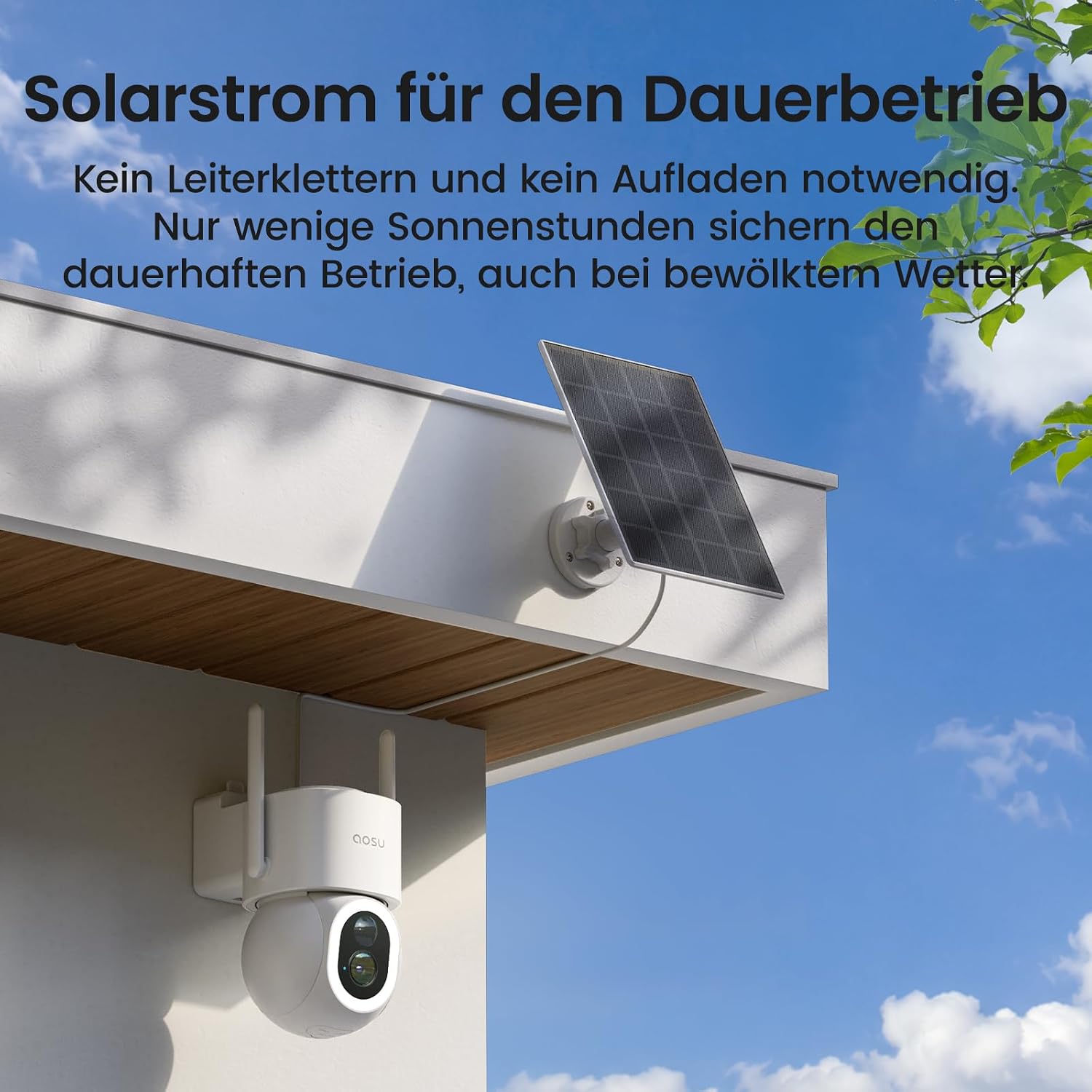
Image: The aosu camera mounted on a wall with its solar panel positioned above, demonstrating a typical installation for continuous power.
2. App Setup and Connectivity
Download the AOSU app from your smartphone's app store. Follow the in-app instructions to connect your camera to your home Wi-Fi network. Ensure your Wi-Fi signal is strong at the camera's location for stable performance.

Image: A person holding a smartphone, demonstrating the easy DIY installation and app setup process for the aosu camera.
Fotoaparato valdymas
1. 360° PTZ Control and Auto-Tracking
Use the AOSU app to remotely control the camera's pan (horizontal) and tilt (vertical) movements, providing a full 360° view of your property. The camera also features intelligent auto-tracking, which automatically follows detected subjects within its field of view.

Paveikslėlis: Viršutinė dalis view of a property with the aosu camera indicating its 360-degree PTZ capability and intelligent auto-tracking of individuals and vehicles.
2. Smart Detection and Notifications
The camera utilizes on-device AI and a PIR motion sensor to accurately detect people, vehicles, and pets. This intelligent detection minimizes false alarms caused by wind-blown trees or other non-threatening movements. You will receive instant notifications on your AOSU app when relevant activity is detected.

Image: An illustration of the camera's AI-powered vehicle detection, showing a person approaching a parked car within a monitored zone.
3. Naktinio matymo režimai
The SolarCam D1 Max offers advanced night vision capabilities:
- Spalvotas naktinis matymas: The integrated 150-lumen LED spotlight provides bright, full-color video recordings at night.
- Infraraudonųjų spindulių nakties vizija: For discreet monitoring, the camera can switch to infrared mode, providing clear black-and-white video in low-light conditions.

Image: A comparison showing the camera's full-color night vision with the spotlight on, versus infrared night vision with the spotlight off, demonstrating clear visibility in both modes.
4. Two-Way Audio and Privacy
Engage in real-time conversations through the camera using the two-way audio feature. For enhanced privacy, a voice change option is available. You can also set privacy zones within the app to exclude specific areas from surveillance.
5. Saugojimo parinktys
Recordings can be stored locally on a memory card (not included) or securely uploaded to the aosu Cloud service. Choose the storage solution that best fits your needs.
6. Išmaniųjų namų integracija
The camera is compatible with Amazon Alexa, allowing you to integrate it into your smart home ecosystem for voice control and enhanced convenience.
Priežiūra
The aosu SolarCam D1 Max is designed for low maintenance. Regular checks can ensure optimal performance:
- Saulės baterijos efektyvumas: Ensure the solar panel remains clean and free from obstructions (leaves, dirt) to maximize sunlight absorption.
- Atsparumas oro sąlygoms: The IP65 rating ensures protection against dust and water jets. No special weatherproofing maintenance is required.
- Programinės įrangos atnaujinimai: Periodically check the AOSU app for firmware updates to ensure your camera has the latest features and security enhancements.
Trikčių šalinimas
| problema | Galima priežastis | Sprendimas |
|---|---|---|
| Dažni klaidingi aliarmai | Environmental factors (e.g., moving branches, shadows) or incorrect sensitivity settings. | Adjust motion detection sensitivity in the AOSU app. Utilize AI detection for people/vehicles/pets to filter out irrelevant movements. Set privacy zones to exclude areas with frequent non-threatening motion. |
| Kamera neprisijungia prie „Wi-Fi“ | Weak Wi-Fi signal, incorrect password, or camera too far from router. | Ensure the camera is within range of your Wi-Fi router. Verify Wi-Fi password. Consider a Wi-Fi extender if the signal is weak. Restart the camera and router. |
| Baterija greitai išsikrauna | Insufficient sunlight for solar panel, excessive motion events, or frequent live view prieiga. | Relocate the solar panel to an area with more direct sunlight. Reduce motion detection sensitivity or frequency of recordings if not critical. Limit live view access to conserve battery. |
| No Recordings Saved | Memory card not inserted, full, or corrupted; cloud subscription expired; or recording settings incorrect. | Check if a memory card is properly inserted and has sufficient space. Verify your aosu Cloud subscription status. Review įrašymo nustatymai programėlėje. |
| Prasta vaizdo kokybė | Nešvarus objektyvas, prastas apšvietimas arba tinklo pralaidumo problemos. | Clean the camera lens with a soft cloth. Ensure adequate lighting for optimal image quality. Check your internet connection speed. |
Specifikacijos
| Funkcija | Detalė |
|---|---|
| Modelio pavadinimas | SolarCam D1 Max |
| Modelio numeris | C9S13 |
| Rezoliucija | 4K (8MP) |
| Kadrų dažnis | 15 kadrų per sekundę |
| Ryšio technologija | Wi-Fi |
| Maitinimo šaltinis | Solar Powered (1 Lithium-polymer battery included) |
| Ypatingos savybės | Person/Vehicle/Pet Detection, Solar Powered, 150 Lumens Super Bright Light, 360° PTZ Auto-Tracking |
| Naudojimas viduje / lauke | Lauke |
| Atsparumo vandeniui lygis | IP65 (atsparus vandeniui) |
| Naktinis matymas | Spalvotas naktinis matymas, 8 metrų atstumas |
| Kontrolės metodas | Application (AOSU App), Amazon Alexa |
| Suderinami įrenginiai | Išmanusis telefonas |
| Montavimo tipas | Sieninis laikiklis |
| Gaminio matmenys | 19 x 15 x 18 cm; 1.03 kilogramo |
| Medžiaga | Plastikiniai |
| Vaizdo įrašymo formatas | MP4 |
Garantija ir palaikymas
AOSU is committed to providing reliable security products and excellent customer service. For any questions, technical assistance, or warranty inquiries, please contact aosu customer support. We offer 24/7 support to ensure a pleasant and worry-free experience.
Please refer to the official aosu website or your product packaging for specific warranty details and contact information.