
1. Svarbus pranešimas
Please carefully check the store name and ensure you are purchasing products sold by "LUZHAN." We have received customer feedback stating that products received did not match the description and were of poor quality. Upon investigation, we found that these customers did not purchase the products from us. To prevent such incidents from happening again in the future and to avoid unnecessary misunderstandings, please carefully verify the store name LUZHAN.

Image: Important notice to verify seller name LUZHAN for authentic products.
2. Baigėsiview
The XIAOMI POCO X8 Pro Max 5G is a high-performance smartphone designed for advanced users. It features a powerful Mediatek Dimensity 9500s processor, a vibrant 1.5K 120Hz AMOLED display, a large 8500mAh battery with 100W HyperCharge, and a 50 MP Light Fusion 600 camera system with OIS. This manual provides essential information for setting up and operating your device.
Vaizdas: Priekinė ir galinė dalys view of the POCO X8 Pro Max 5G smartphone.
Vaizdo įrašas: Viršijimasview of the POCO X8 Pro Series, highlighting key features and design.
3. Sąranka
3.1 Kas yra dėžutėje
- XIAOMI POCO X8 Pro Max 5G Smartphone
- Įkroviklis
- Ekrano apsauga (iš anksto užklijuota arba pridėta)
3.2 Pradinė įrenginio sąranka
- Maitinimas: Press and hold the power button located on the side of the device until the XIAOMI logo appears.
- Kalba ir regionas: Vykdykite ekrane pateikiamus nurodymus, kad pasirinktumėte pageidaujamą kalbą ir regioną.
- Prisijunkite prie „Wi-Fi“: Select your Wi-Fi network and enter the password to connect to the internet. This is necessary for initial setup and software updates.
- Google paskyra: Prisijunkite naudodami „Google“ paskyrą arba sukurkite naują. Tai būtina norint pasiekti „Google Play“ parduotuvę ir kitas „Google“ paslaugas.
- Duomenų perdavimas: If you are upgrading from another device, you may have the option to transfer your data (apps, photos, contacts) during this stage.
- Saugos sąranka: Set up your preferred security method, such as a PIN, pattern, password, or fingerprint. The device supports an ultrasonic fingerprint sensor.
- Užbaigti sąranką: Vykdykite visus likusius nurodymus, kad užbaigtumėte sąrankos procesą.
3.3 SIM kortelės ir eSIM sąranka
The POCO X8 Pro Max 5G supports physical SIM cards and eSIM functionality.
- Physical SIM: Use the provided SIM ejector tool to open the SIM tray. Insert your Nano-SIM card(s) into the tray, ensuring proper orientation. Close the tray securely.
- eSIM: Norėdami aktyvinti eSIM kortelę, eikite į Nustatymai > Tinklas ir internetas > SIM kortelės ir vykdykite instrukcijas, kad pridėtumėte „eSIM Pro“ kortelęfile provided by your carrier.
4. Naudojimo instrukcijos
4.1 Ekrano funkcijos
Your device features a 6.83-inch 1.5K ultra-bright AMOLED display with a 120Hz refresh rate for smooth visuals and a 24x super resolution touch for enhanced responsiveness. It also includes eye protection features and Corning Gorilla Glass 7i for durability.
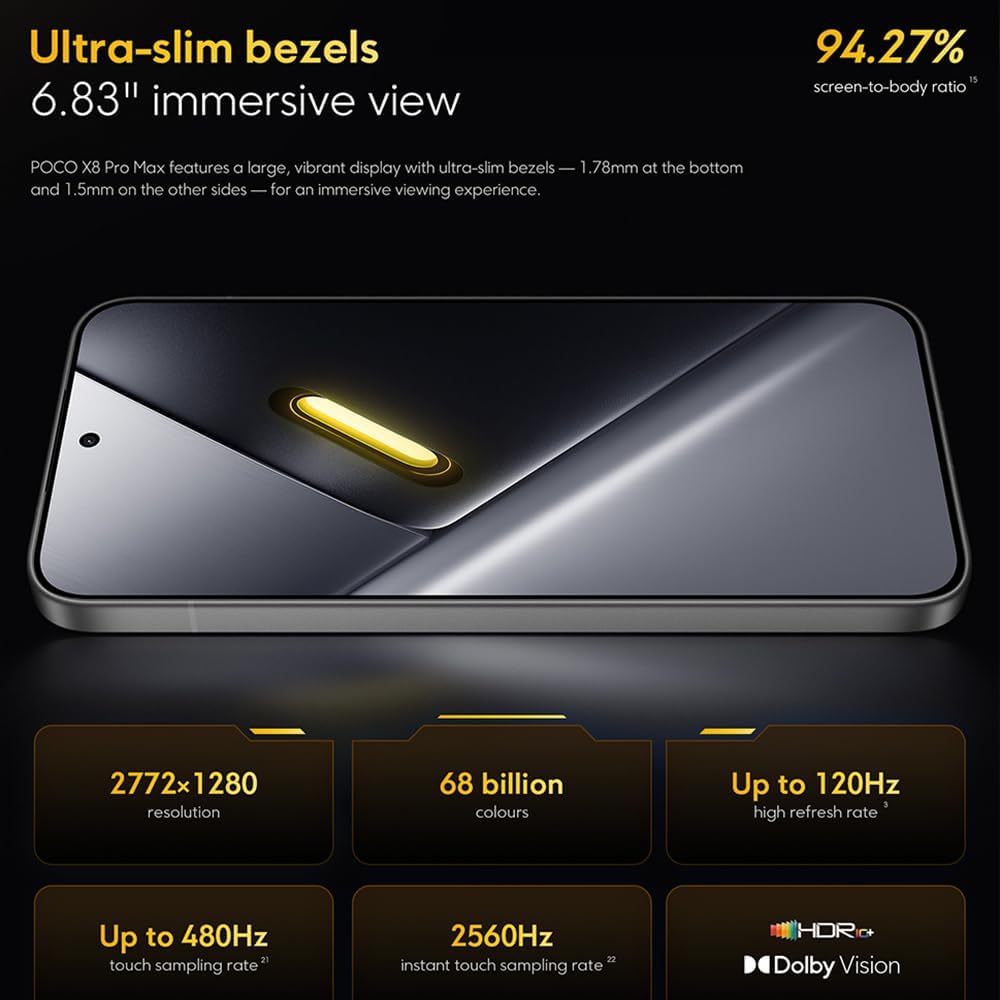
Image: The 6.83-inch 1.5K ultra-bright AMOLED display with minimal bezels.
4.2 Našumas
Powered by the Mediatek Dimensity 9500s chipset (3nm, 4+4 All Big Core architecture, NPU890 AI processor), the POCO X8 Pro Max 5G delivers high performance. The POCO 3D IceLoop cooling system ensures efficient heat dissipation, maintaining optimal performance during intensive tasks like gaming.

Image: Diagram illustrating the Mediatek Dimensity 9500s flagship platform.

Image: Illustration of the 5800mm² ultra-large LHP area for cooling.
4.3 Fotoaparato sistema
The device features a 50 MP Light Fusion 600 main camera with OIS (Optical Image Stabilization) and an 8 MP ultra-wide camera. It supports portrait mode with bokeh + HDR and dynamic video-to-still conversion.

Image: Close-up of the 50 MP main camera and 8 MP ultra-wide camera system.
4.4 Baterija ir įkrovimas
Equipped with a massive 8500 mAh (typical) battery, the POCO X8 Pro Max 5G offers extended usage. It supports 100W HyperCharge, allowing for rapid recharging. A 16% ultra-high carbon-silicon content contributes to its high energy density.

Image: Illustration highlighting the massive 8500mAh battery capacity.

Image: Visual representation of the 100W HyperCharge technology.
4.5 garsas
The device features symmetrical dual stereo speakers (1115F) for a balanced and immersive audio experience.
4.6 Programinė įranga
The POCO X8 Pro Max 5G comes with Xiaomi HyperOS 3 installed, offering an optimized and user-friendly interface based on Android 16.
5. Priežiūra
5.1 Įrenginio valymas
- Ekraną ir galinį skydelį nuvalykite minkštu, nepūkuotu skudurėliu.
- Venkite naudoti stiprias chemines medžiagas, abrazyvines medžiagas ar aerozolinius purškalus.
- Įsisenėjusioms dėmėms šiek tiek pamirkykiteampNuvalykite šluostę vandeniu arba elektronikos ekranams skirtu valikliu.
5.2 Atsparumas dulkėms ir vandeniui
The device is certified for IP68 dust and water resistance. This means it can withstand immersion in up to 2 meters of water for 30 minutes under specific laboratory conditions. However, water and dust resistance may deteriorate over time with normal wear and tear. The warranty does not cover liquid damage. Avoid exposing the device to hot water, saltwater, or other liquids.

Image: Visual representation of the IP68 dust and water resistance.
5.3 Programinės įrangos naujiniai
Reguliariai tikrinkite, ar yra programinės įrangos atnaujinimų, ir juos įdiekite, kad jūsų įrenginyje būtų naujausios funkcijos, saugos pataisymai ir našumo patobulinimai. Paprastai šią parinktį galite rasti Nustatymai > Apie telefoną > Sistemos atnaujinimas.
6. Problemų sprendimas
6.1 Bendrosios problemos ir sprendimai
- Įrenginys neįsijungia: Įsitikinkite, kad akumuliatorius įkrautas. Prijunkite įrenginį prie įkroviklio ir palaukite kelias minutes, prieš bandydami jį vėl įjungti.
- Ekranas nereaguoja: Pabandykite paleisti įrenginį iš naujo ilgai laikydami nuspaustą maitinimo mygtuką (pvz., 10–15 sekundžių), kol jis persikraus.
- Programėlės stringa: Išvalykite probleminės programos talpyklą (Nustatymai > Programos > [Programos pavadinimas] > Atmintis > Išvalyti talpyklą) or reinstall the app. Ensure your device software is up to date.
- Prastas akumuliatoriaus veikimo laikas: Check background app usage, reduce screen brightness, disable unnecessary features like GPS or Bluetooth when not in use, and ensure your software is updated.
- Tinklo ryšio problemos: Restart your device. Check if your SIM card is properly inserted. Toggle Airplane Mode on and off. Reset network settings (Nustatymai > Sistema > Atkurti parinktis > Atkurti „Wi-Fi“, mobiliojo ryšio ir „Bluetooth“ nustatymus).
6.2 Gamyklinių parametrų atkūrimas
If you encounter persistent issues, a factory reset may be necessary. Įspėjimas: Tai ištrins visus jūsų įrenginyje esančius duomenis. Prieš tęsdami sukurkite svarbių duomenų atsarginę kopiją. Eikite į Nustatymai > Sistema > Atstatyti parinktys > Ištrinti visus duomenis (atkurti gamyklinius) ir vykdykite ekrane pateikiamas instrukcijas.
7. Specifikacijos
| Funkcija | Specifikacija |
|---|---|
| Prekės ženklas | XIAOMI |
| Modelio pavadinimas | POCO X8 Pro Max 5G |
| Operacinė sistema | Android 16 (with Xiaomi HyperOS 3) |
| Atminties talpa | 512 GB |
| Ekrano dydis | 6.83 colių |
| Ekrano tipas | AMOLED, 1.5K, 120Hz refresh rate |
| Korinio ryšio technologija | 5G |
| Spalva | Noir (juodas) |
| Jungties tipas | C tipo USB |
| Biometrinis saugumas | Fingerprint Recognition (Ultrasonic) |
| Baterijos talpa | 8500 mAh (ličio polimeras) |
| Įkrovimas | 100 W „HyperCharge“ |
| Pagrindinė kamera | 50 MP Light Fusion 600 with OIS |
| Itin plataus kampo kamera | 8 MP |
| Procesorius | Mediatek Dimensity 9500s |
| Atsparumas dulkėms ir vandeniui | IP68 |
| Modelio metai | 2025 |
| Kilmės šalis | Kinija |
8. Garantija ir palaikymas
For detailed warranty information and customer support, please refer to the warranty card included with your product or visit the official XIAOMI websvetainėje. Išsaugokite pirkimo įrodymą garantiniams reikalavimams.
Online resources and FAQs may also be available on the XIAOMI support portal.