
1. Baigėsiview
The Philips TAZ2200 is a versatile portable sound machine designed for enjoying various audio formats. It features a top-loading CD player, a front-loading cassette player, FM radio, Bluetooth 6.0 connectivity, USB playback, and a 3.5mm audio input. Equipped with dynamic bass boost and 6W stereo speakers, it delivers rich sound. The unit can be powered by AC mains or batteries and includes a carrying handle for portability.
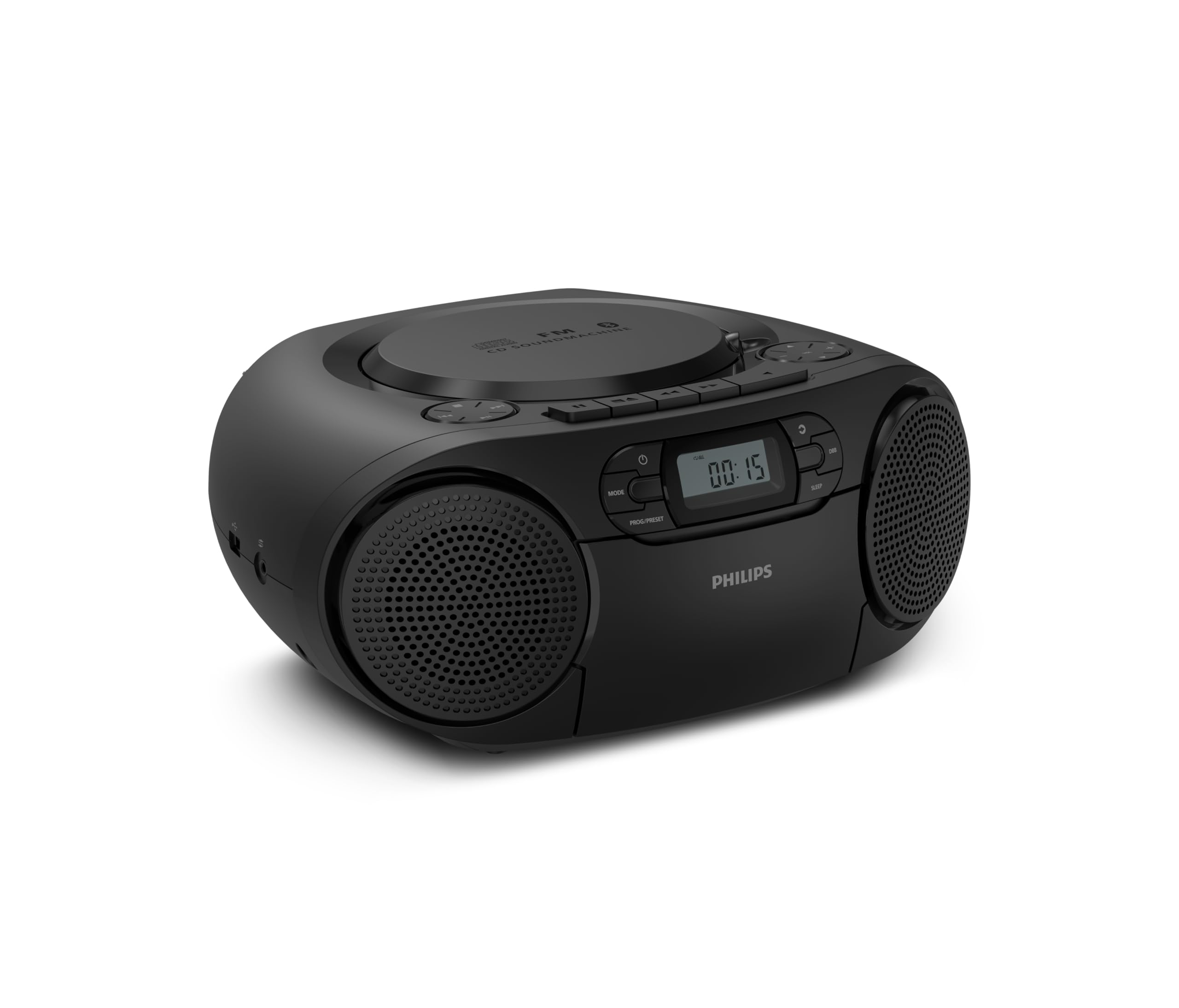
Priekyje view of the Philips TAZ2200 CD Soundmachine, showing the main display and control buttons.
2. Saugos informacija
Please read these safety instructions carefully before using your device and keep them for future reference. Incorrect use may result in hazards.
- Maitinimo šaltinis: Naudokite tik nurodytą maitinimo adapterį arba baterijas. Įsitikinkite, kad įtampatage atitinka įrenginio reikalavimus.
- Vanduo ir drėgmė: Saugokite įrenginį nuo lietaus, drėgmės, lašančio ar taškomo vandens. Nestatykite ant įrenginio daiktų su skysčiais, pavyzdžiui, vazų.
- Vėdinimas: Ensure adequate ventilation. Do not block any ventilation openings. Maintain a minimum distance around the unit for sufficient ventilation.
- Šiluma: Nestatykite įrenginio šalia šilumos šaltinių, tokių kaip radiatoriai, šildytuvai, viryklės ar kiti prietaisai (įskaitant ampkeltuvai), kurie gamina šilumą.
- Baterijos: Follow correct polarity when inserting batteries. Do not mix old and new batteries, or different types of batteries. Remove batteries if the unit is not used for a long period.
- Valymas: Prieš valydami atjunkite įrenginį nuo maitinimo lizdo. Naudokite minkštą, sausą šluostę. Nenaudokite skystų ar aerozolinių valiklių.
- Aptarnavimas: Nemėginkite patys aptarnauti šio gaminio. Visą techninę priežiūrą patikėkite kvalifikuotam aptarnavimo personalui.
3. Kas yra dėžutėje
Išpakuodami įsitikinkite, kad yra visi toliau išvardyti daiktai:
- Philips TAZ2200 CD Soundmachine
- Maitinimo kabelis
- Greitos pradžios vadovas
- Garantijos knygelė
- Saugos lapas
4. Valdikliai ir jungtys
Priekinio skydelio valdikliai
The front panel features the main display, power button, mode selection, program/preset buttons, and dynamic bass boost (DBB) control. Playback controls for CD and USB are also located here.

Detalus priekis view showing the display, power, mode, program/preset, and DBB buttons.
Side and Rear Connections
The side of the unit provides a USB port for digital audio playback and a 3.5mm audio input jack for connecting external devices.

Šoninė view illustrating the USB port and Audio Input jack.
The top of the unit houses the CD compartment and additional playback controls, while the rear features the AC power input and the FM antenna.

Į viršų view showing the CD compartment and associated controls.

Galinis view displaying the AC power input and the telescopic FM antenna.
5. Sąranka
5.1 Maitinimo šaltinis
AC maitinimas
- Įsitikinkite, kad įrenginys išjungtas.
- Connect the supplied power cable to the AC IN socket on the rear of the sound machine.
- Plug the other end of the power cable into a wall power outlet.
Baterijos galia
For portable use, the unit can operate on 6 x C-type batteries (not included).
- Atidarykite baterijos skyriaus dangtį, esantį įrenginio apačioje.
- Insert 6 C-type batteries, ensuring correct polarity (+/-) as indicated inside the compartment.
- Saugiai uždarykite akumuliatoriaus skyriaus dangtelį.
5.2 Antenos reguliavimas
For optimal FM radio reception, fully extend the telescopic antenna located at the rear of the unit. Adjust its position and angle to achieve the clearest signal.
6. Naudojimo instrukcijos
6.1 Bendras veikimas
- Maitinimo įjungimas/išjungimas: Paspauskite GALIA mygtuką, kad įjungtumėte arba išjungtumėte įrenginį.
- Garsumo valdymas: Naudokite VOL+ or TŪRIS - mygtukus, norėdami reguliuoti garso lygį.
- Dinaminis žemųjų dažnių sustiprinimas (DBB): Paspauskite DBB button to activate or deactivate the dynamic bass boost feature for enhanced bass sound.
- Režimo pasirinkimas: Paspauskite REŽIMAS button repeatedly to switch between CD, Cassette, FM Radio, Bluetooth, USB, and Audio Input modes.
6.2 CD atkūrimas
- Open the CD compartment cover on top of the unit.
- Place a CD (CD, CD-R, or CD-RW) with the label side facing up onto the spindle.
- Uždarykite CD skyriaus dangtelį.
- Paspauskite REŽIMAS mygtuką, norėdami pasirinkti CD režimą.
- Paspauskite PALEISTI / PAUZĖ mygtuką, norėdami pradėti atkūrimą.
- Naudokite PRALEISTI mygtukai (|< or >> |), kad praleistumėte takelius.
- Paspauskite ir palaikykite |< or >> | to search within a track.
- Paspauskite STOP mygtuką sustabdyti atkūrimą.
6.3 Kasetės atkūrimas
- Open the cassette compartment door on the front of the unit.
- Įdėkite kasetę atviru kraštu į viršų.
- Uždarykite kasečių skyriaus dureles.
- Paspauskite REŽIMAS mygtuką, kad pasirinktumėte kasetės režimą.
- Paspauskite ŽAISTI mygtuką, norėdami pradėti atkūrimą.
- Naudokite GREITI PIRMYN or ATSUKTI mygtukai, skirti greitai persukti juostą pirmyn arba atgal.
- Paspauskite STOP mygtuką sustabdyti atkūrimą.
6.4 FM radijas
- Paspauskite REŽIMAS mygtuką, kad pasirinktumėte FM radijo režimą.
- Automatinis nuskaitymas: Paspauskite ir palaikykite PROG/PRESET mygtuką, kad automatiškai nuskaitytumėte ir išsaugotumėte galimas FM stotis.
- Rankinis derinimas: Paspauskite TUNINGAS mygtukai (|< or >> |), kad rankiniu būdu nustatytumėte norimą dažnį.
- Išankstinių nustatymų išsaugojimas: After tuning to a station, press PROG/PRESET once, then use |< or >> | , kad pasirinktumėte iš anksto nustatytos stoties numerį, ir paspauskite PROG/PRESET dar kartą patvirtinti.
- Išankstinių nustatymų atšaukimas: FM režimu paspauskite PROG/PRESET repeatedly to cycle through saved preset stations.
6.5 „Bluetooth“ atkūrimas
- Paspauskite REŽIMAS button to select Bluetooth mode. The display will show 'BT' and flash, indicating it's in pairing mode.
- „Bluetooth“ palaikančioje įrangoje (išmaniajame telefone, planšetiniame kompiuteryje) įjunkite „Bluetooth“ ir ieškokite galimų įrenginių.
- Select "Philips TAZ2200" from the list of devices.
- Once paired, the unit will emit a confirmation sound, and 'BT' will stop flashing.
- Start playing audio on your connected device. The sound will be streamed to the sound machine.
6.6 USB atkūrimas
- Įkiškite USB atmintinę į įrenginio šone esantį USB prievadą.
- Paspauskite REŽIMAS mygtuką, norėdami pasirinkti USB režimą.
- Įrenginys automatiškai aptiks ir pradės leisti suderinamą garso įrašą files (MP3, WAV, WMA).
- Naudokite atkūrimo valdiklius (PALEISTI / PAUZĖ, PRALEISTI, STOP) as you would for CD playback.
6.7 Garso įvestis (AUX)
- Connect one end of a 3.5mm audio cable (not included) to the AUDIO IN jack on the side of the sound machine.
- Connect the other end of the audio cable to the headphone jack or audio output of your external device (e.g., MP3 player, turntable).
- Paspauskite REŽIMAS button to select Audio Input mode.
- Start playing audio on your external device. The sound will be played through the sound machine.
7. Priežiūra
- Įrenginio valymas: Nuvalykite įrenginio išorę minkšta, šiek tiek drėgna šluosteamp audinys. Nenaudokite abrazyvinių valiklių ar tirpiklių.
- CD grotuvo priežiūra: Keep the CD compartment clean. If the lens is dirty, use a specialized CD lens cleaner. Avoid touching the lens.
- Kasečių grotuvo priežiūra: Reguliariai valykite juostos galvutes ir suspaudimo volelius vatos tamponėliu.ampsu izopropilo alkoholiu.
- Baterijos keitimas: If using batteries, replace all 6 C-type batteries when the unit's performance diminishes or if the unit will not be used for an extended period.
- Saugykla: Kai nenaudojate, laikykite įrenginį švarioje, sausoje vietoje, apsaugotoje nuo tiesioginių saulės spindulių ir ekstremalių temperatūrų.
8. Problemų sprendimas
If you encounter any issues with your Philips TAZ2200, please refer to the table below for common problems and solutions.
| Problema | Galima priežastis | Sprendimas |
|---|---|---|
| Nėra galios | Neprijungtas maitinimo laidas; Baterijos išsikrovusios arba neteisingai įdėtos. | Patikrinkite kintamosios srovės maitinimo jungtį; pakeiskite baterijas arba užtikrinkite teisingą poliškumą. |
| Nėra garso | Per mažas garsumas; pasirinktas neteisingas režimas; prijungtos ausinės. | Increase volume; Select the correct source mode (CD, FM, BT, etc.); Disconnect headphones. |
| CD negroja | CD inserted incorrectly; CD is dirty or scratched; CD format not supported. | Insert CD with label side up; Clean or replace CD; Ensure CD is CD-R/RW compatible. |
| Kasetė negroja | Cassette inserted incorrectly; Tape is damaged. | Insert cassette correctly; Try a different cassette. |
| Prastas FM priėmimas | Antena neištiesta arba netinkamai pastatyta; silpnas signalas. | Visiškai ištieskite ir sureguliuokite teleskopinę anteną; Pabandykite perkelti įrenginį į kitą vietą. |
| Bluetooth neprisijungia | Unit not in pairing mode; Bluetooth device too far; Device already paired with another unit. | Ensure unit is in Bluetooth mode and flashing; Move device closer; Disconnect from other devices. |
| USB atkūrimo problemos | USB atmintinė netinkamai įdėta; nesuderinama file formatavimas; sugadintas USB diskas. | Įdėkite USB atmintinę iš naujo; Įsitikinkite, kad files are MP3, WAV, or WMA; Try a different USB drive. |
9. Specifikacijos
| Funkcija | Specifikacija |
|---|---|
| Prekės ženklas | PHILIPSAS |
| Modelio numeris | TAZ2200/10 |
| Ryšio technologija | Bluetooth 6.0, USB, Audio Input (3.5mm) |
| Garsiakalbio tipas | Stereo (2 speakers) |
| Išėjimo galia | 6 vatų (maks.) |
| Palaikoma laikmena | CD, CD-R, CD-RW, Cassette, USB (MP3, WAV, WMA) |
| Radijo imtuvas | Digital FM with 20 presets |
| Maitinimo šaltinis | AC (wired), 6 x C-type batteries (not included) |
| Matmenys (IxPxH) | 24.5 x 28.5 x 12.5 cm |
| Svoris | 1.35 kilogramo |
| Spalva | Sidabras |
10. Garantija ir palaikymas
10.1 Gaminio garantija
This Philips TAZ2200 CD Soundmachine comes with a 2 metų garantija nuo pirkimo datos. Išsaugokite pirkimo įrodymą garantiniams reikalavimams. Garantija taikoma gamybos defektams ir gedimams įprastomis naudojimo sąlygomis.
10.2 Pagalba klientams
For technical assistance, troubleshooting beyond this manual, or warranty service, please refer to the contact information provided in the warranty booklet included with your product. You can also visit the official Philips support website for your region for further assistance and FAQs.