
DREO DR-HAC010S
DREO Inverter Dual-Hose Portable Air Conditioner 740S
Model: DR-HAC010S
Svarbios saugos instrukcijos
Prieš naudodami šį prietaisą, atidžiai perskaitykite visas instrukcijas. Nesilaikant šių instrukcijų, gali kilti elektros smūgis, gaisras arba sunkūs sužalojimai.
- Šis prietaisas skirtas naudoti tik patalpose.
- Įsitikinkite, kad maitinimo šaltinis atitinka tūrįtage nurodyta reitingo etiketėje.
- Nenaudokite įrenginio su pažeistu laidu ar kištuku. Jei maitinimo laidas pažeistas, jį turi pakeisti gamintojas, jo techninės priežiūros atstovas arba panašios kvalifikacijos asmenys, kad būtų išvengta pavojaus.
- Laikykite įrenginį bent 50 cm (20 colių) atstumu nuo sienų ar kitų objektų, kad būtų užtikrintas tinkamas oro srautas.
- Neužblokuokite oro įleidimo ar išleidimo angų.
- Prieš valydami arba atlikdami techninę priežiūrą, visada ištraukite įrenginį iš elektros tinklo.
- Do not use chemical solvents (e.g., benzene, alcohol, gasoline) to clean the unit.
- Šis prietaisas nėra skirtas naudoti asmenims (įskaitant vaikus), kurių fizinės, jutimo ar psichikos negalios arba neturintys patirties ir žinių, nebent už jų saugumą atsakingas asmuo juos prižiūrėtų arba instruktuotų, kaip naudoti prietaisą.
- Vaikus reikia prižiūrėti, kad jie nežaistų su prietaisu.
Produktas baigtasview
The DREO Inverter Dual-Hose Portable Air Conditioner 740S (Model DR-HAC010S) is designed to provide efficient cooling, ventilation, and dehumidification for rooms up to 200-300 sq. ft. It features inverter technology for energy efficiency, a dual-hose design for faster cooling, and smart control options.
Įtraukti komponentai:
- 1 x DREO Portable Air Conditioner (DR-HAC010S)
- Window Panel (x4)
- Air Exhaust Hose (x2)
- Išleiskite žarną
- Nuotolinio valdymo pultas
- Other installation components
Pagrindinės funkcijos:
- Galingas aušinimo pajėgumas: 14,000 BTU ASHRAE (10,000 BTU DOE) for rooms up to 300 sq. ft.
- Inverterio technologija: Adapts output for faster cooling and improved energy efficiency (up to 32% more efficient than traditional models).
- Dual-Hose Design: Separates intake and exhaust airflow to reduce hot air backflow, resulting in faster and more efficient cooling.
- Drainage-Free Operation: Patented self-evaporating technology automatically evaporates excess water in environments under 90% humidity, eliminating the need for frequent manual drainage.
- Tylus veikimas: Equipped with a noise isolation system for a low operating noise level of 42 dB.
- Išmanusis valdymas: Supports control via the DREO app, remote control, and Alexa voice commands.
- 3 viename funkcionalumas: Offers Cooling, Ventilation (Fan), and Dehumidification modes.
- Didelis sausinimo pajėgumas: Up to 96 pints/day.
- Lengvas montavimas: Window kit fits both hung and sliding windows between 20-53 inches.
- Plaunamas filtras: Lengvai priežiūrai ir geresnei oro kokybei.
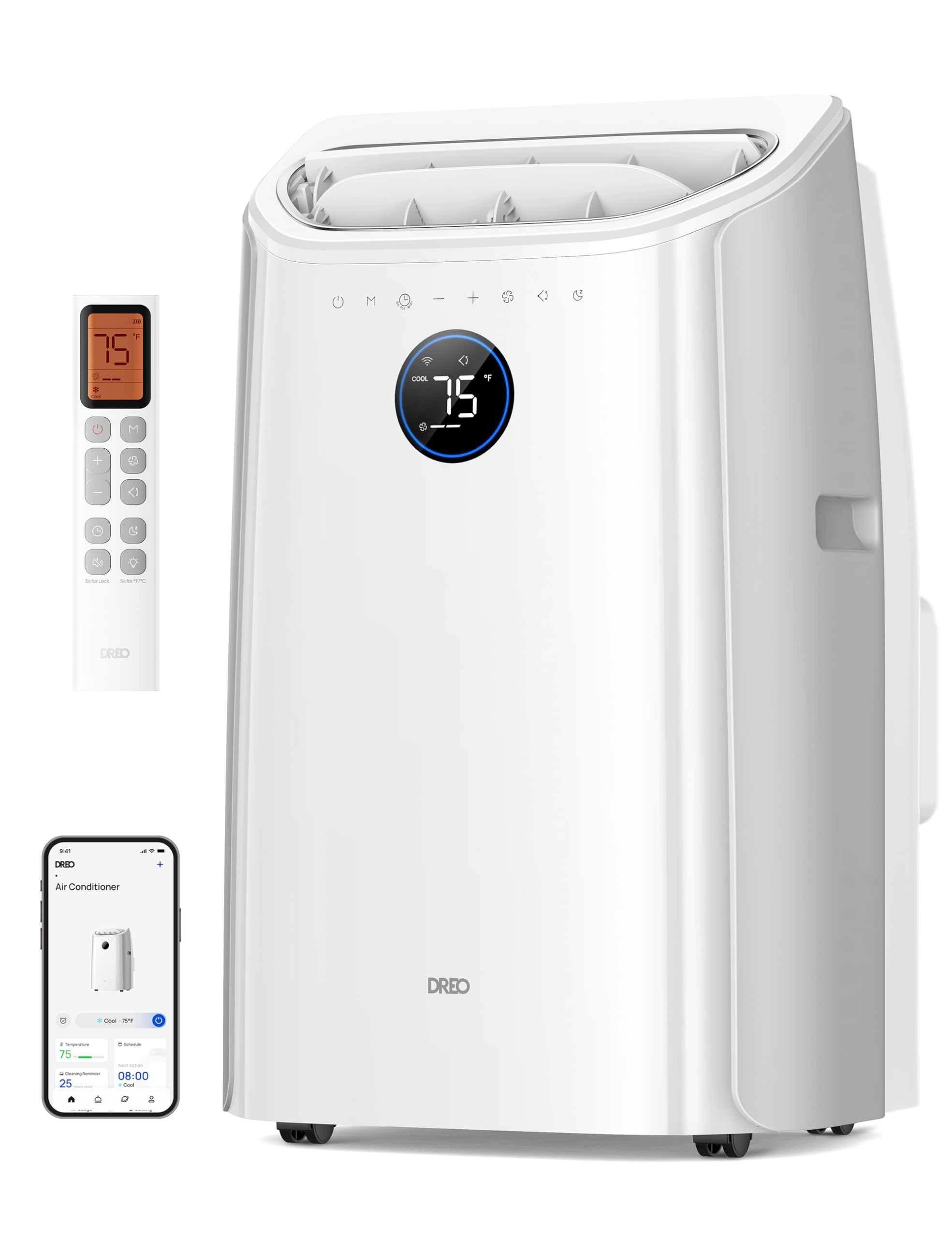
Image: DREO Inverter Dual-Hose Portable Air Conditioner 740S, front view.
Sąranka ir diegimas
Tinkamas montavimas yra labai svarbus efektyviam nešiojamojo oro kondicionieriaus veikimui. Atidžiai atlikite šiuos veiksmus.
1. Langų komplekto montavimas:
- Measure your window opening. The window panel kit is designed for windows between 20 and 53 inches wide (for sliding windows) or high (for hung windows).
- Assemble the window panels to fit your window opening. Use the provided screws to secure the panels.
- Insert the assembled window panel into the window opening. Extend the adjustable panel to fit snugly and secure it.
- Seal any gaps around the window kit with the provided non-adhesive foam to prevent air leakage.
- For wooden windows, optional security brackets can be installed by drilling pilot holes and screwing the brackets into the window frame. This is not recommended for metal-framed windows.

Image: Illustration of window kit installation for both sliding and hung window types, showing the extendable hoses.
2. Connecting the Dual Hoses:
- Attach the two air exhaust hoses to the corresponding adapters on the back of the air conditioner unit. Ensure a secure fit.
- Connect the other end of each hose to the openings in the window panel. The dual-hose system ensures efficient air exchange, drawing in fresh air and expelling hot air separately.

Vaizdas: Stambus planas view of the dual-hose connection to the portable air conditioner and the window panel, illustrating airflow direction.
Quick Start Guide Video:
Video: Official DREO Portable Air Conditioners Quick Start Guide. This video demonstrates the basic steps for setting up your DREO portable air conditioner, including window kit and hose installation.
Naudojimo instrukcijos
Your DREO portable air conditioner offers multiple modes and control options for optimal comfort.
Valdymo skydelis ir nuotolinio valdymo pultas:
The unit features an intuitive control panel on the top and comes with a remote control for convenient operation from a distance. Refer to the remote control diagram in the physical manual for button functions.
Veikimo režimai:
- Vėsus režimas: Provides powerful cooling to lower room temperature. Adjust the desired temperature using the control panel or remote.
- Fan Mode (Ventilation): Circulates air without cooling. Choose from multiple fan speeds (e.g., Low, Medium, High, Auto).
- Sausas režimas (sausinimas): Reduces humidity in the room. The unit can remove up to 96 pints of moisture per day.

Image: Visual representation of the three operating modes: Cool, Dry, and Fan, demonstrating their functions.
Išmanusis valdymas (programėlė ir balsas):
Connect your DREO portable air conditioner to the DREO app for advanced control and scheduling. The unit is also compatible with Alexa for voice commands.
- Atsisiųskite DREO programėlę iš savo išmaniojo telefono programėlių parduotuvės.
- Vykdykite programėlėje pateiktas instrukcijas, kad susietumėte savo įrenginį.
- Once connected, you can adjust settings, set schedules, and monitor the unit remotely.
- For voice control, enable the DREO skill in your Alexa app and link your DREO account.

Image: A person using a smartphone to control the DREO portable AC, with logos for DREO app, Hey Google, and Alexa indicating smart control capabilities.
Smart Connection Video:
Video: Official DREO video demonstrating how to connect the DREO Smart Portable Air Conditioner to the app.
Priežiūra
Reguliarus oro kondicionieriaus aptarnavimas užtikrina optimalų veikimą ir ilgaamžiškumą.
1. Oro filtro valymas:
The air filter should be cleaned regularly, typically every two weeks, or more often depending on usage and air quality.
- Atjunkite oro kondicionierių nuo maitinimo lizdo.
- Suraskite ir nuimkite oro filtrą įrenginio gale.
- Nuplaukite filtrą šiltu muiluotu vandeniu. Kruopščiai nuskalaukite.
- Allow the filter to air dry completely before reinstalling it. Do not expose it to direct sunlight or high heat.
- Įdėkite sausą filtrą atgal į įrenginį.

Image: A person cleaning the washable air filter under a faucet.
2. Drenažas:
This unit features a drainage-free design, automatically evaporating condensed water under normal operating conditions (humidity below 90%). However, in very high humidity environments, some water may accumulate and require manual drainage.
- Išjunkite oro kondicionierių.
- Place a shallow pan or container under the drain outlet at the bottom rear of the unit.
- Išsukite išleidimo kamštį, kad vanduo galėtų tekėti.
- Kai visas vanduo ištekės, tvirtai užsukite išleidimo kamštį.
Video: Official DREO video demonstrating the drainage process for the portable AC.
3. Sandėliavimas:
If storing the unit for an extended period, ensure it is completely drained and cleaned. Store it in an upright position in a dry, cool place.
Trikčių šalinimas
Prieš kreipdamiesi į klientų aptarnavimo tarnybą, žr. toliau pateiktą lentelę, kurioje pateikiamos dažniausiai pasitaikančios problemos ir sprendimai.
| Problema | Galima priežastis | Sprendimas |
|---|---|---|
| Įrenginys neįsijungia. | Nėra maitinimo; Maitinimo laidas neįjungtas; Suveikė grandinės pertraukiklis. | Patikrinkite maitinimo lizdą; Įsitikinkite, kad kištukas yra iki galo įkištas; Atstatykite grandinės pertraukiklį. |
| Įrenginys neefektyviai vėsina. | Window kit not properly sealed; Air filter dirty; Room size too large; Doors/windows open. | Ensure window kit is sealed; Clean air filter; Verify unit capacity for room size; Close all doors and windows. |
| Įrenginys triukšmingas. | Įrenginys ne ant lygaus paviršiaus; Ventiliatoriuje yra kliūtis. | Padėkite įrenginį ant lygaus, stabilaus paviršiaus; patikrinkite, ar nėra kliūčių, ir pašalinkite jas. |
| Vanduo nuteka iš įrenginio. | Drain plug loose; High humidity causing excess condensation. | Ensure drain plug is securely in place; Manually drain the unit if necessary. |
| Nuotolinio valdymo pultas neveikia. | Išsikrovusios baterijos; kliūtis tarp nuotolinio valdymo pulto ir įrenginio. | Pakeiskite baterijas; Pašalinkite visas kliūtis. |
Specifikacijos
| Funkcija | Detalė |
|---|---|
| Prekės ženklas | DREO |
| Modelio numeris | DR-HAC010S |
| Aušinimo galia | 14000 British Thermal Units (ASHRAE) / 10000 British Thermal Units (DOE) |
| Aprėpties sritis | Up to 200-300 Square Feet |
| Triukšmo lygis | 42 decibelų |
| Gaminio matmenys (D x P x A) | 14.37 "D x 17.32" P x 28.13" A |
| Prekės svoris | 55.4 svaro |
| ttage | 115 voltų |
| Vattage | 1540 vatų |
| Šaldymo agentas | R-32 |
| Kontrolės metodas | Programėlė, nuotolinio valdymo pultas |
| Veikimo režimai | Cooling, Ventilation, Dehumidification |
| Sausinimo galimybė | 96 pintų per dieną |
| Langų atidarymo suderinamumas | 20-53 Inches (Width/Height) |
| Hose Extendability | 15-71 colių |

Image: Energy Guide label for the DREO Portable Air Conditioner DR-HAC010S, showing estimated yearly energy cost and CEER rating.
Garantija ir palaikymas
Informacija apie garantiją:
This DREO product is covered by a 12 MĖNESIŲ RIBOTA GARANTIJA nuo pirkimo datos. Išsaugokite pirkimo įrodymą garantiniams reikalavimams. Garantija taikoma medžiagų ir gamybos defektams, atsiradusiems įprasto naudojimo sąlygomis.
The warranty does not cover damage resulting from accident, misuse, abuse, alteration, improper installation, or failure to follow the instructions in this manual.
Klientų aptarnavimas:
For any questions, technical assistance, or warranty claims, please contact DREO Customer Support. Refer to the official DREO webNorėdami gauti naujausią pagalbos informaciją, apsilankykite svetainėje arba pasinaudokite kontaktine informacija, pateikta jūsų produkto pakuotėje.
Taip pat galite apsilankyti DREO Store on Amazon daugiau informacijos apie produktą ir išteklius.
Susiję dokumentai - DR-HAC010S
 |
DREO klientų aptarnavimas: informacija apie numatytąją 12 mėnesių garantiją Supraskite DREO 12 mėnesių ribotą garantiją savo prietaisui. Sužinokite, kam taikoma garantija ir kokios sąlygos gali panaikinti garantiją, įskaitant išimtis dėl netinkamo naudojimo.ampgedimai ir neleistinas remontas. |
 |
Dreo Mini Split Smart Air Conditioner User Manual (321S/342S/363S) User manual and installation guide for the Dreo Mini Split Smart Air Conditioner (Models 321S, 342S, 363S). Includes safety instructions, installation steps, app connectivity, and troubleshooting. |
 |
DREO PTC ventiliatoriaus šildytuvo naudotojo vadovas (DR-HSH006 / DR-HSH006A) Išsamus DREO PTC ventiliatoriaus šildytuvo (modeliai DR-HSH006 ir DR-HSH006A) naudotojo vadovas, kuriame aptariamos saugos instrukcijos, naudojimas, priežiūra ir trikčių šalinimas. |
 |
Dreo Smart Dehumidifier 733S/764S User Manual Comprehensive user manual for the Dreo Smart Dehumidifier models 733S and 764S. Includes safety instructions, setup guide, maintenance, and troubleshooting. |
 |
Dreo Smart Pedestal Air Circulator Fan (DR-HPF508S) User Manual User manual for the Dreo Smart Pedestal Air Circulator Fan (DR-HPF508S), covering assembly, operation, maintenance, and troubleshooting. |
 |
DREO Smart Humidifier User Guide Comprehensive user guide and safety instructions for the DREO Smart Humidifier, including setup, operation, and customer support information. |
Ask a question about this manual
Ask about setup, troubleshooting, compatibility, parts, safety, or missing instructions. Manuals+ will review the question and use this page’s manual context to help answer it.