
1. Įvadas
The GOOLOO DS600 is a professional OBD2 diagnostic scanner designed for comprehensive vehicle system analysis. This device provides advanced diagnostic capabilities for a wide range of vehicles, offering essential functions for both automotive enthusiasts and professional technicians. It features a user-friendly interface and robust hardware for reliable performance.
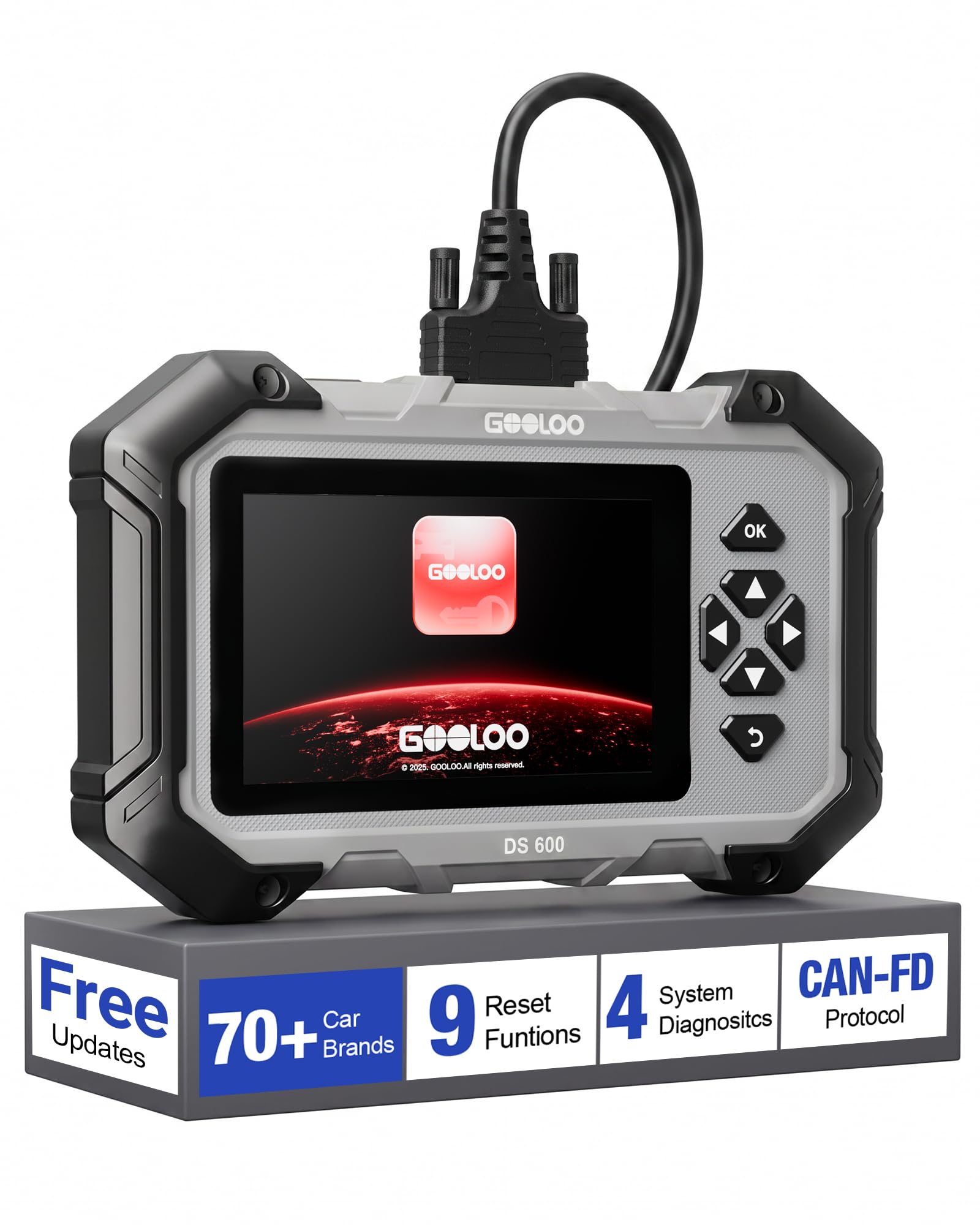
Image 1.1: The GOOLOO DS600 OBD2 Scanner, a handheld diagnostic tool with a 5-inch touchscreen and physical navigation buttons.
2. Produktas baigtasview
2.1 Pagrindinės savybės
- Platus transporto priemonių suderinamumas: Compatible with OBDII-equipped vehicles built after 1996, supporting over 70 vehicle brands. Supports Diesel (12v only), gasoline, 12V passenger cars, pickups, light-duty trucks, SUVs, and minivans.
- Protokolo palaikymas: Compatible with OBD2, CAN, and CAN-FD protocols.
- Operacinė sistema: Runs on Android 11.0.
- Ekranas: 5-inch touchscreen interface.
- Atmintis: 2GB RAM and 64GB ROM.
- Ryšys: 2.4GHz and 5GHz Wi-Fi for updates.
- Galia: Internal 3500mAh lithium battery, rechargeable via USB-C.
- Atnaujinimai: Lifetime free updates and use for core functions.
2.2 Pakuotės turinys
The GOOLOO DS600 package typically includes:
- GOOLOO DS600 OBD2 Scanner Unit
- OBD2 Connection Cable
- USB į USB-C įkrovimo laidas
- Apsauginis dėklas
- Greitas nuorodų vadovas
3. Sąranka
3.1 Initial Power-Up and Registration
- Įkraukite įrenginį: Connect the scanner to a power source using the provided USB-C charging cable. Ensure the device is sufficiently charged before first use.
- Maitinimas: Press and hold the power button located on the top edge of the scanner.
- Pradinės sąrankos vedlys: Follow the on-screen prompts to complete the initial setup, including language selection and time zone.
- Prisijunkite prie „Wi-Fi“: Navigate to the Wi-Fi settings and connect the device to a stable 2.4GHz or 5GHz Wi-Fi network.
- Registruoti įrenginį: Input your email address when prompted. A verification code will be sent to your email. Enter this code on the device to activate and register it. No personal data beyond email is typically required for basic operation.
- Download Updates: After registration, the device will prompt you to download and apply available software and vehicle diagnostic profile updates. It is highly recommended to install all updates to ensure the broadest compatibility and latest features. This process may take some time depending on your internet speed.

Image 3.1: The GOOLOO DS600 displaying the one-click update feature and demonstrating automatic VIN detection.
3.2 Prijungimas prie transporto priemonės
- Raskite OBD2 prievadą: Identify the vehicle's OBD2 diagnostic port, typically located under the dashboard on the driver's side.
- Kabelio prijungimas: Firmly connect one end of the provided OBD2 cable to the vehicle's OBD2 port and the other end to the designated port on the top edge of the GOOLOO DS600 scanner.
- Uždegimas įjungtas: Pasukite automobilio uždegimo raktelį į „ON“ padėtį (variklis išjungtas).
- Establish Communication: The scanner will automatically detect the vehicle's battery voltage and attempt to establish communication.
4. Naudojimo instrukcijos
4.1 Main System Diagnostics
The DS600 can perform in-depth diagnostics on four primary vehicle systems:
- Variklio sistema: Reads and clears engine fault codes, views live data related to engine performance.
- Papildoma apsaugos sistema (SRS): Diagnoses airbag system issues, reads and clears SRS fault codes.
- Stabdžių antiblokavimo sistema (ABS): Checks ABS system status, reads and clears ABS fault codes.
- Perdavimo sistema: Diagnoses automatic transmission issues, reads and clears transmission fault codes.

Image 4.1: The GOOLOO DS600 interface showing options for Engine, SRS, ABS, and Transmission diagnostics.
4.2 Full OBD Functions
Access the 'Diagnostics' menu to perform standard OBD2 functions:
- Skaityti ir išvalyti kodus: Nuskaityti diagnostinius gedimų kodus (DTC) ir juos išvalyti po remonto.
- Tiesioginiai duomenys: View real-time sensor data, parameters, and PIDs in text or graph format.
- I/M pasirengimas: Patikrinkite su emisija susijusių monitorių parengties būseną.
- Borto stebėjimas: Review results of on-board diagnostic monitoring tests for specific components/systems.
- Komponento testas: Pradėkite transporto priemonės EVAP sistemos nuotėkio bandymą.
- Informacija apie transporto priemonę: Gaukite transporto priemonės identifikavimo numerį (VIN), kalibravimo ID (CALID) ir kalibravimo patvirtinimo numerį (CVN).
- Transporto priemonės būsena: Suteikia perview of the vehicle's current diagnostic status.

Image 4.2: The GOOLOO DS600 interface showing various full OBD functions.
4.3 Special Reset Functions
The DS600 offers 9 commonly used reset and service functions:
- Alyvos atstatymas: Atstato alyvos tarnavimo laiko sistemą po alyvos keitimo.
- Droselio adaptacija: Re-learns the throttle body position.
- Brake Reset (EPB Reset): Atstato elektroninę stovėjimo stabdžių sistemą po stabdžių kaladėlių pakeitimo.
- ABS kraujavimas: Performs brake fluid bleeding procedures for the ABS system.
- DPF regeneracija: Pradeda dyzelino kietųjų dalelių filtro regeneracijos procesą.
- Purkštuko kodavimas: Koduoja naujus purkštukų numerius į ECU.
- SAS atstatymas (vairo kampo jutiklis): Atstato vairavimo kampo jutiklį.
- BMS atstatymas (akumuliatorių valdymo sistema): Registruoja naują baterijos pakeitimą.
- TPMS (padangų slėgio stebėjimo sistemos) atstatymas: Re-learns TPMS sensors.

Image 4.3: The GOOLOO DS600 interface showing the 9 special reset functions.
4.4 Išplėstinės funkcijos
- Automobilio VIN: Automatically identifies the vehicle's Vehicle Identification Number (VIN) for quick and accurate vehicle identification.
- CAN-FD & FCA AutoAuth: Supports the Controller Area Network Flexible Data-Rate (CAN-FD) protocol and FCA AutoAuth for enhanced coverage and direct communication with modern Fiat Chrysler Automobiles (FCA) vehicles protected by a Security Gateway Module (SGW). This allows for deeper, bidirectional diagnostics on compatible vehicles.
- Professional Battery Diagnostics: Assesses battery starting power and monitors real-time voltage trends.

Image 4.4: The GOOLOO DS600 interface highlighting CAN-FD and Gateway Ready capabilities for modern vehicles.

Image 4.5: The GOOLOO DS600 demonstrating professional battery diagnostics, including assessing starting power and monitoring voltage trends.
5. Priežiūra
- Programinės įrangos atnaujinimai: Regularly connect the device to Wi-Fi and check for software updates. GOOLOO provides lifetime free updates for the core OBD2 functions and 9 reset functions. Installing updates ensures optimal performance and compatibility with new vehicle models.
- Valymas: Use a soft, dry cloth to clean the screen and exterior of the device. Avoid using abrasive cleaners or solvents.
- Saugykla: When not in use, store the DS600 in its protective carrying case in a cool, dry place to prevent damage from dust, moisture, or impacts.
- Akumuliatoriaus priežiūra: To prolong battery life, avoid fully discharging the battery frequently. Charge the device periodically if it's not used for extended periods.
6. Problemų sprendimas
- Įrenginys neįsijungia: Ensure the battery is charged. Connect the device to a power source using the USB-C cable and try again.
- Nėra ryšio su transporto priemone:
- Verify the OBD2 cable is securely connected to both the scanner and the vehicle's OBD2 port.
- Įsitikinkite, kad automobilio uždegimo jungiklis yra „ON“ padėtyje (variklis išjungtas).
- Patikrinkite automobilio akumuliatoriaus įkrovątage. Mažas ttaggali trukdyti bendravimui.
- Try connecting to a different compatible vehicle to rule out a vehicle-specific issue.
- „Wi-Fi“ ryšio problemos:
- Ensure you are within range of a known Wi-Fi network.
- Patikrinkite, ar teisingai įvestas „Wi-Fi“ slaptažodis.
- Restart the scanner and your Wi-Fi router.
- Screen Responsiveness Issues: If the touchscreen is unresponsive or inaccurate, try restarting the device. Ensure the screen is clean and free of debris.
- Lėtas našumas: Ensure the device has the latest software updates installed. Close any unnecessary applications running in the background if applicable.
7. Specifikacijos
| Modelio numeris | DS600 |
| Operacinė sistema | Android 11.0 |
| Ekrano dydis | 5 colių |
| RAM | 2 GB |
| ROM | 64 GB |
| CPU | 1.8 GHz 4 branduolių |
| Baterijos talpa | 3500 mAh |
| Wi-Fi | 2.4 GHz / 5 GHz |
| Maitinimo šaltinis | Maitinamas baterijomis |
| Matmenys (apytiksliai) | 22.6 cm x 13.7 cm x 3.5 cm (8.9 colio x 5.4 colio x 1.4 colio) |
| Svoris (apytiksliai) | 998 g (19.79 uncijos) |
| Tinkamo automobilio tipas | Universalus tinka |
8. Garantija ir palaikymas
The GOOLOO DS600 comes with lifetime free updates for its full OBD2 functions and the 9 special reset functions, ensuring the device remains current without subscription fees for these core features.
For specific warranty details, including coverage period and terms, please refer to the official GOOLOO website or contact GOOLOO customer support directly. It is recommended to retain your proof of purchase for warranty claims.
For technical assistance, troubleshooting, or any product-related inquiries, please contact GOOLOO customer support through their official channels. Contact information can typically be found on the GOOLOO websvetainėje arba produkto pakuotėje.