
Įvadas
This manual provides detailed instructions for the setup, operation, and maintenance of your Gosasa Digital Watch SM 8105. This watch features a 7-color LED backlight, 5ATM water resistance, alarm, stopwatch, countdown timer, dual time, and 12/24-hour format display. Please read this manual thoroughly to ensure proper use and care of your watch.
Produktas baigtasview

1 pav.: priekis view of the Gosasa Digital Watch SM 8105. The watch features a digital display with a black case and strap.
Mygtukų funkcijos
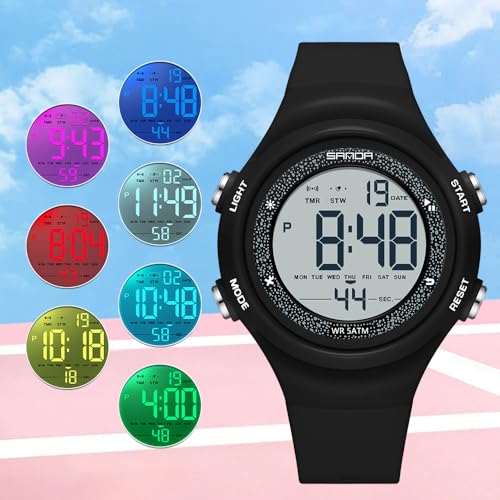
Figure 2: Watch with buttons labeled A, B, C, D for functional reference.
- Mygtukas A (viršuje kairėje): Įjungia LED foninį apšvietimą.
- Button B (Top Right): Used for starting/stopping functions (e.g., stopwatch, countdown) and adjusting values during setting.
- Button C (Bottom Left): Perjungia skirtingus režimus (laikas, žadintuvas, chronometras, atgalinis skaičiavimas, dvigubas laikas).
- D mygtukas (apačioje dešinėje): Used for selecting items or resetting functions (e.g., stopwatch reset) and advancing values during setting.
Ekrano elementai
The digital display shows the current time (hours, minutes, seconds), date (month, day), day of the week, and indicators for active functions such as alarm, stopwatch, or countdown timer. It also indicates AM/PM for 12-hour format.
Sąranka
Laiko ir datos nustatymas
- From the Time Mode, press Mygtukas C three times to enter Time Setting Mode. The seconds will flash.
- Paspauskite Mygtukas D to cycle through the setting items: Seconds → Hour → Minute → Month → Day → Day of Week.
- Kol elementas mirksi, paspauskite Mygtukas B to adjust its value. For seconds, pressing Button B will reset them to 00.
- To switch between 12-hour and 24-hour format, press Mygtukas B while the hour is flashing.
- Kai visi nustatymai bus teisingi, paspauskite Mygtukas C to exit Time Setting Mode and return to Time Mode.
Veikimo režimai
Režimo perjungimas
Paspauskite Mygtukas C pakartotinai, kad perjungtumėte šiuos režimus:
- Time Mode (default display)
- Signalizacijos režimas
- Chronometro režimas
- Atgalinės atskaitos laikmačio režimas
- Dvigubo laiko režimas
Signalizacijos režimas
- Laiko režime paspauskite Mygtukas C vieną kartą, kad įjungtumėte aliarmo režimą.
- Paspauskite Mygtukas D , kad pasirinktumėte valandą arba minutę, kurią norite nustatyti.
- Paspauskite Mygtukas B , kad sureguliuotumėte mirksinčią reikšmę.
- Paspauskite Mygtukas C to exit Alarm Setting Mode.
- Norėdami įjungti / išjungti žadintuvą, paspauskite Mygtukas B while in Alarm Mode (not setting). An alarm icon will appear/disappear on the display.
Chronometro režimas
- Laiko režime paspauskite Mygtukas C twice to enter Stopwatch Mode. The display will show 00:00:00.
- Paspauskite Mygtukas B kad įjungtų chronometrą.
- Paspauskite Mygtukas B dar kartą, kad sustabdytumėte chronometrą.
- While the stopwatch is stopped, press Mygtukas D to reset it to 00:00:00.
Atgalinės atskaitos laikmačio režimas
- Laiko režime paspauskite Mygtukas C tris kartus, kad įjungtumėte atgalinio skaičiavimo laikmačio režimą.
- Paspauskite Mygtukas D , kad pasirinktumėte valandą, minutę arba sekundę, kurią norite nustatyti.
- Paspauskite Mygtukas B , kad sureguliuotumėte mirksinčią reikšmę.
- Paspauskite Mygtukas C to exit Countdown Setting Mode.
- Paspauskite Mygtukas B , kad pradėtumėte arba pristabdytumėte atgalinį skaičiavimą.
- When the countdown is paused, press Mygtukas D to reset it to the initial set time.
Dvigubo laiko režimas
- Laiko režime paspauskite Mygtukas C keturis kartus, kad įjungtumėte dvigubo laiko režimą.
- Paspauskite Mygtukas D , kad pasirinktumėte valandą arba minutę, kurią norite nustatyti.
- Paspauskite Mygtukas B , kad sureguliuotumėte mirksinčią reikšmę antrajai laiko juostai.
- Paspauskite Mygtukas C to exit Dual Time Setting Mode.
LED Backlight
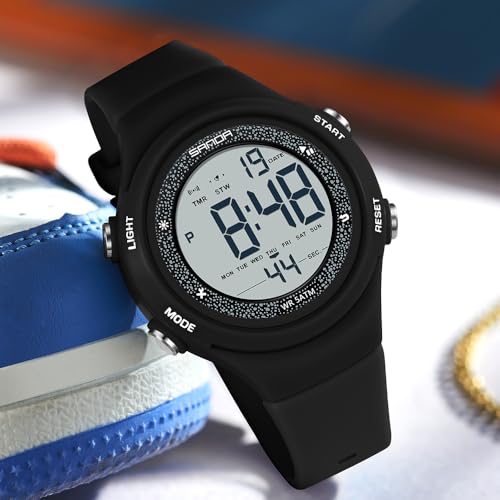
Figure 3: Watch display illuminated by the blue LED backlight.
Paspauskite Mygtukas A (Top Left) to activate the 7-color LED backlight. The backlight will illuminate the display for a few seconds, enhancing visibility in low-light conditions.
Priežiūra
Valymas
Reguliariai valykite laikrodį minkšta, sausa šluoste. Įsisenėjusius nešvarumus galima lengvai nuvalyti.amp Galima naudoti šluostę, po kurios nedelsiant nusausinkite. Venkite cheminių valiklių ar abrazyvinių medžiagų.
Baterijos keitimas
The watch uses 1 Nonstandard Battery. When the display becomes dim or functions are erratic, the battery may need replacement. It is recommended to have the battery replaced by a qualified watch technician to ensure water resistance integrity.
Atsparumas vandeniui (5 atm)
Your Gosasa Digital Watch is rated 5ATM (50 meters / 168 feet) water resistant. This means it is suitable for daily splashes, hand washing, rain, and sweat. It is ne recommended for swimming, bathing, diving, showering, or hot water environments. DO NOT press any buttons while the watch is underwater. Avoid exposure to steam, hot water, saunas, and high-pressure water. If moisture or condensation appears inside the watch, discontinue use immediately and contact customer service. Clean and dry the watch thoroughly after contact with water, sweat, or seawater to prevent damage.
Trikčių šalinimas
- Ekranas tuščias arba blankus: Baterija gali būti išsikrovusi. Pakeiskite bateriją, kaip aprašyta skyriuje „Priežiūra“.
- Mygtukai nereaguoja: Ensure the watch is not in a locked mode (if applicable, though this model typically does not have one). If the issue persists, the battery may be low or there could be an internal malfunction.
- Laikas neteisingas: Re-set the time and date following the instructions in the Setup section. Ensure the 12/24-hour format is correctly selected.
- Vanduo laikrodyje: Immediately stop using the watch and contact customer service. Do not attempt to open or dry the watch yourself.
Specifikacijos
| Modelio numeris | S. 8105 |
| Ekrano tipas | Skaitmeninis |
| Judėjimo tipas | Skaitmeninis kvarcas |
| Bylos medžiaga | Akrilnitrilo butadieno stirenas (ABS) |
| Juostos medžiaga | Termoplastinis poliuretanas (TPU) |
| Krištolo medžiaga | Derva |
| Užsegimo tipas | Sagtis |
| Korpuso skersmuo | 1.61 colio (41 mm) |
| Korpuso storis | 0.51 colio (13 mm) |
| Juostos plotis | 0.79 colio (20 mm) |
| Bendras laikrodžio ilgis | 9.06 colio (230 mm) |
| Prekės svoris | 1.38 uncijos (39 g) |
| Atsparumas vandeniui | 5ATM (50 metrų / 168 pėdų) |
| Baterijos tipas | 1 Nonstandard Battery |
| Papildomos funkcijos | Alarm, Easy Reader, Glow In The Dark, Lightweight, Shock Resistant |
Garantija
This product comes with a Limited Warranty. For specific details regarding warranty coverage, terms, and conditions, please refer to the warranty information provided at the time of purchase or contact Gosasa customer service directly.
Palaikymas
If you encounter any issues or have questions not covered in this manual, please contact Gosasa customer service for assistance. You can typically find contact information on the product packaging, the official Gosasa websvetainėje arba per savo mažmenininką.