1. Įvadas ir pabaigaview
The Casio fx-115MS PLUS SR is a scientific calculator designed for a wide range of mathematical and scientific applications. It features a two-line display, allowing for simultaneous viewing of calculations and results, and supports 10 digits. This calculator is equipped with 279 built-in mathematical functions, including complex number calculations, base conversions, logical operations, standard deviation, and regression analysis. Its algebraic mode displays expressions as they are written, enhancing clarity. The unit includes one independent memory key and six constant memory keys for efficient use. A slide-on hard case is provided for protection.

1.1 pav.: priekis view of the Casio fx-115MS PLUS SR Scientific Calculator, showing its two-line display and key layout.
2. Sąranka
2.1 Maitinimo šaltinis
The Casio fx-115MS PLUS SR calculator operates using both solar power and a battery. This dual power system ensures reliable operation in various lighting conditions. Under sufficient light, the calculator will primarily use solar power. In low light conditions or when performing complex calculations, the battery will provide power.
2.2 Pradinis naudojimas
- Remove the calculator from its packaging.
- Slide off the protective hard case.
- Paspauskite ON button to power on the calculator. If the display does not appear, ensure there is adequate light for solar power or check the battery.
- Adjust display contrast if necessary using the appropriate function (refer to the 'Operating Instructions' section for details on display settings).
3. Naudojimo instrukcijos
3.1 Pagrindinės operacijos
The calculator features a pragmatic key layout designed for ease of use. Input numbers and operations directly. The two-line display shows the input expression on the upper line and the result on the lower line.
3.2 Mathematical Functions
The fx-115MS PLUS SR includes 279 built-in functions. Key categories include:
- Algebraic Computations: Perform standard arithmetic, powers, roots, and logarithms.
- Trigonometrinės funkcijos: Sine, cosine, tangent, and their inverses, supporting degrees, radians, and grads.
- Complex Number Calculations: Perform operations with complex numbers.
- Base Conversions: Convert between decimal, hexadecimal, octal, and binary number systems.
- Loginės operacijos: Execute logical AND, OR, XOR, and NOT operations.
- Statistika: Conduct standard deviation and regression analysis.
- Trupmenos: Input and calculate with fractions, including mixed fractions.
- Mokslinis KOMENTARAS: Easily input and display numbers in scientific notation using the EXP key.
- Coordinate Conversions: Konvertuoti tarp poliarinių ir stačiakampių koordinačių.
3.3 Atminties funkcijos
The calculator provides one independent memory and six constant memory keys. Use these to store and recall values for repeated use in calculations.
3.4 Algebraic Mode
In algebraic mode, expressions are displayed precisely as written, allowing for clear verification of input before calculation. This feature aids in tracking the equation-solving process.
4. Priežiūra
4.1 Valymas
Norėdami valyti skaičiuotuvą, švelniai nuvalykite paviršių minkštu, sausu skudurėliu. Jei nešvarumai sunkiai įveikiami, šiek tiek nuvalykite.ampen the cloth with water and then wipe dry. Avoid using harsh chemicals, abrasive cleaners, or solvents, as these can damage the calculator's casing ir ekranas.
4.2 Saugykla
When not in use, store the calculator in its slide-on hard case to protect it from dust, scratches, and impacts. Avoid exposing the calculator to extreme temperatures, high humidity, or direct sunlight for extended periods.
4.3 Akumuliatoriaus keitimas
While the calculator utilizes solar power, it also contains a backup battery. If the display becomes dim or erratic in adequate lighting, the battery may need replacement. Refer to the manufacturer's guidelines for specific battery type and replacement procedures. Improper battery replacement can void the warranty.
5. Problemų sprendimas
This section addresses common issues you might encounter with your Casio fx-115MS PLUS SR Scientific Calculator.
5.1 Calculator Does Not Turn On or Display is Blank
- Patikrinkite apšvietimą: Įsitikinkite, kad saulės baterijos gauna pakankamai šviesos.
- Baterija: If operating in low light or if the display remains blank, the battery may be depleted. Consider replacing the battery according to manufacturer instructions.
- Atstatyti: A small reset button (often on the back) may be present. Use a thin, pointed object to press it. Note that this will clear all memory.
5.2 Automatinis išsijungimas
The calculator is designed to automatically shut off after a period of inactivity (approximately 6 minutes) to conserve power. This is a normal function. To resume operation, press the ON button. Be aware that calculations in progress may be lost upon automatic shut-off.
5.3 Wobbly Case
The slide-on hard case is designed for protection during transport. If the calculator feels wobbly when placed on a surface with the case underneath, it is due to the rounded design of the case. For stable operation, remove the case and place the calculator directly on a flat surface.
5.4 Neteisingi skaičiavimo rezultatai
- Įvesties klaida: Carefully re-enter the calculation to ensure accuracy. Utilize the two-line display to verify your input.
- Režimo nustatymai: Check if the calculator is in the correct mode (e.g., DEG, RAD, GRD for angles; COMP for complex numbers).
- Išvalyti atmintį: Clear all memory and variables if unexpected results persist.
6. Specifikacijos
The following table details the technical specifications of the Casio fx-115MS PLUS SR Scientific Calculator.
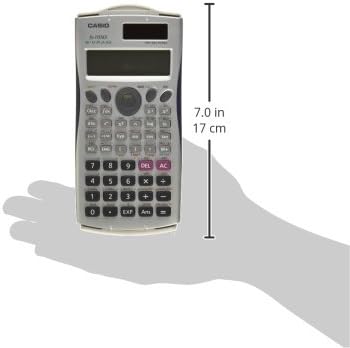
Figure 6.1: Casio fx-115MS PLUS SR Scientific Calculator illustrating its dimensions.
| Funkcija | Specifikacija |
|---|---|
| Modelio numeris | FX-115MS |
| Gaminio matmenys | 6.9 x 4.1 x 1.3 colio |
| Prekės svoris | 8 uncijos |
| Ekrano tipas | 2-line, 10-digit |
| Maitinimo šaltinis | Maitinamas baterijomis, maitinamas saulės energija |
| Skaičiuoklės tipas | Inžinerija/mokslas |
| Gamintojas | Casio Inc. |
| Pasiekiama pirmoji data | 30 m. rugsėjo 2004 d |
7. Informacija apie garantiją
The Casio fx-115MS PLUS SR Scientific Calculator typically comes with a one-year warranty from the manufacturer, Casio Inc., covering manufacturing defects. Please retain your proof of purchase for warranty claims.
7.1 Teisinis atsisakymas
The warranty does not cover misuse of the product. Any damage resulting from improper handling, accidents, unauthorized repairs, or modifications will void the warranty. For specific terms and conditions, refer to the warranty card included with your product or contact Casio Inc. directly.
8. Parama
For further assistance, technical support, or inquiries regarding your Casio fx-115MS PLUS SR Scientific Calculator, please contact the manufacturer directly.
- Gamintojas: Casio Inc.
- Websvetainė: Refer to the official Casio websvetainė, kurioje rasite pagalbos išteklių, DUK ir kontaktinės informacijos.
- Grąžinimai: Please note that the supplier may not accept returns. You must contact the manufacturer for any product-related issues or warranty claims.


