Įvadas
This manual provides detailed instructions for the proper use and care of your Audiovox CE-145G Personal CD Player. Please read this manual thoroughly before operating the device to ensure optimal performance and longevity.
Produkto savybės
- 40-Second Anti-Skip Protection: Ensures continuous audio playback even during movement, utilizing a digital buffer.
- Multi-Directional Anti-Roll Sensors: Provides additional protection against playback interruption from various movements.
- 22-Track Programmable Memory: Allows customization of CD playback order.
- Bass Boost System: Pagerina žemo dažnio garso išvestį.
- 3-Beam Laser Pickup: Designed for accurate CD tracking and clear sound reproduction.
- Keli atkūrimo režimai: Includes random play and various repeat functions.
- Laikymo jungiklis: Prevents accidental button presses and program changes.
- Automatinis išjungimas: Conserves battery life by automatically shutting down the player when not in use.
- Line-Out Jack: For connecting to external audio systems or power adapters.
- Built-in Rechargeable Circuitry: Supports the use of rechargeable Ni-Cad batteries (not included).
- Stereo Headphones: Included for immediate listening.
Sąranka
1. Akumuliatoriaus įdėjimas
The Audiovox CE-145G operates on two (2) AA batteries (not included) or an optional AC/car adapter (not included) connected via the line-out jack. For rechargeable Ni-Cad batteries, the unit features built-in charging circuitry.
- Raskite baterijų skyrių CD grotuvo apačioje.
- Atidarykite akumuliatoriaus skyriaus dangtelį.
- Įdėkite dvi (2) AA baterijas, užtikrindami teisingą poliškumą (+/-), kaip nurodyta skyriaus viduje.
- Saugiai uždarykite akumuliatoriaus skyriaus dangtelį.

Image: The Audiovox CE-145G Personal CD Player in translucent green, shown with included stereo headphones. This image illustrates the overall product design and the headphones that come with the unit.
2. Ausinių prijungimas
Insert the stereo headphone plug into the headphone jack located on the side of the CD player.

Image: A close-up of the stereo headphones included with the Audiovox CE-145G CD player, showing the earcups and the 3.5mm audio jack.
Naudojimo instrukcijos
1. Basic CD Playback
- Open the CD compartment lid by pressing the "OPEN" button or sliding the latch.
- Padėkite kompaktinį diską ant centrinio veleno etikete į viršų.
- Tvirtai uždarykite CD skyriaus dangtelį, kol jis spragtelės.
- Paspauskite PALEISTI / PAUZĖ button to begin playback. The track number and elapsed time will display.
- Norėdami pristabdyti atkūrimą, paspauskite PALEISTI / PAUZĖ dar kartą. Norėdami tęsti, paspauskite dar kartą.
- Norėdami sustabdyti atkūrimą, paspauskite STOP mygtuką.
- Norėdami pereiti prie kito takelio, paspauskite Praleisti pirmyn mygtukas (►►|).
- To return to the beginning of the current track or go to the previous track, press the PRAŠKITE ATGAL mygtukas (|◄◄).
- Norėdami greitai persukti pirmyn arba atgal takelio viduje, paspauskite ir palaikykite Praleisti pirmyn or PRAŠKITE ATGAL mygtuką, atitinkamai.
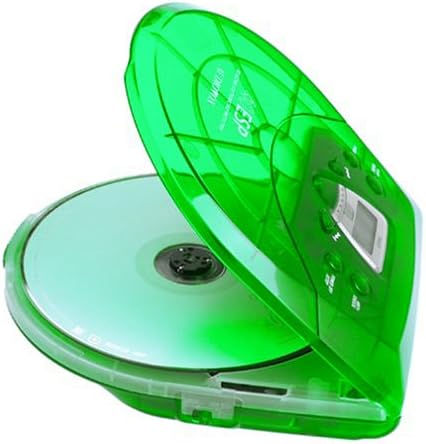
Image: The Audiovox CE-145G Personal CD Player with its translucent green lid open, revealing a compact disc placed inside the compartment.
2. Apsauga nuo prašokimo (ESP)
The CE-145G features a 40-second Electronic Skip Protection (ESP) buffer. This system stores up to 40 seconds of audio data, allowing for uninterrupted playback even if the player experiences minor shocks or vibrations. This feature is automatically active during playback.
3. Programmable Memory (22 Tracks)
Galite užprogramuoti iki 22 takelių grojimą tam tikra tvarka.
- STOP režime paspauskite PROGRAMA button. The display will show "PROG" and "01".
- Naudokite Praleisti pirmyn or PRAŠKITE ATGAL buttons to select the desired first track.
- Paspauskite PROGRAMA again to confirm the track. The display will show "02".
- Repeat steps 2 and 3 to add up to 22 tracks to your program.
- After programming the last track, press PALEISTI / PAUZĖ to start playback of your programmed sequence.
- Norėdami išvalyti programą, paspauskite STOP mygtuką du kartus.
4. Žemųjų dažnių stiprinimas
To enhance the bass frequencies, locate the BASS BOST switch (or button) on the unit and activate it. Deactivate it to return to standard audio output.
5. Laikymo funkcija
The LAIKYTI switch prevents accidental button presses. Slide the LAIKYTI switch to the "ON" position to disable all control buttons. Slide it to "OFF" to re-enable controls.
6. Automatinis išsijungimas
To conserve battery life, the CD player will automatically power off after a period of inactivity (e.g., when a CD finishes playing and no buttons are pressed). To restart, press the PALEISTI / PAUZĖ mygtuką.
Priežiūra
- Įrenginio valymas: Wipe the exterior of the player with a soft, damp audinys. Nenaudokite abrazyvinių valiklių ar tirpiklių.
- CD objektyvo valymas: If playback issues occur due to a dirty lens, use a specialized CD lens cleaning kit. Do not touch the lens directly.
- CD priežiūra: Kompaktinius diskus imkite už kraštų. Laikykite juos švarius ir nesubraižytus. Kai nenaudojate, laikykite juos dėkluose.
- Akumuliatoriaus priežiūra: Jei prietaisas ilgesnį laiką nebus naudojamas, išimkite baterijas, kad išvengtumėte elektrolito pratekėjimo.
Trikčių šalinimas
| Problema | Galima priežastis | Sprendimas |
|---|---|---|
| Nėra galios | Baterijos išsikrovė arba įdėtos neteisingai; kintamosios srovės adapteris neprijungtas arba sugedęs. | Replace batteries, check polarity, or ensure AC adapter is properly connected and functional. |
| CD praleidžia arba sustoja | CD is dirty or scratched; unit is subjected to excessive shock; lens is dirty. | Clean CD, use a different CD, avoid strong impacts, clean the CD lens. |
| Nėra garso | Headphones not connected properly; volume too low; headphones faulty. | Ensure headphones are fully plugged in, increase volume, try different headphones. |
| Mygtukai nereaguoja | Įjungtas HOLD jungiklis. | Slide the HOLD switch to the "OFF" position. |
Specifikacijos
- Modelis: CE-145G
- Prekinis ženklas: Audiovox
- Apsauga nuo praleidimo: 40 seconds (Electronic Skip Protection)
- Programuojami takeliai: 22
- Maitinimo šaltinis: 2 x AA batteries (not included) or optional AC/car adapter
- Garso išvestis: 3.5mm headphone jack, Line-out jack
- Matmenys (apytiksliai): 11.8 x 8.3 x 2.6 colio (paketo matmenys)
- Svoris (apytiksliai): 1.35 svaro (prekės svoris)
- Spalva: Translucent Green
Garantija ir palaikymas
The Audiovox CE-145G Personal CD Player is backed by a 90-day parts-and-labor warranty nuo pirkimo datos. Prašome išsaugoti pirkimo įrodymą garantiniams reikalavimams.
For technical support or warranty service, please refer to the contact information provided with your product packaging or visit the official Audiovox websvetainę.


