1. Produktas baigtasview
The D-Link DES-1008D is an 8-port Fast Ethernet unmanaged desktop switch designed to expand network connectivity for small workgroups. This device allows for flexible connection of Ethernet and Fast Ethernet devices, automatically detecting network speed and negotiating between 10BASE-T and 100BASE-TX, as well as full and half-duplex modes. Its plug-and-play design ensures simple operation without complex configuration.

Figure 1: D-Link DES-1008D 8-Port Fast Ethernet Unmanaged Desktop Switch (Silver/Blue model).
Pagrindinės funkcijos:
- 8 10/100 Mbps auto-sensing ports for flexible network integration.
- Unmanaged design for simple plug-and-play installation.
- Automatic MDI/MDIX crossover for all ports, eliminating the need for crossover cables.
- Fanless operation for silent performance.
2. Pakuotės turinys
Patikrinkite, ar jūsų pakuotėje yra šie elementai:
- D-Link DES-1008D 8 prievadų greitojo eterneto nevaldomas darbalaukio jungiklis
- Maitinimo adapteris
- Quick Install Guide and Documentation
Jei kurio nors iš aukščiau išvardytų daiktų trūksta arba jis pažeistas, kreipkitės pagalbos į vietinį „D-Link“ platintoją.
3. Sąrankos instrukcijos
The DES-1008D switch is designed for easy installation. Follow these steps to set up your device:
- Vieta: Place the switch on a flat, stable surface or mount it to a wall. Ensure adequate ventilation around the device.
- Prijunkite maitinimą: Connect the provided power adapter to the power input port on the switch and then plug the adapter into a standard electrical outlet. The Power LED on the switch should illuminate.
- Prijunkite tinklo įrenginius: Connect your network devices (e.g., computers, printers, network-attached storage, routers) to any of the 8 Fast Ethernet ports on the switch using standard Ethernet cables. The Link/Act LED for each connected port should illuminate, indicating an active connection.
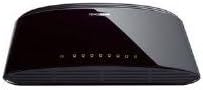
2 pav.: galinis view of the D-Link DES-1008D (Black model) showing Ethernet ports and power input.
The switch will automatically detect the speed and duplex mode of the connected devices. No further configuration is required for basic operation.
4. Naudojimo instrukcijos
The D-Link DES-1008D is an unmanaged switch, meaning it operates automatically without user configuration. Once powered on and devices are connected, it functions as a central hub for your network traffic.
LED indikatoriai:
Jungiklis turi LED indikatorius, kurie rodo būsenos informaciją:
- Maitinimo šviesos diodas: Šviečia, kai jungiklis gauna maitinimą.
- Ryšio / veiksmo šviesos diodai (kiekvienam prievadui):
- Tvirtai žalia: Rodo galiojantį 100 Mbps tinklo ryšį.
- Tvirtas gintaras: Rodo galiojantį 10 Mbps tinklo ryšį.
- Mirksi: Indicates network activity (data transmission or reception) on that port.
- Išjungta: Neprijungtas joks įrenginys arba prijungtas įrenginys yra išjungtas.
Duomenų perdavimas:
The switch facilitates data transfer between connected devices. Each port supports auto-negotiation for speed (10/100 Mbps) and duplex mode (full/half-duplex), ensuring optimal performance for each connection. In full-duplex mode, a workstation can achieve up to 200 Mbps data transfer rate.
5. Priežiūra
To ensure optimal performance and longevity of your D-Link DES-1008D switch, consider the following maintenance guidelines:
- Aplinka: Operate the switch within its specified temperature range (up to 40°C). Avoid placing it in direct sunlight or near heat sources.
- Vėdinimas: Ensure that the ventilation openings on the switch are not blocked. Proper airflow is crucial for heat dissipation.
- Valymas: Laikykite jungiklį švarų ir be dulkių. Valymui naudokite minkštą, sausą šluostę. Nenaudokite skystų ar aerozolinių valiklių.
- Maitinimas: Use only the power adapter supplied with the device. Using an incorrect power adapter may damage the switch and void the warranty.
- Kabelių valdymas: Organize network cables to prevent strain on the ports and to maintain a tidy setup.
6. Problemų sprendimas
If you encounter issues with your D-Link DES-1008D switch, refer to the following troubleshooting tips:
- Nėra maitinimo šviesos diodo:
- Įsitikinkite, kad maitinimo adapteris yra tvirtai prijungtas prie jungiklio ir veikiančio elektros lizdo.
- Patikrinkite, ar elektros lizdas veikia, prijungdami prie jo kitą įrenginį.
- No Link/Act LED for a Connected Device:
- Patikrinkite, ar Ethernet kabelis yra tvirtai prijungtas prie komutatoriaus prievado ir tinklo įrenginio.
- Įsitikinkite, kad prijungtas tinklo įrenginys yra įjungtas ir veikia tinkamai.
- Išbandykite kitą Ethernet kabelį.
- Pabandykite prisijungti prie kito komutatoriaus prievado.
- Verify that the cable length does not exceed the maximum recommended length for Ethernet (100 meters).
- Lėtas tinklo našumas:
- Ensure all connected devices are operating at their optimal speed. The Link/Act LED color indicates the connection speed (Green for 100 Mbps, Amber for 10 Mbps).
- Check for excessive network traffic or bandwidth-intensive applications on your network.
- Verify that your network cables are not damaged.
- Pertraukiamas ryšys:
- Patikrinkite, ar nėra laisvų kabelių jungčių.
- Ensure the switch is placed in an area with good ventilation to prevent overheating.
- Test with different cables and devices to isolate the issue.
If problems persist after following these steps, contact D-Link technical support for further assistance.
7. Specifikacijos
| Funkcija | Detalė |
|---|---|
| Modelio numeris | DES-1008D |
| Prievadų skaičius | 8 |
| Sąsajos tipas | RJ45 |
| Duomenų perdavimo sparta | 10/100 Megabits Per Second (Mbps) |
| Perjungimo talpa | 1.6 Gbps (neužblokuojantis) |
| Standartai | IEEE 802.3 10BASE-T Ethernet, IEEE 802.3u 100BASE-TX Fast Ethernet, IEEE 802.3x Flow Control |
| Automatinis MDI/MDIX | Palaikoma visuose prievaduose |
| Maitinimo įvestis | 230 Volts (AC) (via external power adapter) |
| Energijos suvartojimas | Low power consumption (fanless design) |
| Matmenys (I x P x A) | 6.5 colio x 4.41 colio x 1.42 colio (apytiksliai 165 mm x 112 mm x 36 mm) |
| Prekės svoris | 8.9 uncijos (252 gramų) |
| Bylos medžiaga | Plastikiniai |
| Darbinė temperatūra | nuo 0°C iki 40°C (32°F iki 104°F) |
| Laikymo temperatūra | -10°C iki 70°C (14°F iki 158°F) |
| Darbinė drėgmė | Nuo 10% iki 90% nekondensuojantis |
| Sertifikatai | FCC Class B, CE Class B, VCCI Class B, C-Tick, RoHS |
8. Garantija ir palaikymas
The D-Link DES-1008D switch comes with a limited 2-year warranty. For specific terms and conditions, please refer to the warranty documentation included with your product or visit the official D-Link websvetainę.
For technical support, product registration, or to download the latest firmware and documentation, please visit the D-Link support portal:
When contacting support, please have your product model number (DES-1008D) and serial number ready.