Įvadas
This manual provides essential instructions for the setup, operation, and maintenance of your Oregon Scientific DS6628 ThinCam 1.3MP Digital Flash Camera. Please read this manual thoroughly before using your camera to ensure proper function and longevity.
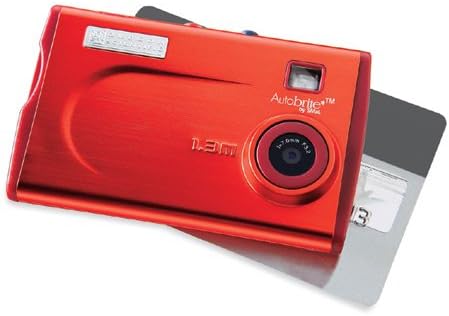
1 paveikslas: The Oregon Scientific DS6628 ThinCam 1.3MP Digital Flash Camera, showcasing its compact red design with the lens, flash, and "Autobrite" branding visible. A memory card is partially inserted on the right side.
Pakuotės turinys
Patikrinkite, ar pakuotėje yra visi reikalingi daiktai:
- DS6628 Digital Camera
- Flash Attachment
- Software CD (for driver installation and image management)
- USB kabelis
- Dėklas nešiojimui
The camera features a built-in Li-polymer battery.
Sąranka
1. Akumuliatoriaus įkrovimas
The DS6628 ThinCam features a built-in Li-polymer battery. To charge the camera, connect it to your computer using the provided USB cable. The camera will charge automatically when connected to a powered USB port. A full charge provides power for up to 500 images.
2. Programinės įrangos ir tvarkyklių diegimas
Before connecting the camera to your computer for the first time, install the included software and drivers from the provided CD. This ensures proper recognition and functionality on both PC and Mac operating systems. Follow the on-screen instructions during installation.
3. Atminties kortelės įdėjimas (pasirinktinai)
The camera has 16MB of internal memory, sufficient for approximately 21 high-resolution or 91 low-resolution pictures. For expanded storage, the camera supports SD and MMC cards.
- Suraskite atminties kortelės angą fotoaparato šone.
- Insert a compatible SD or MMC card into the slot until it clicks into place. Ensure the card is inserted in the correct orientation.
- To remove the card, gently push it inward until it springs out.
Fotoaparato valdymas
1. Įjungimas/išjungimas
Locate the power button, typically on the top or side of the camera. Press and hold it for a few seconds to power the camera on or off.
2. Fotografavimas
The DS6628 ThinCam captures images at 1.3-megapixel resolution (1288 x 962 pixels).
- Įsitikinkite, kad fotoaparatas įjungtas.
- Point the camera at your subject. The camera features a pop-up/focus-free lens pad and an optical viewvaizdo ieškiklis kadravimui.
- Press the shutter button firmly to capture an image.
3. Blykstės naudojimas
The camera includes a detachable flash module. Attach the flash module to the designated port on the camera when additional lighting is required. The flash operates in automatic mode.
4. Transferring Images to a Computer
After installing the necessary software and drivers, connect the camera to your computer using the USB cable. The computer should recognize the camera as a removable storage device. You can then transfer images directly or use the included software for management.
Priežiūra
Akumuliatoriaus priežiūra
- Prieš pradėdami naudoti akumuliatorių, visiškai jį įkraukite.
- Kad pailgintumėte akumuliatoriaus tarnavimo laiką, venkite jo dažnai visiškai iškrauti.
- If the camera will not be used for an extended period, charge it partially (around 50%) before storing.
- Store the camera in a cool, dry place.
Valymas
- Fotoaparato korpusą valykite minkštu, nepūkuotu audiniu.
- Objektyvui valyti naudokite specializuotą lęšių valymo šluostę ir tirpalą. Venkite stiprių cheminių medžiagų.
- Ensure the flash module contacts are clean and free of debris.
Trikčių šalinimas
| Problema | Galima priežastis / sprendimas |
|---|---|
| Kamera neįsijungia. | Battery may be depleted. Connect the camera to a computer via USB to charge. |
| Nepavyksta perkelti vaizdų į kompiuterį. |
|
| Poor image quality (washed out, out of focus). |
|
| Battery does not hold charge for long. |
|
Specifikacijos
| Funkcija | Detalė |
|---|---|
| Prekės ženklas | OREGON SCIENTIFIC |
| Modelio pavadinimas | DS6628 ThinCam |
| Veiksminga nejudančioji raiška | 1.3 MP (1288 x 962 pikselių) |
| Vidinė atmintis | 16 MB (approx. 21 high-res / 91 low-res images) |
| Atminties kortelių palaikymas | SD, MMC |
| Objektyvo tipas | Pop-up, focus-free lens |
| Optinis priartinimas | 1x |
| Vaizdo stabilizavimas | Skaitmeninis |
| Viewieškiklis | Optinis |
| Blykstė | Detachable module, Automatic modes |
| Baterijos tipas | Built-in Li-polymer, rechargeable via USB |
| Baterijos veikimo laikas | Up to 500 images per charge |
| Ryšys | USB |
| Suderinamumas | PC ir Mac |
| Spalva | Raudona |
| Matmenys (apytiksliai) | 2.1 colių (A) x 3.4 colių (W) x 0.3 colių (D) |
Garantija ir palaikymas
For warranty information and technical support, please refer to the documentation included with your purchase or visit the official Oregon Scientific websvetainėje. Išsaugokite pirkimo įrodymą garantiniams reikalavimams.


