1. Įvadas
Ačiū, kad pirkoteasing the Pentax Optio W10 Digital Camera. This manual provides essential information for the safe and effective use of your camera. The Optio W10 is a compact 6.0-megapixel digital camera featuring a 3x optical zoom lens, designed for capturing high-quality still images and video. Its robust design makes it suitable for various environments.
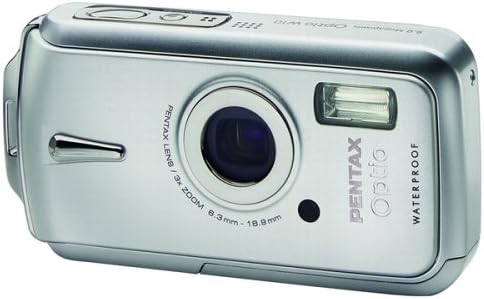
1.1 pav.: priekis view of the Pentax Optio W10 Digital Camera, showcasing objektyvą, blykstę ir prekės ženklo dizainą.
2. Saugos informacija
Please read and understand all safety precautions before using the camera. Failure to do so may result in injury or damage to the product.
- Nebandykite ardyti ar modifikuoti fotoaparato.
- Keep the camera away from extreme temperatures, direct sunlight, and high humidity.
- Ensure all compartment covers (battery, memory card) are securely closed and locked before exposing the camera to water or dust.
- Use only the specified battery type (Lithium-ion DL-I8) and charger.
- Laikyti vaikams nepasiekiamoje vietoje.
3. Pakuotės turinys
Patikrinkite, ar fotoaparato pakuotėje yra visi šie daiktai:
- Pentax Optio W10 Digital Camera
- Lithium-ion Battery DL-I8
- Akumuliatoriaus įkroviklis
- Kintamosios srovės maitinimo laidas
- USB laidas (kompiuterio prijungimui)
- Dirželis
- Programinės įrangos kompaktinis diskas
- Instrukcijų vadovas (šis dokumentas)
4. Sąranka
4.1. Akumuliatoriaus įdėjimas
- Locate the battery/memory card compartment cover on the bottom of the camera.
- Slide the lock switch to the 'OPEN' position and open the cover.
- Insert the Lithium-ion battery DL-I8 into the compartment, ensuring the correct orientation as indicated inside the compartment.
- Close the cover and slide the lock switch to the 'LOCK' position until it clicks securely.

4.1 pav. Apačia view of the camera, illustrating the battery and SD card compartment with the lock switch.
4.2. Atminties kortelės įdėjimas
The Pentax Optio W10 uses SD memory cards.
- Open the battery/memory card compartment cover as described in Section 4.1.
- Insert the SD memory card into the designated slot with the label facing the correct direction, pushing gently until it clicks into place.
- Close the cover and slide the lock switch to the 'LOCK' position.
4.3. Pradinis įjungimas ir datos / laiko nustatymas
- Paspauskite ĮJUNGTA/IŠJUNGTA mygtukas, esantis fotoaparato viršuje.
- Upon first power-on, the camera will prompt you to set the date and time. Use the directional buttons on the back of the camera to navigate and the OK mygtuką, kad patvirtintumėte.
- Vykdykite ekrane pateikiamus nurodymus, kad užbaigtumėte pradinę sąranką.

4.2 paveikslas: viršuje view of the camera, highlighting the ON/OFF button and 6.0 Megapixels branding.
5. Fotoaparato valdymas
5.1. Pagrindinė fotografija
To take a still picture:
- Įjunkite fotoaparatą paspausdami ĮJUNGTA/IŠJUNGTA mygtuką.
- Kadruokite kadrą naudodami 2.5 colių LCD ekraną.
- Norėdami sufokusuoti, paspauskite užrakto mygtuką iki pusės. Kai sufokusuosite, fokusavimo rėmelis taps žalias.
- Norėdami užfiksuoti vaizdą, iki galo paspauskite užrakto mygtuką.

5.1 pav.: galinis view fotoaparato, rodant LCD ekraną ir įvairius valdymo mygtukus naršymui ir nustatymams.
5.2. Fotografavimo režimai
The Optio W10 offers various shooting modes accessible via the REŽIMAS button. Refer to the on-screen menu for specific options such as Program Auto, Scene Modes, and Movie Mode.
5.3. Vaizdo įrašymas
Norėdami įrašyti vaizdo įrašą:
- Switch to Movie Mode using the REŽIMAS mygtuką.
- Press the shutter button to start recording. The camera can capture QuickTime motion JPEG videos at 640 x 480 resolution at 30 frames per second.
- Norėdami sustabdyti įrašymą, dar kartą paspauskite užrakto mygtuką.
5.4. Atkūrimas
Į view užfiksuoti vaizdai ir vaizdo įrašai:
- Paspauskite Atkūrimas mygtukas (paprastai žymimas trikampio piktograma).
- Use the directional buttons to scroll through your photos and videos.
- Paspauskite OK mygtuką prie view vaizdo įrašą arba priartinkite nuotrauką.
5.5. Prisijungimas prie kompiuterio
To transfer images and videos to a computer:
- Įsitikinkite, kad kamera išjungta.
- Prijunkite fotoaparatą prie kompiuterio naudodami pateiktą USB kabelį.
- Turn on the camera. It should be recognized as a removable disk or a PTP device.
- Follow your computer's operating system instructions to access and transfer files.
6. Priežiūra
6.1. Valymas
- Kameros korpusas: Nuvalykite minkšta, sausa šluoste. Įsisenėjusiam purvui naudokite šiek tiek drėgnąamp skudurėliu ir tada gerai išdžiovinkite.
- Objektyvas: Use a lens brush or a soft, clean lens cloth. Avoid touching the lens surface with your fingers.
- LCD monitorius: Švelniai nuvalykite minkšta, sausa šluoste. Venkite stipriai spausti ekraną.
- Vandeniui atsparūs sandarikliai: Regularly inspect the rubber seals around the battery/memory card compartment for dirt, sand, or damage. Clean gently with a soft cloth. Do not use sharp objects.
6.2. Sandėliavimas
When not in use for extended periods, store the camera in a cool, dry, and well-ventilated place. Remove the battery to prevent leakage. Avoid storing in areas with high humidity or extreme temperature fluctuations.
7. Problemų sprendimas
If you encounter issues with your Pentax Optio W10, refer to the following common solutions:
| Problema | Galima priežastis / sprendimas |
|---|---|
| Fotoaparatas neįsijungia | Battery is depleted or incorrectly inserted. Recharge the battery or reinsert it correctly. |
| Negalima fotografuoti | Memory card is full, locked, or not inserted. Delete unnecessary fileatrakinkite kortelę arba įdėkite ją teisingai. |
| Vaizdai neryškūs | Lens is dirty, camera shake, or incorrect focus. Clean the lens, hold the camera steady, or ensure proper focus. |
| Water inside compartment | Compartment cover not securely closed or seal is damaged. Ensure cover is locked. If seal is damaged, contact service. |
For further assistance, please refer to the official Pentax support websvetainėje arba susisiekite su klientų aptarnavimo tarnyba.
8. Specifikacijos
Key technical specifications for the Pentax Optio W10 Digital Camera:
- Veiksminga nejudančioji rezoliucija: 6.0 megapikselio
- Nuotraukų jutiklio technologija: CCD (1/2.5 colio)
- Optinis priartinimas: 3x
- Skaitmeninis priartinimas: 4x
- Maksimalus židinio nuotolis: 114 mm
- Minimalus židinio nuotolis: 38 mm
- LCD ekrano dydis: 2.5 colių
- Vaizdo stabilizavimas: Skaitmeninis, optinis
- Vaizdo įrašo raiška: 640 x 480, 30/15 fps (QuickTime Motion JPEG)
- Palaikoma File Formatas: JPEG (nuotraukos), MJPEG (vaizdo įrašai)
- Saugojimo laikmena: SD/MMC card, Internal Memory
- Baterijos tipas: Lithium-ion (DL-I8)
- Ypatinga funkcija: Waterproof (Note: Ensure all seals are properly closed before water exposure)
- Minimalus užrakto greitis: 4 sekundžių
- Maksimalus užrakto greitis: 1/2000 sekundžių
- ISO diapazonas: Auto, 64, 100, 200, 400, 800
- Prekės svoris: 5.6 uncijos
- Modelio numeris: 19033
9. Garantija ir palaikymas
For information regarding warranty coverage, service, or technical support for your Pentax Optio W10 camera, please refer to the warranty card included with your product or visit the official Pentax websvetainėje. Išsaugokite pirkimo įrodymą garantiniams reikalavimams.
Palaikymas internetu: Ricoh Imaging Global Support (Pentax is a brand of Ricoh Imaging)


