1. Įvadas
This manual provides comprehensive instructions for the safe and efficient use of your Logisys PS480D 480W ATX Power Supply. Please read this manual thoroughly before installation and operation to ensure proper functionality and to prevent damage to the unit or other components.

Figure 1: Logisys PS480D 480W ATX Power Supply, front view with cables bundled.
2. Saugos informacija
ĮSPĖJIMAS: Power supplies contain high voltage komponentai. Neatidarykite maitinimo šaltinio casing. Viduje nėra dalių, kurias galėtų aptarnauti vartotojas.
- Prieš montuodami ar atlikdami techninę priežiūrą, įsitikinkite, kad maitinimo šaltinis yra atjungtas nuo kintamosios srovės lizdo.
- Always ground yourself to prevent electrostatic discharge (ESD) when handling internal computer components.
- Nenaudokite maitinimo šaltinio drėgnoje ar sausoje vietoje.amp sąlygas.
- Užtikrinkite tinkamą vėdinimą aplink maitinimo šaltinį, kad išvengtumėte perkaitimo.
- Use only the provided power cables and connectors.
3. Produkto ypatybės
The Logisys PS480D is a 480W ATX power supply designed for personal computers. Key features include:
- Didelis efektyvumas
- Low Noise & Ripple
- Per ttage Apsauga
- Trumpojo jungimo apsauga
- Built-in EMI Filter
- Insulation Resistance 100MΩ min.
- Complies with FCC part 15J class B 115VAC operation and CISPR 22 230 VAC operation.
- Meets UL 1950, CSA 22.2 LEVEL 3 Requirement.
- 100% Burn-in test / Vibration test / Hi-pot test / Leakage current test.
- MTBF above 100,000 hours at 25 °C.

Figure 2: Rear panel of the power supply with fan, AC inlet, and power switch.
4. Sąranka ir diegimas
Follow these steps to install the Logisys PS480D power supply into your computer system.
- Paruošimas: Ensure your computer is completely powered off and unplugged from the wall outlet. Open your computer case according to its manufacturer's instructions.
- Išimkite seną maitinimo šaltinį (jei taikoma): Disconnect all cables from the old power supply to the motherboard, drives, and other components. Unscrew and remove the old power supply from the case.
- Įdiekite naują maitinimo šaltinį: Carefully place the Logisys PS480D into the power supply bay of your computer case. Secure it with screws.
- Prijunkite pagrindinį maitinimą: Connect the 20+4 pin ATX mainboard connector to your motherboard. If your motherboard uses a 20-pin connector, detach the 4-pin section. If it uses a 24-pin connector, connect both sections.
- Prijunkite procesoriaus maitinimą: Connect the 4-pin +12V power connector to the corresponding port on your motherboard.
- Prijunkite periferinį maitinimą:
- Use the 4-pin standard drive connectors for HDDs and CD/DVD-ROM drives.
- Use the 4-pin 3.5" FDD or ZIP connectors for floppy disk drives or similar devices.
- Use the Serial ATA (SATA) connectors for SATA hard drives and SSDs.
- Kabelių valdymas: Route cables neatly to ensure proper airflow within the case.
- Uždaryti bylą: Kai visos jungtys bus saugios, uždarykite kompiuterio korpusą.
- Prijunkite kintamosios srovės maitinimą: Plug the AC power cord into the power supply's AC inlet and then into a wall outlet.
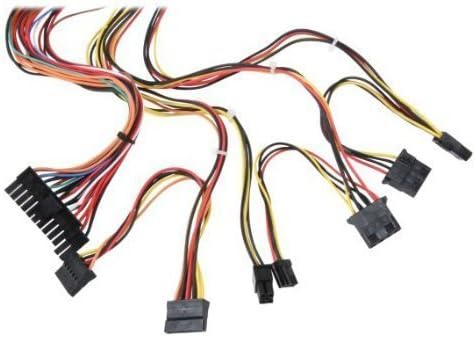
3 pav. Baigtaview of power supply connectors.

Figure 4: Power supply dimensions and included AC power cord.
5. Naudojimo instrukcijos
After successful installation, you can power on your computer.
- Ensure the power switch on the rear of the power supply (Figure 2) is in the "ON" (I) position.
- Paspauskite kompiuterio korpuso maitinimo mygtuką.
- The power supply will provide stable power to your system components.
- To power off, shut down your operating system normally. For complete power disconnection, switch the power supply to the "OFF" (O) position and unplug the AC cord.
6. Priežiūra
Reguliarus aptarnavimas padeda užtikrinti jūsų maitinimo šaltinio ilgaamžiškumą ir optimalų veikimą.
- Valymas: Reguliariai valykite dulkes nuo maitinimo šaltinio ventiliatoriaus ir ventiliacijos angų suslėgtu oru. Prieš valydami įsitikinkite, kad maitinimo šaltinis yra atjungtas nuo elektros tinklo.
- Oro srautas: Ensure that the computer case has adequate airflow and that the power supply's fan is not obstructed.
- Kabelio vientisumas: Periodically check all power cables for secure connections and signs of wear or damage.
7. Problemų sprendimas
Jei kyla problemų dėl maitinimo šaltinio, vadovaukitės toliau pateiktais įprastais trikčių šalinimo veiksmais.
- Nėra galios:
- Check if the AC power cord is securely plugged into both the power supply and the wall outlet.
- Ensure the power switch on the rear of the power supply is in the "ON" (I) position.
- Patikrinkite, ar sieninis lizdas veikia, prijungdami prie jo kitą įrenginį.
- Check all internal power connections (20/24-pin ATX, 4-pin +12V, peripheral connectors) are firmly seated.
- Sistemos nestabilumas / atsitiktiniai išsijungimai:
- This could indicate an overloaded or failing power supply. Ensure your system's power requirements do not exceed the PS480D's 480W capacity.
- Check for proper ventilation and ensure the power supply fan is spinning. Overheating can cause instability.
- Neįprastas triukšmas:
- A loud fan noise might indicate dust buildup or a failing fan bearing. Clean the fan as described in the Maintenance section.
If problems persist after attempting these steps, contact Logisys customer support or a qualified technician.
8. Specifikacijos
| Funkcija | Specifikacija |
|---|---|
| Prekės ženklas | Logisys |
| Modelio numeris | PS480D |
| Išėjimo vattage | 480 vatų |
| Formos faktorius | ATX |
| Matmenys (IxPxH) | 6" ilgis x 5.5" plotis x 3.25" aukštis (15.24 x 13.97 x 8.25 cm) |
| Prekės svoris | 2.06 svaro (0.93 kg) |
| Pagrindinės plokštės jungtis | 1x 20+4 Pin ATX |
| CPU maitinimo jungtis | 1x 4 Pin +12V |
| Standard Drive Connectors | 4x 4 Pin (Molex) |
| FDD/ZIP Connectors | 1x 4 Pin 3.5" |
| Serial ATA jungtys | 1x SATA |
| Aušinimo būdas | Oras |
| Apsaugos | Per ttage Apsauga, apsauga nuo trumpojo jungimo |
| Sertifikatai | FCC part 15J class B, CISPR 22, UL 1950, CSA 22.2 LEVEL 3 |
9. Garantija ir palaikymas
For warranty information, technical support, or service inquiries, please refer to the official Logisys websvetainėje arba susisiekite su jų klientų aptarnavimo skyriumi. Išsaugokite pirkimo kvitą kaip pirkimo įrodymą.

