1. Įvadas
Thank you for choosing the Casio Felite LWQ-300LE-4EER Radio-Controlled Watch. This timepiece combines elegant design with advanced atomic timekeeping technology, ensuring precise timekeeping. This manual provides detailed instructions on how to set up, operate, and maintain your watch to ensure optimal performance and longevity.
Key features include radio-controlled atomic timekeeping, world time display, daily alarm, stopwatch, and countdown timer, all housed in a water-resistant case with a comfortable leather strap.
2. Saugos informacija
- Atsparumas vandeniui: This watch is water-resistant. Avoid operating buttons underwater. Do not expose to hot water or steam, as this can damage the seals.
- Temperatūra: Avoid exposing the watch to extreme temperatures (above 60°C / 140°F or below -10°C / 14°F) for extended periods.
- Poveikis: Saugokite laikrodį nuo stiprių smūgių.
- Cheminės medžiagos: Avoid contact with gasoline, cleaning solvents, spray aerosols, adhesives, paints, etc. These can cause discoloration, deterioration, or damage to the resin case and strap.
- Magnetiniai laukai: Laikrodį laikykite atokiau nuo stiprių magnetinių laukų, nes jie gali paveikti laiko tikslumą.
- Dirželių priežiūra: The leather strap requires proper care. Avoid prolonged exposure to water, direct sunlight, and harsh chemicals to prevent damage and premature wear.
3. Sąranka
3.1 Initial Time Synchronization
Your Casio Felite LWQ-300LE-4EER watch is equipped with radio-controlled atomic timekeeping, which automatically synchronizes with time calibration signals. For the first use, or after a long period of inactivity, ensure the watch is in an environment where it can receive signals.
- Signalo priėmimas: Place the watch near a window at night. The best reception typically occurs between midnight and 5:00 AM.
- Vieta: Ensure there are no large metal objects or electronic devices nearby that could interfere with signal reception.
- Rankinis priėmimas: If automatic reception is unsuccessful, you can initiate manual reception. Refer to the "Operating Instructions" section for details on manual signal reception.
3.2 Setting Your Home City
Before the watch can display the correct time for your region, you need to set your Home City. This setting determines which time calibration signal the watch attempts to receive.
- In Timekeeping Mode, hold down Button A (usually top-left) until the city code starts to flash.
- Use Button B (usually top-right) and Button D (usually bottom-right) to scroll through the city codes until your desired Home City is displayed. For Europe, common cities include LON (London), PAR (Paris), BER (Berlin), ATH (Athens).
- Press Button A again to exit the setting mode. The watch will then attempt to receive the time calibration signal for your selected Home City.
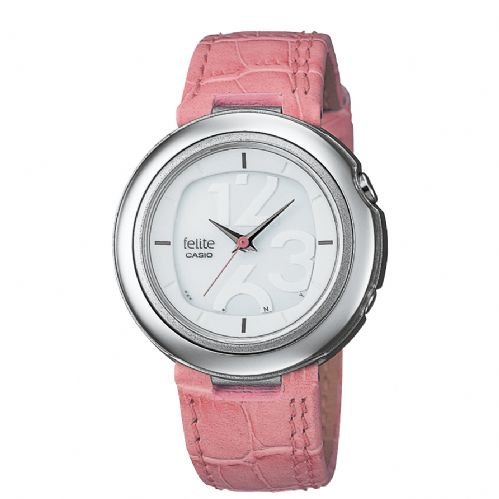
Figure 1: Casio Felite LWQ-300LE-4EER watch. This image shows the elegant design of the watch with its round dial and leather strap, highlighting its aesthetic appeal and functionality.
4. Naudojimo instrukcijos
4.1 Režimo navigacija
Press Button C (usually bottom-left) to cycle through the different modes: Timekeeping Mode, World Time Mode, Alarm Mode, Stopwatch Mode, and Countdown Timer Mode.
4.2 Laiko skaičiavimo režimas
This is the default mode, displaying the current time and date. The watch automatically adjusts for Daylight Saving Time (DST) if enabled for your Home City.
- Rankinis laiko reguliavimas: While atomic timekeeping is highly accurate, manual adjustment is possible if needed. Refer to the full manual for detailed steps.
- Checking Signal Reception: In Timekeeping Mode, press Button D (bottom-right) to check the last successful signal reception time and date.
4.3 Pasaulio laiko režimas
Šis režimas leidžia view dabartinis laikas įvairiuose didžiuosiuose pasaulio miestuose.
- Enter World Time Mode by pressing Button C.
- Use Button B and Button D to scroll through the different city codes and view their respective times.
4.4 kasdienis žadintuvas
Set a daily alarm to sound at a specific time each day.
- Enter Alarm Mode by pressing Button C.
- Hold Button A until the alarm time digits start to flash.
- Use Button B and Button D to set the hour and minute.
- Press Button A to confirm and exit.
- Press Button D to toggle the alarm ON/OFF.
4.5 Chronometras
Measure elapsed time with the stopwatch function.
- Enter Stopwatch Mode by pressing Button C.
- Press Button D to start/stop the stopwatch.
- Press Button B to reset the stopwatch to zero while it is stopped.
4.6 Atgalinės atskaitos laikmatis
Set a countdown from a specified time.
- Enter Countdown Timer Mode by pressing Button C.
- Hold Button A until the countdown time digits start to flash.
- Use Button B and Button D to set the desired countdown time (hours, minutes, seconds).
- Press Button A to confirm.
- Press Button D to start/stop the countdown. An alarm will sound when the countdown reaches zero.
5. Priežiūra
5.1 Laikrodžio valymas
- Case and Bezel: Wipe with a soft, dry cloth. For stubborn dirt, use a soft cloth dampnuplaukite vandeniu ir švelniu neutraliu plovikliu, tada nusausinkite.
- Odinis dirželis: Gently wipe with a soft, dry cloth. Avoid using water or cleaning solutions, as they can damage the leather. If the strap gets wet, dry it thoroughly in a well-ventilated area, away from direct sunlight or heat.
- Atsparumas vandeniui: Po sąlyčio su sūriu vandeniu laikrodį kruopščiai nuplaukite gėlu vandeniu ir nusausinkite minkštu skudurėliu.
5.2 Informacija apie akumuliatorių
This radio-controlled watch typically uses a long-life battery or is solar-powered. If your watch requires a battery replacement, it is recommended to have it done by an authorized Casio service center to ensure proper sealing and water resistance.
5.3 Periodinė apžiūra
It is recommended to have your watch inspected periodically (e.g., every 2-3 years) by an authorized service center to check the water resistance seals and overall condition.
6. Problemų sprendimas
| Problema | Galima priežastis | Sprendimas |
|---|---|---|
| Neteisingas laiko rodymas | Poor signal reception; Home City not set correctly; Manual time adjustment needed. | Ensure watch is in a good reception area (near a window, away from interference). Verify Home City setting. Perform manual signal reception or manual time adjustment. |
| No Signal Reception | Watch is too far from transmitter; Interference from electronics/metal objects; Weak battery. | Move to a location with better reception. Ensure watch is fully charged (if solar) or battery is not low. Try manual reception. |
| Mygtukai nereaguoja | Watch is in a locked mode; Internal malfunction. | Check if the watch is in a special mode (e.g., setting mode). If problem persists, contact Casio service. |
| Vanduo viduje | Water resistance seals compromised; Buttons operated underwater. | Immediately take the watch to an authorized Casio service center for inspection and repair to prevent further damage. |
7. Specifikacijos
- Modelio numeris: LWQ-300LE-4EER
- Prekinis ženklas: Casio Felite
- Laiko nustatymas: Atomic radio-controlled (Multi-band 6)
- Funkcijos: World Time, Daily Alarm, Stopwatch, Countdown Timer
- Atsparumas vandeniui: Yes (specific depth not provided, generally 50m or 100m for "water resistant")
- Dirželio medžiaga: Oda
- Lytis: Moteriškas
- Gamintojas: CASIO
8. Garantija ir palaikymas
Casio watches typically come with a manufacturer's warranty. Please refer to the warranty card included with your purchase for specific terms and conditions, including the warranty period and coverage details.
For product support, service, or to locate an authorized service center, please visit the official Casio websvetainėje arba susisiekite su jų klientų aptarnavimo skyriumi. Išsaugokite pirkimo įrodymą garantiniams reikalavimams.
Oficialus Casio Websvetainė: www.casio.com