1. Įvadas
Thank you for choosing the Mac Audio MPX 4000 4-channel ampkeltuvas. Tai amplifier is designed to provide high-quality audio performance for your car hi-fi system. To ensure safe operation and optimal performance, please read this manual thoroughly before installation and use. Keep this manual for future reference.
2. Saugos instrukcijos
- Maitinimas: Prijunkite amplifier only to a 12 Volt DC car electrical system with a negative ground. Ensure proper fusing of the power cable.
- Montavimas: Įdiekite amplifier in a dry, well-ventilated location, away from direct sunlight, heat sources, and moisture. Ensure it is securely mounted to prevent movement during driving.
- Laidai: All wiring should be done with the vehicle's battery disconnected. Use appropriate gauge wires for power, ground, and speaker connections. Avoid routing cables near sharp edges or moving parts.
- Vėdinimas: Do not block the ventilation openings of the amplifier. Adequate airflow is crucial for preventing overheating.
- Profesionalus montavimas: Jei abejojate dėl kurio nors įrengimo aspekto, pasikonsultuokite su kvalifikuotu automobilių garso įrangos specialistu.
- Klausos apsauga: Ilgalaikis didelio garsumo poveikis gali pažeisti klausą. Sureguliuokite garsumą iki patogaus lygio.
3. Pakuotės turinys
Patikrinkite pakuotės turinį, kad įsitikintumėte, jog yra visi reikalingi daiktai:
- Mac Audio MPX 4000 4-Channel Ampgyvybingesnis
- Tvirtinimo varžtai
- Vartotojo vadovas (šis dokumentas)
- Garantijos kortelė (jei taikoma)
4. Produktas baigtasview
The Mac Audio MPX 4000 is a robust 4-channel amplifier designed for versatile car audio setups. It features a durable casing and clearly labeled connections for easy installation.

4.1 pav.: Kampinis view of the Mac Audio MPX 4000 amplifier, highlighting the brushed metal finish and input/output connections on the side.
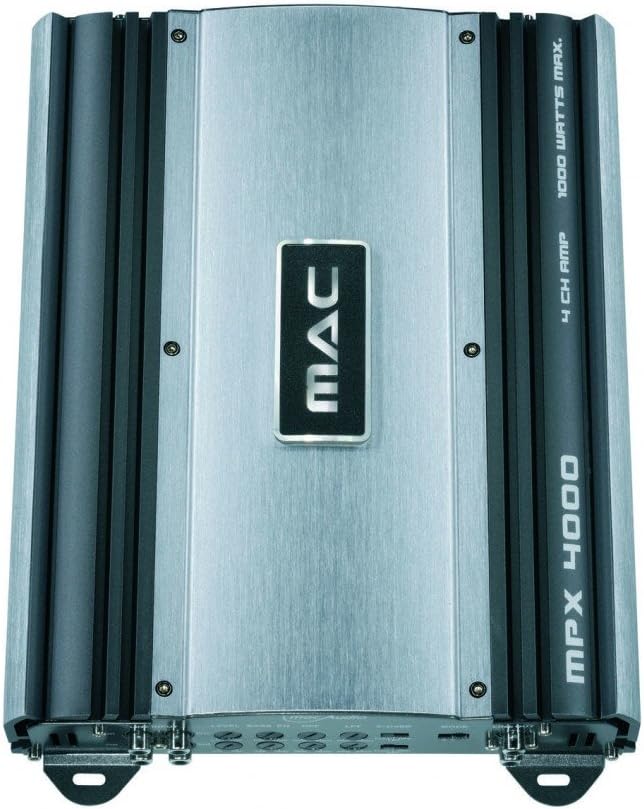
4.2 pav.: Iš viršaus į apačią view of the Mac Audio MPX 4000 ampgelbėtojas, šouasing the central MAC logo and the model designation on the heatsink fins.
5. Sąranka ir diegimas
Tinkamas montavimas yra labai svarbus jūsų įrenginio veikimui ir ilgaamžiškumui ampAtidžiai atlikite šiuos veiksmus:
- Atjunkite akumuliatorių: Before starting any wiring, disconnect the negative terminal of your vehicle's battery to prevent short circuits.
- Montavimo vieta: Choose a secure, dry, and well-ventilated location for the amplifier. Ensure there is enough space around the unit for proper heat dissipation. Avoid mounting on carpet or directly on metal surfaces without insulation.
- Maitinimo laidai:
- Run a heavy-gauge power cable (e.g., 8 AWG or thicker) directly from the positive terminal of the car battery to the amplifier +12 V gnybto. Įrenkite integruotą saugiklio laikiklį 45 cm atstumu nuo akumuliatoriaus.
- Connect a short, heavy-gauge ground cable from the ampPrijunkite lifier GND gnybtą prie švaraus, nedažyto metalinio taško ant transporto priemonės važiuoklės. Įsitikinkite, kad elektros jungtis yra tvirta.
- Prijunkite nuotolinio įjungimo laidą iš pagrindinio įrenginio nuotolinio valdymo išvesties prie amplifier REM gnybtą. Šis laidas įjungia ampįjunkite ir išjunkite ližiiklį naudodami pagrindinį įrenginį.
- Garso įvesties jungtys: Prijunkite RCA laidus nuo pagrindinio įrenginio išankstinio prijungimoamp išėjimai į amplifier's RCA input jacks (FRONT, REAR).
- Garsiakalbių jungtys: Prijunkite garsiakalbius prie amplifier's speaker output terminals. Ensure correct polarity (+ to + and - to -). This amplifier is stable at 2 ohms, allowing for flexible speaker configurations.
- Gain and Crossover Settings: Initially set all gain controls to minimum and crossover settings to flat or full range. Adjust these after the system is powered on and playing music.
- Iš naujo prijunkite akumuliatorių: Once all connections are secure and verified, reconnect the negative terminal of your vehicle's battery.
6. Valdymas Ampgyvybingesnis
After successful installation, follow these steps for initial operation:
- Maitinimas: Turn on your car's ignition and head unit. The amplifier should power on automatically via the remote turn-on wire, indicated by a power LED.
- Pradinis tūris: Start with the head unit's volume at a low level.
- Stiprinimo reguliavimas: Play a familiar piece of music. Slowly increase the amplifier's gain control until you hear distortion, then back it off slightly. The gain control is not a volume knob; it matches the amplifier įvesties jautrumas galvos įrenginio išvesties atžvilgiu.
- Crossover nustatymai: Adjust the high-pass (HPF) or low-pass (LPF) filters as needed for your speaker setup. For full-range speakers, you might use HPF to protect them from low frequencies. For subwoofers, use LPF.
- Tikslus derinimas: Listen to various types of music and make small adjustments to the gain and crossover settings for optimal sound quality.
7. Priežiūra
The Mac Audio MPX 4000 ampLiferiui reikia minimalios priežiūros:
- Valymas: Periodiškai nuvalykite ampIšorinį paviršių nuvalykite minkštu, sausu skudurėliu. Nenaudokite stiprių cheminių medžiagų ar abrazyvinių valiklių.
- Vėdinimas: Ensure that the ventilation fins remain free of dust and debris to maintain proper cooling. Use compressed air if necessary to clear dust.
- Jungtys: Retkarčiais patikrinkite visas maitinimo, įžeminimo, nuotolinio valdymo ir garsiakalbių jungtis, kad įsitikintumėte, jog jos tvirtos ir be korozijos.
8. Problemų sprendimas
Jei kyla problemų dėl savo amplifier, žr. šias dažniausiai pasitaikančias problemas ir sprendimus:
| Problema | Galima priežastis | Sprendimas |
|---|---|---|
| AmpLifier neįsijungia (nėra maitinimo LED) | No power, ground, or remote signal; Blown fuse; Loose connections. | Check battery connections, in-line fuse, ground connection, and remote wire connection. Ensure head unit is on. |
| Iš garsiakalbių nėra garso | RCA cables disconnected; Speaker wires disconnected or shorted; Amplifier in protect mode; Gain too low. | Check RCA and speaker connections. Verify speaker polarity. Check for shorted speaker wires. Increase gain. If in protect mode, turn off system, check wiring, and restart. |
| Iškraipytas garsas | Gain set too high; Improper crossover settings; Poor ground connection; Speaker impedance mismatch. | Reduce gain. Adjust crossover settings. Ensure solid ground connection. Verify speaker impedance is within amplifier's limits (2 ohm stable). |
| Amplifier overheats (protect LED on) | Insufficient ventilation; Speaker impedance too low; Prolonged high volume. | Užtikrinkite tinkamą oro cirkuliaciją aplink amplifier. Check speaker impedance. Reduce volume. Allow ampkeltuvą atvėsti. |
If the problem persists after trying these solutions, contact Mac Audio customer support or a qualified service technician.
9. Specifikacijos
Key technical specifications for the Mac Audio MPX 4000 ampgyvybingesnis:
- Modelio numeris: MPX4000
- Kanalai: 4 kanalas
- Didžiausia galia: 4 x 180 Watts (Total 1000 Watts Max)
- Impedanso stabilumas: Stable at 2 Ohm
- Veiklos ttage: 12 voltų DC
- Prekės svoris: 3 kilogramo
- Gaminio matmenys (I x P x A): 22.6 x 31.9 x 5.9 cm (8.9 x 12.6 x 2.3 colio)
- Montavimo tipas: Pastatomas
- ASIN: B000Q9MRME
- GTIN: 04023037041408
10. Garantija ir palaikymas
Mac Audio products are designed for quality and reliability. For information regarding warranty coverage, please refer to the warranty card included with your product or visit the official Mac Audio website. For technical support, troubleshooting assistance beyond this manual, or service inquiries, please contact your authorized Mac Audio dealer or customer service department.
Prašome išsaugoti pirkimo įrodymą bet kokiems garantiniams reikalavimams.


