1. Įvadas
This manual provides essential information for the safe and efficient operation of your Roline DesignSecure 525 Uninterruptible Power Supply (UPS). Please read this manual thoroughly before installation and use to ensure proper functionality and to prevent damage to the unit or connected equipment.
The Roline DesignSecure 525 UPS is designed to provide reliable emergency power for workstations and communication technology, protecting against power fluctuations, blackouts, and surges.
2. Saugos informacija
ĮSPĖJIMAS: Nesilaikant šių saugos nurodymų, gali kilti elektros smūgis, gaisras arba sunkūs sužalojimai.
- Neatidarykite UPS korpuso.asing. Viduje nėra dalių, kurias galėtų aptarnauti vartotojas. Visus techninės priežiūros darbus patikėkite kvalifikuotiems techninės priežiūros darbuotojams.
- Nejunkite prietaisų, kurie galėtų perkrauti UPS, pavyzdžiui, lazerinių spausdintuvų ar dulkių siurblių.
- Įsitikinkite, kad UPS yra prijungtas prie įžeminto maitinimo lizdo.
- Saugokite UPS nuo vandens ar per didelės drėgmės.
- Position the UPS in a well-ventilated area, away from direct sunlight and heat sources.
- Prieš valydami atjunkite UPS nuo maitinimo lizdo. Valymui naudokite sausą šluostę.
3. Produktas baigtasview
The Roline DesignSecure 525 UPS provides uninterruptible power and protection for your electronic devices. Key features include:
- Patikimas maitinimo šaltinis: Provides emergency power and protection against spikes, voltage variations, blackouts, interference, and overvoltage.
- Pailgintas akumuliatoriaus veikimo laikas: Features a battery management system for efficient charging and a digital display for battery status.
- Galia: Supports 2000 VA / 1200 W, offering a full power runtime of 2 minutes and 4 minutes at mid-power.
- Built-in AVR: Automatinis ttage Regulation protects against surges and undervoltages, regulating voltage variations via Buck and Boost technology.
- Stebėjimo programinė įranga: Includes built-in software for communication between the inverter microprocessor and a PC, compatible with common operating systems.
3.1. Komponentai
Below is an image of the Roline DesignSecure 525 UPS, highlighting its general appearance.
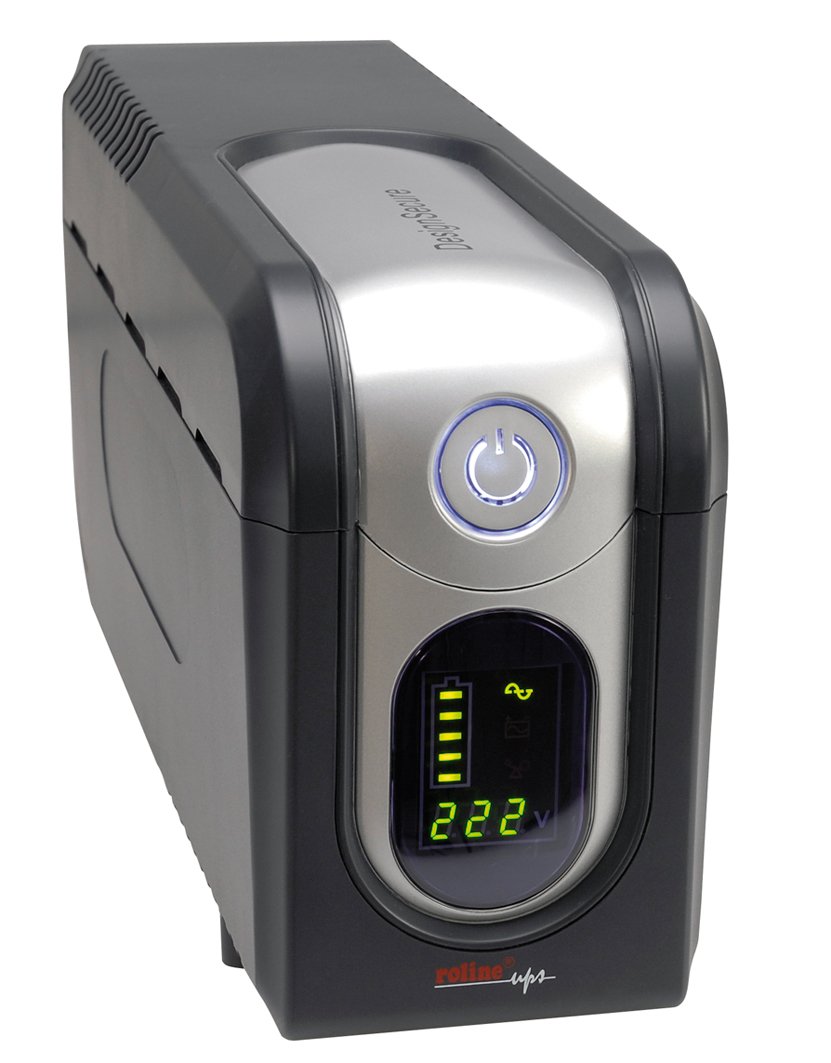
1 pav.: priekis view of the Roline DesignSecure 525 UPS. This image shows the main unit, including the display panel and power outlets.
The UPS typically includes:
- Maitinimo įvesties prievadas
- Output Power Outlets (Type B - 3 pin North American)
- Control Panel / LCD Display
- USB ryšio prievadas
- Telephone/Modem Protection Ports (RJ11)
4. Sąranka
4.1. Išpakavimas
Atsargiai išpakuokite UPS ir patikrinkite, ar nėra gabenimo pažeidimų. Išsaugokite pakuotę būsimam transportavimui ar saugojimui.
4.2. Įdėjimas
Place the UPS on a flat, stable surface in a clean, dry, and well-ventilated area. Ensure there is adequate space around the unit for proper airflow. Avoid placing it near heat sources or in direct sunlight.
4.3. Prisijungimas prie maitinimo
- Įsitikinkite, kad UPS išjungtas.
- Connect the UPS power input cable to a grounded Type B (3-pin North American) wall outlet.
- Prieš pirmą kartą naudodami, leiskite UPS įkrauti bent 8 valandas, kad užtikrintumėte optimalų akumuliatoriaus veikimą.
4.4. Įrangos prijungimas
- Connect your computer, monitor, and other critical devices to the UPS output receptacles.
- For telephone/modem line protection, connect your incoming telephone/modem line to the "IN" port on the UPS, and then connect a cable from the "OUT" port to your telephone/modem device.
- Do not connect surge strips or extension cords to the UPS output.
4.5. Programinės įrangos diegimas (neprivaloma)
For advanced monitoring and management, install the provided smart monitoring software on your computer. Connect the UPS to your computer using a USB cable. Refer to the software's specific instructions for installation and configuration.
5. Naudojimo instrukcijos
5.1. Turning On the UPS
Press and hold the power button on the front panel for approximately 2-3 seconds until you hear a beep and the display illuminates. The UPS will perform a self-test and then enter online mode.
5.2. Turning Off the UPS
To turn off the UPS, press and hold the power button for approximately 2-3 seconds until you hear a beep and the display turns off. Ensure all connected devices are properly shut down before turning off the UPS.
5.3. Ekrano indikatoriai
The digital display provides real-time information about the UPS status, including:
- Įvesties tomastage
- Išėjimas ttage
- Akumuliatoriaus įkrovimo lygis
- Apkrovos lygis
- Operating Mode (Online, Battery, Bypass)
- Klaidų kodai (jei yra)
Refer to the software manual for detailed explanations of all display indicators and error codes.
5.4. Automatinis ttage reglamentas (AVR)
The built-in AVR automatically corrects minor voltage fluctuations without switching to battery power, preserving battery life. If the input voltage goes too high or too low, the AVR will adjust it to a safe level for your connected devices.
5.5. Baterijos režimas
Esant galiai outage, the UPS will automatically switch to battery power. An audible alarm will sound, and the display will indicate battery mode. The duration of battery backup depends on the load connected. The UPS will automatically shut down when the battery is depleted to prevent deep discharge.
6. Priežiūra
6.1. Akumuliatoriaus priežiūra
- To maintain optimal battery life, ensure the UPS is connected to a power source and charging when not in use.
- Venkite dažnų gilių iškrovų.
- If storing the UPS for an extended period, fully charge it every three months to prevent battery degradation.
- Battery replacement should only be performed by qualified personnel.
6.2. Valymas
Ensure the UPS is turned off and disconnected from the power outlet before cleaning. Use a soft, dry cloth to wipe the exterior. Do not use liquid or aerosol cleaners.
6.3. Aplinkos sąlygos
Maintain the UPS in an environment with stable temperature and humidity. Extreme conditions can shorten battery life and affect performance.
7. Problemų sprendimas
This section provides solutions to common issues you might encounter with your Roline DesignSecure 525 UPS.
| Problema | Galima priežastis | Sprendimas |
|---|---|---|
| UPS neįsijungia. | No input power; Low battery; Power button not pressed long enough. | Check power cord connection; Allow UPS to charge for several hours; Press and hold power button for 2-3 seconds. |
| UPS nuolat pypsi veikiant internetiniam režimui. | Overload condition; Internal fault. | Reduce connected load; Disconnect non-essential devices; If problem persists, contact support. |
| Trumpas akumuliatoriaus veikimo laikas. | Overload; Battery nearing end of life; Battery not fully charged. | Reduce connected load; Allow UPS to charge fully; Consider battery replacement if old. |
| Connected devices not receiving power. | UPS is off; UPS is in fault mode; Output receptacles are not active. | Turn on UPS; Check display for error codes; Ensure devices are connected to battery-backed outlets. |
If the problem persists after attempting these solutions, please contact Roline customer support.
8. Specifikacijos
| Funkcija | Detalė |
|---|---|
| Modelio numeris | 19401205 |
| Gaminio matmenys | 4.13 x 6.61 x 13.15 colio |
| Prekės svoris | 12.79 svaro |
| Išėjimas ttage | 120 voltai (kintamoji srovė) |
| Maitinimo kištuko tipas | B tipas – 3 kontaktų (Šiaurės Amerikos) |
| Spalva | Juoda/Sidabrinė |
| Gamintojas | ROLINAS |
| Pasiekiama pirmoji data | 20 m. rugpjūčio 2012 d |
9. Garantija ir palaikymas
9.1. Informacija apie garantiją
Roline products are manufactured to high quality standards. For specific warranty terms and conditions, please refer to the warranty card included with your product or visit the official Roline websvetainėje. Išsaugokite pirkimo įrodymą garantiniams reikalavimams.
9.2. Pagalba klientams
If you require technical assistance or have questions not covered in this manual, please contact Roline customer support. Contact information can typically be found on the Roline websvetainėje arba ant produkto pakuotės.
When contacting support, please have your model number (19401205) and purchase date ready.


