1. Įvadas
This manual provides essential information for the safe and efficient use of your Hama USB 7.1 Surround Sound Card, Model 00051620. Please read these instructions carefully before using the device and keep them for future reference. This external sound card allows you to connect headphones, microphones, or speakers with a 3.5mm jack to your computer or tablet via a USB-A port, enhancing your audio experience with simulated 7.1 surround sound.
2. Saugos instrukcijos
- Do not open the device. Opening the device voids the warranty and may lead to electric shock.
- Saugokite gaminį nuo purvo, drėgmės ir perkaitimo.
- Naudokite gaminį tik pagal paskirtį.
- Do not drop the product or expose it to severe shocks.
- Šį gaminį, kaip ir visus elektros gaminius, laikykite vaikams nepasiekiamoje vietoje.
- Nedelsdami išmeskite pakavimo medžiagas pagal vietines galiojančias taisykles.
3. Pakuotės turinys
Patikrinkite, ar jūsų pakuotėje yra šie elementai:
- 1x Hama USB 7.1 Surround Sound Card (Model 00051620)
- 1x naudojimo instrukcija
4. Produktas baigtasview
The Hama USB 7.1 Surround Sound Card is a compact audio adapter designed to provide enhanced sound capabilities for your computer or tablet. It features a USB-A connector for easy plug-and-play functionality and includes dedicated ports for audio input and output.
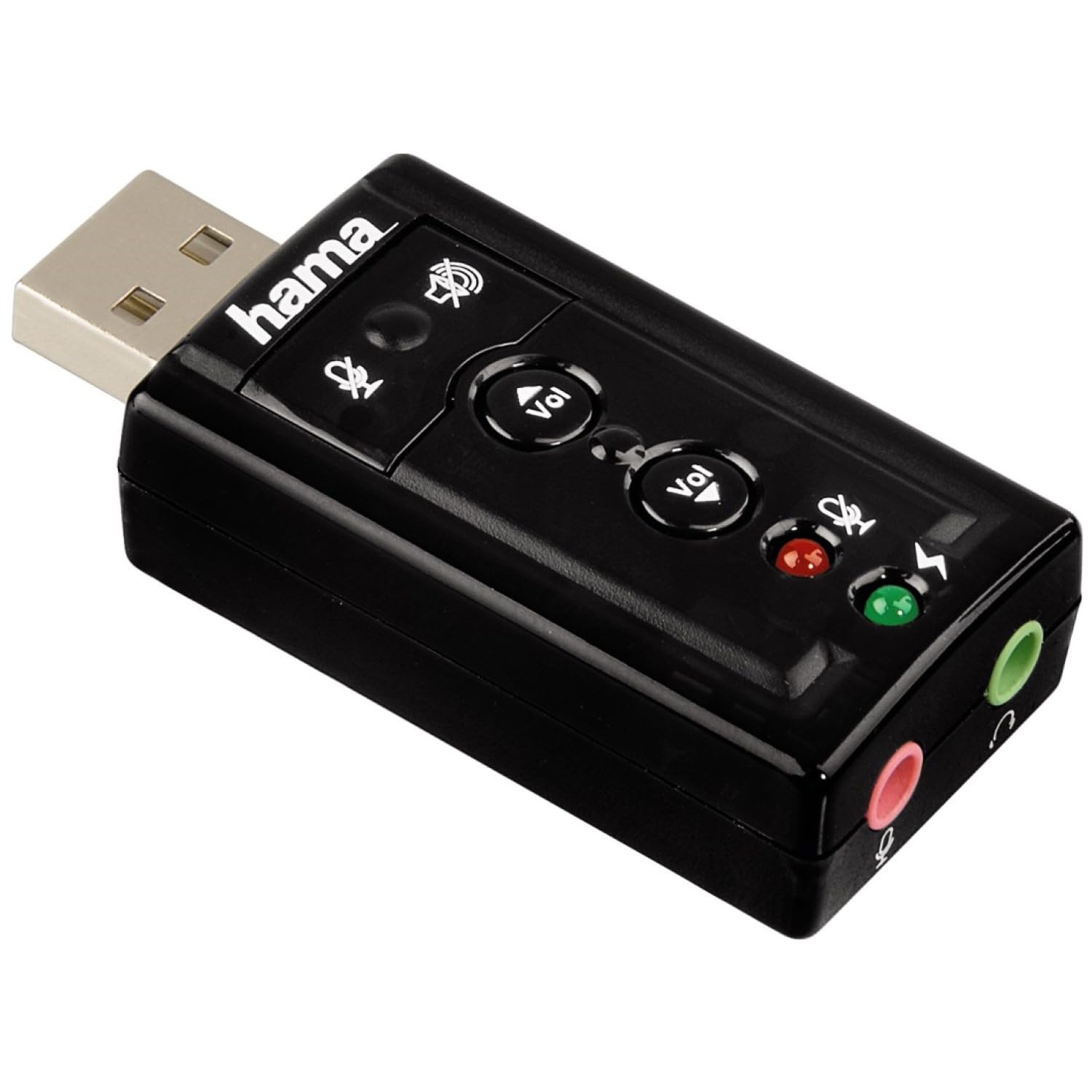
1 pav.: Viršus view of the Hama USB 7.1 Surround Sound Card, showing the USB-A connector, volume control buttons, and mute indicators.
Valdikliai ir prievadai:
- USB-A jungtis: For connecting to your computer or tablet.
- Garsumo didinimo / mažinimo mygtukai: Reguliuoja garso išvesties garsumą.
- Mikrofono nutildymo mygtukas: Mutes or unmutes the connected microphone.
- Speaker Mute Button: Mutes or unmutes the audio output to headphones/speakers.
- 3.5mm Microphone Jack (Red): Išoriniam mikrofonui prijungti.
- 3.5mm Headphone/Speaker Jack (Green): Skirta ausinėms arba garsiakalbiams prijungti.

2 pav.: Pabaiga view of the Hama USB 7.1 Surround Sound Card, highlighting the red microphone input jack and the green headphone/speaker output jack.
5. Sistemos reikalavimai
- Operating System: Windows, macOS, or compatible tablet OS.
- Galimas USB-A prievadas.
- Headphones, microphone, or speakers with a 3.5mm jack connector.
6. Diegimas ir sąranka
- Connect the Sound Card: Plug the USB-A connector of the Hama USB 7.1 Surround Sound Card into an available USB-A port on your computer or tablet.
- Tvarkyklės diegimas: The device is typically plug-and-play, and your operating system should automatically detect and install the necessary drivers. If prompted, follow the on-screen instructions.
- Prijunkite garso įrenginius:
- For headphones or speakers, connect the 3.5mm jack into the žalias port on the sound card.
- For a microphone, connect the 3.5mm jack into the raudona port on the sound card.
- Garso nustatymų konfigūravimas: Access your operating system's sound settings to ensure the Hama USB 7.1 Surround Sound Card is selected as the default playback and recording device.
- Programinės įrangos diegimas (nebūtina): For advanced features like XeaR-Sound 7.1 surround simulation, 10-band equalizer, and karaoke functions, install the dedicated software. Refer to the manufacturer's website for software downloads and installation instructions.
7. Operacija
Basic Audio Control:
- Garso reguliavimas: Use the 'Vol +' and 'Vol -' buttons on the sound card to increase or decrease the output volume.
- Mute Audio Output: Press the speaker mute button to temporarily silence the audio output. Press again to unmute.
- Mute Microphone Input: Press the microphone mute button to temporarily disable microphone input. Press again to enable.
Išplėstinės programinės įrangos funkcijos:
If you have installed the optional software, you can access the following features:
- XeaR-Sound Technology: Enables simulated 7.1 crystal-clear surround sound for stereo speakers or headsets.
- 10 juostų ekvalaizeris: Customize your audio experience with various presets (e.g., Jazz, Rock, Classic) or create your own.
- Additional Sound Effects: Apply various sound effects to your audio.
- Adjustable Room Acoustics: Modify the perceived acoustic environment.
- Karaoke Recording: Record karaoke performances with original voice suppression and tone adjustment capabilities.
8. Priežiūra
The Hama USB 7.1 Surround Sound Card requires minimal maintenance.
- Prietaisą valykite tik šiek tiek damp, nepūkuojantis audinys. Nenaudokite agresyvių valymo priemonių.
- Ensure the USB port and audio jacks are free from dust and debris.
9. Problemų sprendimas
Nėra garso išvesties:
- Ensure the sound card is securely plugged into a USB port.
- Check if your headphones/speakers are correctly connected to the green jack.
- Verify that the speaker mute button on the sound card is not active.
- Confirm that the Hama USB 7.1 Surround Sound Card is selected as the default playback device in your operating system's sound settings.
- Adjust the volume using the sound card's buttons and your computer's volume controls.
Mikrofonas neveikia:
- Ensure your microphone is correctly connected to the red jack.
- Verify that the microphone mute button on the sound card is not active.
- Confirm that the Hama USB 7.1 Surround Sound Card is selected as the default recording device in your operating system's sound settings.
- Patikrinkite mikrofono privatumo nustatymus savo operacinėje sistemoje.
Garso kokybės problemos:
- Įsitikinkite, kad visos jungtys yra saugios.
- Try connecting the sound card to a different USB port.
- If using the optional software, check equalizer settings and disable any sound effects that might be causing distortion.
10. Specifikacijos
| Funkcija | Detalė |
|---|---|
| Prekės ženklas | Hama |
| Modelio numeris | 00051620 (taip pat žinomas kaip 51620) |
| Spalva | Juoda |
| Jungtis | USB A male |
| USB standartas | USB 2.0 |
| Garsiakalbio prijungimas | 3.5mm female jack |
| Ausinių prijungimas | 3.5mm female jack |
| Garsumo valdymas | Yes, with mute function |
| Garso išvesties režimas | Aplink |
| Erdvinio garso kanalo konfigūracija | 7.1 (simulated with software) |
| Maksimalus S.amplingo norma | 48 kHz |
| Suderinami įrenginiai | USB (PC, Laptop, Tablets) |
| Gamintojas | Hama EURL |
11. Informacija apie šalinimą
Observe the applicable local regulations for the disposal of electronic devices. The product must not be disposed of with normal household waste. Dispose of the product according to the European Directive 2012/19/EU on waste electrical and electronic equipment (WEEE) at a designated collection point for electrical and electronic equipment.
12. Garantija
Hama GmbH & Co KG provides a limited warranty for this product. For detailed warranty terms and conditions, please refer to the official Hama websvetainėje arba susisiekite su vietiniu pardavėju. Išsaugokite pirkimo įrodymą, jei prireiktų pateikti garantinį prašymą.
13. Pagalba klientams
If you have any questions about this product or require technical assistance, please contact Hama customer support. You can find contact information on the official Hama websvetainė (www.hama.com) or through your local retailer.