Įvadas
Ačiū, kad pirkoteasing the Technics SL-PD807 MASH 5 Disc CD Player. This manual provides detailed instructions for the proper setup, operation, and maintenance of your new audio component. Please read this manual thoroughly before using the unit to ensure optimal performance and longevity.
The SL-PD807 features a 5-disc carousel changer, allowing for extended playback without interruption, and incorporates MASH (Multi-stage Noise Shaping) D/A conversion for high-quality audio reproduction.
Svarbi saugos informacija
- Maitinimo šaltinis: Ensure the unit is connected to an AC 120V, 60Hz power supply.
- Vėdinimas: Neužblokuokite ventiliacijos angų. Palikite pakankamai vietos aplink įrenginį tinkamam oro cirkuliavimui ir perkaitimo prevencijai.
- Drėgmė: Saugokite įrenginį nuo lietaus ar drėgmės. Nestatykite ant įrenginio daiktų, pripildytų skysčių, pavyzdžiui, vazų.
- Valymas: Prieš valydami atjunkite įrenginį nuo elektros lizdo. Valymui naudokite sausą šluostę.
- Aptarnavimas: Nebandykite patys atlikti šio įrenginio techninės priežiūros. Visus techninės priežiūros darbus patikėkite kvalifikuotiems techninės priežiūros darbuotojams.
Pakuotės turinys
Prašome patikrinti, ar pakuotėje yra visi reikalingi daiktai:
- Technics SL-PD807 MASH 5 Disc CD Player
- Maitinimo laidas
- RCA garso kabeliai
Note: A remote control is not included with this unit.
Sąranka
1. Išpakavimas
Carefully remove the CD player and all accessories from the packaging. Retain the packaging materials for future transport or storage.
2. Įdėjimas
Place the CD player on a stable, level surface away from direct sunlight, heat sources, and excessive dust or vibrations. Ensure there is sufficient space around the unit for proper ventilation.

1 paveikslas: Priekyje view of the Technics SL-PD807 CD Player with included RCA cables.
3. Jungtys
Connect the CD player to your amplifier or receiver using the supplied RCA audio cables.
- Connect one end of the RCA audio cables (red and white plugs) to the 'LINE OUT' jacks on the rear of the SL-PD807.
- Connect the other end of the RCA audio cables to an available 'CD IN' or 'AUX IN' input on your amplifier/receiver. Match the red plug to the 'R' (right) input and the white plug to the 'L' (left) input.
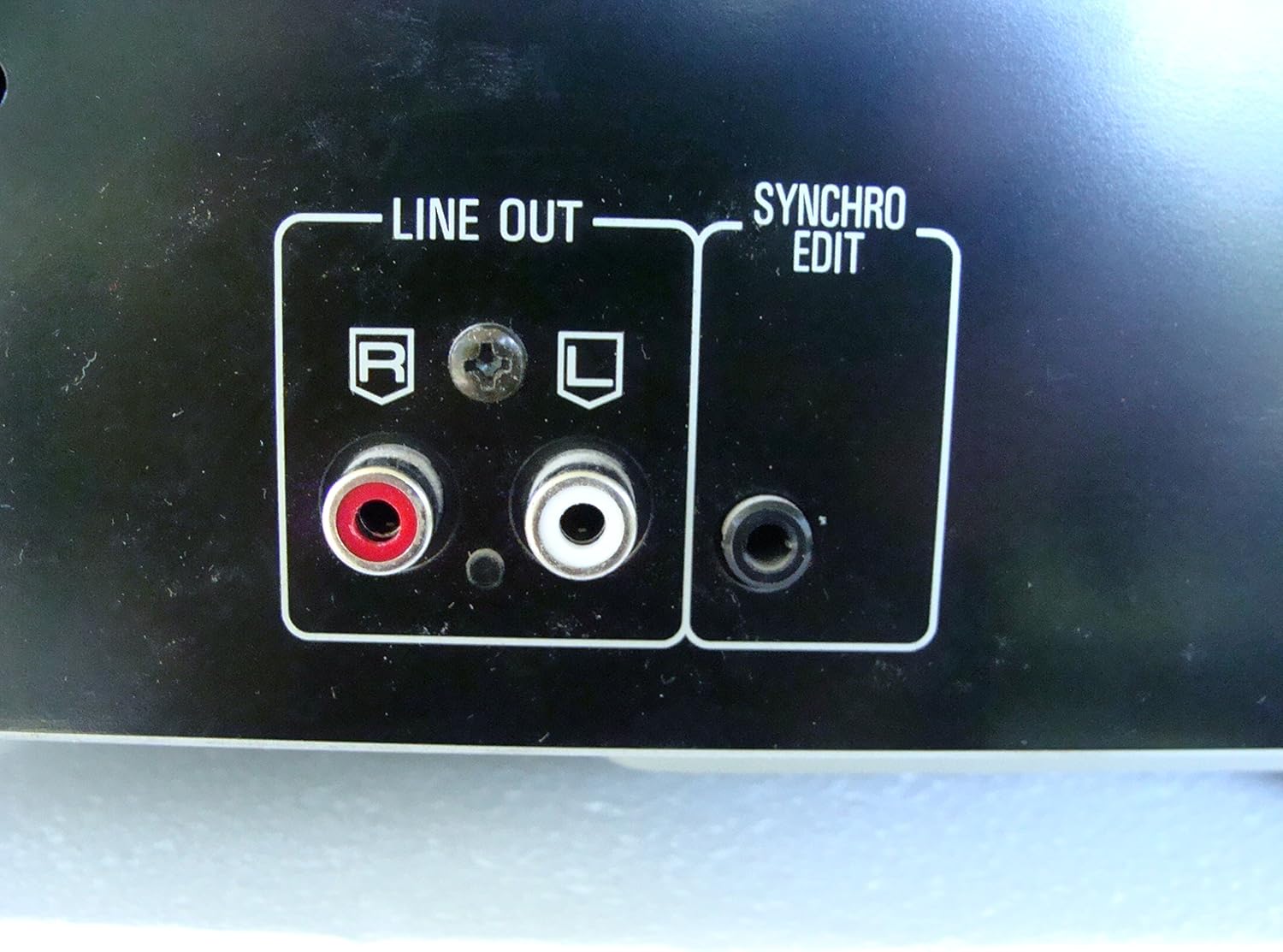
2 paveikslas: Rear panel connections, highlighting the 'LINE OUT' (RCA) and 'SYNCHRO EDIT' ports.
- Plug the power cord into the AC inlet on the rear of the CD player, then plug the other end into a standard AC wall outlet.
Naudojimo instrukcijos
1. Maitinimo įjungimas/išjungimas
Paspauskite GALIA button located on the front left of the unit to turn the CD player on or off.
2. Loading Discs
The SL-PD807 features a 5-disc carousel. Press the ATIDARYTI/UŽDARYTI button to open the disc tray. Place up to five CDs onto the numbered disc slots with the label side facing up. Press ATIDARYTI/UŽDARYTI dar kartą, kad uždarytumėte dėklą.

3 paveikslas: Front panel controls including disc tray, display, and playback buttons.
3. Pagrindinis atkūrimas
- Žaisti: Paspauskite ŽAISTI mygtuką (►), kad pradėtumėte atkūrimą.
- Pristabdyti: Paspauskite PASTABA button (⏸) to temporarily stop playback. Press again to resume.
- Sustabdyti: Paspauskite STOP mygtuką (■), kad sustabdytumėte atkūrimą.
- Praleisti takelius: Paspauskite PRALEISTI buttons (⏭︎ / ⏮︎) to skip to the next or previous track.
- Paieška: Laikykite nuspaudę PAIEŠKA buttons (⏪︎ / ⏩︎) to fast forward or rewind within a track.
4. Disc Exchange
You can exchange discs while another disc is playing. Press the Disko praleidimas button to rotate the carousel to an empty slot or a disc you wish to remove/replace. The currently playing disc will continue to play until you select a new disc to play.
5. Atkūrimo režimai
- Atsitiktinis žaidimas: Paspauskite ATSITIKTINIAI button to play tracks on the current disc or all loaded discs in a random order.
- Programos atkūrimas: Naudokite PROGRAMA button to create a custom playback sequence of tracks from the loaded discs. Refer to the on-screen display for programming steps.
- Pakartokite žaidimą: Paspauskite KARTOT button to repeat the current track, current disc, or all discs.
Priežiūra
1. Įrenginio valymas
Wipe the exterior of the unit with a soft, dry cloth. For stubborn stains, slightly dampen the cloth with water and a mild detergent, then wipe dry. Do not use abrasive cleaners, benzene, thinner, or alcohol, as these can damage the finish.

4 paveikslas: Top surface of the unit, illustrating areas that may require cleaning or show wear.
2. Diskų priežiūra
- Diskus imkite už kraštų, kad ant grojimo paviršiaus neliktų pirštų atspaudų.
- Keep discs clean. Wipe from the center outwards with a soft, lint-free cloth if necessary.
- Laikykite diskus jų dėkluose, kad apsaugotumėte juos nuo dulkių ir įbrėžimų.
Trikčių šalinimas
If you experience problems with your CD player, please consult the following table before seeking service.
| Problema | Galima priežastis | Sprendimas |
|---|---|---|
| Nėra galios | Maitinimo laidas netinkamai prijungtas. | Patikrinkite maitinimo laido jungtį su įrenginiu ir sieniniu lizdu. |
| Nėra garso | RCA audio cables not connected correctly. AmpNepasirinkta liferio/imtuvo įvestis. | Ensure RCA cables are securely connected to both the CD player and ampPasirinkite tinkamą įvestį savo įrenginyje. ampkeltuvas/imtuvas. |
| Diskas negrojamas / praleidžiamas | Diskas nešvarus arba subraižytas. Diskas įdėtas neteisingai. | Clean the disc with a soft, lint-free cloth. Ensure the disc is placed label-side up in the tray. Try another disc. |
| Carousel does not rotate | Obstruction in the disc tray. | Ensure no foreign objects are obstructing the carousel mechanism. |
Specifikacijos
The following are the technical specifications for the Technics SL-PD807 MASH 5 Disc CD Player:
| Funkcija | Specifikacija |
|---|---|
| Modelio pavadinimas | SL-PD807 |
| Gamintojas | Technika |
| Disko talpa | 5 diskų |
| Galios reikalavimai | AC 120V, 60Hz, 13W |
| Pakuotės matmenys | 17 x 17 x 5 colio |
| Prekės svoris | 15.02 svaro |
| Ryšio technologija | Pagalbinis, infraraudonųjų spindulių |
| Ypatinga funkcija | Apsauga nuo praleidimo |

5 paveikslas: Product label displaying model number and power specifications.
Garantija ir palaikymas
For information regarding warranty coverage and customer support for your Technics SL-PD807 CD Player, please refer to the warranty card included with your purchase or visit the official Technics website. If you require further assistance, please contact Technics customer service.