Įvadas
This manual provides essential information for the safe and efficient installation, operation, and maintenance of your HP ATX 300W Power Supply, Model 366505-001. This power supply is designed to provide reliable power to compatible personal computer systems.
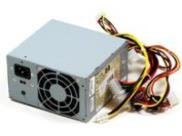
1 vaizdas: priekis view of the HP ATX 300W Power Supply. This image displays the compact form factor and primary connectors of the power supply unit.
Please read this manual thoroughly before attempting any installation or operation. Keep this manual for future reference.
Saugos informacija
- Elektros pavojus: Power supplies contain high voltage komponentai. Neatidarykite maitinimo šaltinio casing. Elektros smūgio pavojus.
- Vėdinimas: Ensure adequate ventilation around the power supply. Do not block air vents. Overheating can cause damage or fire.
- Įžeminimas: Always connect the power supply to a properly grounded electrical outlet.
- Drėgmė: Do not expose the power supply to water or excessive moisture.
- Profesionalus montavimas: Jei nesate tikri dėl diegimo proceso, kreipkitės pagalbos į kvalifikuotą specialistą.
- Suderinamumas: Use only with compatible personal computer systems as specified.
Sąranka ir diegimas
Follow these steps for proper installation of the HP ATX 300W Power Supply into your personal computer system:
- Paruošimas:
- Turn off and unplug your computer from the wall outlet.
- Open the computer case according to your computer's manufacturer instructions.
- Prieš liesdami komponentus, iškraukite statinę elektrą paliesdami įžemintą metalinį objektą.
- Išimkite seną maitinimo šaltinį (jei taikoma):
- Disconnect all cables from the existing power supply to the motherboard, graphics card, hard drives, and other components.
- Unscrew the old power supply from the computer case and carefully remove it.
- Įdiekite naują maitinimo šaltinį:
- Carefully place the HP ATX 300W Power Supply into the designated power supply bay in your computer case.
- Pritvirtinkite maitinimo šaltinį prie korpuso naudodami atitinkamus varžtus.
- Prijunkite kabelius:
- Connect the main 20+4 pin ATX connector to the motherboard.
- Connect the 4-pin or 8-pin CPU power connector to the motherboard.
- Connect SATA power connectors to hard drives, SSDs, and optical drives.
- Connect any necessary PCIe power connectors to graphics cards (if applicable).
- Ensure all connections are firm and correctly seated.
- Paskutiniai žingsniai:
- Organize cables to improve airflow and prevent interference.
- Uždarykite kompiuterio korpusą.
- Prijunkite kompiuterio maitinimo laidą prie maitinimo šaltinio, o tada – prie įžeminto sieninio lizdo.
Operacija
Once installed, the HP ATX 300W Power Supply operates automatically with your computer system. When you power on your computer, the power supply will deliver stable and consistent power to all connected components.
- Maitinimo įjungimas/išjungimas: The power supply is controlled by your computer's power button. Ensure the main power switch on the back of the power supply (if present) is in the 'ON' position before powering on the computer.
- Aušinimas: The integrated air cooling system will activate automatically to maintain optimal operating temperatures. Ensure the fan intake and exhaust are not obstructed.
- Galia: This unit provides a maximum output of 300 Watts. Ensure your system's total power requirements do not exceed this limit for stable operation.
Priežiūra
Reguliarus aptarnavimas padeda užtikrinti jūsų maitinimo šaltinio ilgaamžiškumą ir optimalų veikimą:
- Valymas: Periodically clean the exterior of the power supply and its fan vents to prevent dust buildup. Use compressed air to gently clear dust from the fan and internal components (with the computer powered off and unplugged).
- Patikra: Occasionally inspect power cables for any signs of wear, fraying, or damage. Replace damaged cables immediately.
- Aplinka: Operate the computer in a clean, dry, and well-ventilated environment to prevent dust accumulation and overheating.
Trikčių šalinimas
Jei kyla problemų dėl maitinimo šaltinio, atsižvelkite į šiuos įprastus trikčių šalinimo veiksmus:
- Nėra galios:
- Patikrinkite, ar maitinimo laidas tvirtai įjungtas tiek į maitinimo šaltinį, tiek į sieninį lizdą.
- Ensure the main power switch on the power supply is in the 'ON' position.
- Patikrinkite, ar sieninis lizdas veikia, prijungdami prie jo kitą įrenginį.
- Check all internal power connections (motherboard, CPU, peripherals) are firmly seated.
- Pertraukiamas maitinimo / sistemos nestabilumas:
- Ensure the power supply's wattage (300W) is sufficient for all your computer components. Upgrading components may require a higher wattage maitinimo šaltinis.
- Check for overheating. Ensure proper airflow and clean any dust from the power supply fan.
- Inspect for loose cable connections.
- Neįprasti garsai:
- A grinding or loud fan noise may indicate a failing fan. Consider professional inspection or replacement.
If problems persist after attempting these steps, contact HP customer support or a qualified computer technician.
Specifikacijos
| Prekės ženklas | HP |
| Modelio pavadinimas / numeris | 366505-001 |
| Formos faktorius | ATX |
| Išėjimo vattage | 300 vatų |
| Jungties tipas | ATX |
| Suderinami įrenginiai | Asmeninis kompiuteris |
| Aušinimo būdas | Oras |
| Gaminio matmenys (I x P x A) | 9.5 x 12 x 4 colio |
| Prekės svoris | 5.59 svaro (2.54 kilogramo) |
| ASIN | B001U0ICS6 |
| Pasiekiama pirmoji data | 16 m. rugpjūčio 2010 d |
Garantija ir palaikymas
For information regarding the warranty coverage for your HP ATX 300W Power Supply, please refer to the warranty documentation provided with your original computer system or contact HP customer support directly. Warranty terms and conditions may vary based on region and purchase date.
For technical support, service, or further inquiries, please visit the official HP support website or contact their customer service department. Have your product model number (366505-001) and serial number (if applicable) ready when contacting support.
HP palaikymas Websvetainė: www.hp.com/support