Įvadas
Ačiū, kad pirkoteasing the Muse M-12 CR Radio Alarm Clock. This compact and versatile device combines an FM radio with a dual alarm clock, offering convenience and functionality for your daily routine. Featuring a clear red LED display and intuitive controls, the M-12 CR is designed for ease of use. Please read this manual carefully to ensure proper operation and to fully utilize all features of your new alarm clock.
Pakuotės turinys
Prašome patikrinti, ar visi daiktai yra ir yra geros būklės:
- Muse M-12 CR Radio Alarm Clock Unit
- Maitinimo adapteris
- Vartotojo vadovas (šis dokumentas)
Produktas baigtasview ir valdikliai
Familiarize yourself with the various parts and controls of your Muse M-12 CR Radio Alarm Clock.

1 paveikslas: Priekyje ir viršuje view of the Muse M-12 CR Radio Alarm Clock, highlighting the red LED display and the arrangement of control buttons.
Valdymo mygtukai (viršutinis skydelis):
- SNOOZE / DIMMER Button: Press to temporarily silence the alarm (snooze function). Press and hold to adjust display brightness.
- ALARM 1 Button: Press to activate/deactivate Alarm 1. Press and hold to set Alarm 1 time.
- ALARM 2 Button: Press to activate/deactivate Alarm 2. Press and hold to set Alarm 2 time.
- LAIKO NUSTATYMO mygtukas: Press and hold to set the current time.
- HR (Hour) Button: Used to adjust the hour during time or alarm setting.
- MIN (Minute) Button: Used to adjust the minute during time or alarm setting.
- VOL- / PREV Button: Decreases volume. In radio mode, short press for previous preset station, long press for backward auto-scan.
- VOL+ / NEXT Button: Increases volume. In radio mode, short press for next preset station, long press for forward auto-scan.
- FM / MEM Button: Press to switch to FM radio mode. Press and hold to automatically scan and store FM stations.
- MIEGO mygtukas: Įjungia miego laikmačio funkciją.
- NAP mygtukas: Activates the nap timer function.
Sąranka
1. Maitinimo prijungimas
- Unpack the Muse M-12 CR unit and the power adapter.
- Insert the DC plug of the power adapter into the DC IN jack located at the back of the unit.
- Plug the power adapter into a standard AC wall outlet (100-240V, 50/60Hz). The display will light up, and the clock will be ready for time setting.
2. Baterijos atsarginis maitinimas (neprivaloma)
To maintain time and alarm settings during a power outage, you can install backup batteries (not supplied). The unit typically uses AAA batteries. Refer to the battery compartment on the bottom of the unit for correct battery type and polarity.
Naudojimo instrukcijos
Laiko nustatymas
- Paspauskite ir palaikykite LAIKO NUSTATYMAS mygtuką, kol pradės mirksėti valandų skaitmenys.
- Paspauskite HR mygtuką kelis kartus, kad nustatytumėte valandą.
- Paspauskite MIN mygtuką kelis kartus, kad sureguliuotumėte minutes.
- Paspauskite LAIKO NUSTATYMAS dar kartą paspauskite mygtuką, kad patvirtintumėte ir išeitumėte iš laiko nustatymo režimo.
Žadintuvų nustatymas (1 ir 2 žadintuvai)
The M-12 CR features two independent alarms.
- Paspauskite ir palaikykite 1 pavojaus signalas or 2 pavojaus signalas mygtuką, kol pradės mirksėti žadintuvo valandų skaitmenys.
- Paspauskite HR mygtuką, kad nustatytumėte norimą žadintuvo valandą.
- Paspauskite MIN mygtuką norėdami nustatyti norimą žadintuvo minutę.
- Paspauskite 1 pavojaus signalas or 2 pavojaus signalas button again to select the alarm source (Radio or Buzzer). The corresponding indicator will light up.
- Paspauskite 1 pavojaus signalas or 2 pavojaus signalas button one more time to confirm and activate the alarm. The alarm indicator (1 or 2) will appear on the display.
Norėdami išjungti žadintuvą, paspauskite atitinkamą 1 pavojaus signalas or 2 pavojaus signalas button until its indicator disappears from the display.
Radijo veikimas (FM)
- Paspauskite FM / MEM mygtuką, kad perjungtumėte į FM radijo režimą. Bus rodomas dažnis.
- Automatinis nuskaitymas ir išsaugojimas: Paspauskite ir palaikykite FM / MEM button to automatically scan for and store available FM stations (up to 20 presets).
- Rankinis derinimas: Naudokite VOL- / PREV ir VOL+ / NEXT buttons to manually tune to a specific frequency. Long press for auto-scan to the next strong station.
- Išankstinių nustatymų pasirinkimas: Trumpai paspauskite VOL- / PREV or VOL+ / NEXT buttons to cycle through stored preset stations.
- Garso reguliavimas: Naudokite VOL- / PREV ir VOL+ / NEXT buttons (when not in tuning mode) to adjust the radio volume.
Snaudimo funkcija
Kai skamba žadintuvas, paspauskite SNOOSE / DIMMER button to temporarily silence the alarm. The alarm will sound again after a few minutes (default snooze time is usually 9 minutes, refer to specific product behavior if different).
Budėjimo laikmačio funkcija
Miego laikmatis leidžia užmigti klausantis radijo, kuris automatiškai išsijungs po nustatyto laiko.
- Kol groja radijas, paspauskite MIEGAS button repeatedly to cycle through available sleep timer durations (e.g., 120, 90, 60, 30, 15, 10, 5 minutes, or OFF).
- Radijas automatiškai išsijungs po pasirinkto laiko.
Miegojimo laikmačio funkcija
The nap timer sets an alarm to sound after a short, predefined period.
- Paspauskite NAP button repeatedly to select a nap duration (e.g., 120, 90, 60, 30, 15, 10, 5 minutes, or OFF).
- The alarm will sound after the selected nap time has elapsed.
Ekrano reguliatorius
Norėdami reguliuoti LED ekrano ryškumą:
- Paspauskite SNOOSE / DIMMER button (when the alarm is not sounding) to cycle through different brightness levels (e.g., High, Medium, Low, Off).
Priežiūra
- Valymas: Išorinį įrenginį valykite minkštu, sausu skudurėliu. Nenaudokite abrazyvinių valiklių, vaško ar tirpiklių, nes jie gali pažeisti apdailą.
- Vieta: Pastatykite įrenginį ant stabilaus, lygaus paviršiaus, atokiau nuo tiesioginių saulės spindulių, šilumos šaltinių ir per didelio dulkių ar drėgmės kiekio.
- Vėdinimas: Užtikrinkite tinkamą vėdinimą aplink įrenginį, kad jis neperkaistų. Neužblokuokite ventiliacijos angų.
- Maitinimo atjungimas: If the unit is not going to be used for a long period, unplug the power adapter from the wall outlet.
Trikčių šalinimas
| Problema | Galima priežastis | Sprendimas |
|---|---|---|
| Nėra maitinimo / Ekranas išjungtas | Power adapter not connected or faulty. Power outlet not active. | Įsitikinkite, kad maitinimo adapteris yra tvirtai prijungtas prie įrenginio ir veikiančio sieninio lizdo. Išbandykite kitą lizdą. |
| Signalizacija neskamba | Alarm not activated. Alarm volume too low (for radio alarm). Incorrect alarm time set. | Ensure the alarm indicator (1 or 2) is visible on the display. Increase radio volume if using radio alarm. Verify alarm time is correctly set. |
| Prastas radijo priėmimas | Antenna not extended or positioned correctly. Interference from other electronic devices. Weak signal in the area. | Fully extend and adjust the FM wire antenna for best reception. Move the unit away from other electronics. Try auto-scanning for stronger stations. |
| Mygtukai nereaguoja | Laikinas sistemos triktis. | Unplug the unit from power for a few minutes, then plug it back in to reset. |
Specifikacijos
| Modelis | M-12 CR |
| Ekrano tipas | LED (raudona) |
| Ekrano dydis | 1.5 cm (0.6 coliai) |
| Radijo dažnis | FM (with 20 preset stations) |
| Signalizacijos funkcijos | Dual Alarm (Radio or Buzzer), Snooze, Sleep, Timer (Nap) |
| Maitinimo šaltinis | Wired (AC Power Adapter) |
| Matmenys (I x P x A) | 12.9 x 5.3 x 6.5 cm (apytiksliai) |
| Svoris | 290 g (maždaug) |
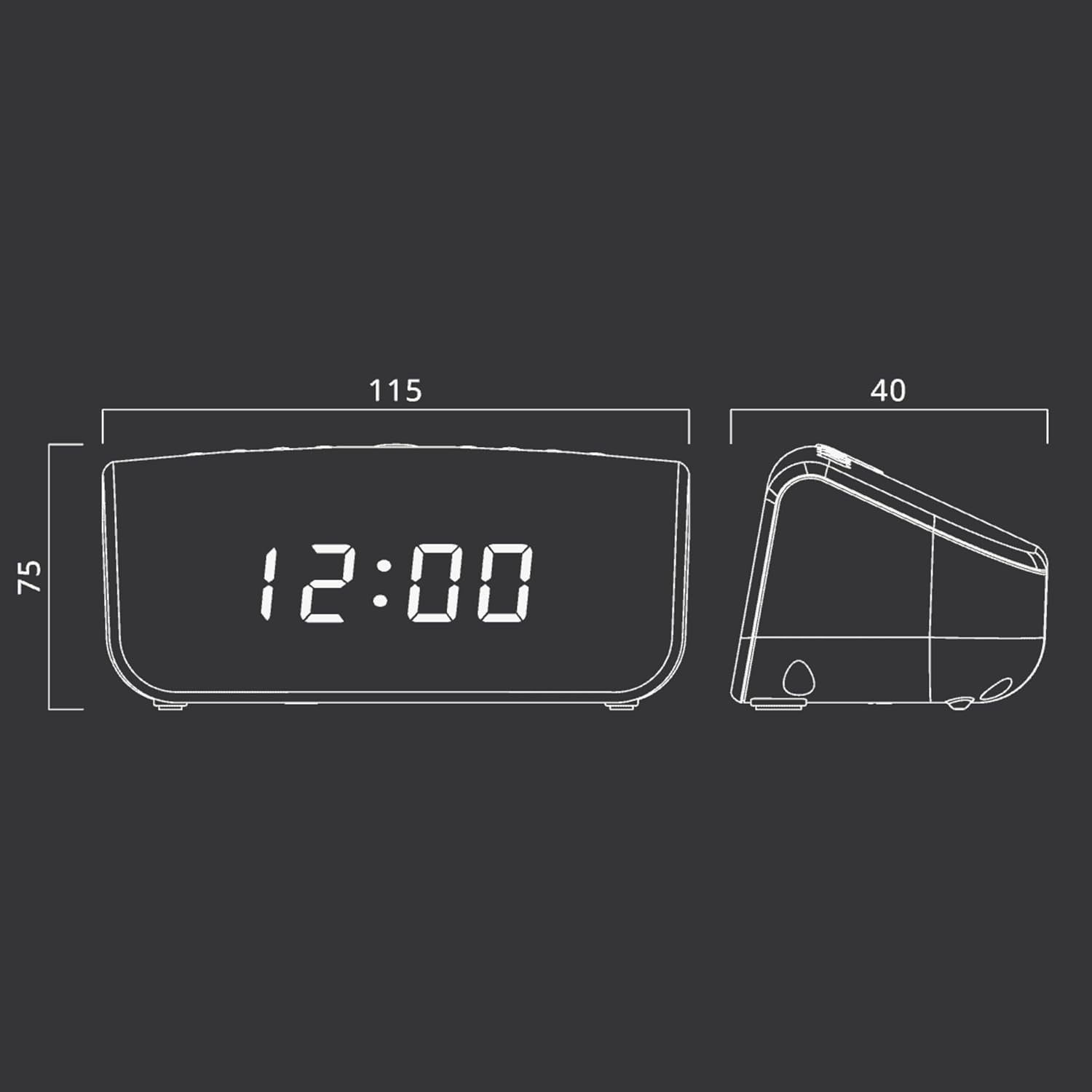
2 paveikslas: Approximate dimensions of the Muse M-12 CR unit.
Garantija ir palaikymas
For warranty information and technical support, please refer to the warranty card included with your product or visit the official Muse websvetainėje. Išsaugokite pirkimo kvitą kaip pirkimo įrodymą bet kokiems garantiniams prašymams.
For further assistance, please contact Muse customer service.


