1. Įvadas
This manual provides essential information for the setup, operation, and maintenance of your InFocus IN102 Portable DLP Projector. The IN102 is designed for various presentation environments, including conference rooms and classrooms, offering a balance of performance and portability.
Pagrindinės funkcijos:
- SVGA (800 x 600) native resolution, supporting up to UXGA (1600 x 1200).
- 2700 ANSI Lumens brightness (2200 lumens in Eco Mode) for clear images in various lighting conditions.
- 1500:1 contrast ratio for distinct visuals.
- DLP® technology with InFocus BrilliantColor™ for accurate color reproduction.
- 3D-ready capability for displaying 3D content.
- Lightweight design (approximately 5 pounds / 2.3 kg) for portability.
- Ilgaamžis lamp and filter-free design for reduced maintenance.
2. Kas yra dėžutėje
Upon unpacking, please verify that all the following items are included with your InFocus IN102 projector:
- InFocus IN102 Projector
- Maitinimo laidas
- VGA laidas
- Dėklas nešiojimui
- Nuotolinio valdymo pultas
- Saugos instrukcijos
- CD Quick Start/User Guide
3. Produktas baigtasview
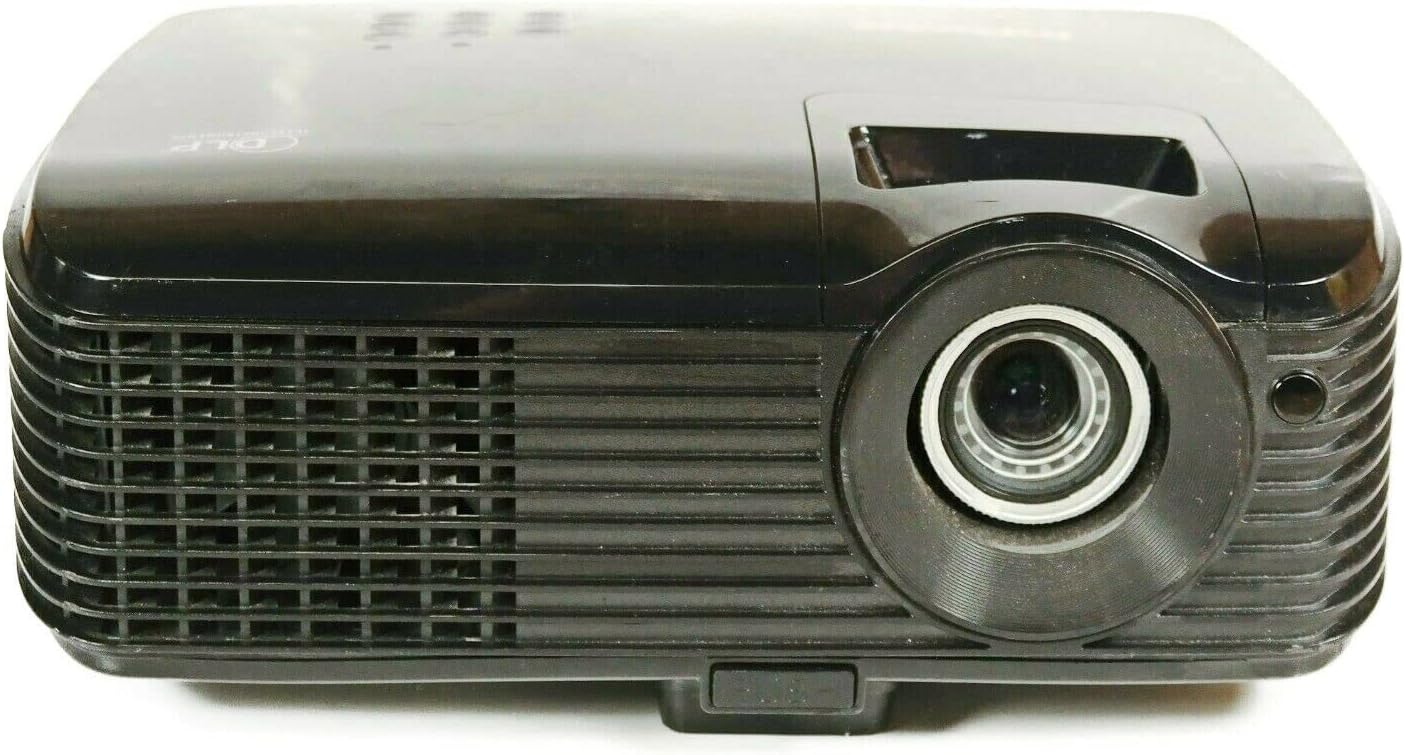
3.1 pav.: priekis View of the IN102 Projector. This image displays the projector's front, highlighting the projection lens and the primary ventilation grille.

3.2 pav.: galinis View of the IN102 Projector. This image illustrates the back panel, featuring the power input, two VGA ports, S-Video, and Composite video inputs.

3.3 paveikslas: viršuje View of the IN102 Projector. This image shows the top surface, including the integrated control panel buttons and the manual focus/zoom adjustment rings.

3.4 pav. Apačia View of the IN102 Projector. This image displays the underside, revealing the mounting points for ceiling installation and the adjustable feet for leveling.
4. Sąranka
4.1 Įdėjimas
Position the projector on a stable, flat surface or mount it securely. Ensure adequate ventilation around the projector, keeping clear of any obstructions to the air intake and exhaust vents. The distance from the screen will determine the image size. Adjust the projector's angle to minimize keystone distortion.
4.2 Maitinimo prijungimas
- Connect the power cord to the AC inlet on the rear of the projector.
- Kitą maitinimo laido galą įkiškite į įžemintą elektros lizdą.
4.3 Vaizdo šaltinių prijungimas
The IN102 offers multiple input options:
- VGA (Computer): Use the supplied VGA cable to connect your computer's VGA output to one of the VGA input ports (VGA1 or VGA2) on the projector.
- S vaizdo įrašas: Connect devices with S-Video output (e.g., DVD players) to the S-Video port.
- Sudėtinis vaizdo įrašas: Connect devices with Composite video output (e.g., VCRs, older game consoles) to the Composite video port.
Prieš įjungdami projektorių, įsitikinkite, kad visi laidai yra tvirtai prijungti.
5. Naudojimo instrukcijos
5.1 Maitinimo įjungimas/išjungimas
- Norėdami įjungti, paspauskite Galia button on the projector's control panel or the remote control. The power indicator light will illuminate.
- Norėdami išjungti, paspauskite Galia button twice. The projector will enter a cooling cycle before shutting down completely. Do not unplug the projector during the cooling cycle.
5.2 Įvesties šaltinio pasirinkimas
Paspauskite Šaltinis button on the projector or remote control to cycle through available input sources (VGA1, VGA2, S-Video, Composite) until your desired source is displayed.
5.3 Vaizdo koregavimas
- Fokusas ir priartinimas: Rotate the focus and zoom rings on the projector lens until the image is sharp and fills the screen as desired.
- Keystone Korekcija: If the projected image appears trapezoidal, use the keystone correction function (usually via buttons on the control panel or remote) to adjust the image geometry to a rectangular shape.
- Ryškumas ir kontrastas: Access the on-screen display (OSD) menu to fine-tune brightness, contrast, and other image settings.
5.4 Ekologinis režimas
Activate Eco Mode to extend lamp life and reduce power consumption. This mode is ideal for presentations in dimly lit environments. Refer to the OSD menu for Eco Mode activation.
5.5 3D funkcionalumas
The IN102 is 3D-ready. To project 3D content, ensure your source device is compatible and configured for 3D output, and use appropriate 3D glasses (sold separately). Consult your 3D source device's manual for specific setup instructions.
6. Priežiūra
6.1 Lamp Pakeitimas
Projektorius lamp turi ribotą gyvavimo trukmę. Kai lamp life indicator illuminates or the image brightness significantly decreases, the lamp needs replacement. The lamp door is conveniently located on the top of the projector for easy access, even when the unit is installed.
- Power off the projector and allow it to cool completely for at least 30 minutes.
- Ištraukite maitinimo laidą.
- Locate and open the lamp projektoriaus viršuje esantį dangtelį.
- Atsargiai nuimkite seną lamp module and replace it with a new InFocus-approved lamp (SP-LAMP-060).
- Apsaugokite lamp uždenkite ir prijunkite maitinimo laidą.
- Iš naujo nustatykite lamp laikmatį projektoriaus OSD meniu.
6.2 Valymas
The IN102 features a filter-free design, eliminating the need for filter cleaning or replacement. Periodically clean the projector's exterior with a soft, dry cloth. For the lens, use a lens cleaning cloth and solution specifically designed for optical surfaces.
6.3 Saugykla
When not in use for extended periods, store the projector in its carrying case in a cool, dry environment, away from direct sunlight and extreme temperatures.
7. Problemų sprendimas
This section addresses common issues you might encounter with your InFocus IN102 projector.
7.1 No Image or Blank Screen
- Patikrinkite jungtis: Ensure all video cables (VGA, S-Video, Composite) are securely connected to both the projector and the source device.
- Select Correct Input: naudokite Šaltinis button on the projector or remote to select the correct input channel corresponding to your connected device.
- Kompiuterio ekrano nustatymai: If connecting a laptop, ensure its display output is enabled. On many Windows laptops, pressing the Fn key simultaneously with a function key (often F4, F5, F7, arba F8, indicated by a monitor icon) toggles between display modes (laptop only, projector only, or both).
- Projektorius Lamp: Patikrinkite lamp indicator light. If it's red or blinking, the lamp gali prireikti pakeitimo.
7.2 Projector Shuts Off Unexpectedly
- Perkaitimas: Ensure the projector's ventilation vents are not blocked. Excessive heat can cause the projector to shut down automatically to prevent damage. Allow the unit to cool down in a well-ventilated area.
- Lamp Problemos: An aging or faulty lamp can cause intermittent shutdowns. Consider replacing the lamp if it's nearing the end of its lifespan.
- Maitinimo šaltinis: Check the power cord connection and ensure the power outlet is functioning correctly.
7.3 Vaizdo kokybės problemos
- Neryškus vaizdas: Adjust the focus ring on the projector lens.
- Distorted Image (Trapezoid): Use the keystone correction function to square the image.
- Poor Color/Brightness: Adjust brightness, contrast, and color settings via the OSD menu. Ensure the room lighting is appropriate for the selected display mode (e.g., Eco Mode for darker rooms).
- Resolution Mismatch: Ensure your source device's output resolution is compatible with the projector's native or supported resolutions.
7.4 Nuotolinio valdymo pultas neveikia
- Baterijos: Pakeiskite nuotolinio valdymo pulto baterijas.
- Matymo linija: Ensure there is a clear line of sight between the remote control and the projector's IR receiver.
8. Specifikacijos
| Funkcija | Specifikacija |
|---|---|
| Modelio numeris | IN102 |
| Ekrano technologija | DLP |
| Gimtoji raiška | SVGA (800 x 600) |
| Didžiausia raiška | UXGA (1600 x 1200) |
| Ryškumas | 2700 ANSI Lumens (2200 lumens Eco Mode) |
| Kontrasto santykis | 1500:1 |
| Lamp Life (Average) | 4,000 hours (Eco Mode), 3,000 hours (Normal Mode) |
| Ryšio technologija | Wired (VGA, S-Video, Composite), Wireless (with optional LiteShow™ adapter) |
| Ypatingos savybės | 3D-Ready, Filter-free design |
| Gaminio matmenys | 8.8 x 10.4 x 3.7 colio |
| Prekės svoris | 5.07 svaro (2.3 kg) |
| Gamintojas | Infocus |
| Pasiekiama pirmoji data | 1 m. kovo 2010 d |
9. Garantija ir palaikymas
9.1 Ribota garantija
All new DLP® projectors from InFocus, including the IN102, are backed by a comprehensive limited warranty:
- Projektorius: 5 metų ribota garantija
- Dalys ir darbas: 2-year coverage
- Lamp: 6 mėnesių ribota garantija
Išsaugokite pirkimo įrodymą, kad galėtumėte kreiptis dėl garantijos.
9.2 Pagalba klientams
For further assistance, technical support, or warranty inquiries, please refer to the contact information provided in your product's quick start guide or visit the official InFocus support websvetainę.


