1. Produktas baigtasview
The Dell UltraSharp U2410 Monitor is a 24-inch widescreen LCD display designed for high performance. It features PremierColor technology, delivering vibrant, consistent, and true-to-life colors, minimizing the need for extensive calibration. This monitor is suitable for graphics-intensive applications, offering detailed visuals and responsive performance.

1.1 pav.: priekis view of the Dell UltraSharp U2410 Monitor.
2. Sąrankos instrukcijos
2.1 Monitoriaus išpakavimas
Atsargiai išimkite visus komponentus iš pakuotės. Įsitikinkite, kad yra visos dalys:
- Dell UltraSharp U2410 Monitor
- Monitoriaus stovas
- Maitinimo kabelis
- Video Cables (DVI, DisplayPort, HDMI, USB Upstream)
- Dokumentacija
2.2 Stovo surinkimas
Attach the monitor panel to the stand base. Ensure it clicks securely into place. The stand allows for height, tilt, swivel, and pivot adjustments.
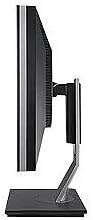
2.1 pav.: šonas view of the monitor showing stand assembly.
2.3 Jungiamieji kabeliai
Connect the necessary cables to the rear of the monitor and your computer. The U2410 supports multiple input types:
- Maitinimo kabelis: Connect to the monitor's power input and a wall outlet.
- Vaizdo kabelis: Pasirinkite vieną iš šių:
- HDMI: Didelės raiškos skaitmeniniam vaizdui ir garsui.
- DVI: For digital video.
- DisplayPort: Didelės raiškos skaitmeniniam vaizdui ir garsui.
- VGA: For analog video (if applicable, check specific model for VGA).
- USB išsiuntimo kabelis: Connect this cable from your computer to the monitor's upstream USB port to enable the monitor's built-in USB hub.
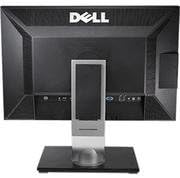
2.2 pav.: galinis view monitoriaus, kuriame rodomi įvairūs įvesties prievadai.
2.4 Pradinis įjungimas
After connecting all cables, press the power button on the monitor. The monitor should display the Dell logo and then your computer's desktop. If no image appears, ensure all cables are securely connected and the correct input source is selected.
3. Monitoriaus valdymas
3.1 Maitinimo įjungimas/išjungimas
Norėdami įjungti arba išjungti monitorių, paspauskite maitinimo mygtuką, esantį monitoriaus priekiniame skydelyje.
3.2 Ekrano meniu (OSD)
The OSD menu allows you to adjust various display settings. Use the control buttons on the front bezel to navigate the menu.
- Įvesties šaltinis: Select between HDMI, DVI, DisplayPort, or VGA inputs.
- Ryškumas / kontrastas: Reguliuokite ekrano šviesumo ir kontrasto lygius.
- Spalvų nustatymai: Access PremierColor settings, including preset modes (e.g., Adobe RGB, sRGB) and custom color adjustments.
- Vaizdas vaizde (PIP) / Vaizdas prie vaizdo (PBP): If supported, configure multiple input sources to display simultaneously.
3.3 USB šakotuvo funkcionalumas
The monitor includes a built-in USB hub with multiple downstream ports. Connect the USB upstream cable from your computer to the monitor to enable these ports for connecting peripherals like keyboards, mice, or USB drives.
4. Priežiūra
4.1 Monitoriaus valymas
To clean the monitor screen and bezel:
- Išjunkite monitorių ir atjunkite maitinimo laidą.
- Use a soft, clean, lint-free cloth lightly dampnuplaukite vandeniu arba neabrazyviniu ekrano valikliu.
- Švelniai valykite ekraną. Venkite per didelio spaudimo.
- Nepurkškite valiklio tiesiai ant ekrano.
Atsargiai: Do not use benzene, thinner, ammonia-based cleaners, or abrasive cleaners, as these can damage the monitor's surface.
5. Problemų sprendimas
5.1 Ekrane nėra vaizdo
- Įsitikinkite, kad maitinimo laidas yra tvirtai prijungtas tiek prie monitoriaus, tiek prie maitinimo lizdo.
- Verify the video cable (HDMI, DVI, DisplayPort) is firmly connected to both the monitor and your computer.
- Paspauskite monitoriaus maitinimo mygtuką, kad įsitikintumėte, jog jis įjungtas.
- Norėdami pasirinkti tinkamą įvesties šaltinį, naudokite OSD meniu.
- Test the monitor with another computer or a different video cable if possible.
5.2 Incorrect Colors or Display Issues
- Access the OSD menu and reset color settings to factory defaults.
- Užtikrinkite tinkamą spalvų gamąfile is selected in your computer's display settings.
- For Mac users, ensure you are using a Dual Link DVI connector and an appropriate Mini DisplayPort to DVI adapter for optimal color output, as some DisplayPort cables may result in YPbPr signals instead of RGB.
- Consider performing a hardware calibration if precise color accuracy is critical.
5.3 Neveikiantys USB prievadai
- Confirm the USB upstream cable is connected from your computer to the monitor.
- Įsitikinkite, kad jūsų kompiuterio USB tvarkyklės yra atnaujintos.
- Pabandykite prijungti USB įėjimo kabelį prie kito kompiuterio USB prievado.
5.4 Monitor Not Entering Power Saving Mode (Mac Specific)
- When using a DVI connection with certain Mac models (e.g., late 2011 MacBook Pros with Thunderbolt/MDP), the monitor may not automatically enter power-saving mode.
- To force power-saving mode, manually put your Mac to sleep (Apple menu > Sleep).
- This issue is often related to specific Mac firmware and not the monitor itself.
6. Specifikacijos
| Modelis | Dell UltraSharp U2410 |
| Ekrano dydis | 24 colių |
| Skydelio tipas | IPS |
| Rezoliucija | 1920 x 1200 (WUXGA) |
| Krašto santykis | 16:10 |
| Ryšys | HDMI, DVI, DisplayPort, VGA, 4x USB 3.0 (downstream), 1x USB (upstream) |
| Spalvų palaikymas | PremierColor Technology (Adobe RGB, sRGB) |
| Matmenys (IxPxH) | 25.4 x 18.2 x 9.3 colio |
| Svoris | 9.55 svaro |
| Gamintojas | Dell Marketing USA, LP |
7. Garantija ir palaikymas
7.1 Informacija apie garantiją
This Dell UltraSharp U2410 monitor typically comes with a 3-year Dell warranty. Please refer to your purchase documentation for specific terms and conditions. For warranty claims or service, contact Dell directly.
7.2 Techninė pagalba
Dėl techninės pagalbos, tvarkyklių atsisiuntimų ar papildomos pagalbos apsilankykite oficialioje „Dell“ palaikymo svetainėje website or contact Dell customer service. Have your monitor's service tag Arba greitojo aptarnavimo kodą, paruoštą susisiekiant su palaikymo tarnyba.
„Dell“ palaikymas Websvetainė: www.dell.com/support


