Įvadas
Ačiū, kad pirkoteasing the Muse M-10 CR Clock Radio. This manual provides important information regarding the setup, operation, and maintenance of your new device. Please read it thoroughly before use and retain it for future reference.
Svarbi saugos informacija
- Nelaikykite šio prietaiso nuo lašančio ar purslančio vandens.
- Nestatykite ant prietaiso daiktų, pripildytų skysčių, pavyzdžiui, vazų.
- Užtikrinkite tinkamą vėdinimą aplink įrenginį. Neužblokuokite ventiliacijos angų.
- Naudokite tik su įrenginiu pateiktą maitinimo adapterį.
- Nebandykite ardyti ar modifikuoti įrenginio. Visus techninės priežiūros darbus patikėkite kvalifikuotiems darbuotojams.
- Laikykite įrenginį atokiau nuo tiesioginių saulės spindulių, šilumos šaltinių ir stiprių magnetinių laukų.
- Įrenginį valykite tik minkšta, sausa šluoste.
Pakuotės turinys
Prašome patikrinti, ar yra visi daiktai:
- Muse M-10 CR Clock Radio
- Maitinimo adapteris
- Vartotojo vadovas
Produktas baigtasview
Familiarize yourself with the controls and display of your Muse M-10 CR.

Vaizdas: Priekyje view of the Muse M-10 CR Clock Radio, showing the large white LED display and control buttons on top.

Vaizdas: Į viršų view of the Muse M-10 CR Clock Radio, highlighting the control buttons for power, alarm settings, hour/minute adjustment, radio tuning, and the large snooze button.
Valdikliai ir indikatoriai:
- Maitinimo mygtukas: Įjungia/išjungia įrenginį.
- 1 / 2 žadintuvo mygtukai: Set and activate individual alarms.
- HR (Hour) Button: Adjusts the hour.
- MIN (Minute) Button: Adjusts the minute.
- Tuning Buttons (<< / >>): Reguliuoja radijo dažnį.
- Snaudimo mygtukas: Temporarily silences the alarm and dims the display.
- Skystųjų kristalų ekranas: Rodo laiką, žadintuvo būseną ir radijo dažnį.
Sąranka
1. Maitinimo prijungimas
- Insert the DC plug of the power adapter into the DC IN jack on the back of the unit.
- Plug the power adapter into a standard wall outlet (AC 220V, 50Hz).
- The LED display will light up, indicating the unit is powered.
2. Laiko nustatymas
- Norėdami nustatyti laiką, paspauskite ir palaikykite HR mygtuką, norėdami reguliuoti valandas.
- Paspauskite MIN mygtuką, kad nustatytumėte minutes.
- Release the buttons to confirm the time. The time will be set in 24-hour format.
Naudojimo instrukcijos
Radijo veikimas (FM)
- Paspauskite Galia mygtuką, kad įjungtumėte radiją.
- Paspauskite Tuning (<< / >>) buttons briefly to manually tune to your desired FM frequency.
- To auto-scan and store presets: Press and hold the Tuning (<< / >>) button for a few seconds. The radio will scan for available stations and store them automatically. The unit supports 20 preset FM stations.
- To recall a preset station: After auto-scanning, use the Tuning (<< / >>) mygtukus, kad peržiūrėtumėte išsaugotas iš anksto nustatytas stotis.
Pastaba: For optimal reception, ensure the FM wire antenna (located at the back of the unit) is fully extended.
Setting Alarms (Dual Alarm)
The Muse M-10 CR features a dual alarm system, allowing you to set two separate alarm times.
- Paspauskite Signalas 1 or Signalas 2 button once. The alarm time will flash on the display.
- Kol mirksi žadintuvo laikas, paspauskite HR button to set the alarm hour.
- Paspauskite MIN button to set the alarm minute.
- Paspauskite Signalas 1 or Signalas 2 dar kartą paspauskite mygtuką, kad patvirtintumėte žadintuvo laiką.
- To select the alarm source (Buzzer or Radio), press the respective Signalas 1 or Signalas 2 button repeatedly until the desired icon (buzzer or radio wave) appears next to the alarm indicator on the display.
- Norėdami išjungti žadintuvą, paspauskite atitinkamą Signalas 1 or Signalas 2 mygtuką, kol iš ekrano išnyks žadintuvo indikatorius.
Snaudimo funkcija
Kai suskamba žadintuvas, paspauskite didelį SNAIGĖ button on top of the unit. The alarm will be temporarily silenced for approximately 9 minutes and will sound again after this period. The snooze function can be used multiple times.
Ekrano reguliatorius
The 0.6-inch white LED display has adjustable intensity. Press the SNAIGĖ button while the unit is in standby mode to cycle through different brightness levels (High, Low, Off). This allows you to adjust the display brightness to your preference, especially for nighttime use.
Priežiūra
Valymas
- Prieš valydami, visada ištraukite įrenginį iš maitinimo lizdo.
- Use a soft, dry cloth to wipe the exterior surfaces of the clock radio.
- Nenaudokite abrazyvinių valiklių, vaško ar tirpiklių, nes jie gali pažeisti apdailą.
Sandėliavimas
If you plan to store the unit for an extended period, unplug it from the power source and store it in a cool, dry place, away from direct sunlight and extreme temperatures.
Trikčių šalinimas
| Problema | Galima priežastis | Sprendimas |
|---|---|---|
| Įrenginys neįsijungia. | Maitinimo adapteris neprijungtas arba sugedęs. | Įsitikinkite, kad maitinimo adapteris yra tvirtai prijungtas prie įrenginio ir veikiančio sieninio lizdo. Išbandykite kitą lizdą. |
| Prastas radijo priėmimas. | Weak signal; antenna not properly extended. | Visiškai ištieskite FM laidinę anteną. Pakeiskite įrenginio padėtį, kad signalas būtų geresnis. |
| Signalizacija neskamba. | Alarm not set or deactivated; volume too low (for radio alarm). | Verify that the alarm is set and activated (alarm icon visible). Ensure radio alarm volume is audible. |
| Ekranas per ryškus/tamsus. | Display dimmer setting needs adjustment. | Press the SNOOZE button in standby mode to cycle through display brightness levels. |
Specifikacijos
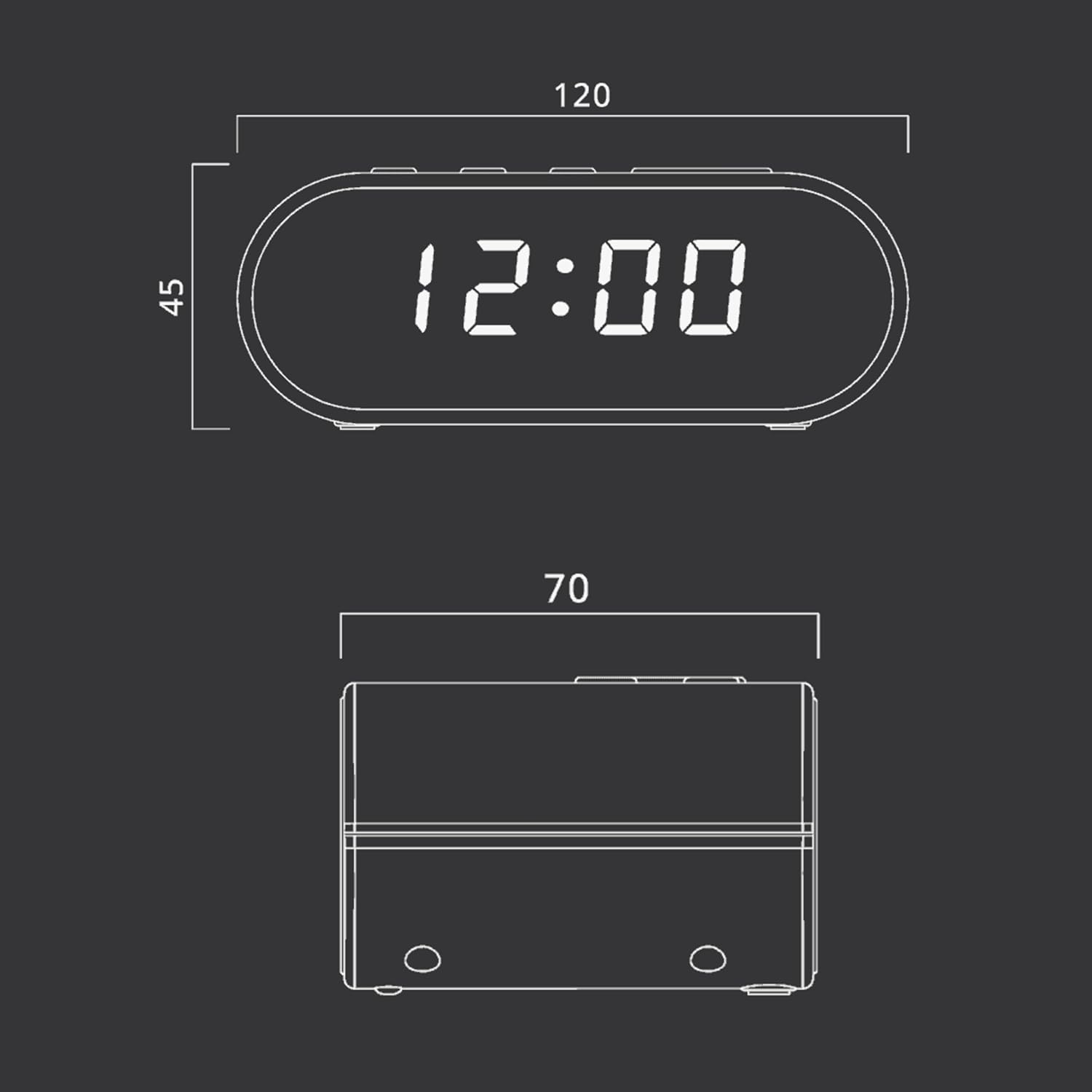
Vaizdas: Technical drawing illustrating the dimensions of the Muse M-10 CR Clock Radio, with measurements in millimeters.
- Prekinis ženklas: Mūza
- Modelio numeris: 3700460200701
- Spalva: Schwarz (juodas)
- Gaminio matmenys: 12 x 7 x 10.9 cm (I x P x A)
- Prekės svoris: 200 g
- ttage: 220 voltų
- Medžiaga: Kunststoff (plastikas)
- Ekrano tipas: LED (0.6-inch white)
- Radijas: FM PLL Radio with 20 preset stations
- Ypatingos savybės: Adjustable Brightness, Large Display, Radio, Snooze Function, Dual Alarm
Garantija ir palaikymas
For warranty information or technical support, please refer to the warranty card included with your purchase or contact your local Muse distributor or retailer. Keep your proof of purchase for any warranty claims.
You can also visit the official Muse websvetainę, kurioje rasite daugiau pagalbos ir informacijos apie produktą.


