1. Įvadas
This manual provides essential information for the safe and efficient operation of your Intermec PD42 Series Commercial Printer. The PD42 is a dependable and versatile direct thermal printer designed for medium-duty applications in manufacturing, transportation, and warehousing environments. It features a robust all-metal chassis, proven printing mechanics, and powerful electronics to ensure reliable performance. The integrated monochrome graphical display allows for direct setup and configuration, enhancing user control and reducing reliance on host commands.
2. Saugos informacija
Prieš naudodami spausdintuvą, perskaitykite ir supraskite visas saugos instrukcijas. Nesilaikant šių instrukcijų, galite susižaloti arba sugadinti įrangą.
- Visada junkite spausdintuvą prie įžeminto maitinimo lizdo.
- Do not operate the printer with a damaged power cord or plug.
- Avoid placing the printer in areas with excessive dust, humidity, or extreme temperatures.
- Nebandykite patys atlikti spausdintuvo techninės priežiūros. Visus techninės priežiūros darbus patikėkite kvalifikuotiems darbuotojams.
- Eksploatacijos metu laikykite rankas ir laisvus drabužius atokiau nuo judančių dalių.
3. Pakuotės turinys
Verify that all items are present in the package. If any items are missing or damaged, contact your supplier immediately.
- Intermec PD42 Series Commercial Printer
- Power Cord (Euro and US compatible)
- Greito paleidimo vadovas (jei pridėtas)
- Documentation CD (if included)
4. Fizinis viršusview
Familiarize yourself with the external components and connection ports of the Intermec PD42 printer.

4.1 pav.: Priekinė ir šoninė dalys View of the Intermec PD42 Printer. This image displays the printer's front panel with its graphical display and control buttons, along with a label partially ejected from the print mechanism. The robust casing and compact design are visible.
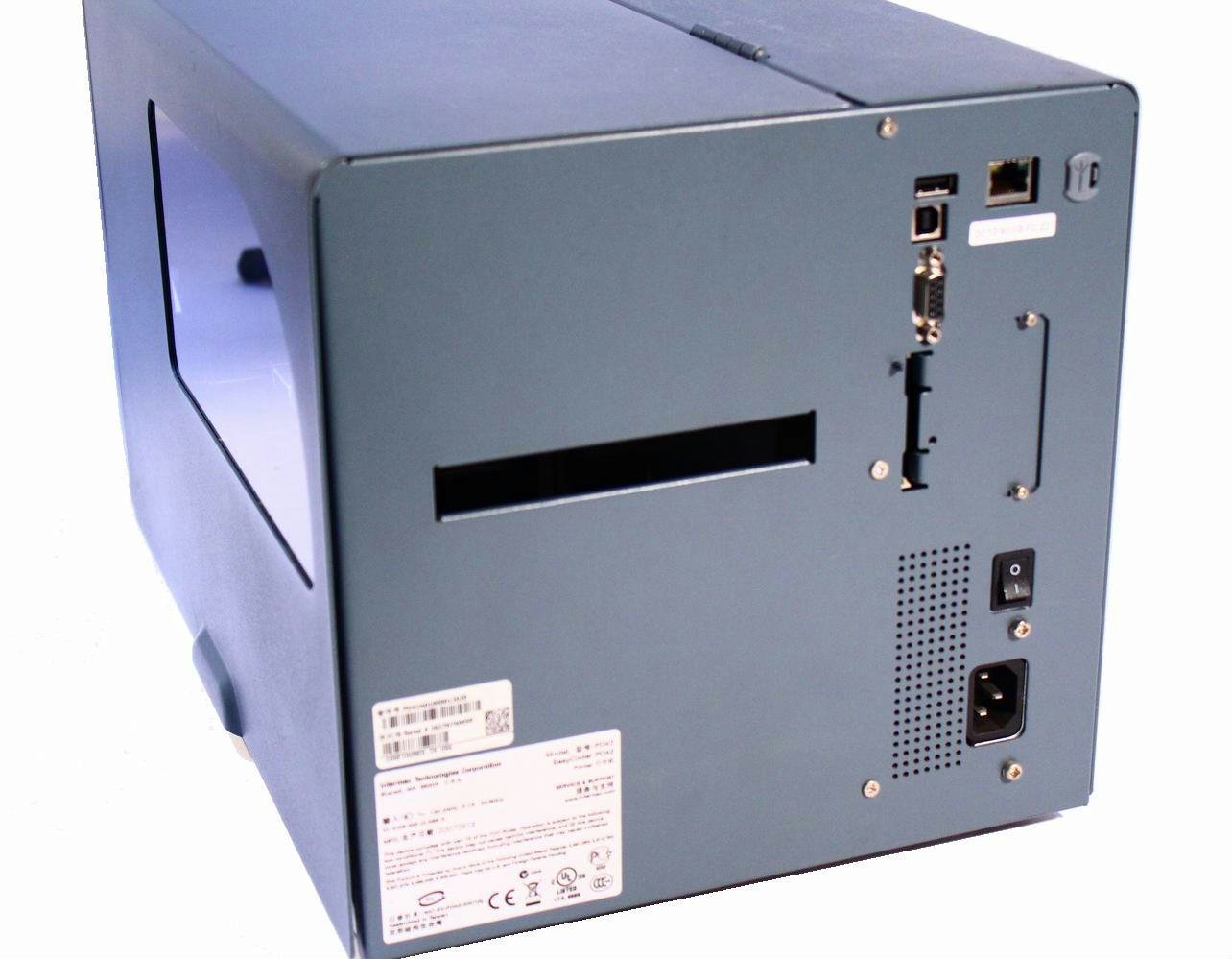
4.2 pav.: galinis View of the Intermec PD42 Printer. This image highlights the various connectivity options available on the back of the printer, including USB, Serial, and Ethernet ports. The power input and main power switch are also visible.

4.3 pav. Vidinis View of the Intermec PD42 Printer. With the top cover open, this image reveals the internal mechanisms for loading labels and ribbon. Key components such as the printhead assembly, media guides, and ribbon spindles are visible, illustrating the media path.
5. Sąranka
5.1 Išpakavimas ir įdėjimas
- Atsargiai išimkite spausdintuvą iš pakuotės.
- Pastatykite spausdintuvą ant stabilaus, lygaus paviršiaus, kuriame būtų tinkama ventiliacija.
- Ensure sufficient space around the printer for media loading and maintenance.
5.2 Maitinimo prijungimas
- Connect the power cord to the power input on the rear of the printer (refer to Figure 4.2).
- Kitą maitinimo laido galą įkiškite į įžemintą elektros lizdą.
5.3 Connecting Data Cables
PD42 siūlo kelias prijungimo galimybes:
- USB: Prijunkite USB kabelį nuo spausdintuvo USB prievado prie kompiuterio.
- Serialas: Connect a serial cable from the printer's serial port to your computer or host system.
- Ethernet: Connect an Ethernet cable from the printer's Ethernet port to your network.
5.4 Laikmenų (etikečių ir juostelių) įdėjimas
The PD42 supports industry-standard 200-mm (8-inch) label rolls and 450-m (18,000-inch) ribbon rolls.
- Open the printer's top cover (refer to Figure 4.3).
- Follow the internal diagrams or specific instructions for your media type to correctly load the label roll onto the media spindle.
- Thread the labels through the media guides and under the printhead assembly.
- If using thermal transfer printing, load the ribbon onto the ribbon supply spindle and thread it according to the internal guides.
- Saugiai uždarykite viršutinį dangtį.
6. Naudojimo instrukcijos
6.1 Įjungimas / išjungimas
- Norėdami įjungti: Flip the main power switch on the rear of the printer to the 'On' position. The graphical display will illuminate.
- Norėdami išjungti: Flip the main power switch to the 'Off' position.
6.2 Using the Graphical Display
The monochrome graphical display and control buttons on the front panel allow you to configure printer settings directly. Navigate through menus using the arrow buttons and confirm selections with the 'Enter' button. Refer to the on-screen prompts for specific options.
6.3 Tvarkyklės ir programinės įrangos diegimas
Before printing from a computer, install the appropriate printer drivers. These are typically available on the manufacturer's website or an included CD. Follow the on-screen instructions during installation.
6.4 Printing a Test Label
After setup, it is recommended to print a test label to verify proper operation and media loading. This option is usually available through the printer's front panel menu or via the printer driver software.
7. Priežiūra
Reguliarus aptarnavimas užtikrina optimalų našumą ir pailgina spausdintuvo tarnavimo laiką.
7.1 Spausdinimo galvutės valymas
The printhead should be cleaned regularly, especially if print quality degrades. Use a lint-free cloth or a printhead cleaning pen with isopropyl alcohol. Ensure the printer is powered off and cooled down before cleaning.
7.2 Cleaning Rollers and Media Path
Dust and adhesive residue can accumulate on rollers and within the media path. Use a lint-free cloth dampened with isopropyl alcohol to clean these components. Always power off the printer before cleaning.
7.3 Laikmenos keitimas
Kai baigiasi etikečių ritinėlis arba juostelė, atlikite 5.4 skyriuje nurodytus veiksmus, kad įdėtumėte naujos laikmenos.
8. Problemų sprendimas
Šiame skyriuje aptariamos dažniausiai pasitaikančios problemos, su kuriomis galite susidurti naudodami PD42 spausdintuvą.
- Spausdintuvas neįsijungia: Check power cord connections and ensure the power outlet is functional.
- Nėra spausdinimo išvesties: Verify that the printer is online, connected correctly to the host, and that media is loaded properly. Check for error messages on the graphical display.
- Prasta spausdinimo kokybė: Clean the printhead. Ensure the correct media and ribbon (if applicable) are used and properly loaded. Adjust print darkness settings via the display or driver.
- Ryšio problemos: Check all cable connections. Verify network settings for Ethernet connections. Reinstall printer drivers if necessary.
- Klaidos pranešimai ekrane: Consult the printer's graphical display for specific error codes or messages, then refer to the full product documentation or manufacturer's support webišsamių sprendimų svetainė.
9. Specifikacijos
| Funkcija | Specifikacija |
|---|---|
| Modelio pavadinimas | PD42BJ1000002021 |
| Spausdinimo technologija | Tiesioginis terminis |
| Spausdintuvo išvestis | Vienspalvis |
| Rezoliucija | 203 dpi |
| Spausdinimo greitis | Iki 150 mm/s (6 ips) |
| Ryšio technologija | USB, nuoseklusis, eternetas |
| Ypatinga funkcija | Graphical Display, Ethernet |
| Prekės svoris | 28.7 svaro |
| Gaminio matmenys | 25 x 15 x 15 colio |
| Valdiklio tipas | Mygtukas |
| Spausdinimo laikmena | Etiketės |
10. Garantija ir palaikymas
For warranty information and technical support, please refer to the documentation provided with your printer or visit the official Intermec (now Honeywell) websvetainėje. Išsaugokite pirkimo kvitą kaip pirkimo įrodymą garantiniams reikalavimams.
Internetiniai ištekliai: For the latest drivers, firmware updates, and detailed troubleshooting guides, visit the manufacturer's support portal.


