1. Įvadas
This manual provides essential instructions for the safe and efficient operation of your Panasonic SC-BT330 5.1 Channel Cinema Surround Home Entertainment System. This system integrates a Blu-ray Disc player/amplifier with a 5.1-channel speaker set, delivering 1000 watts of total power. Please read this manual thoroughly before using the product and retain it for future reference.
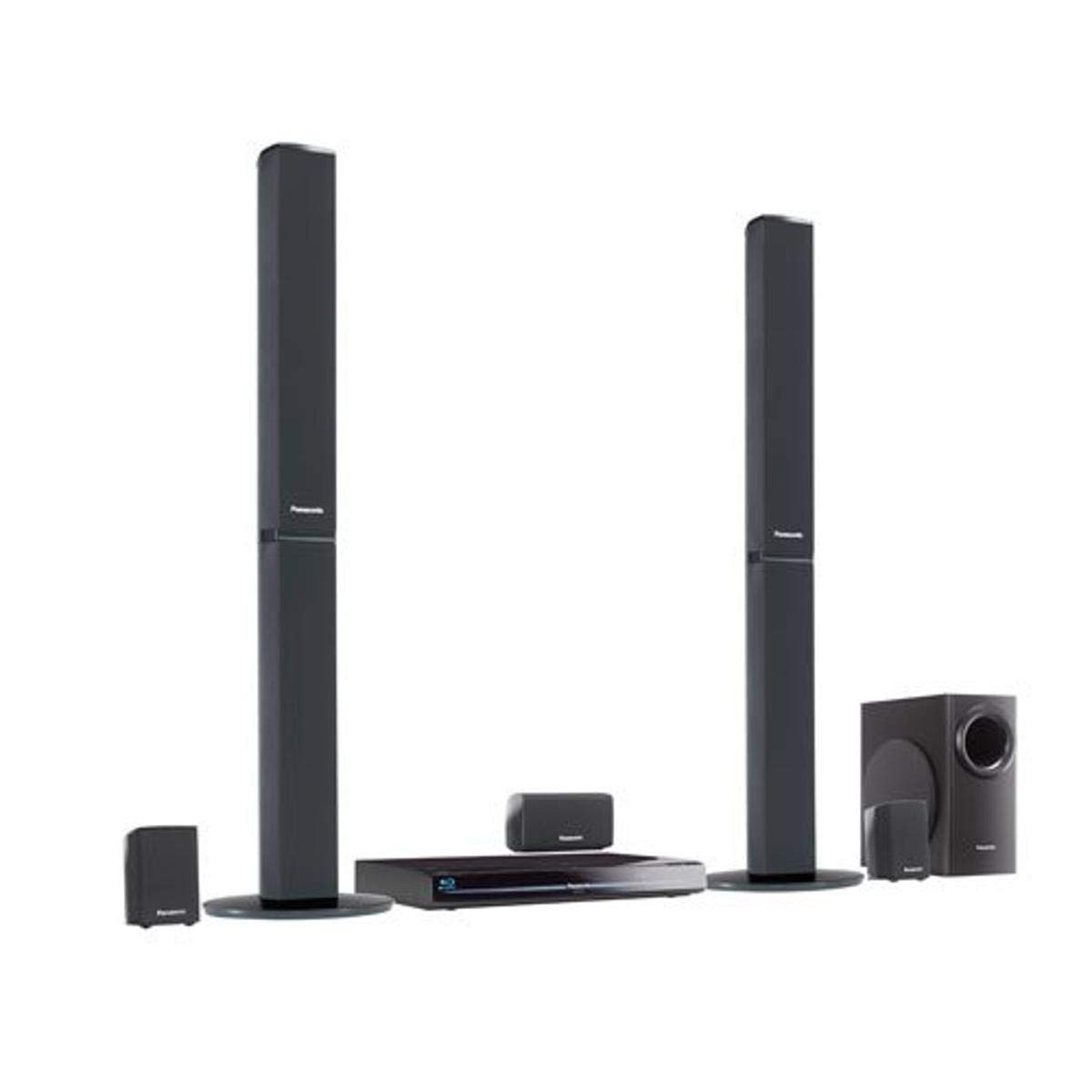
1 paveikslas: Panasonic SC-BT330 Home Theater System. This image displays the main unit (Blu-ray player/amplifier) and the accompanying speakers, including the tallboy front speakers and the subwoofer, providing a visual overview visos sistemos.
2. Saugos informacija
Norėdami užtikrinti saugų darbą ir išvengti žalos, laikykitės šių atsargumo priemonių:
- Maitinimas: Connect the unit only to an AC 120 V, 60 Hz power supply. Do not overload electrical outlets.
- Vėdinimas: Ensure adequate ventilation. Do not block ventilation openings with items such as newspapers, tablecloths, or curtains. Maintain a minimum distance of 10 cm (4 inches) around the unit for proper airflow.
- Drėgmė ir skysčiai: Saugokite įrenginį nuo lietaus, drėgmės, lašančio ar taškomo vandens. Nestatykite ant įrenginio daiktų su skysčiais, pavyzdžiui, vazų.
- Užsienio objektai: Never insert any metallic objects or flammable materials into the unit's ventilation openings.
- Garsiakalbio vieta: Place speakers on a stable, level surface to prevent them from falling. Keep speakers away from heat sources and direct sunlight.
- Baterijos: Replace batteries in the remote control with the correct type (2 AA batteries). Do not mix old and new batteries, or different types of batteries. Dispose of used batteries according to local regulations.
- Aptarnavimas: Nebandykite patys taisyti šio įrenginio. Visus techninės priežiūros darbus patikėkite kvalifikuotiems techninės priežiūros specialistams.
3. Pakuotės turinys
Prieš tęsdami sąranką, patikrinkite, ar pakuotėje yra visi elementai:
- Main Unit (Blu-ray Disc Player/Ampgyvybingesnis)
- Front Speakers (2 tallboy speakers)
- Center Speaker (1)
- Surround Speakers (2)
- Žemųjų dažnių garsiakalbis (1)
- Remote Control with Batteries (2 AA)
- Garsiakalbių kabeliai
- Vidinė FM antena
- Kintamosios srovės maitinimo laidas
- Naudojimo instrukcijos (šis vadovas)
4. Sąranka
4.1 Garsiakalbių išdėstymas
Optimal speaker placement is crucial for achieving the best 5.1 channel surround sound experience. Position the speakers as follows:
- Priekiniai garsiakalbiai: Place one on each side of your television, equidistant from the viewpadėtis.
- Centrinis garsiakalbis: Padėkite tiesiai virš arba po televizoriaus centru.
- Erdviniai garsiakalbiai: Place to the sides or slightly behind the main listening area, facing inwards.
- Žemų dažnių garsiakalbis: Position in a corner of the room or near a wall for enhanced bass response. Experiment with placement to find the best sound.
4.2 Jungtys
Follow these steps to connect your system:
- Garsiakalbių jungtys: Connect each speaker cable to the corresponding color-coded terminals on the rear of the main unit. Ensure correct polarity (+ to + and - to -).
- HDMI jungtis: Connect an HDMI cable from the HDMI OUT terminal on the main unit to an HDMI IN terminal on your television. This single cable transmits both video and audio.
- Tinklo ryšys (neprivaloma):
- Laidinis: Connect an Ethernet cable from the LAN terminal on the main unit to your home router.
- Belaidis ryšys: If using an optional Wi-Fi dongle (sold separately), insert it into the USB port on the main unit. Configure wireless settings in the system menu after initial power-on.
- Maitinimo jungtis: Plug the AC power cord into the main unit and then into a wall outlet.
4.3 Pradinė sąranka
After connecting all components and powering on the unit, follow the on-screen instructions for initial setup, which typically includes:
- Kalbos pasirinkimas.
- Video output settings.
- Audio setup, including speaker level calibration.
- Network configuration (if not already connected via Ethernet).
5. Naudojimo instrukcijos
5.1 Pagrindinis atkūrimas
Insert a Blu-ray Disc, DVD, or CD into the disc slot. The system will typically begin playback automatically. Use the remote control for playback functions such as Play, Pause, Stop, Fast Forward, and Rewind.
5.2 Internet Features (VIERA Cast)
The SC-BT330 supports VIERA Cast, providing access to online services such as Netflix, YouTube, and Amazon Video. Ensure your system is connected to the internet. Navigate to the VIERA Cast menu using the remote control to access these services.
5.3 „iPod“ / „iPhone“ dokas
Connect your iPod or iPhone to the integrated dock. The system will automatically detect the device. Use the system's remote control to navigate your device's music and video content, which will be displayed on your television screen. The dock also charges your device during connection.
5.4 Garso nustatymai
To adjust surround sound and equalizer (EQ) levels:
- Press the AUDIO button on the remote control to access sound settings.
- Use the LEFT/RIGHT arrow buttons to navigate through options like 'Surround Mode' or 'EQ Presets'.
- Use the UP/DOWN arrow buttons to adjust the selected setting's level or choose a preset.
- Press ENTER to confirm your selection or EXIT to close the menu.
5.5 VIERA Link
If you have a compatible Panasonic VIERA television, VIERA Link allows for integrated control. When connected via HDMI, the system can automatically power on/off with your TV and switch inputs seamlessly.
6. Priežiūra
6.1 Valymas
Norėdami išlaikyti sistemos išvaizdą ir našumą:
- Wipe the main unit and speakers with a soft, dry cloth.
- Esant sunkiai įsisenėjusiems nešvarumams, švelniai dampsudrėkinkite šluostę vandeniu ir tada nusausinkite.
- Nenaudokite abrazyvinių valiklių, vaško ar tirpiklių, nes jie gali pažeisti apdailą.
6.2 Firmware atnaujinimai
Panasonic may release firmware updates to improve performance or add new features. To check for and install updates:
- Ensure the unit is connected to the internet.
- Navigate to the 'Setup' menu, then 'Others', and select 'Firmware Update'.
- Vykdykite ekrane pateikiamus nurodymus, kad patikrintumėte, ar yra atnaujinimų, ir juos įdiegtumėte. Atnaujinimo metu neišjunkite įrenginio.
7. Problemų sprendimas
Dažniausiai pasitaikančių problemų sprendimus rasite šiame skyriuje:
| Problema | Sprendimas |
|---|---|
| Nėra galios | Patikrinkite, ar maitinimo laidas tvirtai prijungtas prie įrenginio ir sieninio lizdo. Įsitikinkite, kad lizdas veikia. |
| Nėra garso | Verify speaker cables are correctly connected. Check the volume level and ensure the mute function is not active. Confirm the correct audio input is selected on your TV. |
| Nėra nuotraukos | Ensure the HDMI cable is securely connected to both the unit and the TV. Select the correct HDMI input on your television. |
| Tinklo ryšio problemos | Check Ethernet cable connection or Wi-Fi dongle. Restart your router and the home theater system. Verify network settings in the system menu. |
| Disc playback errors | Ensure the disc is clean and free of scratches. Verify the disc type is supported by the player. |
| Loud pop from subwoofer | Check subwoofer cable connections. Ensure the subwoofer is not placed too close to other electronic devices that might cause interference. |
| Sluggish menus or garbled text | Try performing a full power cycle: turn off the unit, unplug it from the power outlet for a few minutes, then plug it back in and restart. Check for firmware updates. |
| Įrenginys atsitiktinai išsijungia | Check for proper ventilation around the unit to prevent overheating. Ensure power connections are stable. |
| Remote control issues (e.g., sound adjustment) | Replace batteries. Ensure there are no obstructions between the remote and the unit. For sound adjustments, use the LEFT/RIGHT arrow buttons after pressing AUDIO, not UP/DOWN. |
8. Specifikacijos
Key technical specifications for the Panasonic SC-BT330 Home Theater System:
| Funkcija | Detalė |
|---|---|
| Modelio pavadinimas | SC-BT330 |
| Garsiakalbio tipas | Žemųjų dažnių garsiakalbis, erdvinis garsas |
| Erdvinio garso kanalo konfigūracija | 5.1 |
| Didžiausia garsiakalbio išėjimo galia | 1000 vatų |
| Ryšio technologija | Wi-Fi (optional dongle required), Ethernet |
| Suderinami įrenginiai | Television, iPod/iPhone |
| Maitinimo šaltinis | Su laidu elektra |
| Prekės svoris | 36.6 svaro |
| Gaminio matmenys | 36 x 20 x 16 colio |
| Baterijos (nuotolinio valdymo pultui) | Reikalingos 2 AA baterijos |
| UPC | 885170003033 |
9. Garantija ir palaikymas
This Panasonic product is covered by a limited warranty. Please refer to the warranty card included with your purchase for specific terms and conditions, including warranty period and coverage details. Keep your proof of purchase for warranty claims.
For technical assistance, troubleshooting beyond this manual, or to inquire about service, please contact Panasonic Customer Support. Contact information can typically be found on the Panasonic official websvetainėje arba savo garantijos dokumentuose.


