1. Įvadas
Thank you for choosing the SHARP KC850U Air Purifier and Humidifier. This appliance is designed to improve indoor air quality and maintain optimal humidity levels in medium-sized rooms. It combines a multi-stage filtration system with Plasmacluster Ion Technology to effectively reduce airborne particles, odors, and maintain a comfortable environment.
Please read this manual thoroughly before operating the unit to ensure safe and efficient use. Keep this manual for future reference.
2. Saugos informacija
To reduce the risk of electric shock, fire, or injury, always follow basic safety precautions when using electrical appliances:
- Nenaudokite įrenginio su pažeistu laidu arba kištuku.
- Nestatykite įrenginio šalia šilumos šaltinių ar tiesioginiuose saulės spinduliuose.
- Įsitikinkite, kad įrenginys pastatytas ant stabilaus, lygaus paviršiaus.
- Neužblokuokite oro įleidimo ir išleidimo angų.
- Prieš valydami ar atlikdami bet kokią techninę priežiūrą, atjunkite įrenginį nuo elektros tinklo.
- Nemerkite įrenginio į vandenį ar kitus skysčius.
- Laikyti vaikams ir naminiams gyvūnėliams nepasiekiamoje vietoje.
- Use only genuine SHARP replacement parts and filters.
3. Produktas baigtasview
The SHARP KC850U integrates air purification and humidification functions into a single unit. Key components include the air intake, air outlet, control panel, dust and humidity sensors, and water tank.

3.1 paveikslas: Priekyje view of the SHARP KC850U Air Purifier and Humidifier, showing the control panel and display.
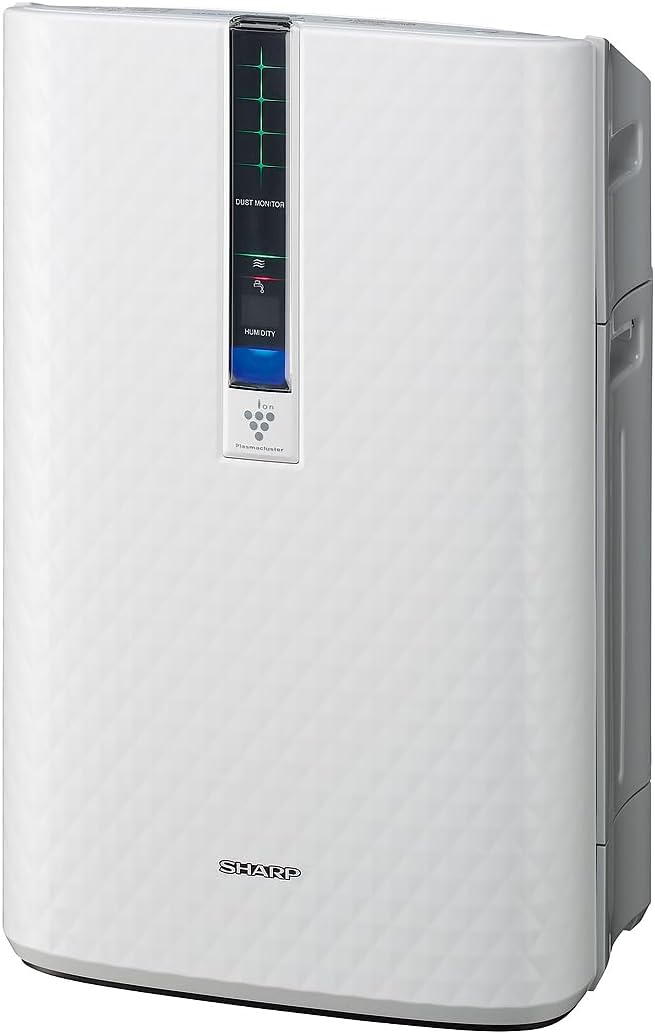
3.2 paveikslas: Šoninė view of the SHARP KC850U, illustrating its compact design.
Valdymo skydas ir ekranas
The unit features an intuitive control panel and a display that provides real-time information on air quality and humidity levels.

3.3 paveikslas: Į viršų view of the control panel, showing buttons for power, fan speed, modes, and light control.
- Maitinimo mygtukas: Įjungia arba išjungia įrenginį.
- Ventiliatoriaus greičio mygtukas: Cycles through Max, Med, and Low fan speeds.
- Režimo mygtukas: Selects operating modes including Auto, Pollen, and Quick Clean.
- Šviesos mygtukas: Adjusts the brightness of the display lights (Bright, Dim, Off).
- Dust Monitor: Visual indicator of air impurity levels (e.g., green for clean, red for high impurity).
- Drėgmės ekranas: Shows the current relative humidity percentage.
4. Sąranka
4.1 Išpakavimas
- Atsargiai išimkite įrenginį iš pakuotės.
- Nuimkite visas apsaugines medžiagas ir plastikinius maišelius.
- Ensure all filters are properly installed before first use. Refer to the Maintenance section for filter installation details.
4.2 Įdėjimas
For optimal performance, place the air purifier in a location where air can circulate freely. Avoid placing it directly against a wall or furniture that might obstruct air intake or output.
- Recommended for use in bedrooms, living rooms, studies, or exercise rooms.
- Ensure at least 12 inches (30 cm) of clear space around the unit.
- Padėkite ant tvirto, lygaus paviršiaus.
4.3 Vandens bako pildymas (drėkinimui)
If you intend to use the humidification function, fill the water tank:
- Remove the water tank from the side of the unit.
- Open the tank cap and fill with clean tap water.
- Tvirtai užsukite dangtelį ir įstatykite vandens bakelį atgal į prietaisą.
5. Naudojimo instrukcijos
5.1 Maitinimo įjungimas/išjungimas
Paspauskite Galia mygtuką, kad įjungtumėte arba išjungtumėte įrenginį.
5.2 Ventiliatoriaus greičio pasirinkimas
Paspauskite Ventiliatoriaus greitis button repeatedly to cycle through the available fan speeds:
- Maks.: Highest air purification and humidification.
- Vid.: Moderate operation.
- Žemas: Quiet operation, suitable for sleeping (as quiet as 23 dBA).
5.3 Režimo pasirinkimas
Paspauskite Režimas button repeatedly to select an operating mode:
- Automatinis režimas: The unit automatically adjusts fan speed and humidification based on sensor readings for air quality and humidity.
- Žiedadulkių režimas: Optimized for pollen removal.
- Greito valymo režimas: Releases high-density Plasmacluster ions for rapid air purification.
5.4 „Plasmacluster“ jonų technologija
The Plasmacluster Ion Technology actively disperses positive and negative ions into the air to help reduce microscopic pollutants. This function operates automatically with the unit. A slight clicking sound may be audible during operation, which is normal.
5.5 Ekrano apšvietimo valdymas
Paspauskite Šviesos button to adjust the brightness of the display indicators:
- Ryškus: Full illumination.
- Pritemdyta: Reduced illumination.
- Išjungta: Display lights are off, suitable for dark rooms.

5.1 paveikslas: Display showing 'Lo' for low humidity and green dust monitor indicators.

5.2 paveikslas: Display showing 'Hi' for high humidity and red dust monitor indicators, indicating higher impurity levels.
6. Priežiūra
Regular maintenance ensures optimal performance and extends the lifespan of your SHARP KC850U. Always unplug the unit before cleaning or replacing filters.
6.1 Filter System Overview
The KC850U utilizes a triple filtration system:
- Plaunamas išankstinis filtras: Traps large airborne particles like dust and pet dander.
- Activated Carbon Deodorizing Filter: Helps reduce common household odors.
- Tikras HEPA filtras: Captures 99.97% of particles 0.3 microns and larger.
- Humidifying Filter: Used for the humidification function.

6.1 paveikslas: Diagram showing the air purification process through the humidifying filter, True HEPA filter, carbon filter, and pre-filter.
6.2 Filtro valymas ir keitimas
- Išankstinis filtras: Clean regularly by vacuuming or washing with water. Allow to dry completely before reinstallation.
- Activated Carbon Deodorizing Filter: May be washed. Refer to the filter's specific instructions for cleaning frequency and method. Replace as needed, typically every 2-5 years depending on usage and environment.
- Tikras HEPA filtras: This filter is not washable. Replace typically every 2-5 years, depending on usage and environment. The unit will indicate when replacement is due.
- Humidifying Filter: Clean regularly to prevent mineral buildup. Replace as needed, typically every 2-5 years depending on water quality and usage.
Actual filter life may vary significantly based on air quality, usage frequency, and environmental conditions.
6.3 Bendras valymas
- Nuvalykite įrenginio išorę minkšta, damp audinys.
- Clean the dust and humidity sensors periodically to ensure accurate readings.
- Clean the water tank and humidifying tray regularly to prevent mold or bacteria growth.
7. Problemų sprendimas
If you encounter issues with your SHARP KC850U, refer to the following common problems and solutions:
| Problema | Galima priežastis | Sprendimas |
|---|---|---|
| Įrenginys neįsijungia. | Power cord not properly plugged in; no power at outlet. | Check power connection; test outlet with another device. |
| Air purification/humidification is ineffective. | Filters are dirty or clogged; water tank is empty (for humidification). | Clean or replace filters as per Maintenance section; refill water tank. |
| Unusual noise (e.g., clicking). | Normal operation of Plasmacluster Ion generator; foreign object in fan. | A slight clicking is normal. If noise is excessive, unplug and check for obstructions. |
| Odor persists or unit emits strange smell. | Carbon filter saturated; new unit odor; mold in water tank. | Replace carbon filter; new unit odor will dissipate; clean water tank and humidifying filter. |
| Drėgmės lygis nepadidėjaasing. | Water tank empty; humidifying filter dirty or damaged. | Refill water tank; clean or replace humidifying filter. |
If the problem persists after attempting these solutions, please contact SHARP customer support.
8. Specifikacijos
| Funkcija | Specifikacija |
|---|---|
| Modelio numeris | KC850U |
| Prekės ženklas | Aštrus |
| Spalva | Baltas |
| Gaminio matmenys (D x P x A) | 10.5" x 14.87" x 23.11" |
| Prekės svoris | 20.5 svaro |
| Rekomenduojamas grindų plotas | 254 Square Feet (4.8 air changes/hour) |
| Triukšmo lygis | 23 dBA (Quiet Sleep setting) to 36 dB (typical) |
| Dalelių sulaikymo dydis | 0.3 Micrometer (HEPA filter) |
| Valdiklio tipas | Mygtukų valdymas |
| Vattage | 50 vatų |
| CADR (Smoke / Dust / Pollen) | 164-164-174 |
| Sertifikatai | ENERGY STAR Rated, AHAM Verifide Tested, CARB Certified |

8.1 paveikslas: Dimensions of the SHARP KC850U unit.

8.2 paveikslas: Room coverage diagram, showing 254 sq. ft. for 4.8 air changes per hour.
9. Garantija ir palaikymas
9.1 Informacija apie garantiją
The SHARP KC850U Air Purifier and Humidifier comes with a 1 metų ribota garantija. Please retain your proof of purchase for warranty claims. For detailed terms and conditions, refer to the warranty card included with your product or visit the official SHARP websvetainę.
9.2 Pagalba klientams
For technical assistance, troubleshooting beyond this manual, or to inquire about replacement parts and filters, please contact SHARP customer support. Contact information can typically be found on the SHARP official websvetainėje arba ant produkto pakuotės.


