1. Įvadas
The VTech Disney Princess Magical Learn and Go is an electronic learning toy designed to engage children in educational play. This device emulates a smartphone and features four Disney Princesses who guide the child through various learning activities. It is designed to help develop skills such as letter recognition, alphabet order, spelling, logic, and music. The toy incorporates an LCD screen, gem-style arrow buttons, and a QWERTY keyboard layout for an interactive learning experience.
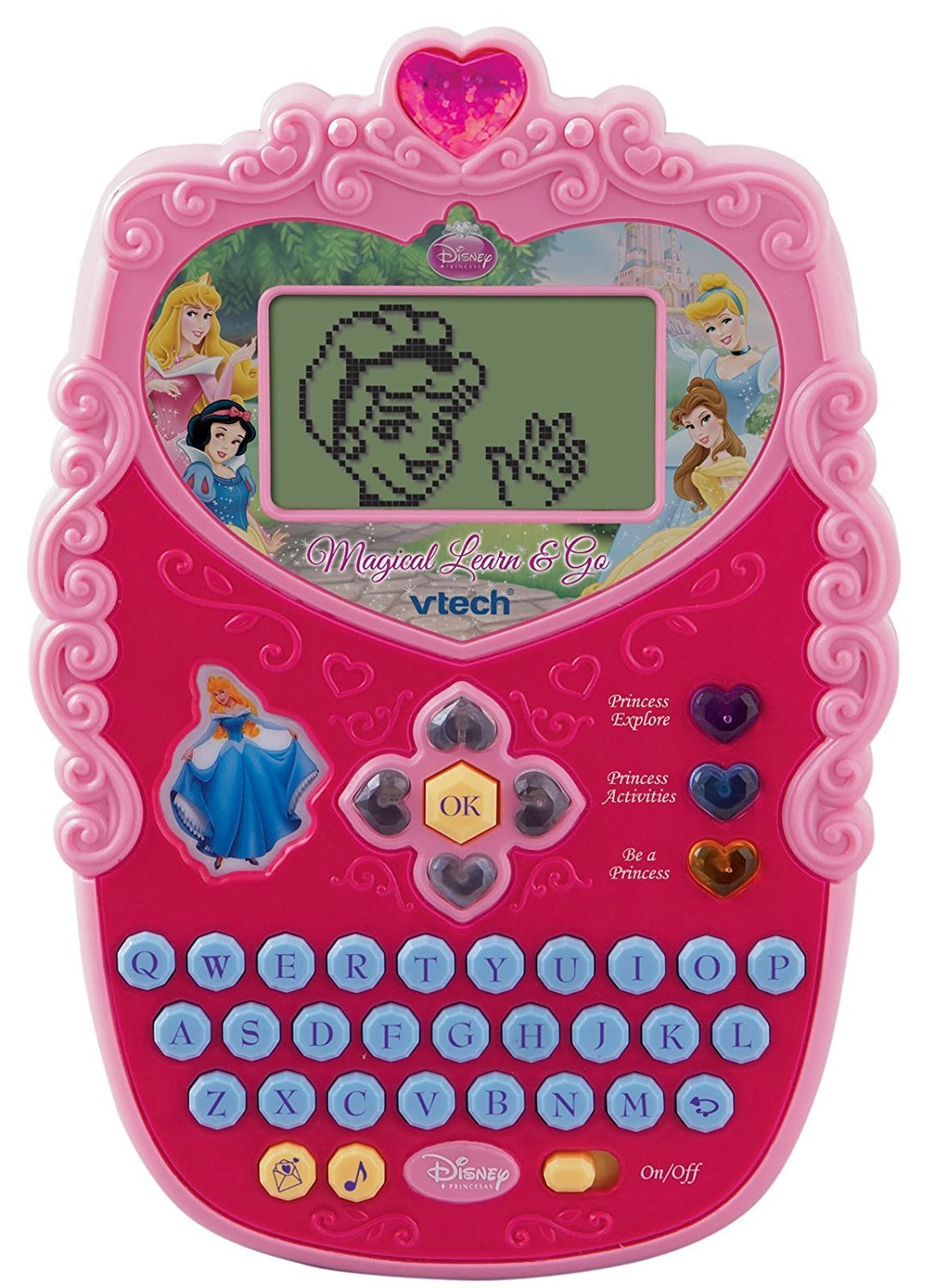
Image 1.1: The VTech Disney Princess Magical Learn and Go device. This image displays the overall design of the electronic learning toy, highlighting its compact, princess-themed appearance.
2. Pakuotės turinys
Upon opening the package, ensure all components are present. The box should contain:
- One VTech Disney Princess Magical Learn and Go electronic learning toy.
- Three AA batteries (pre-installed or included separately).
- Šis naudojimo vadovas.

Image 2.1: The VTech Disney Princess Magical Learn and Go toy shown in its retail packaging. The packaging highlights key features and the Disney Princess branding.
3. Produkto ypatybės
The VTech Disney Princess Magical Learn and Go offers several features designed for educational engagement:
- Interactive Princesses: Features Cinderella, Belle, Snow White, and Aurora to guide learning.
- E-Card Reception: Girls can receive virtual e-cards from their favorite princesses.
- QWERTY klaviatūra: A full QWERTY keyboard layout for familiar computer-like play and typing practice.
- LCD ekranas: A clear LCD screen displays activities and animations.
- Gem-Style Arrow Buttons: Intuitive navigation buttons for selecting options and interacting with games.
- Keli žaidimo režimai: Three distinct modes of play to vary the learning experience.
- Eight Learning Activities: Includes activities focusing on letter recognition, alphabet order, spelling, logic, and music.
- Elegantiškas dizainas: A princess-themed design to appeal to young users.
4. Sąranka
4.1 Akumuliatoriaus įdėjimas
The VTech Disney Princess Magical Learn and Go requires three (3) AA batteries for operation. Batteries may be pre-installed for demonstration purposes. If replacing batteries:
- Suraskite akumuliatoriaus skyrių įrenginio gale.
- Atsuktuvu atlaisvinkite baterijų skyriaus dangtelio varžtą ir nuimkite dangtelį.
- Insert three new AA batteries, ensuring correct polarity (+/-) as indicated inside the compartment.
- Uždėkite baterijų skyriaus dangtelį ir tvirtai priveržkite varžtą.
Svarbi informacija apie akumuliatorių:
- Use only fresh batteries of the required type.
- Nemaišykite senų ir naujų baterijų.
- Nemaišykite šarminių, standartinių (anglies-cinko) arba įkraunamų (nikelio-kadmio) baterijų.
- Išimkite išnaudotas baterijas iš žaislo.
- Išimkite baterijas, jei žaislo nenaudosite ilgą laiką.
- Saugiai išmeskite baterijas. Nemeskite baterijų į ugnį.
4.2 Maitinimo įjungimas/išjungimas
To turn the unit on, locate the On/Off switch, typically found on the side or bottom of the device, and slide it to the "On" position. To turn the unit off, slide the switch to the "Off" position.
5. Naudojimo instrukcijos
The Magical Learn and Go toy is designed for intuitive play. Familiarize yourself with the main controls:
- LCD ekranas: Displays all visual content, including activities, letters, and princess animations.
- QWERTY klaviatūra: Used for typing letters, words, and interacting with spelling activities.
- Gem-Style Arrow Buttons: Navigate through menus, select options, and move characters within games.
- Gerai mygtukas: Patvirtina pasirinkimus arba veiksmus.
- Princess Buttons: Dedicated buttons to interact with specific princesses or access princess-themed content.
5.1 Modes of Play
The toy features three distinct modes of play. Use the mode selection buttons (if present) or navigate through the main menu to choose a mode:
- Mokymosi režimas: Focuses on educational activities like letter recognition, spelling, and logic puzzles.
- Muzikos režimas: Engages children with melodies, sounds, and musical activities.
- Creative/Role-Play Mode: Allows for imaginative play, such as receiving e-cards from princesses or engaging in princess-themed scenarios.
5.2 Mokymosi veikla
There are eight built-in learning activities. Select an activity from the main menu using the arrow buttons and the OK button. Examples of activities include:
- Letter identification and pronunciation.
- Alphabetical order challenges.
- Basic spelling games.
- Logic puzzles.
- Musical note recognition.

Image 5.1: A child interacting with the VTech Disney Princess Magical Learn and Go toy. This demonstrates the product in use, highlighting its handheld design and user interface.
6. Priežiūra
6.1 Valymas
Norėdami išvalyti žaislą, nuvalykite jį šiek tiek drėgnu skudurėliuamp cloth. Do not use harsh chemicals or abrasive cleaners. Ensure the toy is completely dry before storage or further use.
6.2 Saugykla
Store the toy in a cool, dry place away from direct sunlight and moisture. If the toy will not be used for an extended period, remove the batteries to prevent leakage.
7. Problemų sprendimas
If the VTech Disney Princess Magical Learn and Go is not functioning as expected, please refer to the following common issues and solutions:
| Problema | Sprendimas |
|---|---|
| Įrenginys neįsijungia. |
|
| Ekranas tuščias arba mirga. |
|
| Garsas iškraipytas arba jo visai nėra. |
|
| Mygtukai nereaguoja. |
|
8. Specifikacijos
| Funkcija | Detalė |
|---|---|
| Gaminio matmenys | 4.78 x 7.06 x 1.44 colio |
| Prekės svoris | 13.6 uncijos |
| Modelio numeris | 80-116900 |
| Rekomenduojamas amžius | 4 - 7 metų |
| Reikalingos baterijos | 3 AA baterijos (pridedamos) |
| Gamintojas | „VTech“ |
| Išleidimo data | 12 m. birželio 2010 d |
9. Saugos informacija
Please read and follow these safety precautions to ensure safe operation of the toy:
- This toy is intended for children aged 4-7 years. Adult supervision is recommended.
- Nemerkite žaislo į vandenį ir nelaikykite jo per didelėje drėgmėje.
- Avoid dropping the toy or subjecting it to strong impacts.
- Do not attempt to disassemble or modify the toy, as this may cause damage or injury.
- Laikykite baterijas mažiems vaikams nepasiekiamoje vietoje. Prarijus, nedelsdami kreipkitės medicininės pagalbos.
- In rare cases, prolonged use of electronic toys may cause skin irritation. If irritation occurs, discontinue use.
10. Garantija ir palaikymas
VTech products are manufactured with high-quality materials and undergo rigorous testing. For detailed warranty information, please refer to the warranty card included with your purchase or visit the official VTech websvetainė. Dėl techninės pagalbos ar klientų aptarnavimo klausimų susisiekite su „VTech“ klientų aptarnavimo tarnyba oficialiais kanalais.
VTech oficialus Websvetainė: www.vtechkids.com


