Įvadas
The Taylor Pro Digital 4-Event Timer is designed to track up to four separate timing events simultaneously. This device features a large LCD display for clear visibility and offers versatile placement options with its integrated magnets and built-in stand. It supports countdown timing up to 99 hours, 59 minutes, and 59 seconds, and includes a memory function for recalling previous settings.
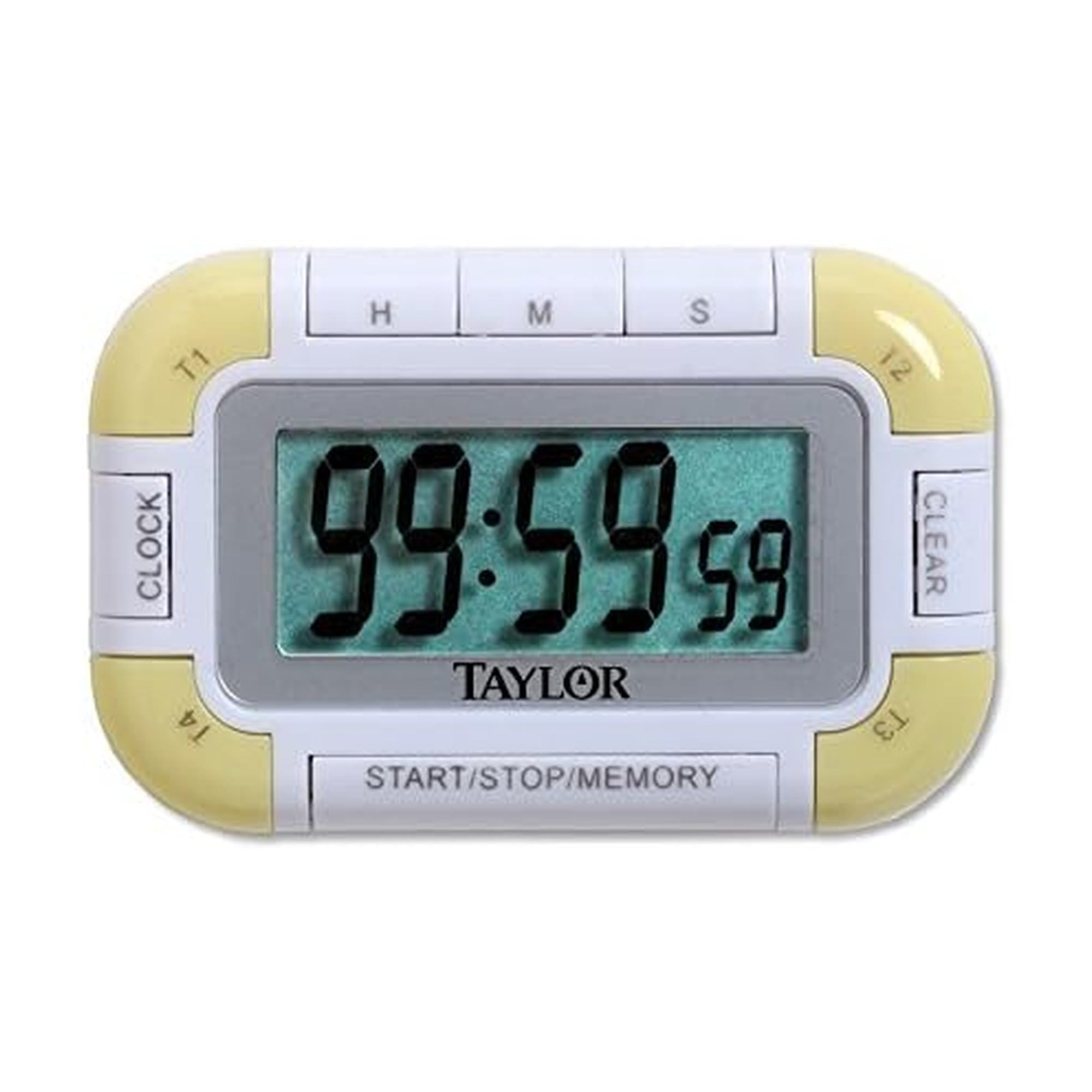
1 pav.: priekis view of the Taylor Pro Digital 4-Event Timer.
Saugos informacija
WARNING: This product contains button cell batteries. Swallowing a button cell battery can cause severe internal burns in as little as 2 hours and can lead to death. Keep new and used batteries away from children. If the battery compartment does not close securely, stop using the product and keep it away from children. If you think batteries might have been swallowed or placed inside any part of the body, seek immediate medical attention.

Figure 2: Button cell battery safety warning.
Pakuotės turinys
- Taylor Pro Digital 4-Event Timer (Model 5862)
- Instrukcijų vadovas
- 2 x Product Specific Batteries (pre-installed or included separately)
Produkto savybės
- Four Independent Timers: Track up to four events simultaneously.
- Didelis LCD ekranas: 0.8-inch display for clear time readings.
- Universalus išdėstymas: Strong magnets for metal surfaces and a built-in stand for countertops.
- Extended Countdown: Sets times up to 99 hours, 59 minutes, 59 seconds.
- Distinctive Alarms: Each timer has a unique beep pattern.
- Atminties funkcija: Recalls the last set time for each event.

3 pav. Išsamus view of the timer's display and control buttons.
Sąranka
Akumuliatoriaus montavimas
- Raskite baterijų skyrių laikmačio gale.
- Atidarykite skyriaus dangtelį.
- Insert two product-specific batteries, ensuring correct polarity (+/-).
- Saugiai uždarykite akumuliatoriaus skyriaus dangtelį.
Pradinis įjungimas
Once batteries are installed, the timer should automatically power on and display '00:00:00' or the current time if a clock function is present (refer to display for confirmation).
Naudojimo instrukcijos
Selecting a Timer (T1, T2, T3, T4)
Paspauskite T1/T2/T3/T4 buttons to select the desired timer. The active timer will be indicated on the display.
Setting a Countdown Timer
- Select the desired timer (T1-T4).
- Paspauskite HR mygtukas valandoms nustatyti, MIN for minutes, and SEC for seconds. Each press increases the value. Hold the button for faster adjustment.
- To clear a set time, press the IŠVALYTI button while the timer is selected and stopped.
Starting and Stopping a Timer
- Nustatę norimą laiką, paspauskite START/STOP mygtuką, kad pradėtumėte atgalinį skaičiavimą.
- To pause the countdown, press START/STOP vėl.
- Norėdami tęsti, paspauskite START/STOP dar kartą.
Signalizavimo funkcija
When a timer reaches zero, it will emit an audible alarm. Each of the four timers has a distinct alarm sound to help differentiate between events. Press any button to silence the alarm.
Atminties funkcija
The timer automatically stores the last set time for each of the four events. To recall a previously set time, select the desired timer (T1-T4) and press the ATMINTIS button. The last set time for that specific timer will be displayed.
Priežiūra
Valymas
Nuvalykite laikmatį minkšta, damp Nenaudokite abrazyvinių valiklių ir nemerkite įrenginio į vandenį.
Baterijos keitimas
When the display becomes dim or the timer functions erratically, it is time to replace the batteries. Follow the battery installation steps outlined in the Setup section.
Trikčių šalinimas
| Problema | Galima priežastis | Sprendimas |
|---|---|---|
| Ekranas tuščias arba blankus. | Išsikrovusios arba išsikrovusios baterijos. | Pakeiskite baterijas naujomis, užtikrindami teisingą poliškumą. |
| Laikmatis neįsijungia. | Time not set or START/STOP not pressed. | Ensure a time is set for the selected timer. Press START/STOP. |
| Signalizacija neskamba. | Volume setting too low (if applicable) or timer not reaching zero. | Ensure timer counts down to zero. Check for any mute function (if available). |
| Mygtukai nereaguoja. | Išsikrovusios baterijos arba vidinis gedimas. | Pakeiskite baterijas. Jei problema išlieka, susisiekite su klientų aptarnavimo tarnyba. |
Specifikacijos
- Modelio numeris: 5862
- Prekinis ženklas: Teiloras
- Medžiaga: Plastikiniai
- Spalva: Balta/Žalia
- Prekės svoris: 2.4 uncijos
- Gaminio matmenys: 7 x 5.1 x 6.68 colio
- Ekrano dydis: 0.8 colio (LCD)
- Laikmačių skaičius: 4
- Max Countdown: 99 Hours, 59 Minutes, 59 Seconds
- Baterijos: 2 Product Specific batteries (required)
Garantija
This Taylor Pro Digital 4-Event Timer (Model 5862) comes with a 1 metų garantija covering parts and labor from the date of purchase. This warranty does not cover damage caused by misuse, accident, unauthorized modifications, or normal wear and tear. Please retain your proof of purchase for warranty claims.
Palaikymas
Dėl papildomos pagalbos, trikčių, neaprašytų šiame vadove, arba garantijos klausimų kreipkitės į „Taylor“ klientų aptarnavimo tarnybą. Žr. gaminio pakuotę arba oficialų „Taylor“ websvetainę, kurioje rasite naujausią kontaktinę informaciją.


