1. Įvadas
This manual provides detailed instructions for the setup, operation, maintenance, and troubleshooting of your Inland Pro Bluetooth Optical Mouse (Model 07347). Please read this manual thoroughly before using the device to ensure proper functionality and to prevent damage.
The Inland Pro Bluetooth Optical Mouse offers wireless convenience and precise optical tracking for various computing tasks. Its ergonomic design aims to provide comfortable use.
2. Pakuotės turinys
Patikrinkite, ar jūsų gaminio pakuotėje yra visi toliau išvardyti daiktai:
- Inland Pro Bluetooth Optical Mouse (Model 07347)
- Vartotojo vadovas (šis dokumentas)
- Pastaba: veikimui reikalingos 2 AAA baterijos, kurios neįeina į komplektą.
3. Produktas baigtasview
The Inland Pro Bluetooth Optical Mouse is designed for ease of use and reliable performance. Key features include:
- Bluetooth Wireless Interface: Provides a cable-free connection to your compatible device.
- Optical Technology: Delivers accurate and responsive cursor control.
- Ergonomiškas dizainas: Shaped for comfortable handling during extended use.
- Two Buttons and Scroll Wheel: Standard navigation controls for efficient interaction.
- 1000 DPI Sensor: Offers a fixed sensitivity for general computing tasks.
Pelės komponentai
Refer to the image below for an illustration of the mouse components.
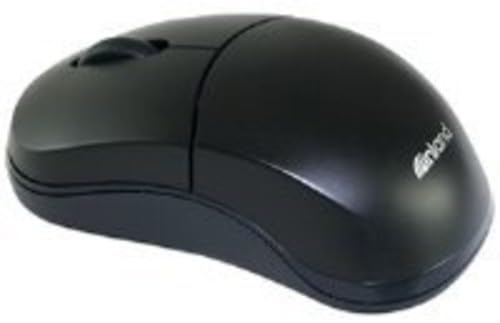
Figure 1: Inland Pro Bluetooth Optical Mouse (Model 07347). This image displays the top and side profile of the black optical mouse, highlighting its ergonomic shape and standard button layout.
- Kairiojo spustelėjimo mygtukas
- Dešiniuoju pelės mygtuku spustelėkite
- Slinkties ratukas
- Optinis jutiklis (esantis apačioje)
- Baterijų skyrius (esantis apačioje)
- Bluetooth Connection/Pairing Button (located on the underside)
- Power On/Off Switch (located on the underside)
4. Sąranka
4.1. Baterijų įdėjimas
- Turn the mouse over to access the underside.
- Locate the battery compartment cover. Slide or lift the cover to open it.
- Įdėkite dvi (2) AAA baterijas, užtikrindami, kad teigiamas (+) ir neigiamas (-) poliai teisingai sutaptų su žymėjimais skyriaus viduje.
- Saugiai uždėkite akumuliatoriaus skyriaus dangtelį.
- Slide the Power On/Off switch to the 'On' position.
4.2. „Bluetooth“ poravimas
Follow these steps to connect your mouse to a compatible device:
- Ensure the mouse has fresh batteries and is powered on.
- On your computer or device, enable Bluetooth and open the Bluetooth settings or device manager.
- Paspauskite ir palaikykite Bluetooth Connection/Pairing Button on the underside of the mouse for approximately 3-5 seconds. An indicator light on the mouse (if present) may flash to indicate pairing mode.
- On your device, search for new Bluetooth devices. The mouse should appear as "Inland Pro Mouse" or a similar identifier.
- Select the mouse from the list of available devices to initiate the connection.
- If prompted for a passkey, enter "0000" or consult your device's Bluetooth instructions. Some devices may not require a passkey.
- Once connected, the mouse indicator light may stop flashing or turn solid, and your device should confirm the successful pairing.
Suderinamumo pastaba: This mouse is compatible with Windows 2000, Windows XP, Windows Vista, and Mac OS. Compatibility with other operating systems or specific Bluetooth adapters may vary.
5. Naudojimo instrukcijos
After successful pairing, the mouse is ready for use.
- Žymeklio perkėlimas: Move the mouse across a flat, non-reflective surface to control the cursor on your screen.
- Kairysis spustelėjimas: Paspauskite kairįjį mygtuką, kad pasirinktumėte elementus, atidarytumėte nuorodas arba suaktyvintumėte funkcijas.
- Dešiniuoju pelės mygtuku spustelėkite: Paspauskite dešinįjį mygtuką, kad atidarytumėte kontekstinius meniu arba pasiektumėte papildomas parinktis.
- Slinkties ratukas: Norėdami naršyti dokumentuose, sukite slinkties ratuką aukštyn arba žemyn ir web pages. The scroll wheel can also be pressed as a middle click button for some functions.
6. Priežiūra
6.1. Pelės valymas
Norint išlaikyti optimalų našumą ir išvaizdą:
- Prieš valydami įsitikinkite, kad pelė yra išjungta.
- Šiek tiek naudokite minkštą, be pūkelių šluostę dampnuplauti vandeniu arba švelniu valymo tirpalu.
- Wipe the exterior surfaces of the mouse gently.
- Venkite naudoti stiprias chemines medžiagas, abrazyvinius valiklius ar per didelę drėgmę, nes jos gali pažeisti pelę.
- Do not spray cleaners directly onto the mouse.
6.2. Baterijos keitimas
When the mouse's performance degrades or it stops responding, it may be time to replace the batteries. Follow the steps in Section 4.1 to replace the two (2) AAA batteries.
Pastaba: panaudotas baterijas utilizuokite atsakingai, laikydamiesi vietinių taisyklių.
7. Problemų sprendimas
If you encounter issues with your Inland Pro Bluetooth Optical Mouse, refer to the following common problems and solutions:
- Mouse does not respond or cursor does not move:
- Ensure the mouse is powered on. Check the On/Off switch on the underside.
- Pakeiskite baterijas naujomis AAA tipo baterijomis.
- Ensure the mouse is within the effective range of your Bluetooth device (typically up to 10 meters).
- Verify that the mouse is properly paired with your device. If not, re-pair it following the steps in Section 4.2.
- Try connecting the mouse to a different Bluetooth-enabled device to rule out an issue with your primary device's Bluetooth adapter.
- Connection fails or mouse frequently disconnects:
- Įsitikinkite, kad nėra kitų stiprių belaidžių signalų ar įrenginių, trukdančių „Bluetooth“ ryšiui.
- Turn the mouse off and then on again using the power switch on the underside. This can often re-establish the connection.
- Remove the mouse from your device's Bluetooth paired devices list and then re-pair it.
- Atnaujinkite savo kompiuterio „Bluetooth“ tvarkykles.
- If your device requests a code during pairing and none was provided, try common codes like "0000" or "1234". If issues persist, consult your device's operating system documentation.
- Žymeklio judėjimas yra netolygus arba netikslus:
- Nuvalykite optinį jutiklį pelės apačioje minkštu, sausu skudurėliu.
- Use the mouse on a clean, uniform, non-reflective surface. Avoid highly reflective or transparent surfaces.
8. Specifikacijos
| Prekės ženklas | Vidaus |
| Modelio numeris | 07347 |
| Ryšio technologija | Bluetooth, Wireless (2.4 GHz Radio Frequency, 802.11abg) |
| Judesio aptikimo technologija | Optinis |
| DPI (taškai colyje) | 1000 dpi |
| Mygtukų skaičius | 2 (plus scroll wheel click) |
| Spalva | Juoda |
| Operacinės sistemos suderinamumas | Windows 2000, Windows XP, Windows Vista, Mac OS |
| Reikalingos baterijos | 2 x AAA (neįtraukta) |
| Prekės svoris | 109 g |
| Gaminio matmenys (I x P x A) | 20.32 x 6.35 x 18.29 cm (apytiksliai pakuotės matmenys) |
9. Garantija ir palaikymas
For warranty information, please refer to the documentation provided at the time of purchase or contact your retailer. Inland typically offers a limited warranty against defects in materials and workmanship.
For technical support or further assistance, please visit the official Inland website or contact their customer service department. Contact details are usually available on the product packaging or the manufacturer's websvetainę.


