Įvadas
This manual provides comprehensive instructions for the setup, operation, maintenance, and troubleshooting of your Logitech M510 Wireless Mouse. Designed for comfort and efficiency, the M510 offers precise control and convenient features for your computing needs.
The Logitech M510 is a comfortable wireless computer mouse featuring a USB Unifying Receiver, back/forward buttons, and side-to-side scrolling. It operates on 2 AA batteries and is compatible with Personal Computers and Macbooks running operating systems like Windows 10.
Pakuotės turinys
- Logitech M510 belaidė pelė
- „Logitech Unifying“ imtuvas
- 2 AA baterijos (iš anksto įdėtos arba pridėtos)
Sąranka
1. Akumuliatoriaus įdėjimas
The Logitech M510 mouse requires two AA batteries for operation. These are typically included with your purchase. If not already installed, follow these steps:
- Raskite baterijų skyriaus dangtelį pelės apačioje.
- Norėdami atidaryti skyrių, pastumkite arba pakelkite dangtelį.
- Įdėkite dvi AA baterijas, užtikrindami, kad teigiamas (+) ir neigiamas (-) poliai teisingai sutaptų su indikatoriais skyriaus viduje.
- Saugiai uždarykite akumuliatoriaus skyriaus dangtelį.
2. „Unifying“ imtuvo prijungimas
The Logitech M510 uses a Logitech Unifying Receiver for wireless connectivity. This small USB receiver allows you to connect multiple compatible Logitech devices to your computer using a single USB port.
- Locate the Logitech Unifying Receiver. It is often stored inside the battery compartment of the mouse for safekeeping during transport.
- Plug the Unifying Receiver into an available USB port on your computer (desktop, laptop, or Macbook).
- Your computer should automatically detect the receiver and install the necessary drivers. This may take a few moments.
- Once the drivers are installed, the mouse should be ready for use. If not, ensure the mouse's power switch (if present) is in the 'ON' position.

Vaizdas: Iš viršaus į apačią view of the Logitech M510 Wireless Mouse alongside its compact USB Unifying Receiver.
Pelės valdymas
The Logitech M510 Wireless Mouse is designed for intuitive use with several programmable buttons and comfortable ergonomics.
Pagrindinės funkcijos
- Kairysis pelės mygtuko paspaudimas: Pagrindinis mygtukas elementams pasirinkti, atidaryti fileir sąveikaujant su programine įranga.
- Dešiniojo pelės mygtuko paspaudimo mygtukas: Antrinis mygtukas, skirtas pasiekti kontekstinius meniu ir papildomas parinktis.
- Slinkties ratukas: Slinkite aukštyn arba žemyn per dokumentus ir web pages. The scroll wheel also functions as a middle-click button.
- Side-to-Side Scrolling: Tilt the scroll wheel left or right to scroll horizontally in applications that support this feature.
Advanced Features (Programmable Buttons)
The M510 features two thumb buttons (back/forward) on the left side, which can be customized using Logitech Options software (available for download from the Logitech website). By default, these buttons perform browser navigation functions.
- Atgal mygtukas: Navigates back in web naršyklės arba file tyrinėtojai.
- Pirmyn mygtukas: Naviguoja pirmyn web naršyklės arba file tyrinėtojai.
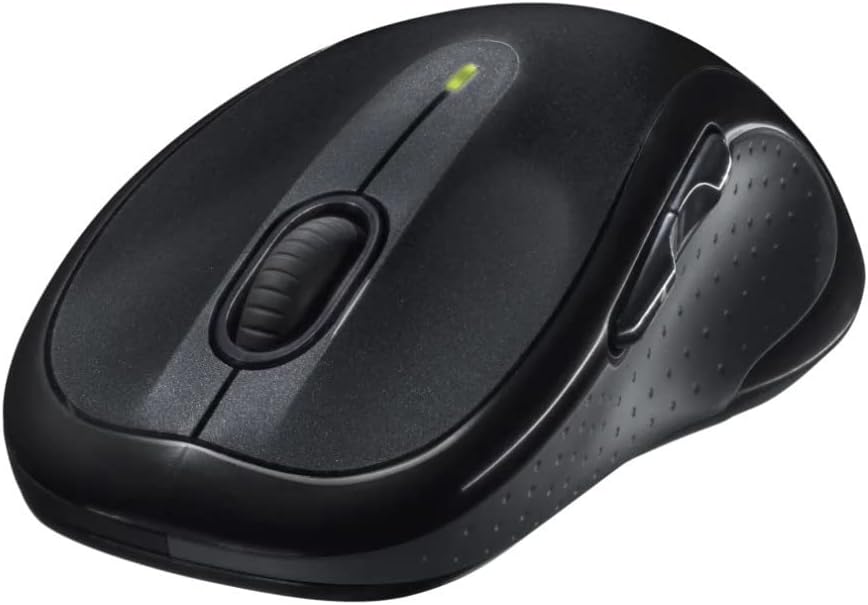
Vaizdas: kampuotas view of the Logitech M510 Wireless Mouse, highlighting its ergonomic shape and side buttons.
Priežiūra
Pelės valymas
To ensure optimal performance and hygiene, regularly clean your Logitech M510 mouse:
- Disconnect the mouse from your computer by removing the Unifying Receiver.
- Lengvai naudokite minkštą, nepūkuotą audinį dampened with water or a mild cleaning solution (e.g., isopropyl alcohol) to wipe down the surface of the mouse.
- Įtrūkimams ir aplink sagas valyti naudokite vatos tamponą arba minkštą šepetėlį.
- Avoid getting liquid into the internal components or the optical sensor.
- Allow the mouse to dry completely before re-connecting.
Baterijos keitimas
The Logitech M510 has an average battery life of 18 months. When the battery indicator light (if present) flashes or mouse performance degrades, it's time to replace the batteries.
- Turn off the mouse using the power switch on the underside.
- Atidarykite akumuliatoriaus skyriaus dangtelį.
- Išimkite senas AA baterijas.
- Insert two new AA batteries, observing the correct polarity (+/-).
- Uždarykite akumuliatoriaus skyriaus dangtelį.
- Įjunkite pelę.
Trikčių šalinimas
| Problema | Galima priežastis | Sprendimas |
|---|---|---|
| Pelė nereaguoja | Low or dead batteries; Unifying Receiver not connected; Mouse power off; Driver issue. | Replace batteries; Ensure Unifying Receiver is securely plugged into a USB port; Turn mouse power switch to 'ON'; Reinstall Logitech Options software or check device manager for driver issues. |
| Lagging or erratic cursor movement | Interference; Dirty optical sensor; Mouse used on unsuitable surface; Low battery. | Move mouse closer to receiver; Clear obstructions; Clean optical sensor; Use a mouse pad or suitable surface; Replace batteries. |
| Šoniniai mygtukai neveikia | Software not installed or configured; Application does not support custom buttons. | Download and install Logitech Options software from the official Logitech website to customize button functions. Ensure the application you are using supports these functions. |
| Unifying Receiver not recognized | Faulty USB port; Driver issue. | Try a different USB port; Restart your computer; Download and install the Logitech Unifying Software to re-pair the mouse with the receiver. |
Specifikacijos
| Funkcija | Detalė |
|---|---|
| Prekės ženklas | Logitech |
| Modelio numeris | 910-001822 |
| Serija | M510 |
| Ryšio technologija | Radio Frequency, USB (via Unifying Receiver) |
| Judesio aptikimo technologija | Lazeris |
| Spalva | Tamsiai Pilka |
| Prekės svoris | 4.6 uncijos (apie 130 gramų) |
| Gaminio matmenys (IxPxH) | 4.38 x 2.5 x 1.75 colio (apytiksliai 11.13 x 6.35 x 4.45 cm) |
| Maitinimo šaltinis | Maitinamas baterijomis |
| Reikalingos baterijos | 2 AA baterijos (pridedamos) |
| Vidutinis baterijos veikimo laikas | 18 mėnesių |
| Aparatinės įrangos platforma | Personal Computer, Macbook |
| Operacinės sistemos suderinamumas | Windows 10 (and likely earlier versions, macOS) |
| Ypatingos savybės | Battery Life Indicator, Power Saving Mode, Programmable Buttons, Wireless |
| Pasiekiama pirmoji data | 7 m. birželio 2010 d |

Vaizdas: Iš viršaus į apačią view of the Logitech M510 Wireless Mouse showing its approximate dimensions (4.4" length, 2.5" width).
Garantija ir palaikymas
Informacija apie garantiją
Logitech products typically come with a limited hardware warranty. For specific warranty terms and conditions applicable to your Logitech M510 Wireless Mouse, please refer to the warranty card included with your product or visit the official Logitech websvetainę.
Pagalba klientams
For further assistance, technical support, or to download the latest software (such as Logitech Options or Unifying Software), please visit the official Logitech support websvetainė:
„Logitech“ palaikymas Websvetainę
Taip pat galite rasti naudingų išteklių, DUK ir bendruomenės forumų jų svetainėje websvetainę.


