Įvadas
Welcome to the Greenlee DM-810A True RMS Digital Multimeter user manual. This document provides essential information for the safe and effective operation, maintenance, and troubleshooting of your device. The DM-810A is designed for accurate measurement of AC/DC voltage, AC/DC current, resistance, capacitance, frequency, and continuity, making it a versatile tool for electrical professionals.
Saugos informacija
Norėdami užtikrinti saugų skaitiklio veikimą ir aptarnavimą, vadovaukitės šiomis instrukcijomis. Nesilaikant šių įspėjimų galima sunkiai susižeisti arba mirtis.
- Always read and understand the entire instruction manual before using the meter.
- Neviršykite jokių funkcijų maksimalių įvesties ribų.
- Būkite atsargūs dirbdami su voltagesant didesnei nei 30 V AC RMS, 42 V pikinei vertei arba 60 V DC įtampai. Šie įtampų lygiaitagtai kelia šoko pavojų.
- Always use the proper terminals, function, and range for your measurements. The DM-810A features a Beep-Jack audible and visible warning to guard against improper A and mA terminal plug-in.
- Inspect test leads for damaged insulation or exposed metal before each use. Replace if damaged.
- Nenaudokite matuoklio, jei jis atrodo pažeistas arba jei korpusas yra atidarytas.
- Prieš naudodami įsitikinkite, kad akumuliatoriaus dangtelis yra sandariai uždarytas.
- Adhere to local and national safety codes. Use personal protective equipment (PPE) such as approved safety glasses and electrically insulated gloves when necessary.
Produktas baigtasview
This section identifies the key parts and controls of your Greenlee DM-810A multimeter.

1 paveikslas: Priekyje view of the Greenlee DM-810A Digital Multimeter, showing the display, function selector dial, and input jacks.
- Ekranas: Large LCD for clear readings, often with dual display capability.
- Function Selector Dial: Used to select the desired measurement function (e.g., V~, V-, A~, A-, Ω, CAP, Hz, Continuity).
- Įvesties lizdai:
- COM: Bendras (neigiamas) įėjimas visiems matavimams.
- VΩHz: Teigiamas tūrio įėjimastage, varžos, dažnio ir talpos matavimai.
- mAμA: Teigiama įvestis milimetriuiampčia ir mikroampsrovės matavimai.
- A: Positive input for ampsrovės matavimai.
- Mygtukai:
- PASIRINKTI: Toggles between functions on a single dial position (e.g., AC/DC voltage, diodas/tęsinumas).
- DIAPAZONAS: Manually selects measurement range or returns to auto-ranging.
- △: Delta function for relative measurements.
- LAIKYTI: Įšaldo dabartinį rodmenį.
Sąranka
Akumuliatoriaus montavimas
The Greenlee DM-810A requires batteries for operation. Refer to the back of the meter for the battery compartment. Use a screwdriver to open the compartment, insert the specified batteries (typically AA or 9V, check the compartment label), observing correct polarity, and then securely close the cover.
Bandymo laidų prijungimas
Always ensure test leads are properly connected before taking measurements.
- Įkiškite juodą bandymo laidą į COM (bendras) įvesties lizdas.
- Insert the red test lead into the appropriate positive input jack based on the measurement you intend to make:
- Už ttage, resistance, capacitance, or frequency, use the VΩHz domkratas.
- Už milimetrijąampere or microampere current, use the Maμa. domkratas.
- Už ampere current, use the A domkratas.
- The meter's Beep-Jack feature will provide an audible and visible alert if the function selector is set to a current measurement (A or mA) but the test lead is incorrectly plugged into a voltage/resistance jack, or vice-versa. This helps prevent damage to the meter and ensures correct setup.
Naudojimo instrukcijos
This section details how to perform various measurements with your DM-810A multimeter.
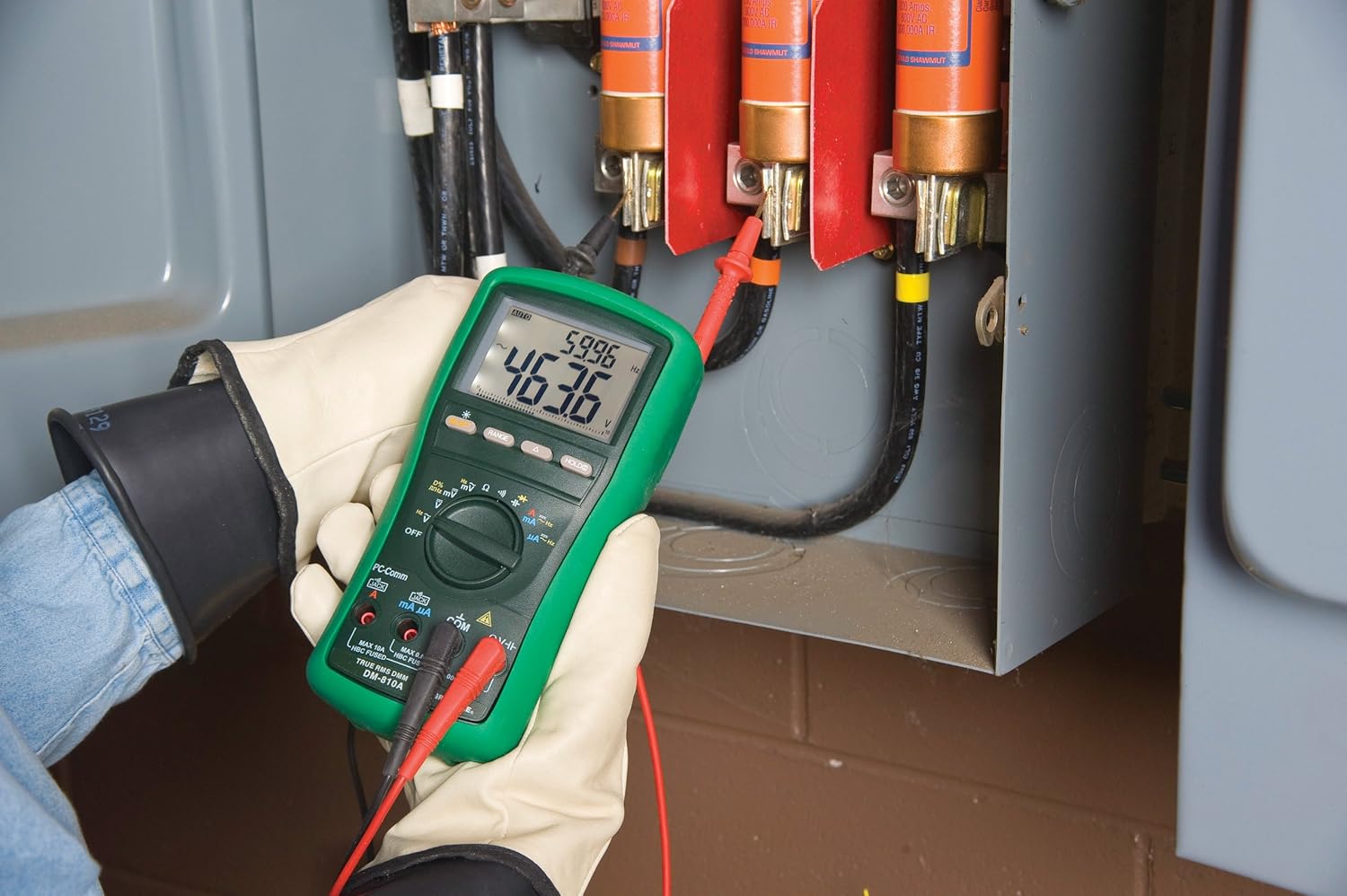
2 paveikslas: The Greenlee DM-810A Digital Multimeter being used to take measurements within an electrical panel, demonstrating practical application.
AC/DC matavimas Voltage
- Set the function selector to V~ (AC Voltage) arba V- (nuolatinė tūriotage). Use the SELECT button to toggle if both are on one position.
- Prijunkite juodą bandymo laidą prie COM ir raudoną bandymo laidą VΩHz.
- Prijunkite bandymo zondus lygiagrečiai per išmatuotą grandinę arba komponentą.
- Perskaitykite ttage reikšmė ekrane.
AC/DC srovės matavimas
Svarbu: Srovės matavimams matuoklis turi būti nuosekliai prijungtas prie grandinės. Prieš prijungdami matuoklį, įsitikinkite, kad grandinėje nėra įtampos.
- Išjunkite grandinę.
- Set the function selector to A~ (AC Current) or A- (DC Current), or mA~ / mA-.
- Prijunkite juodą bandymo laidą prie COM. Connect the red test lead to Maμa. for small currents or A for larger currents (up to 10A). The Beep-Jack warning will activate if leads are in the wrong jacks for the selected function.
- Open the circuit where the current is to be measured and connect the meter in series.
- Vėl įjunkite grandinę ir nuskaitykite srovės vertę.
- De-energize the circuit before disconnecting the meter.
Measuring Resistance (Ω)
- De-energize the circuit or component.
- Set the function selector to Ω.
- Prijunkite juodą bandymo laidą prie COM ir raudoną bandymo laidą VΩHz.
- Prijunkite bandymo zondus prie komponento.
- Nuskaitykite varžos vertę.
Measuring Capacitance (CAP)
- Prieš matavimą įsitikinkite, kad kondensatorius yra visiškai išsikrovęs.
- Set the function selector to CAP.
- Prijunkite juodą bandymo laidą prie COM ir raudoną bandymo laidą VΩHz.
- Prijunkite bandymo zondus prie kondensatoriaus gnybtų.
- Nuskaitykite talpos vertę.
Measuring Frequency (Hz)
- Set the function selector to Hz.
- Prijunkite juodą bandymo laidą prie COM ir raudoną bandymo laidą VΩHz.
- Prijunkite bandymo zondus prie signalo šaltinio.
- Nuskaitykite dažnio reikšmę.
Tęstinumo testas
- De-energize the circuit or component.
- Set the function selector to the continuity symbol (often shared with diode test, use SELECT to toggle).
- Prijunkite juodą bandymo laidą prie COM ir raudoną bandymo laidą VΩHz.
- Prijunkite bandymo zondus prie grandinės kelio arba komponento.
- An audible beep indicates continuity (low resistance). The display will show the resistance value.
Priežiūra
Valymas
Nuvalykite skaitiklį reklamaamp šluoste ir švelniu plovikliu. Nenaudokite abrazyvinių medžiagų ar tirpiklių. Prieš naudodami įsitikinkite, kad matuoklis yra visiškai sausas.
Baterijos keitimas
When the battery indicator appears on the display, replace the batteries immediately to ensure accurate readings. Follow the battery installation steps outlined in the Setup section.
Saugiklio keitimas
If the current measurement functions cease to work, the internal fuses may need replacement. Refer to the meter's internal diagram (usually accessible by opening the battery compartment or back casing) for fuse specifications and replacement instructions. Always replace fuses with those of the specified type and rating to maintain safety and performance.
Trikčių šalinimas
This section provides solutions for common issues encountered during the operation of your DM-810A multimeter.
| Problema | Galima priežastis | Sprendimas |
|---|---|---|
| Nėra ekrano arba ekranas yra pritemdytas | Išsikrovusios arba išsikrovusios baterijos | Pakeiskite baterijas. |
| Neteisingi rodmenys | Incorrect function/range selected; Damaged test leads; External interference | Verify function and range; Inspect and replace test leads; Move away from strong electromagnetic fields. |
| Srovės matavimas neveikia | Blown fuse; Incorrect lead connection | Check and replace fuses; Ensure leads are in the correct A or mA jacks. |
| Beep-Jack warning active | Test leads connected to incorrect input jacks for the selected function | Adjust test lead connections to match the selected function on the dial. |
| Continuity test not beeping | Open circuit; High resistance | Ensure the circuit is closed; Check for breaks in the circuit or component. |
Techninės specifikacijos
The following table outlines the key technical specifications for the Greenlee DM-810A Digital Multimeter.
| Funkcija | Vertė |
|---|---|
| Prekės ženklas | Greenlee |
| Modelis | DM-810A |
| Matavimo tipas | Tikras RMS skaitmeninis multimetras |
| Maitinimo šaltinis | Maitinamas baterijomis |
| Stilius | Skaitmeninis |
| Prekės svoris | 16 uncijų (1 svaras) |
| Gaminio matmenys (I x P x A) | 10 x 10 x 12 colio |
| Sertifikatai | CE, CSA, UL |
| UPC | 783310087434 |
Garantija ir palaikymas
Informacija apie garantiją
The Greenlee DM-810A Digital Multimeter comes with a 1 metų gamintojo garantijaŠi garantija taikoma medžiagų ir gamybos defektams, atsiradusiems įprasto naudojimo sąlygomis. Išsaugokite pirkimo įrodymą, jei galėtumėte pateikti pretenzijas dėl garantijos.
Pagalba klientams
For technical assistance, warranty service, or to inquire about replacement parts, please contact Greenlee customer support. Refer to the official Greenlee webNaujausią kontaktinę informaciją rasite svetainėje arba produkto pakuotėje.


