Įvadas
This manual provides comprehensive instructions for the installation, operation, and maintenance of your Aiphone 2-Call DA Series Door Station, model DA-2DS. Please read this manual thoroughly before attempting to install or operate the unit to ensure correct usage and to prevent damage.
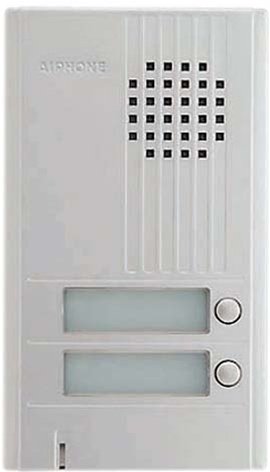
Vaizdas: priekis view of the Aiphone DA-2DS 2-Call Door Station. This silver unit features two call buttons for multi-tenant or multi-location communication.
Saugos informacija
Kad išvengtumėte sužalojimų ir įrangos sugadinimo, laikykitės šių saugos priemonių:
- Prieš atlikdami bet kokius laidų prijungimo ar techninės priežiūros darbus, visada atjunkite maitinimą.
- Ensure all wiring is compliant with local electrical codes and regulations.
- Nelaikykite įrenginio per didelėje drėgmėje ar ekstremalioje temperatūroje.
- Naudokite tik nurodytus maitinimo šaltinius ir priedus.
- Montavimą turėtų atlikti kvalifikuotas personalas.
Pakuotės turinys
Patikrinkite, ar pakuotėje yra visi reikalingi daiktai:
- Aiphone DA-2DS Door Station Unit
- Montavimo varžtai ir inkarai
- Instrukcijų vadovas (šis dokumentas)
Sąranka
Montavimas
Select a suitable mounting location, typically near the entrance, at a height that allows easy access for all users. Ensure the surface is flat and secure. Use the provided mounting screws and anchors to firmly attach the door station to the wall.
Laidai
Connect the door station to the indoor master station using appropriate wiring. The DA-2DS requires a 2-wire connection for each call button to the corresponding indoor station. Refer to the wiring diagram provided with your indoor master station for specific connection points. Ensure all connections are secure and insulated.
Pradinis įjungimas
After all wiring is complete and verified, apply power to the system. Test each call button to ensure proper communication with the indoor stations.
Naudojimo instrukcijos
Skambinimas
To initiate a call from the door station, press the desired call button. This will activate the corresponding indoor master station, which will then ring to alert the occupant.
Atsiliepimas į skambutį
When a call is initiated from the door station, the indoor master station will ring. The occupant can answer the call by pressing the talk button on the indoor station. Two-way communication will then be established.
Priežiūra
Valymas
Clean the exterior of the door station periodically with a soft, damp cloth. Do not use abrasive cleaners, solvents, or strong chemicals, as these can damage the finish and internal components.
Reguliarūs patikrinimai
Periodically check the mounting screws for tightness and ensure all wiring connections remain secure. Test the call buttons and communication functionality regularly to ensure proper operation.
Trikčių šalinimas
| Problema | Galima priežastis | Sprendimas |
|---|---|---|
| No sound from door station | Loose wiring connection; faulty speaker/microphone | Check wiring connections at both door and master stations. If problem persists, contact support. |
| Call button does not activate indoor station | Incorrect wiring; faulty button | Verify wiring connections for the specific call button. Test button functionality. |
| Trikdžiai arba prasta garso kokybė | Improper wiring; electrical interference | Ensure wiring is correctly installed and shielded if necessary. Check for nearby sources of electrical interference. |
Specifikacijos
- Modelis: DA-2DS
- Gamintojas: Aiphone
- Dalies numeris: DA-2DS
- Prekės svoris: 3 svaro
- Spalva: Sidabras
- Prekės pakuotės kiekis: 1
- Įtrauktos baterijos: Nr
- Pirmą kartą pasiekiama data: 8 m. gegužės 2008 d
Informacija apie garantiją
Aiphone products are designed for reliability and performance. This product is covered by a limited warranty against defects in materials and workmanship. For specific warranty terms and conditions, please refer to the warranty card included with your purchase or visit the official Aiphone websvetainėje. Išsaugokite pirkimo įrodymą garantiniams reikalavimams.
Palaikymas
For technical assistance, troubleshooting, or service inquiries, please contact Aiphone customer support. You can find contact information, including phone numbers and online resources, on the official Aiphone website. When contacting support, please have your model number (DA-2DS) and a description of the issue ready.


