
1. Įvadas
The BUFFALO Giga Switching Hub LSW3-GT-24NSR is a 24-port Gigabit Ethernet switch designed for high-speed network environments. It is ideal for small to medium-sized offices and workplaces requiring robust and reliable network connectivity. This device supports full Gigabit speeds across all ports, ensuring efficient data transfer.
Key features include a fanless design for silent operation and enhanced reliability, as well as a loop detection function to prevent network disruptions caused by accidental network loops.
2. Saugos informacija
Please read and understand the following safety precautions before using the device to prevent injury or damage.
- Maitinimas: Naudokite tik pateiktą maitinimo adapterį. Įsitikinkite, kad maitinimo lizdas atitinka nurodytą įtampą.tage reikalavimus.
- Vėdinimas: Neužblokuokite ventiliacijos angų. Užtikrinkite pakankamą oro cirkuliaciją aplink įrenginį, kad jis neperkaistų.
- Aplinka: Avoid exposing the device to water, high humidity, extreme temperatures, or direct sunlight.
- Tvarkymas: Do not drop or subject the device to strong impacts. Do not attempt to open or repair the device yourself. Refer all servicing to qualified personnel.
- Kabeliai: Ensure all network cables are properly connected and secured.
3. Pakuotės turinys
Patikrinkite, ar pakuotėje yra visi reikalingi daiktai:
- BUFFALO Giga Switching Hub LSW3-GT-24NSR Unit
- Maitinimo kabelis
- Rack Mount Brackets (if included with your model)
- Guminės kojelės (skirtos pastatyti ant stalo)
4. Sąranka
4.1 Fizinis įrengimas
The LSW3-GT-24NSR can be installed on a desktop or mounted in a 19-inch equipment rack.
Vieta darbalaukyje:
- Attach the included rubber feet to the bottom of the unit to prevent slipping and provide stability.
- Pastatykite įrenginį ant lygaus, stabilaus paviršiaus su tinkama ventiliacija.
Stovo montavimas:
- Attach the rack mount brackets to the sides of the unit using the provided screws.
- Secure the unit into a standard 19-inch equipment rack using appropriate rack screws (not included).
4.2 Tinklo kabelių prijungimas
Connect your network devices (computers, servers, other switches) to any of the 24 RJ-45 ports on the front panel using standard Ethernet cables (Category 5e or higher recommended for Gigabit speeds).

1 pav.: Priekinis skydelisview with 24 Ethernet Ports and Status LEDs.
4.3 Maitinimo prijungimas
- Connect the power cable to the AC IN port on the rear of the device.
- Kitą maitinimo laido galą įkiškite į tinkamą maitinimo lizdą.
- The device will power on automatically. The POWER LED on the front panel should illuminate.

2 pav.: Galinio skydelio viršusview with AC IN Power Port.
5. Naudojimo instrukcijos
5.1 LED indikatoriai
The front panel features several LED indicators to monitor the status of the switch and its ports.
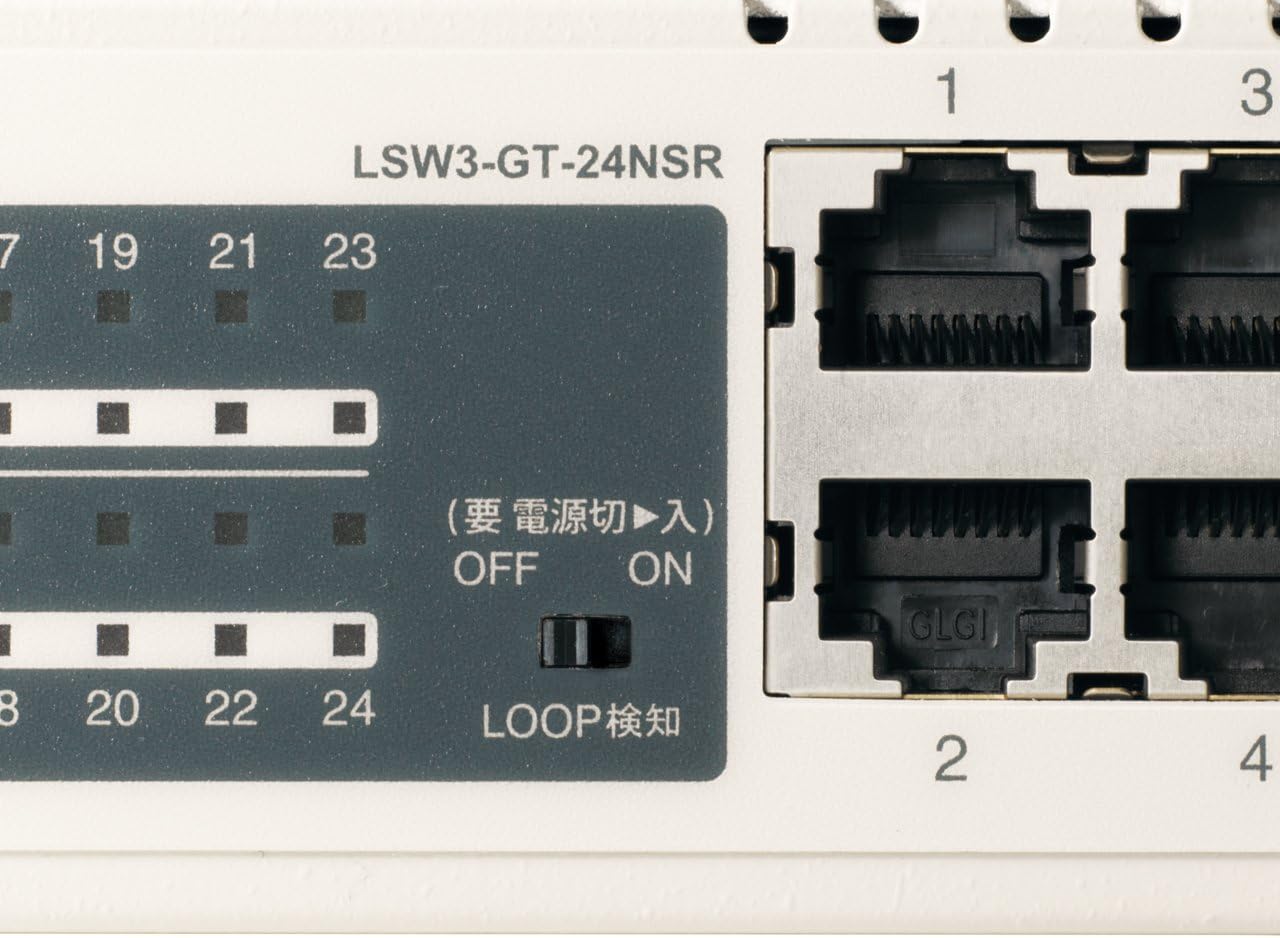
3 pav. Išsamus view of LED Indicators and Loop Detection Switch.
| LED pavadinimas | Būsena | Aprašymas |
|---|---|---|
| GALIA | On | Įrenginys įjungtas. |
| NUORODA / AKTAS (už uostą) | On | A network device is connected and a link is established. |
| Mirksi | Duomenys perduodami arba gaunami per prievadą. | |
| 1000/100/10 mln (už uostą) | Žalia | Port is operating at 1000 Mbps (Gigabit Ethernet). |
| Oranžinė | Port is operating at 100 Mbps (Fast Ethernet). | |
| Išjungta | Port is operating at 10 Mbps (Ethernet). | |
| LOOP DETECT | On | A network loop has been detected. |
5.2 Loop Detection Function
The LSW3-GT-24NSR features a hardware switch for enabling or disabling the loop detection function. This function helps prevent network instability caused by accidental network loops.
Figure 4: Loop Detection Switch (ON/OFF).
- ĮJUNGTA: Loop detection is active. If a loop is detected, the corresponding port will be automatically shut down to prevent network broadcast storms, and the LOOP DETECT LED will illuminate.
- IŠJUNGTA: Loop detection is disabled.
It is recommended to keep the loop detection function ON for network stability.
6. Priežiūra
6.1 Prietaiso valymas
To maintain optimal performance, periodically clean the exterior of the switch.
- Prieš valydami atjunkite maitinimo laidą.
- Paviršių nuvalykite minkšta, sausa šluoste.
- Do not use liquid cleaners, aerosols, or solvents, as these may damage the casing arba vidiniai komponentai.
6.2 Aplinkosaugos aspektai
Ensure the device is operated within its specified environmental conditions:
- Temperatūra: nuo 0°C iki 40°C (32°F iki 104°F)
- Drėgmė: nuo 10% iki 85% (nekondensuojantis)
7. Problemų sprendimas
If you encounter issues with your BUFFALO Giga Switching Hub, refer to the following common problems and solutions.
7.1 Nėra galios
- Simptomai: POWER LED nedega.
- Sprendimas: Check if the power cable is securely connected to both the device and the power outlet. Ensure the power outlet is functional.
7.2 No Link or Slow Speed on a Port
- Simptomai: The LINK/ACT LED for a connected port is off, or the 1000/100/10M LED indicates a lower speed than expected (e.g., 100M instead of 1000M).
- Sprendimas:
- Patikrinkite, ar Ethernet kabelis tvirtai prijungtas abiejuose galuose.
- Try a different Ethernet cable. Ensure it is a Category 5e or higher cable for Gigabit speeds.
- Prijunkite įrenginį prie kito komutatoriaus prievado.
- Check the network adapter settings on the connected device (computer, server) to ensure it is configured for auto-negotiation or the correct speed.
7.3 Network Instability / LOOP DETECT LED is On
- Simptomai: The LOOP DETECT LED is illuminated, and network performance is degraded or unstable.
- Sprendimas:
- A network loop has been detected. This typically occurs when two ports on the same switch (or different switches) are connected to each other, creating an infinite data path.
- Carefully inspect your network cabling to identify and remove any redundant connections that form a loop.
- If the loop detection switch is ON, the affected port will be automatically shut down. Once the loop is resolved, the port should resume normal operation.
8. Specifikacijos
| Funkcija | Aprašymas |
|---|---|
| Prekės ženklas | BUFALAS |
| Modelio numeris | LSW3-GT-24NSR |
| Uosto skaičius | 24 x 10/100/1000BASE-T RJ-45 prievadai |
| Perjungimo talpa | 48 Gbps (Non-blocking) |
| Persiuntimo norma | 35.7 Mps |
| MAC adresų lentelės dydis | 8K įrašai |
| Jumbo Frame palaikymas | Iki 9 KB |
| Savybės | Auto-MDI/MDIX, Auto-Negotiation, Loop Detection Function, Fanless Design |
| Maitinimo šaltinis | Vidinis kintamosios srovės maitinimo šaltinis |
| Matmenys (P x G x A) | (Specific dimensions not provided in source, typical for 1U rackmount) |
| Svoris | (Specific weight not provided in source) |
| Darbinė temperatūra | 0°C iki 40°C |
| Darbinė drėgmė | nuo 10% iki 85% (nekondensuojantis) |
9. Garantija ir palaikymas
This BUFFALO product is covered by a manufacturer's warranty. Please refer to the warranty card included with your product or visit the official BUFFALO websvetainėje, kurioje pateikiamos išsamios garantijos sąlygos.
For technical support, product registration, or further assistance, please visit the official BUFFALO support websvetainėje arba susisiekite su jų klientų aptarnavimo skyriumi. Kontaktinę informaciją paprastai galite rasti gamintojo websvetainėje arba produkto pakuotėje.