1. Įvadas
This manual provides comprehensive instructions for the installation, operation, and maintenance of your Jensen AWM965 AM/FM|CD|DVD|MP3/USB Wallmount Stereo. The AWM965 is a versatile 12-volt unit designed for wall mounting, featuring an AM/FM electronic tuner, CD and DVD player, and a front USB input for MP3, WMA, and JPEG file playback. It also includes three stereo high-level speaker output zones and a remote control for convenient operation.

1.1 pav.: priekis view of the Jensen AWM965 Wallmount Stereo, showing the display, control knobs, and various buttons.
2. Saugos informacija
Please read all safety instructions carefully before operating the unit. Failure to follow these instructions may result in injury or damage to the unit. Keep this manual for future reference.
- Maitinimas: This unit operates on a 12V DC negative ground power supply. Ensure correct voltage and polarity during installation.
- Montavimas: Professional installation is recommended. Ensure all wiring is secure and properly insulated to prevent short circuits.
- Drėgmė: Saugokite įrenginį nuo lietaus ar drėgmės, kad išvengtumėte gaisro ar elektros smūgio.
- Valymas: Valymui naudokite minkštą, sausą šluostę. Venkite abrazyvinių valiklių ar tirpiklių.
- Aptarnavimas: Do not attempt to service this unit yourself. Refer all servicing to qualified personnel.
3. Pakavimo sąrašas
Prieš tęsdami montavimą, patikrinkite, ar pakuotėje yra visi reikalingi daiktai.
- Jensen AWM965 Wallmount Stereo Unit
- Nuotolinio valdymo pultas su baterija
- 20-Pin Power/A/B Speaker Mating Pigtail
- Aux Audio/Video Cable
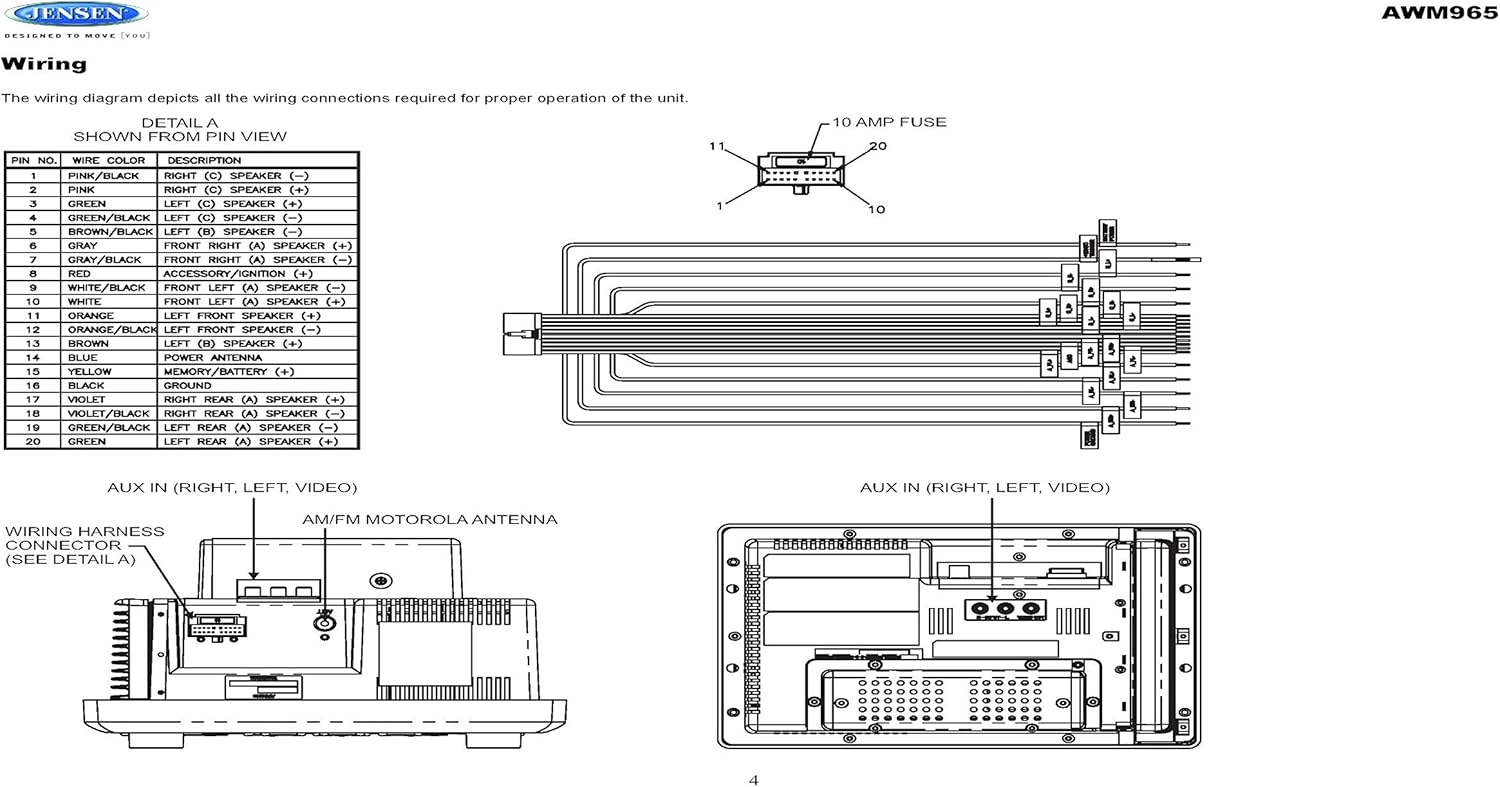
Figure 3.1: Diagram illustrating the components included in the Jensen AWM965 package, including the main unit, remote control, wiring harness, and auxiliary cables.

Figure 3.2: Image showing the included remote control, 20-pin wiring harness, and auxiliary audio/video cable.
4. Sąranka
4.1 Montavimo vietos pasirinkimas
It is important to select an appropriate mounting location for the AWM965 to ensure optimal performance and longevity. Consider the following:
- Avoid places exposed to heat-radiating appliances such as electric heaters.
- Do not mount adjacent to other equipment that radiates significant heat.
- Ensure the location is well-ventilated and not dusty.
- Venkite drėgnų ar drėgnų vietų.
4.2 Preparing the Opening
Use the provided mounting hole diagram to measure and cut an opening in the mounting surface. After cutting, mount the unit using four M3x20mm screws.
4.3 Radijo montavimas
Route the power, speaker, and antenna cables through the hole. Connect them to the unit as outlined in the wiring diagram. After ensuring correct connections, perform a test operation.
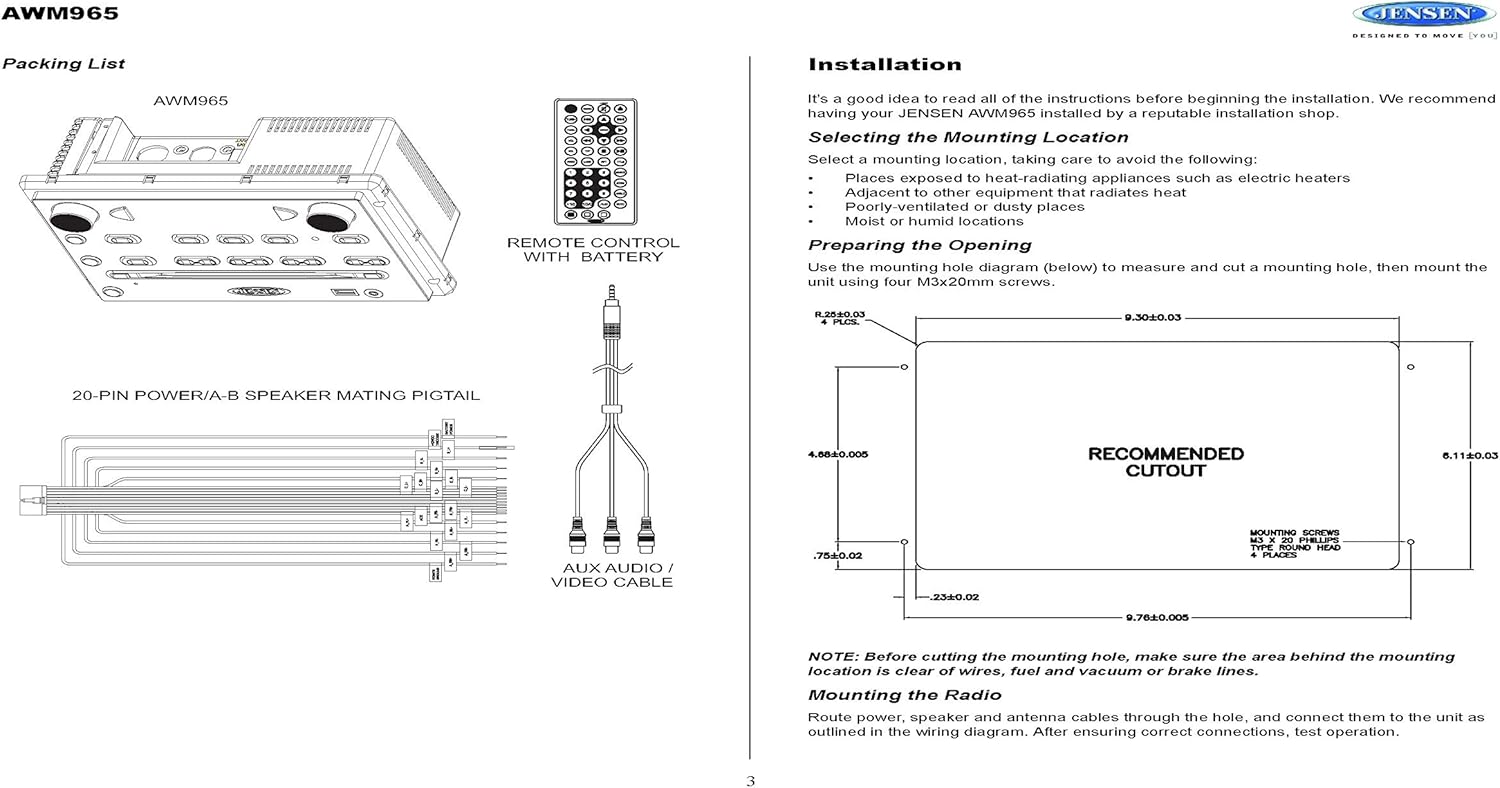
Figure 4.1: Detailed diagram showing the product dimensions (10.43"W x 7.01"H x 5"D) and the recommended cutout dimensions for installation (9.30"W x 6.11"H).
4.4 Laidai
The wiring diagram below depicts all the connections required for proper operation of the unit. Ensure all connections are secure and correctly matched to prevent damage.
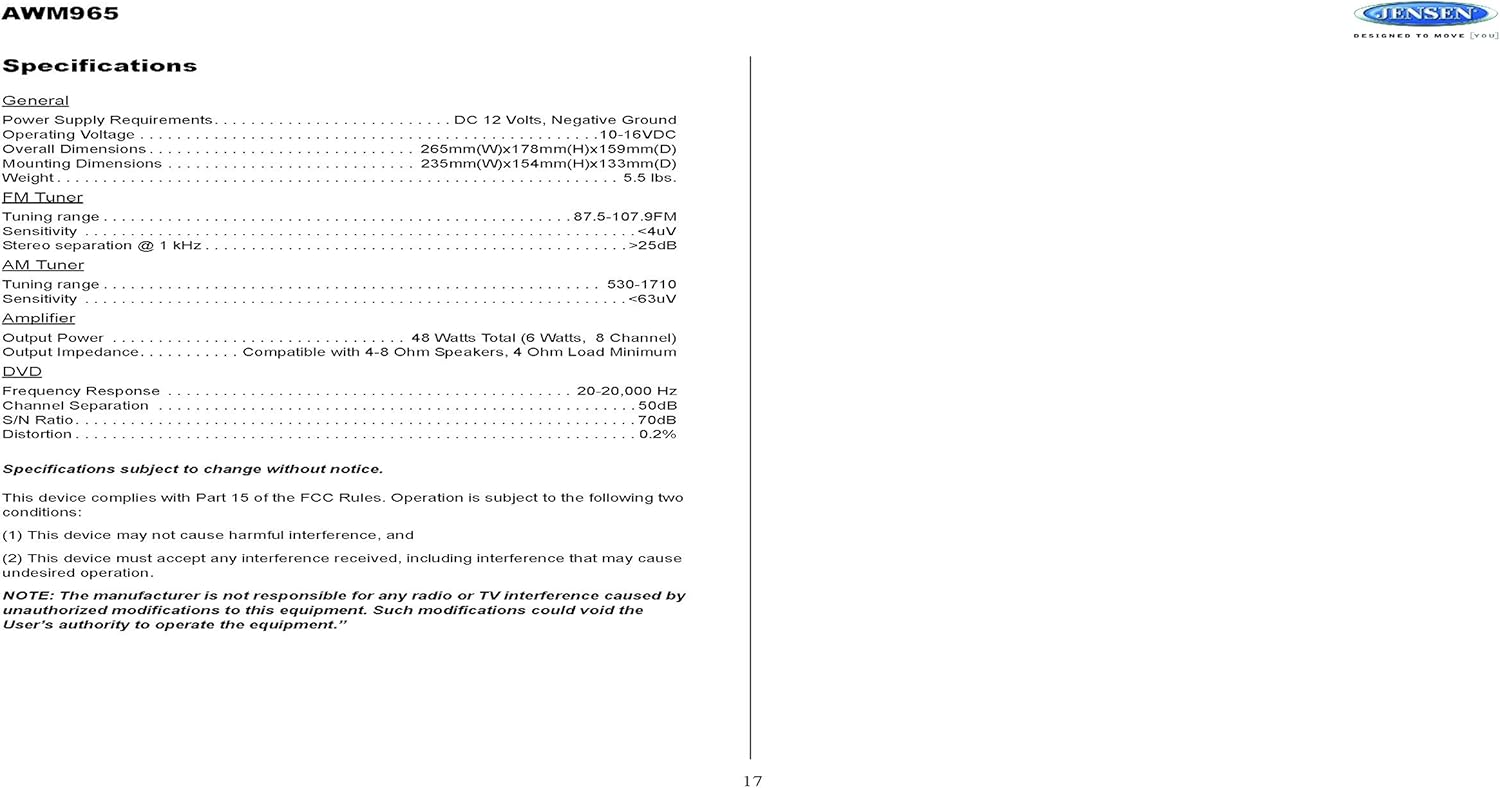
Figure 4.2: Detailed wiring diagram for the Jensen AWM965, showing the 20-pin connector pin assignments for power, ground, accessory, antenna, and speaker outputs (Right/Left, Front/Rear, A/B/C zones).
Wiring Harness Pin Details:
| Smeigtukas Nr. | Vielos spalva | Aprašymas |
|---|---|---|
| 1 | ROŽINĖ / JUODA | DEŠINIS (C) GALKARIAUSIS (-) |
| 2 | ROŽINĖ | DEŠINIS (C) GALKARIAUSIS (+) |
| 3 | ŽALIA | KAIRIS (C) GALBAKARIUS (+) |
| 4 | ŽALIA / JUODA | KAIRIS (C) GALKARIAUSIS (-) |
| 5 | RUDA / JUODA | KAIRIS (B) GALBIAKARIS (-) |
| 6 | RUDA | KAIRIS (B) GALARAKIASIS (+) |
| 7 | PILKA / JUODA | PRIEKINIS DEŠINIS (A) GARSIAKARBIKAS (-) |
| 8 | RAUDONA | ACCESSORY / IGNITION (+) |
| 9 | BALTA JUODA | PRIEKINIS KAIRIS (A) GARSIAKARBIKAS (-) |
| 10 | BALTAS | PRIEKINIS KAIRINIS (A) GALBARIASIS (+) |
| 11 | ORANŽINĖ | KAIRINIS PRIEKINIS GALBARIAUKIS (+) |
| 12 | ORANŽINĖ / JUODA | KAIRIS PRIEKINIS GALBIAUSIASIS (-) |
| 13 | RUDA | DEŠINIS (B) GALKARIAUSIS (+) |
| 14 | MĖLYNA | MAITINIMO ANTENA |
| 15 | GELTONA | MEMORY / BATTERY (+) |
| 16 | JUODAS | ŽEMĖ |
| 17 | VIOLETĖ | DEŠINIS GALINĖS (A) GARSIAKARIASIS (+) |
| 18 | VIOLET / BLACK | DEŠINIS GALINĖS (A) GARSIAKARIASIS (-) |
| 19 | ŽALIA / JUODA | KAIRIS GALINĖS (A) GARSIAKARIASIS (-) |
| 20 | ŽALIA | KAIRIS GALINIS (A) GARSIAKARIASIS (+) |
5. Naudojimo instrukcijos
5.1 Priekinio skydelio valdikliai
Familiarize yourself with the controls on the front panel for easy operation.

5.1 pav. Iš arti view of the Jensen AWM965 front panel, highlighting the display, volume knob, power button, tuning/track buttons, and various function buttons for AUX, AS/PS, speaker zones, and media playback.
- VOL (garsumo) rankenėlė: Rotate to adjust volume. Push to access audio menu.
- Įjungimo mygtukas: Paspauskite norėdami įjungti arba išjungti įrenginį.
- T/F CLOCK Button: Press to display or set the clock.
- TUN/TRK (Tune/Track) Buttons: Use for tuning radio stations or navigating tracks on media.
- AUX mygtukas: Pasirenka pagalbinį įvesties šaltinį.
- AS/PS (automatinio išsaugojimo/išankstinių nustatymų nuskaitymo) mygtukas: Automatically stores strong radio stations or scans through presets.
- A, B, C (Speaker Zone) Buttons: Activates or deactivates speaker output zones.
- Įvesties mygtukas: Patvirtina pasirinkimus.
- LOUD mygtukas: Įjungia / išjungia garsumo kompensavimą.
- MUTE mygtukas: Mutes/unmutes audio output.
- 1–6 mygtukai: Radio station presets, track functions (RPT, RDM, G.LANG).
- ALARM SET / ON/OFF Buttons: Sets and activates/deactivates the alarm clock.
- DVD MENU Button: Accesses the DVD menu.
- Disc Eject Button: Ejects a loaded disc.
- USB prievadas: Connect USB devices for media playback and charging.
5.2 Pagrindinės operacijos
- Maitinimo įjungimas/išjungimas: Paspauskite GALIA mygtuką.
- Garso reguliavimas: Pasukite VOL rankenėlė.
- Šaltinio pasirinkimas: Paspauskite REŽIMAS button (if available, or cycle through sources using a dedicated button or menu).
5.3 Radijo veikimas (AM/FM)
- Tiuningas: Paspauskite TUN/TRK buttons to manually tune or hold to seek.
- Iš anksto nustatytos stotys: Press and hold a numbered button (1-6) to store the current station. Press briefly to recall.
- Auto Store / Preset Scan: Naudokite AS/PS button for automatic station management.
5.4 CD/DVD/MP3/USB Playback
- Įkeliami diskai: Insert a disc into the slot with the label side up. The unit will automatically begin playback.
- USB atkūrimas: Insert a compatible USB flash drive into the front USB port. The unit supports MP3, WMA, and JPEG formats.
- Atkūrimo valdikliai: Naudokite TUN/TRK buttons for track navigation (skip forward/backward). Use numbered buttons for repeat (RPT) or random (RDM) playback.
- DVD meniu: Paspauskite DVD MENIU button to access the disc's menu.
- USB įkrovimas: The front USB port supports charging of iPod and other USB-based devices.
5.5 Clock and Alarm Features
- Laikrodžio nustatymas: Paspauskite ir palaikykite T/F CLOCK button to enter clock setting mode. Use the TUN/TRK mygtukai valandoms ir minutėms reguliuoti, ir ENTER patvirtinti.
- Žadintuvas: Naudokite ALARM SET button to configure the alarm time and the ĮJUNGTA/IŠJUNGTA button to activate or deactivate it.
- Miego laikmatis: Refer to the full manual for detailed instructions on setting the sleep timer.
5.6 Pagalbinė įvestis
Connect external audio/video devices to the front 3.5mm line-level input using the provided Aux Audio/Video Cable. Press the AUX mygtuką, kad pasirinktumėte šį šaltinį.
5.7 Nuotolinis valdymas
The included wireless remote control provides convenient access to most functions. Ensure the battery is correctly installed.
Figure 5.2: Image of the Jensen AWM965 remote control, showing buttons for power, menu, tune, volume, enter, source, program, language, repeat, title, zoom, angle, and numeric keypad.
6. Priežiūra
6.1 Įrenginio valymas
Wipe the front panel and cabinet with a soft, dry cloth. For stubborn stains, dampen the cloth lightly with water. Never use harsh chemicals, abrasive cleaners, or solvents as they may damage the finish.
6.2 Diskų priežiūra
Diskus imkite už kraštų, kad išvengtumėte pirštų atspaudų. Laikykite diskus švarius ir nesubraižytus. Kai nenaudojate, laikykite diskus jų dėkluose.
7. Problemų sprendimas
If you experience problems with your AWM965, consult the following common issues and solutions before contacting support.
- Nėra galios: Check the 12V DC power connection and ensure the unit's fuse (10 AMP) is not blown. Verify proper grounding.
- Nėra garso: Check speaker connections and ensure speaker zones (A, B, C) are activated. Verify volume level and mute status.
- Disc Error: Ensure the disc is clean, free of scratches, and inserted correctly. Try a different disc.
- Prastas radijo ryšys: Check the antenna connection. Ensure the antenna is fully extended and positioned for best reception.
- USB įrenginys neatpažintas: Ensure the USB device is formatted correctly and contains compatible files (MP3, WMA, JPEG). Try a different USB device.
8. Specifikacijos
Detailed technical specifications for the Jensen AWM965 unit.
| Kategorija | Specifikacija |
|---|---|
| Maitinimo šaltinis | 12V DC, neigiamas įžeminimas |
| Veiklos ttage | 10-16VDC |
| Bendri matmenys | 265mm(W) x 178mm(H) x 159mm(D) / 10.4"W x 7"H x 5"D |
| Montavimo matmenys | 235mm(W) x 154mm(H) x 133mm(D) / 9.25"W x 6.06"H x 5.25"D |
| Svoris | 0.9 svarai (apytiksliai) |
| FM derinimo diapazonas | 87.5-107.9MHz |
| FM jautrumas | <4uV |
| FM Stereo Separation @ 1 kHz | >25dB |
| AM derinimo diapazonas | 530-1710kHz |
| AM jautrumas | <63uV |
| Ampgyvybingesnė išėjimo galia | 48 Watts Total (8 Channel) |
| Išėjimo varža | Compatible with 4-8 Ohm Speakers |
| DVD Frequency Response | 20-20,000 Hz |
| DVD Channel Separation | 50 dB |
| DVD S/N Ratio | 70 dB |
| DVD Distortion | 0.2 % |
| Suderinami diskų formatai | CD, CD-R, CD-RW, MP3, DVD, DVD+/-RW |
| Ypatingos savybės | Adjustable LCD Dimmer, Front USB (MP3/WMA/JPEG, Charging), Front 3.5mm Line-Level Video/Audio Input, 1 Composite Video Out, 1 Stereo Audio Input |
Specifikacijos gali būti keičiamos be įspėjimo.
8.1 FCC atitiktis
Šis įrenginys atitinka FCC taisyklių 15 dalį. Eksploatacijai taikomos dvi sąlygos:
- Šis prietaisas negali sukelti žalingų trukdžių.
- Šis įrenginys turi priimti bet kokius gaunamus trikdžius, įskaitant trikdžius, kurie gali sukelti nepageidaujamą veikimą.
NOTE: The manufacturer is not responsible for any radio or TV interference caused by unauthorized modifications to this equipment. Such modifications could void the user's authority to operate the equipment.
9. Informacija apie garantiją
Jensen products are designed and manufactured to the highest quality standards. This product is covered by a limited warranty against defects in materials and workmanship. The specific terms and duration of the warranty are typically provided with the product packaging or can be found on the manufacturer's official websvetainėje. Prašome išsaugoti pirkimo įrodymą garantiniams reikalavimams.
10. Parama
If you require further assistance or encounter issues not covered in this manual, please contact Jensen customer support. You can typically find contact information (phone number, email, or support portal) on the official Jensen websvetainėje arba produkto pakuotėje.
When contacting support, please have your product model number (AWM965) and a detailed description of the issue ready.


