Įvadas
The Cellularline Roller Clip Bluetooth Headset is designed for convenient, hands-free communication. Featuring a retractable cable and a wireless Bluetooth clip, this headset offers flexibility and ease of use. It supports simultaneous connection to two mobile phones, automatically activating when a call is received or made on either device. Its automatic cable winder ensures a tidy experience, making it ideal for users who prefer to wear the headset only during calls.
Produktas baigtasview
Familiarize yourself with the components and features of your Cellularline Roller Clip Bluetooth Headset.

1 paveikslas: Priekyje view of the Cellularline Roller Clip Bluetooth Headset, showing the main unit with the retractable earbud.
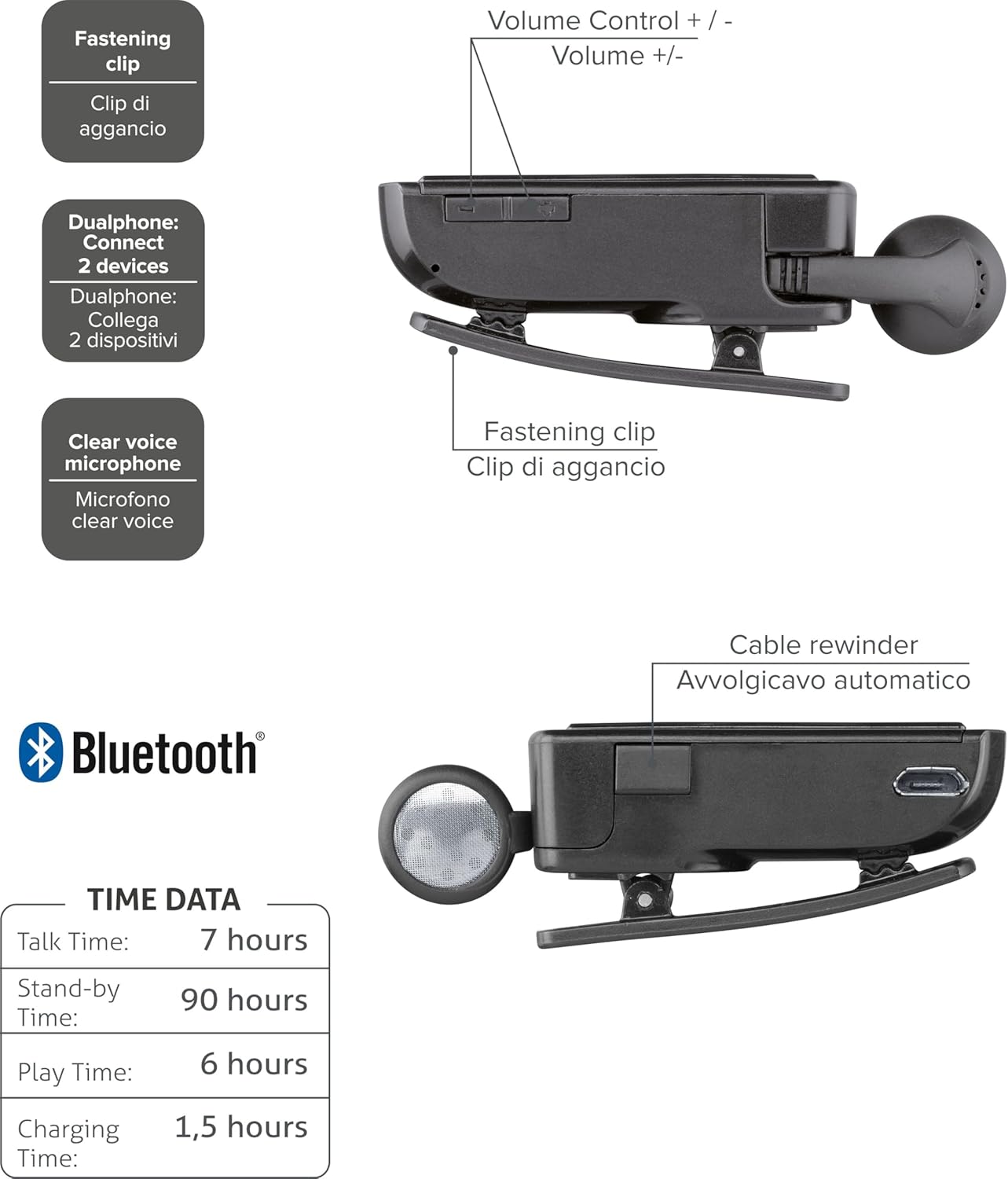
2 paveikslas: Diagram illustrating key features including the fastening clip, volume controls, dualphone connectivity, clear voice microphone, and cable rewinder.
- Retractable Earbud: The earbud cable automatically retracts into the main unit for compact storage.
- Bluetooth Clip: The main unit features a clip for attaching to clothing.
- Garsumo valdikliai: Buttons located on the side for adjusting audio volume.
- Kelių taškų jungtis: Prisijungia prie dviejų mobiliųjų telefonų vienu metu.
- Clear Voice Microphone: Ensures clear audio transmission during calls.
- Mikro-USB prievadas: Prietaiso įkrovimui.
Sąranka
1. Ausinių įkrovimas
Before first use, fully charge the headset. Use the provided Micro-USB cable to connect the headset to a USB power source (e.g., computer USB port or wall adapter).
- Įkrovimo metu užsidegs įkrovimo indikatoriaus lemputė.
- Pilnas įkrovimas paprastai trunka maždaug 1.5 valandas.
- Kai įkrovimas bus baigtas, indikatoriaus lemputė pasikeis arba užges.

3 paveikslas: Šoninė view of the headset showing the Micro-USB charging port.
2. Susiejimas su mobiliuoju įrenginiu
To use the headset, it must be paired with your Bluetooth-enabled mobile phone or device.
- Įsitikinkite, kad ausinės išjungtos.
- Press and hold the Multi-function button (usually the main power button) until the indicator light flashes blue and red alternately, indicating pairing mode.
- Mobiliajame įrenginyje įjunkite „Bluetooth“ ir ieškokite naujų įrenginių.
- Select "Cellularline Roller Clip" or a similar name from the list of available devices.
- Jei jūsų paprašys slaptažodžio, įveskite „0000“ (keturis nulius).
- Once paired, the indicator light will typically flash blue slowly, and you may hear a confirmation tone.
3. Connecting to Two Devices (Multi-point)
The headset can be connected to two mobile phones simultaneously.
- Pair the headset with the first mobile device as described above.
- Išjunkite „Bluetooth“ pirmame įrenginyje.
- Put the headset back into pairing mode and pair it with the second mobile device.
- Once paired with the second device, re-enable Bluetooth on the first device.
- The headset should now be connected to both devices. It will automatically switch to the active call on either phone.
Naudojimo instrukcijos
Maitinimo įjungimas/išjungimas
- Maitinimas: Press and hold the Multi-function button for approximately 3 seconds until the blue indicator light flashes.
- Išjungti: Press and hold the Multi-function button for approximately 3 seconds until the red indicator light flashes and then turns off.
Skambinimas ir skambučių priėmimas
- Atsiliepti į skambutį: Kai skambinate, vieną kartą paspauskite daugiafunkcį mygtuką.
- Baigti skambutį: Skambučio metu vieną kartą paspauskite daugiafunkcį mygtuką.
- Atmesti skambutį: Kai skambinate, maždaug 2 sekundes palaikykite nuspaudę daugiafunkcį mygtuką.
- Perrink paskutinį numerį: Double-press the Multi-function button when the headset is idle.
- Voice Dialing (if supported by phone): Press and hold the Multi-function button for approximately 1 second when the headset is idle.
Garsumo valdymas
Adjust the call or media volume using the dedicated volume buttons on the side of the headset.

4 paveikslas: Šoninė view of the headset showing the volume control buttons.
- Pagarsink: Paspauskite mygtuką „+“.
- Patildyti: Paspauskite mygtuką „-“.
Ištraukiamas kabelis
To extend the earbud, gently pull it out. To retract, press the cable winder button (if present) or gently pull the cable slightly further and release to activate the retraction mechanism.
Priežiūra
- Valymas: Ausines valykite minkštu, sausu skudurėliu. Nenaudokite abrazyvinių valiklių ar tirpiklių.
- Saugykla: Laikykite ausines vėsioje, sausoje vietoje, toliau nuo tiesioginių saulės spindulių ir ekstremalių temperatūrų.
- Akumuliatoriaus priežiūra: Norėdami pailginti baterijos veikimo laiką, venkite dažnai visiškai ją iškrauti. Reguliariai įkraukite ausines, net jei jų nenaudojate ilgą laiką.
- Kabelio priežiūra: Avoid forcefully pulling the retractable cable. Allow the automatic winder to retract the cable smoothly.
Trikčių šalinimas
| Problema | Galima priežastis | Sprendimas |
|---|---|---|
| Ausinės neįsijungia. | Senka baterija. | Visiškai įkraukite ausines. |
| Nepavyksta susieti ausinių. | Ausinės neįjungtos susiejimo režimu; įrenginyje išjungtas „Bluetooth“ ryšys; įrenginys per toli. | Ensure headset is in pairing mode (flashing red/blue). Enable Bluetooth on your device. Move headset closer to the device. |
| Nėra garso arba garso kokybė prasta. | Per mažas garsumas; neprijungtos ausinės; trukdžiai. | Increase volume on both headset and phone. Reconnect the headset. Move away from other electronic devices. |
| Retractable cable not working smoothly. | Mechanizmo užsikimšimas arba pažeidimas. | Ensure no debris is obstructing the cable. Avoid forceful pulling. If damaged, contact support. |
| Cannot connect to two devices. | Incorrect pairing sequence. | Follow the multi-point pairing instructions carefully (pair first, disable Bluetooth, pair second, re-enable first). |
Specifikacijos
| Funkcija | Detalė |
|---|---|
| Modelio numeris | BTCLIPARDP |
| Prekės ženklas | Korinio ryšio linija |
| Spalva | Black/Grey (Schwarz) |
| Ausų išdėstymas | Ausyje |
| Formos faktorius | Ausyje |
| Varža | 32 omų |
| Gaminio matmenys | 9 x 2.4 x 11 cm; 50 g |
| Baterijos tipas | 1 ličio jonų baterija |
| Pokalbių laikas | Iki 7 valandų |
| Budėjimo laikas | Iki 90 valandų |
| Žaidimo laikas | Iki 6 valandų |
| Įkrovimo laikas | Maždaug 1.5 val |
Garantija ir palaikymas
Dėl garantijos informacijos ir techninės pagalbos kreipkitės į oficialią „Cellularline“ svetainę. websvetainėje arba susisiekite tiesiogiai su jų klientų aptarnavimo tarnyba. Išsaugokite pirkimo įrodymą garantiniams reikalavimams.
Dėl papildomos pagalbos galite apsilankyti product page on Amazon.ae.


