1. Įvadas
This manual provides essential information for the proper setup, operation, and maintenance of your Thorens TD-235 Semi-automatic Turntable. Please read these instructions carefully before using your turntable to ensure optimal performance and longevity of the unit.
2. Saugos instrukcijos
- Saugokite įrenginį nuo lietaus ar drėgmės.
- Neatidarykite korpuso. Visus techninės priežiūros darbus patikėkite kvalifikuotiems darbuotojams.
- Ensure the turntable is placed on a stable, level surface away from direct sunlight, heat sources, and excessive vibration.
- Jei įrenginys ilgesnį laiką nebus naudojamas, atjunkite maitinimo laidą nuo sieninio lizdo.
- Handle the stylus with care to prevent damage and ensure proper playback.
3. Pakuotės turinys
Patikrinkite, ar pakuotėje yra visi toliau išvardyti daiktai:
- Thorens TD-235 Turntable Unit
- Apsauga nuo dulkių
- Lėkštė
- Pavarokite diržą
- Veltinis Mat
- Atsvara
- Svoris nuo čiuožimo
- Maitinimo adapteris
- Garso kabelis (RCA)
- AT-95E Cartridge (pre-installed or separate)
- Vartotojo vadovas (šis dokumentas)
4. Sąranka
4.1 Išpakavimas ir įdėjimas
Carefully remove all components from the packaging. Place the turntable on a flat, stable surface. Ensure adequate ventilation around the unit.
4.2 Plokštelės ir diržo montavimas
- Uždėkite lėkštę ant centrinio veleno.
- Locate the drive belt. Carefully stretch the belt around the inner rim of the platter and then around the motor pulley. Ensure the belt is not twisted.
- Padėkite veltinio kilimėlį ant lėkštės viršaus.

Vaizdas: Iš viršaus į apačią view of the Thorens TD-235 turntable with the dust cover closed, illustrating the assembled unit.
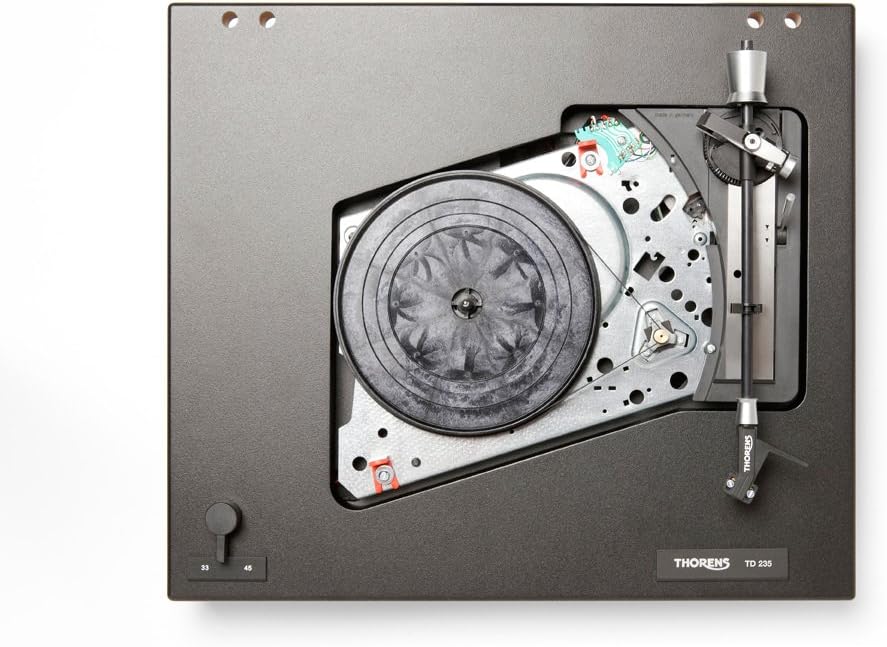
Vaizdas: vidinis view of the Thorens TD-235 turntable with the platter removed, showing the motor and belt drive system for installation reference.
4.3 Cartridge and Tonearm Setup
The TD-235 typically comes with an AT-95E cartridge pre-installed. If not, carefully mount the cartridge to the headshell following the cartridge manufacturer's instructions.
- Atsvaros reguliavimas: Slide the counterweight onto the rear of the tonearm. Adjust it until the tonearm is balanced and floats horizontally. Lock the counterweight in place.
- Tracking Force Setting: Refer to the cartridge specifications (e.g., 2.0 grams for AT-95E). Rotate the numbered ring on the counterweight to the desired tracking force without moving the counterweight itself.
- Anti-skating Adjustment: Attach the anti-skating weight to the small fishing line and loop it over the anti-skating rod. Set the anti-skating force to match the tracking force.

Vaizdas: Išsamus view of the tonearm assembly, highlighting the cartridge, counterweight, and anti-skating system for precise adjustment.
4.4 Dulkių dangtelio montavimas
Insert the hinges of the dust cover into the receptacles at the rear of the turntable plinth.
4.5 Garso ir maitinimo jungtys
- Connect the integrated RCA audio cables from the turntable to the PHONO input of your amplifier or receiver. Ensure the ground wire is connected to the ground terminal on your ampgyvesnis.
- Prijunkite maitinimo adapterį prie patefono nuolatinės srovės įvesties, tada įjunkite jį į sieninį lizdą.
5. Naudojimo instrukcijos
5.1 Įjungimas / išjungimas
The turntable powers on automatically when the tonearm is moved over the platter and powers off when the tonearm returns to its rest or after the record finishes playing.
5.2 Greičio pasirinkimas
Use the speed selector switch, typically located on the front left of the plinth, to choose between 33 1/3 RPM for LPs and 45 RPM for singles. Ensure the correct speed is selected for the record you are playing.
5.3 Įrašo atkūrimas
- Padėkite plokštelę ant veltinio kilimėlio ant lėkštės.
- Atlaisvinkite tonarmą nuo jo laikiklio.
- Švelniai pakelkite tonarmą naudodami tonarmo svirtį.
- Move the tonearm over the desired starting groove of the record. The platter should begin to spin automatically.
- Lower the cueing lever slowly to allow the stylus to descend onto the record.

Image: The Thorens TD-235 turntable with its dust cover open, ready for operation, displaying the main components.
5.4 Atkūrimo sustabdymas
When the record reaches the end of the last track, the tonearm will automatically lift and return to its rest, and the platter will stop spinning. To stop playback manually:
- Pakelkite tonarmą naudodami tonarmo svirtį.
- Gently guide the tonearm back to its rest.
- Nuleiskite kreipimo svirtį.
- Lock the tonearm in its rest position. The platter should stop spinning shortly after.
6. Priežiūra
6.1 Rašiklio valymas
Regularly clean the stylus using a soft brush designed for stylus cleaning, brushing gently from back to front. A dirty stylus can degrade sound quality and damage records.
6.2 Valymo įrašai
Keep your records clean to prevent dust and debris from accumulating on the stylus. Use a carbon fiber brush or a record cleaning solution and cloth before each play.
6.3 Patefono valymas
Wipe the plinth and dust cover with a soft, dry, lint-free cloth. For stubborn marks, a slightly damp cloth can be used, followed by a dry cloth. Avoid harsh chemicals or abrasive cleaners.
6.4 Pavaros diržo keitimas
The drive belt may stretch or degrade over time, affecting speed stability. Replace the belt if you notice inconsistent speed or if it appears worn. Refer to section 4.2 for installation.
7. Problemų sprendimas
| Problema | Galima priežastis | Sprendimas |
|---|---|---|
| Nėra garso ar mažas garsumas | Neteisinga amplifier input, loose connections, damaged stylus/cartridge. | Ensure RCA cables are securely connected to the PHONO input. Check ground wire. Inspect stylus for damage. |
| Iškraipytas garsas | Dirty stylus, incorrect tracking force/anti-skating, damaged record. | Clean stylus. Re-adjust tracking force and anti-skating. Try a different record. |
| Neteisingas atkūrimo greitis | Wrong speed selected, worn drive belt. | Verify speed selector switch. Inspect and replace drive belt if necessary. |
| Platter does not spin automatically | Tonearm not moved far enough over platter, power issue. | Ensure tonearm is moved fully over the record area. Check power connection. |
| Automatic stop/return not working | Mechanism obstruction, internal issue. | Ensure no physical obstructions. If problem persists, contact Thorens support. |
8. Specifikacijos
- Modelis: Thorens TD-235
- Tipas: Semi-automatic Turntable
- Variklio tipas: DC variklis
- Greičiai: 33 1/3, 45 aps./min
- Kasetė: AT-95E (included)
- Signalo formatas: Analoginis
- Signalo ir triukšmo santykis: 72 dB
- Maitinimo šaltinis: Su laidu elektra
- Gaminio matmenys: 16.14 x 13.39 x 5.12 colio (410 x 340 x 130 mm)
- Prekės svoris: 14.77 svaro (6.7 kg)
- Gamintojas: Torensas
9. Garantija ir palaikymas
Thorens products are covered by a manufacturer's warranty. Please refer to the warranty card included with your product or visit the official Thorens website for detailed warranty terms and conditions. For technical support or service inquiries, please contact your authorized Thorens dealer or the Thorens customer service department.
For further assistance, you may visit the official Thorens websvetainė: www.thorens.com


