Įvadas
Thank you for choosing the Olight T Series T15-T R5 Cree XP-G LED Flashlight. This compact and durable flashlight is designed for reliable illumination in various conditions. Featuring a Cree XP-G R5 LED, it offers three brightness levels and a strobe function, all housed in a solid aluminum body with an ultra-clear, anti-reflective lens. This manual provides essential information for the safe and effective use, maintenance, and troubleshooting of your device.
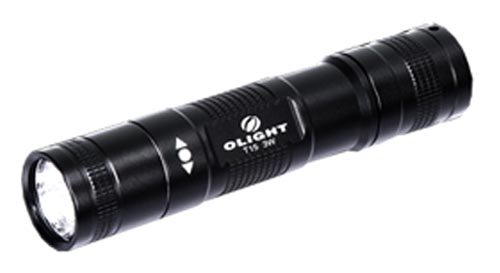
Image: The Olight T15-T R5 Cree XP-G LED Flashlight, showcasindėl savo kompaktiško dizaino ir patvarios konstrukcijos.
Sąranka
-
1. Pirminė apžiūra:
Upon unpacking, inspect the flashlight for any visible damage. Ensure all components, including the tail cap and head, are securely fastened.
-
2. Baterijos įdėjimas:
- Atsukite žibintuvėlio galinį dangtelį, pasukdami jį prieš laikrodžio rodyklę.
- Insert one AA battery (not included) with the positive (+) terminal facing towards the head of the flashlight.
- Carefully screw the tail cap back on clockwise until it is finger-tight. Avoid over-tightening.
Pastaba: Ensure correct battery polarity to prevent damage to the flashlight. Use high-quality AA batteries for optimal performance.
Naudojimo instrukcijos
-
1. Įjungimas / išjungimas:
Press the tail switch completely to turn the flashlight ON. Press it again completely to turn the flashlight OFF.
-
2. Changing Brightness Levels:
With the flashlight ON, lightly press (half-press) the tail switch repeatedly to cycle through the three available brightness levels (Low → Medium → High). Release the switch to select the desired mode.
-
3. Activating Strobe Mode:
From any brightness mode, quickly double half-press the tail switch to activate the Strobe mode. Half-press again to return to the previous brightness level.
Priežiūra
-
Valymas:
Wipe the flashlight body with a clean, soft cloth. For stubborn dirt, use a slightly damp audinys. Nenaudokite stiprių cheminių medžiagų ar abrazyvinių valiklių.
-
Akumuliatoriaus priežiūra:
Remove the battery if the flashlight will not be used for an extended period to prevent leakage and potential damage. Dispose of used batteries responsibly.
-
O žiedo tepimas:
Periodically inspect the O-rings for wear and tear. Apply a thin layer of silicone grease to maintain water resistance. Replace damaged O-rings promptly.
-
Thread Cleaning:
Keep the threads of the tail cap and head clean from dirt and debris to ensure smooth operation and proper electrical contact.
Trikčių šalinimas
| Problema | Galima priežastis | Sprendimas |
|---|---|---|
| Žibintuvėlis neįsijungia. |
|
|
| Šviesa blanki arba mirga. |
|
|
| Tail switch is unresponsive. |
|
|
Specifikacijos
- Modelis: T15-T
- Šviesos šaltinis: Cree XP-G R5 LED
- Maksimalus ryškumas: 115 liumenų
- Režimai: 3 brightness levels + Strobe
- Konstrukcija: Solid aluminum
- Objektyvas: Ultra clear glass, non-scratch with anti-reflective coating
- Maitinimo šaltinis: 1 x AA baterija (nepridedama)
- Svoris: 45.4 g (be akumuliatoriaus)
- Savybės: Shock-proof, dependable lighting
Garantija ir palaikymas
Olight products are manufactured to high-quality standards. For specific warranty information, please refer to the warranty card included with your purchase or visit the official Olight website. If you encounter any issues not covered in this manual or require further assistance, please contact Olight customer support.
Kontaktinė informacija: Please refer to your product packaging or the official Olight websvetainę, kurioje rasite naujausią klientų aptarnavimo kontaktinę informaciją.


