1. Įvadas
The Linksys SE1500 is a 5-Port Fast Ethernet Switch designed to expand your wired network. It allows you to connect up to five devices, such as computers, printers, storage devices, and gaming consoles, at speeds up to 100 Mbps. This device provides a simple and efficient way to add more wired connections to your existing network without complex configuration.

1 pav.: priekis view of the Linksys SE1500 5-Port Fast Ethernet Switch.
2. Pakuotės turinys
Patikrinkite, ar jūsų pakuotėje yra šie elementai:
- Linksys SE1500 5-Port 10/100 Switch
- Maitinimo adapteris
- Greito paleidimo vadovas (neįtrauktas į šį vadovą)
3. Produkto ypatybės
The Linksys SE1500 switch offers the following key features:
- 5 greito Ethernet prievadai: Provides five 10/100 Mbps ports for connecting wired devices.
- Auto-Sensing Ports: Automatically detects and optimizes the speed for each connected device.
- Paslaugos kokybė (QoS): Prioritizes traffic for smooth performance of bandwidth-intensive applications.
- Energiją taupančios funkcijos: Includes auto power-down for unused ports and a port status switch to disable LED indicators, reducing energy consumption.
- Prijunkite ir paleiskite: Requires no software configuration for basic operation.
4. Sąrankos instrukcijos
Follow these steps to set up your Linksys SE1500 switch:
- Jungiklio padėtis: Padėkite jungiklį ant lygaus, stabilaus paviršiaus arba pritvirtinkite jį tinkamoje vietoje. Užtikrinkite tinkamą vėdinimą aplink įrenginį.
- Prijunkite maitinimo adapterį: Plug the included power adapter into the 12V DC port on the back of the switch. Then, plug the other end of the power adapter into a standard electrical outlet. The power LED on the front of the switch should illuminate.
- Prisijunkite prie savo tinklo: Connect an Ethernet cable from your router or modem to any of the five numbered Ethernet ports on the back of the SE1500 switch.
- Prijunkite įrenginius: Connect your wired devices (e.g., computer, printer, gaming console) to the remaining Ethernet ports on the switch using Ethernet cables. The switch's auto-sensing ports will automatically detect the connection speed.
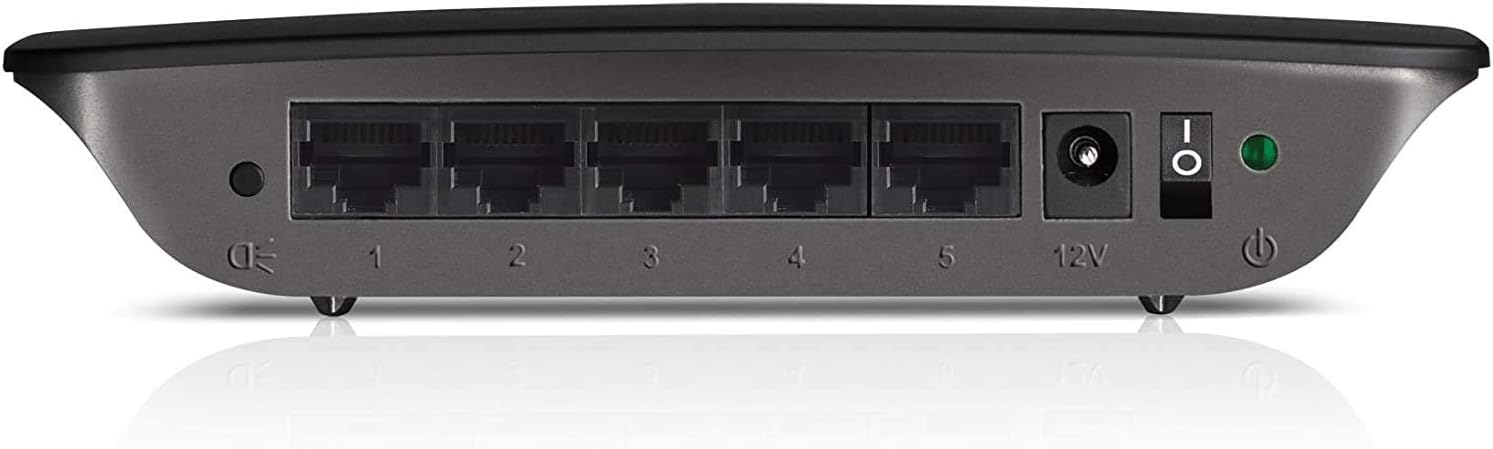
Figure 2: Rear panel of the Linksys SE1500, showing Ethernet ports, power input, and power switch.
5. Naudojimo instrukcijos
The Linksys SE1500 is a plug-and-play device, meaning it typically requires no software configuration. Once connected, it operates automatically.
LED indikatoriai
The front panel of the switch features LED indicators to provide status information:
- Maitinimo šviesos diodas: Šviečia, kai jungiklis įjungtas.
- Prievadų šviesos diodai (1–5): Each numbered port has an associated LED.
- Tvirtai žalia: Indicates a successful link connection at 100 Mbps.
- Tvirtas gintaras: Indicates a successful link connection at 10 Mbps.
- Mirksi: Indicates network activity (data transmission).
- Išjungta: No link detected or port is inactive.
Energijos taupymo režimas
The SE1500 automatically enters a power-saving mode when a connected device is turned off or when a port is unused. This feature helps reduce energy consumption. You can also use the port status switch on the rear panel to turn off the port LEDs if desired.
6. Priežiūra
To ensure optimal performance and longevity of your Linksys SE1500 switch, consider the following maintenance tips:
- Laikyti švarų: Regularly wipe the exterior of the switch with a soft, dry cloth. Avoid using liquid cleaners or aerosols.
- Užtikrinti vėdinimą: Do not block the ventilation openings on the switch. Ensure it is placed in an area with good airflow to prevent overheating.
- Kabelių valdymas: Keep Ethernet cables neatly organized to prevent accidental disconnections or damage.
- Power Cycle (if needed): If the switch becomes unresponsive, disconnect the power adapter, wait 10 seconds, and then reconnect it.
7. Problemų sprendimas
If you encounter issues with your Linksys SE1500 switch, try the following troubleshooting steps:
- Nėra galios:
- Įsitikinkite, kad maitinimo adapteris yra tvirtai prijungtas prie jungiklio ir veikiančio elektros lizdo.
- Verify the power switch on the rear panel is in the "On" position.
- Nėra ryšio lemputės:
- Patikrinkite, ar Ethernet kabelis yra tvirtai prijungtas prie komutatoriaus prievado ir prijungto įrenginio.
- Išbandykite kitą Ethernet kabelį.
- Įsitikinkite, kad prijungtas įrenginys įjungtas ir veikia tinkamai.
- If the port status switch is off, toggle it to enable the LEDs.
- Mažas tinklo greitis:
- Ensure all connected devices and cables support Fast Ethernet (100 Mbps) for optimal performance.
- Check for excessive network traffic or issues with your internet service provider (ISP) or router.
- Pertraukiamas ryšys:
- Patikrinkite, ar nepažeisti Ethernet kabeliai.
- Try connecting devices to different ports on the switch.
- Power cycle the switch, router, and connected devices.
8. Specifikacijos
| Modelis | SE1500 |
| Prekės ženklas | Linksys |
| Prievadų skaičius | 5 |
| Sąsajos tipas | RJ45 |
| Duomenų perdavimo sparta | 10/100 Mbps (greitasis eternetas) |
| Gaminio matmenys | 4.29 x 6.06 x 1.14 colio |
| Prekės svoris | 5.4 uncijos (0.34 svaro) |
| Spalva | Juoda |
| Suderinami įrenginiai | Desktop, Gaming Console, Laptop, Printer |
| Įtraukti komponentai | 5-port 10/100 Switch, Power Adapter |
9. Garantija ir palaikymas
For detailed warranty information and technical support, please refer to the documentation included with your purchase or visit the official Linksys support websvetainėje. Garantijos sąlygos ir nuostatos gali skirtis priklausomai nuo regiono.
Linksys palaikymas Websvetainė: www.linksys.com/support


