BlackBerry BB 9900

BlackBerry BB 9900 Bold Touch Smartphone User Manual

Model: BB 9900

1. Įvadas

This manual provides essential instructions for setting up, operating, and maintaining your BlackBerry BB 9900 Bold Touch smartphone. Please read this guide thoroughly to ensure proper use and to maximize the device's capabilities. The BlackBerry BB 9900 Bold Touch combines a capacitive touchscreen with a full QWERTY keyboard, running on BlackBerry OS 7.

2. Pakuotės turinys

Patikrinkite, ar jūsų pakuotėje yra šie elementai:

3. Įrenginys baigtasview

Familiarize yourself with the physical features of your BlackBerry BB 9900 Bold Touch.

3.1 Priekis View

BlackBerry BB 9900 Bold Touch front view, showing the screen, QWERTY keyboard, and navigation buttons.

Vaizdas: priekis view of the BlackBerry BB 9900 Bold Touch, highlighting the 2.8-inch touchscreen and the physical QWERTY keyboard below it. The device also features a trackpad and call/end buttons.

  • Jutiklinis ekranas: 2.8-inch capacitive display for interactive navigation.
  • QWERTY klaviatūra: Full physical keyboard for efficient typing.
  • Optical Trackpad: For precise navigation and selection.
  • Skambinimo / baigimo mygtukai: Standard telephony controls.

3.2 Galinis View

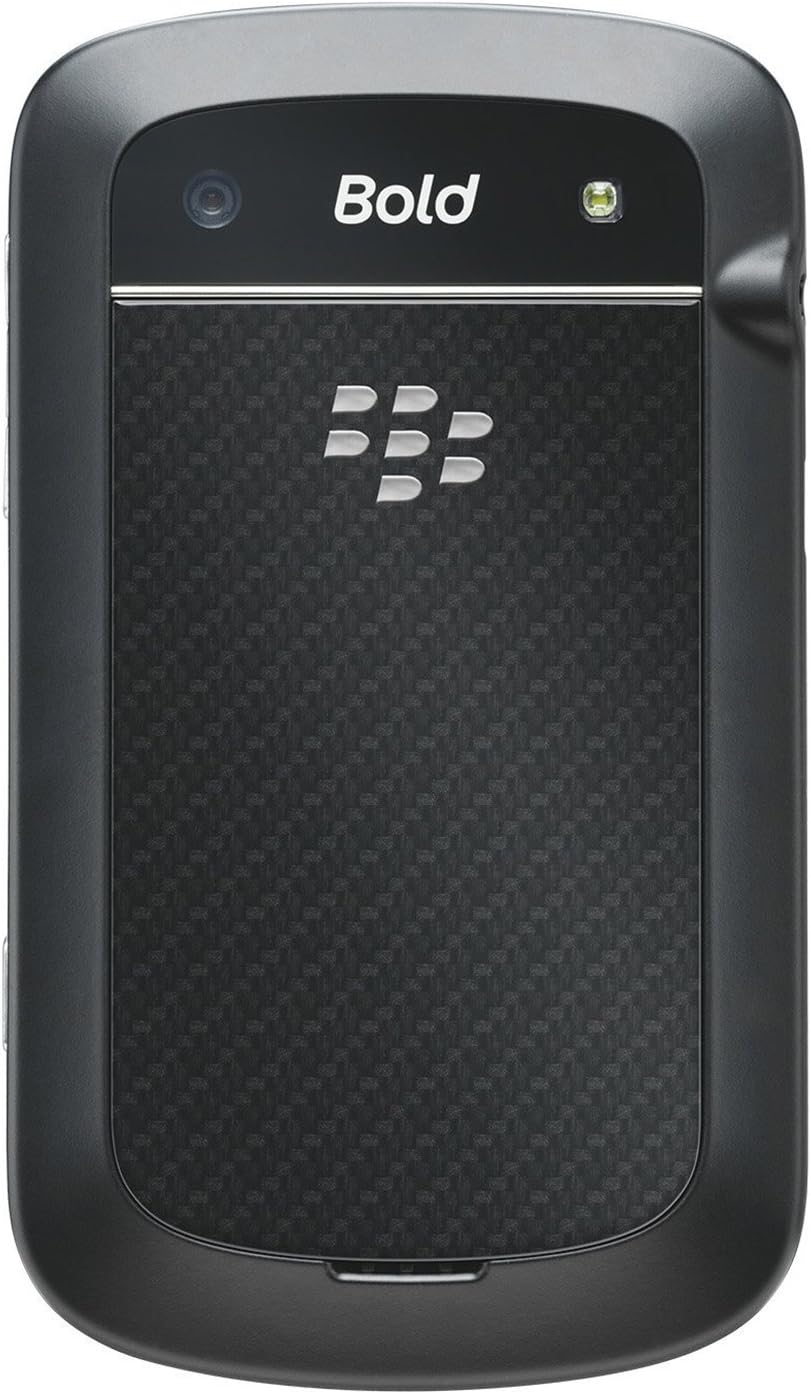
BlackBerry BB 9900 Bold Touch rear view, showing the 5MP camera lens and LED flash.

Vaizdas: Galinis view of the BlackBerry BB 9900 Bold Touch, featuring the 5-megapixel camera lens, LED flash, and the BlackBerry logo.

  • 5 MP kamera: Primary camera with autofocus and LED flash.
  • Baterijos dangtelis: Removable cover for battery and SIM card access.

3.3 pusė View

BlackBerry BB 9900 Bold Touch side view, showing volume buttons and convenience key.

Vaizdas: Šoninė view of the BlackBerry BB 9900 Bold Touch, illustrating the placement of the volume control buttons and a customizable convenience key.

  • Garsumo mygtukai: Sureguliuokite garso lygius.
  • Convenience Key: Pritaikomas spartusis mygtukas.

4. Sąranka

4.1 SIM kortelės įdėjimas

  1. Remove the battery cover from the back of the device.
  2. Raskite SIM kortelės lizdą.
  3. Įdėkite SIM kortelę auksiniais kontaktais žemyn, o nupjautas kampas sulygiuotas su lizdu.
  4. Įsitikinkite, kad SIM kortelė yra saugiai įstatyta.

4.2 Akumuliatoriaus įdėjimas

  1. After inserting the SIM card, align the battery's gold contacts with the contacts in the battery compartment.
  2. Švelniai paspauskite bateriją į vietą, kol ji spragtelės.
  3. Uždėkite akumuliatoriaus dangtelį.

4.3 Įrenginio įkrovimas

  1. Connect the USB cable to the charging port on your device.
  2. Plug the other end of the USB cable into the wall charger, then into a power outlet.
  3. Allow the device to charge fully before first use. The battery indicator on the screen will show charging status.

4.4 Įjungimas / išjungimas

  • Norėdami įjungti: Press and hold the Power/Lock button (usually located on the top edge) until the BlackBerry logo appears.
  • Norėdami išjungti: Press and hold the Power/Lock button until the 'Power Off' option appears on the screen. Tap 'Power Off' to confirm.

5. Naudojimo instrukcijos

5.1 Jutiklinio ekrano navigacija

  • Bakstelėkite: Touch the screen briefly to open applications, select items, or activate buttons.
  • Perbraukimas: Drag your finger across the screen to scroll through lists or switch between home screen panels.
  • Žiupsnelis, norint priartinti: Nuotraukoms priartinti arba atitolinti naudokite du pirštus, web puslapius arba žemėlapius.

5.2 QWERTY klaviatūros naudojimas

The physical QWERTY keyboard allows for fast and accurate text entry. Each key corresponds to a letter, number, or symbol. Use the 'Alt' key for alternate characters and the 'Shift' key for capitalization.

5.3 Skambinimas

  1. From the home screen, tap the Phone icon or press the green Call button.
  2. Enter the phone number using the keyboard.
  3. Norėdami pradėti skambutį, paspauskite žalią skambinimo mygtuką.
  4. To end a call, press the red End Call button.

5.4 Pranešimų siuntimas

  1. Tap the Messages icon from the home screen.
  2. Select 'Compose New' or similar option.
  3. Įveskite gavėjo numerį arba pasirinkite iš kontaktų.
  4. Type your message using the QWERTY keyboard.
  5. Tap 'Send'.

5.5 Kameros naudojimas

  1. Palieskite kameros piktogramą, kad atidarytumėte kameros programėlę.
  2. Kadruokite kadrą naudodami ekraną kaip viewieškiklis.
  3. Tap the screen or press the convenience key (if configured) to take a photo.
  4. The 5MP camera features autofocus and an LED flash for improved image quality.

5.6 Prisijungimas prie „Wi-Fi“.

  1. Go to 'Options' > 'Networks and Connections' > 'Wi-Fi'.
  2. Turn Wi-Fi on. The device will scan for available networks.
  3. Pasirinkite norimą tinklą ir, jei būsite paraginti, įveskite slaptažodį.
  4. Once connected, the Wi-Fi indicator will appear in the status bar.

5.7 Using NFC (Near Field Communication)

The BlackBerry BB 9900 Bold Touch supports NFC for short-range wireless communication. This allows for quick pairing with compatible accessories or sharing data with other NFC-enabled devices by tapping them together.

  1. Įsitikinkite, kad įrenginio nustatymuose įjungtas NFC.
  2. Hold your device close to another NFC-enabled device or tag.
  3. Follow on-screen prompts to complete the desired action (e.g., pairing, data transfer).

6. Priežiūra

6.1 Įrenginio valymas

  • Use a soft, lint-free cloth to wipe the screen and body of the device.
  • Venkite naudoti stiprias chemines medžiagas, abrazyvinius valiklius ar aerozolinius purškalus.
  • Saugokite prietaisą nuo per didelės drėgmės.

6.2 Akumuliatoriaus priežiūra

  • Venkite ekstremalių temperatūrų, kurios gali sumažinti akumuliatoriaus veikimą.
  • Use only the original or approved charger.
  • Nepradurkite ir nepažeiskite akumuliatoriaus.

6.3 Programinės įrangos naujiniai

Periodically check for software updates to ensure your device has the latest features and security enhancements. Updates can typically be found in the device's 'Options' or 'Settings' menu under 'Software Updates'.

7. Problemų sprendimas

7.1 Įrenginys neįsijungia

  • Įsitikinkite, kad baterija tinkamai įdėta ir įkrauta.
  • Prijunkite įrenginį prie įkroviklio ir palaukite kelias minutes, prieš bandydami vėl įjungti.
  • If the issue persists, try removing and reinserting the battery.

7.2 Tinklo ryšio problemos

  • Check if your SIM card is correctly inserted and activated with your carrier.
  • Verify that cellular data or Wi-Fi is enabled in your device settings.
  • Iš naujo paleiskite įrenginį.
  • If using Wi-Fi, ensure your router is working and you have entered the correct password.

7.3 Jutiklinis ekranas nereaguoja

  • Iš naujo paleiskite įrenginį.
  • Įsitikinkite, kad ekranas yra švarus ir be dulkių ar drėgmės.
  • If the issue is intermittent, check for any recent software installations that might be causing conflicts.

8. Specifikacijos

Funkcija Detalė
Modelio pavadinimas BB 9900
Operacinė sistema BlackBerry OS 7
Ekranas 2.8-inch Capacitive Touchscreen, 640 x 480 Resolution
Procesorius Not specified (typically 1.2 GHz for this model)
RAM 768 MB
Vidinė saugykla 8 GB
Galinė kamera 5 MP, Autofocus, LED Flash
Ryšys Wi-Fi 802.11 b/g/n, NFC, Bluetooth, GPS
Tinklo palaikymas Quad-band GSM/GPRS/EDGE, Tri-band HSPA+
Matmenys 4.53 x 2.6 x 0.41 colio (115 x 66 x 10.5 mm)
Svoris 4.6 uncijos (130 gramų)
Garso lizdas 3.5 mm

9. Palaikymas ir garantija

9.1 Pagalba klientams

For technical assistance, troubleshooting beyond this manual, or service inquiries, please visit the official BlackBerry support website or contact your local service provider. Refer to the packaging or official websvetainę, kurioje pateikiami konkretūs kontaktiniai duomenys.

9.2 Informacija apie garantiją

Your BlackBerry BB 9900 Bold Touch is covered by a limited warranty. Please refer to the warranty card included in your product packaging or visit the official BlackBerry webIšsamias sąlygas, įskaitant garantijos laikotarpį ir aprėpties sąlygas, rasite svetainėje. Išsaugokite pirkimo įrodymą, jei galėtumėte pateikti pretenzijas dėl garantijos.

Susiję dokumentai - BB 9900

Preview „BlackBerry Q10“ išmaniojo telefono naudotojo vadovas
Išsamus „BlackBerry Q10“ išmaniojo telefono vadovas, kuriame aprašomos tokios funkcijos kaip „BlackBerry Hub“, klaviatūra, „BBM Video“, kamera, medijos bendrinimas ir įrenginio nustatymai. Sužinokite, kaip maksimaliai padidinti produktyvumą ir pritaikyti savo patirtį.
Preview „BlackBerry Java“ kūrimo aplinka: GPS ir „BlackBerry“ žemėlapių kūrimo vadovas
Šiame vadove išsamiai aprašomas GPS ir „BlackBerry“ žemėlapių funkcijų integravimas į „BlackBerry Java“ kūrimo aplinką, kuri yra techninis šaltinis kūrėjams, kuriantiems vietos nustatymo programas.
Preview „BlackBerry Tasks for Android“ naudotojo vadovas | Saugus užduočių valdymas
Oficialiame „BlackBerry Tasks for Android“ naudotojo vadove (3.17 versija) pateikiamos išsamios instrukcijos, kaip įdiegti, aktyvuoti, valdyti užduotis, nustatyti ir šalinti saugią „BlackBerry“ įmonės užduočių valdymo programą.
Preview BlackBerry Q5 Smartphone User Guide: Setup, Features, and Operations
This comprehensive user guide provides detailed information and instructions for operating the BlackBerry Q5 Smartphone. It covers the features and functionalities of the BlackBerry 10 OS, version 10.2.1, designed to enhance productivity and connectivity.
Preview Руководство пользователя BlackBerry Z10: Полное руководство
Полное руководство пользователя для смартфона BlackBerry Z10, охватывающее новые функции BlackBerry 10 OS, настройку устройства, приложения, соединения и многое другое.
Preview „BlackBerry Z30“ išmaniojo telefono naudotojo vadovas: funkcijos, sąranka ir valdymas
Susipažinkite su išsamiu „BlackBerry Z30“ išmaniojo telefono (10.3.2 versija) naudotojo vadovu. Šiame vadove pateikiamos išsamios instrukcijos apie įrenginio nustatymą, funkcijų naršymą, ryšių valdymą, medijos galimybių naudojimą, nustatymų pritaikymą ir saugumo gerinimą, siekiant optimalios naudotojo patirties.