1. Produktas baigtasview
The Mitel MiVoice 5304 IP Phone is a compact and cost-effective entry-level display phone designed for various environments such as hotel rooms, university dorms, classrooms, and retail spaces. It provides essential communication features and integrates seamlessly with Mitel IP-based communication platforms.
This phone supports both MiNet and SIP protocols, offering flexibility in deployment. It features a backlit display, two lines with LED indication, and programmable keys for enhanced functionality.
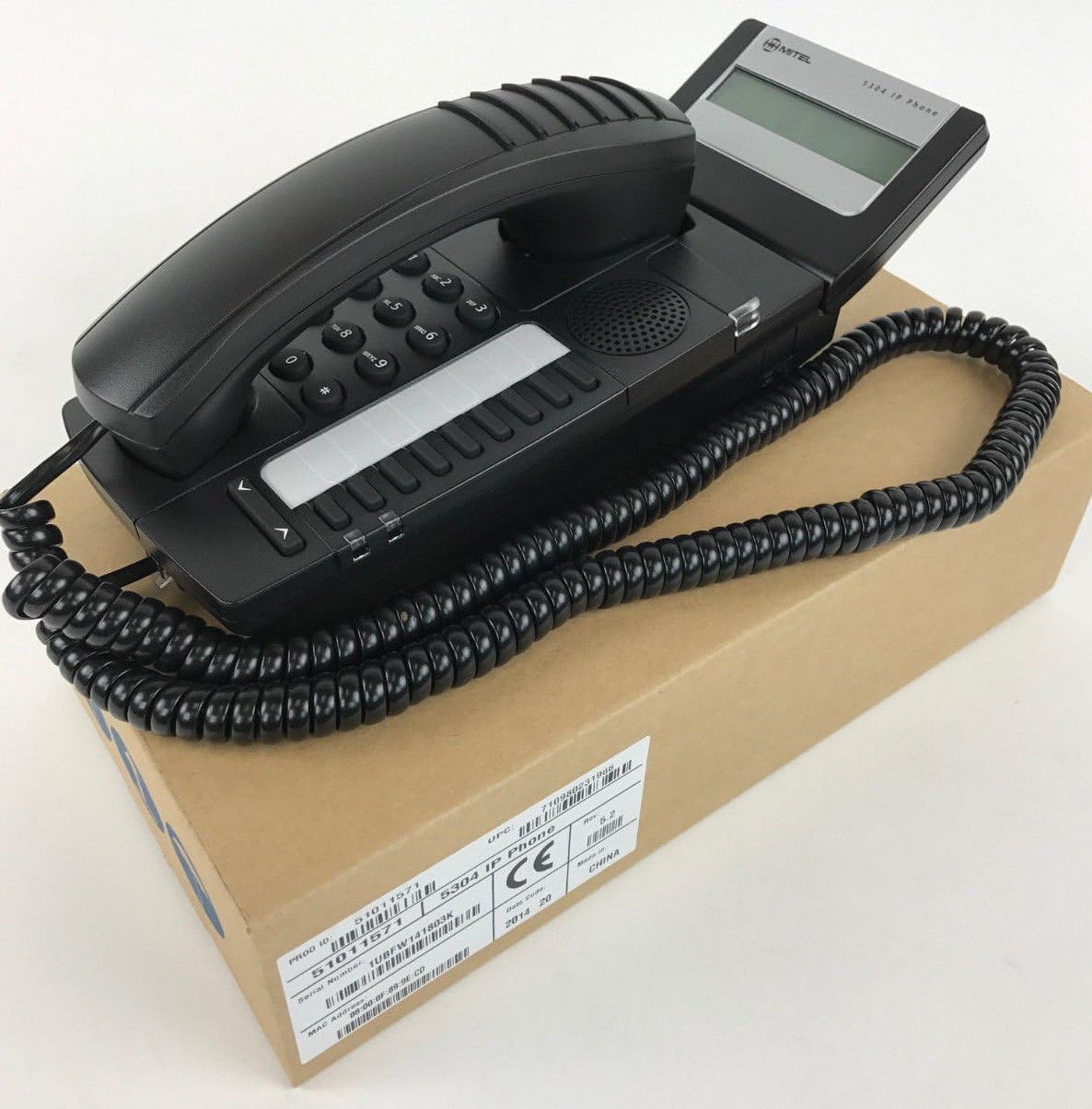
Figure 1: Mitel MiVoice 5304 IP Phone. This image shows the black IP phone with its coiled handset cord, resting on a brown cardboard box. The phone features a numeric keypad, several function buttons, and a small display screen.
2. Pagrindinės savybės
- Ekranas: Two x 20 character backlit display with auto-dimming.
- Eilutės: Two lines with LED indication (one prime line, one programmable key).
- Programuojami klavišai: Eight programmable keys for speed dials, feature access codes, paging, conferencing, voicemail access, etc.
- Puslapis: Paging and page receive capability, including direct page and group page support.
- Dviejų režimų palaikymas: Compatible with both MiNet and SIP protocols.
- Vizualiniai indikatoriai: Incoming call visual indication and message waiting indication.
- Garso valdikliai: Adjustable volume and ringing controls.
- Montavimas: Wall-mountable (optional accessory may be required).
- Maitinimas: Multiple powering options, including 802.3af compliant Power over Ethernet (PoE).
- Prieinamumas: ADA-compliant (HAC handset).
- Kompaktiškas dizainas: Small footprint (approximately 26.5 cm x 10 cm or 10.5 x 4 inches).
- Energiją taupantis: Designed for power conservation to reduce overall energy consumption.
3. Sąranka ir diegimas
3.1 Pakuotės turinys
Prieš pradėdami, įsitikinkite, kad yra visi komponentai:
- Mitel MiVoice 5304 IP Phone unit
- Ragelis
- Ragelis suvyniotas laidas
- Ethernet kabelis
- (Optional) Power adapter if PoE is not used
3.2 Telefono prijungimas
- Prijunkite ragelį: Prijunkite vieną susukto ragelio laido galą prie ragelio, o kitą – prie ragelio prievado telefono bazėje.
- Prisijunkite prie tinklo: Connect one end of the Ethernet cable to the LAN port on the back of the phone and the other end to an active network port (e.g., a wall jack or network switch). If using Power over Ethernet (PoE), the phone will power on automatically.
- Prijunkite maitinimą (jei nenaudojate PoE): If your network does not provide PoE, connect an optional Mitel-approved power adapter to the power port on the phone and then to a standard electrical outlet.
- Pradinis paleidimas: The phone will power on and begin its boot-up sequence. This may take a few moments as it obtains an IP address and registers with your communication system.
3.3 Tvirtinimas prie sienos (pasirinktinai)
The Mitel 5304 IP Phone can be wall-mounted. An optional wall-mount kit (sold separately) may be required. Follow the instructions provided with the wall-mount kit for proper installation.
4. Naudojimo instrukcijos
4.1 Skambinimas ir atsiliepimas į skambučius
- Norėdami paskambinti:
- Pakelkite ragelį arba paspauskite Pranešėjas mygtuką.
- Surinkite norimą numerį naudodami klaviatūrą.
- Paspauskite Surinkite or Siųsti button (if available) or wait for the call to connect automatically.
- Norėdami atsiliepti į skambutį:
- Pakelkite ragelį arba paspauskite mirksintį linijos mygtuką arba Pranešėjas mygtuką.
- Norėdami baigti skambutį:
- Padėkite ragelį arba paspauskite Baigti skambutį or Pranešėjas mygtuką.
4.2 Programuojamų klavišų naudojimas
The Mitel 5304 features eight programmable keys. Their functions are typically configured by your system administrator and can include:
- Speed Dial numbers
- Access to specific features (e.g., Call Forward, Do Not Disturb)
- Paging functions
- Voicemail access
- Konferencija
To use a programmable key, simply press the button corresponding to the desired function.
4.3 Garsumo reguliavimas
Use the volume control buttons (usually located below the keypad or on the side of the phone) to adjust the handset, speakerphone, or ringer volume. Press the + mygtuką, kad padidintumėte garsumą, ir - mygtuką, norėdami sumažinti garsumą.
4.4 Message Waiting Indication
A flashing LED indicator on the phone signifies that you have new voicemail messages. To retrieve messages, press the dedicated Pranešimas button (if configured) or dial your voicemail access code.
5. Priežiūra ir priežiūra
- Valymas: Naudokite minkštą, šiek tiek damp cloth to clean the phone's surface. Do not use abrasive cleaners, solvents, or strong chemicals, as these can damage the finish.
- Dulkės: Regularly dust the phone, especially around the keypad and display, to prevent accumulation that could affect performance.
- Aplinka: Keep the phone away from excessive heat, direct sunlight, and moisture. Ensure proper ventilation if placed in an enclosed space.
- Kabeliai: Įsitikinkite, kad visi laidai yra tvirtai prijungti ir nėra suspausti ar pažeisti.
6. Problemų sprendimas
| Problema | Galima priežastis | Sprendimas |
|---|---|---|
| Telefonas neįsijungia. | No power from Ethernet (PoE) or power adapter not connected/faulty. |
|
| Nėra rinkimo signalo arba negalima skambinti. | Network connectivity issue, phone not registered, or system configuration problem. |
|
| Ekranas tuščias arba neįskaitomas. | Power issue or display fault. |
|
| Negirdžiu skambinančiojo arba skambinantis negirdi manęs. | Volume settings, handset/speaker issue, or network audio problem. |
|
7. Specifikacijos
| Atributas | Detalė |
|---|---|
| Modelio numeris | 51011571 |
| Gaminio matmenys (I x P x A) | 10 x 10 x 6 colio (25.4 x 25.4 x 15.24 cm) |
| Prekės svoris | 1.9 svaro (0.86 kg) |
| Spalva | Juoda |
| Telefono tipas | Laidinis IP telefonas |
| Maitinimo šaltinis | Corded Electric (PoE 802.3af compliant or optional power adapter) |
| Rinkiklio tipas | Viena klaviatūra |
| Ekranas | Two x 20 character backlit display |
| Linijos palaikymas | 2 Lines with LED indication |
| Palaikomi protokolai | MiNet, SIP |
| Suderinami įrenginiai | VoIP services, IP-based communication systems, Mitel 3300, Mitel SX-200 IP Communications Platforms |
| Konferencinio skambučio galimybė | 2 krypčių |
8. Garantija ir palaikymas
Informacijos apie gaminio garantiją ieškokite prie pirkinio pridėtoje garantijos kortelėje arba apsilankykite oficialioje „Mitel“ svetainėje. website. For technical support, service, or further inquiries, please contact your Mitel authorized dealer or system administrator.
You can also find additional resources and contact information on the official Mitel websvetainė: www.mitel.com