1. Įvadas
The ZIPRO Treadmill (Model 5941329 L) is a versatile and compact fitness machine designed for home use, offering a comprehensive range of features for effective cardiovascular training, jogging, and walking. Its foldable design makes it ideal for small spaces, allowing for easy storage when not in use.
This treadmill is equipped with a powerful 1.96 HP motor, providing a speed range of 1 to 16 km/h. It features 12 adjustable incline levels to increase workout intensity and engage different muscle groups. The integrated LED display and heart rate sensors provide real-time data on time, speed, distance, calories burned, and heart rate, helping you monitor your progress effectively.
For an enhanced training experience, the treadmill supports connectivity with compatible fitness applications like Kinomap and FitShow, allowing for interactive workouts and data tracking. It also includes a smartphone holder, MP3 function, and built-in speakers for entertainment during your exercise sessions. Designed with user comfort in mind, it features a spacious running surface (45 x 125 cm) and a joint-friendly cushioning system to minimize impact.

Image: The ZIPRO Treadmill in an unfolded state, with a user actively running on it. A smartphone with fitness app icons is shown in the background, highlighting the app connectivity feature.
2. Saugos informacija
Prieš naudodami bėgimo takelį, atidžiai perskaitykite visas instrukcijas. Išsaugokite šį vadovą ateičiai.
- Didžiausia svorio talpa: Do not exceed the maximum user weight of 130 kg (286 lbs). Exceeding this limit can cause damage to the treadmill and lead to injury.
- Vieta: Bėgimo takelį pastatykite ant lygaus, stabilaus paviršiaus. Įsitikinkite, kad už bėgimo takelio yra bent 2 metrai (6.5 pėdos) laisvos vietos, o iš abiejų pusių – po 0.6 metro (2 pėdos).
- Maitinimo jungtis: Connect the treadmill to a grounded electrical outlet. Do not use extension cords or adapters.
- Saugos raktas: Always attach the safety key clip to your clothing before starting the treadmill. In case of an emergency or if you fall, the safety key will detach, immediately stopping the machine.
- Vaikai ir augintiniai: Keep children and pets away from the treadmill, especially when it is in operation. This equipment is not a toy.
- Medicininės sąlygos: Consult your physician before starting any exercise program, especially if you have pre-existing medical conditions.
- Tinkama apranga: Wear appropriate athletic footwear and clothing that will not get caught in the moving parts of the treadmill.
- Priežiūra: Perform regular maintenance as described in this manual to ensure safe and optimal operation.

Image: A user exercising on the ZIPRO treadmill, illustrating the safe and versatile training environment provided by the machine, including its adjustable speed range.
3. Pakuotės turinys
Upon unpacking, please verify that all the following components are included in your package:
- ZIPRO Treadmill (Main Unit)
- Vartotojo vadovas (šis dokumentas)
- Tool Kit for assembly and maintenance
- Lubricant for treadmill belt maintenance
- Saugos raktas
- Maitinimo laidas
Jei trūksta kokių nors dalių arba jos pažeistos, nedelsdami susisiekite su klientų aptarnavimo tarnyba.
4. Sąranka ir surinkimas
The ZIPRO Treadmill is designed for minimal assembly. Follow these steps for initial setup:
4.1 Bėgimo takelio išskleidimas
- Atsargiai išimkite bėgimo takelį iš pakuotės.
- Pastatykite bėgimo takelį ant lygaus, horizontalaus paviršiaus.
- Lift the console/handlebar assembly until it locks into the upright position. Ensure it is securely locked before proceeding.
- Lower the running deck gently until it rests flat on the floor.
4.2 Prijungimas prie elektros tinklo
Plug the power cord into the treadmill's power input, then into a grounded electrical outlet. Ensure the power switch (usually located near the power cord input) is in the 'ON' position.
4.3 Sulankstymas sandėliavimui
To fold the treadmill for storage:
- Įsitikinkite, kad bėgimo takelis yra išjungtas ir atjungtas.
- Carefully lift the running deck until it clicks into the vertical locked position.
- The treadmill can then be moved using the transport wheels and stored vertically, requiring minimal space (approx. 31.5 cm high when folded flat, or 150 cm high when stored vertically).

Image: A user demonstrating the folding mechanism of the ZIPRO treadmill, highlighting its compact design and ease of vertical storage to save space.
5. Naudojimo instrukcijos
5.1 Valdymo skydas baigtasview
The treadmill features an intuitive LED display and control buttons on the console and handlebars. The display shows key metrics such as time, speed, distance, calories, and heart rate.
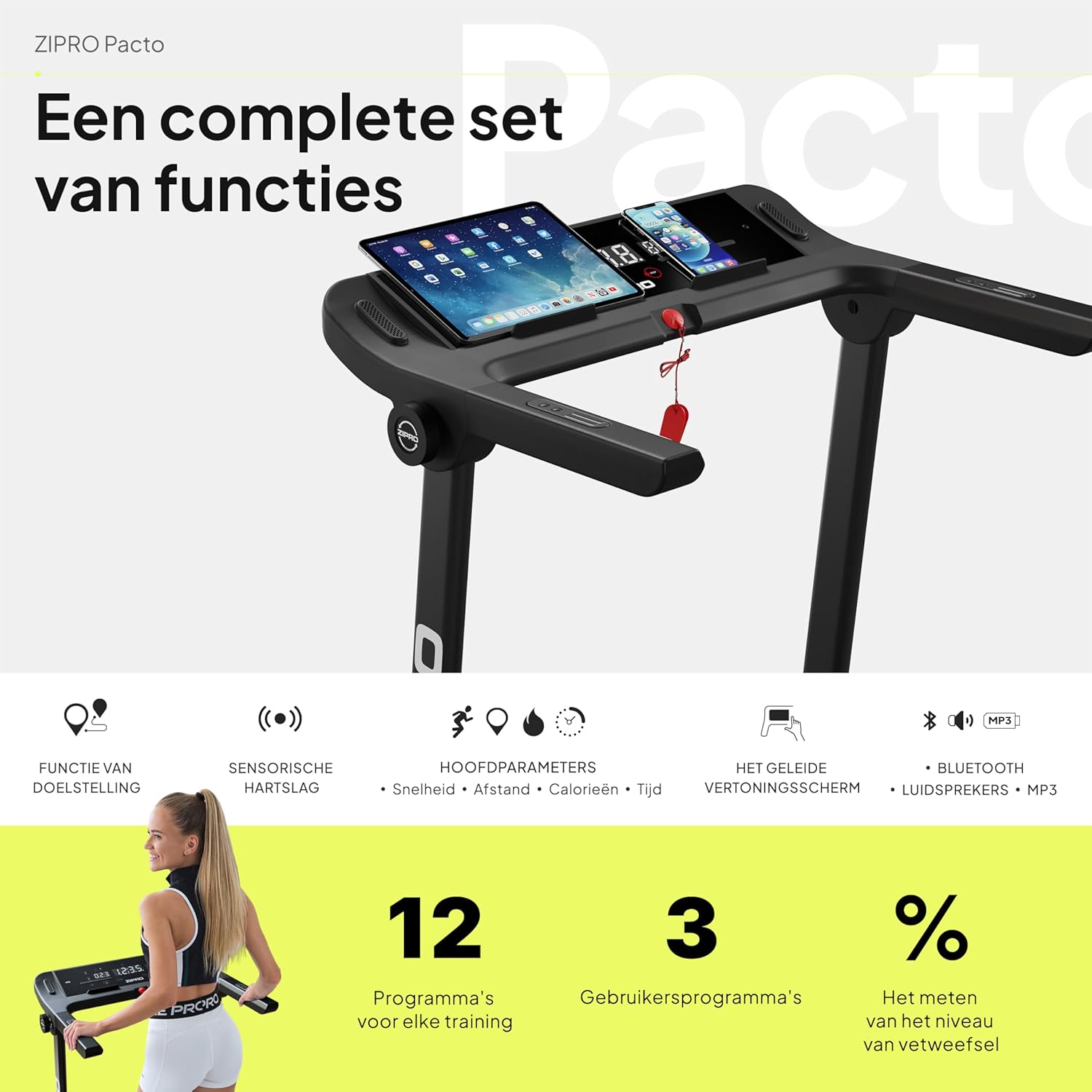
Paveikslėlis: detalus view of the ZIPRO treadmill's control panel, featuring a tablet and smartphone in their respective holders, illustrating the comprehensive set of functions available.
5.2 Treniruotės pradžia
- Įsitikinkite, kad saugos raktas tinkamai pritvirtintas prie konsolės ir jūsų drabužių.
- Press the 'START' button. The treadmill will typically begin with a short countdown before the belt starts moving at a low speed.
5.3 Greičio ir nuolydžio reguliavimas
- Greitis: Use the '+' and '-' buttons on the console or handlebars to adjust the speed from 1 km/h to 16 km/h. Quick speed buttons (e.g., 3, 6, 9, 12 km/h) may also be available for rapid adjustments.
- Pakreipimas: Use the 'INCLINE +' and '-' buttons to adjust the incline level. The treadmill offers 12 adjustable incline levels to simulate uphill walking or running.
5.4 Iš anksto nustatytų programų naudojimas
The treadmill comes with 12 pre-set workout programs and 3 customizable user programs. Refer to the specific program section in your detailed manual for instructions on selecting and using these programs.
5.5 Širdies ritmo stebėjimas
Grasp the heart rate sensors on the handlebars to display your current heart rate on the LED screen. For accurate readings, ensure your hands are clean and firmly placed on the sensors.
5.6 App Connectivity (Kinomap & FitShow)
Enhance your workout experience by connecting your smartphone or tablet to the treadmill via Bluetooth and using compatible fitness apps like Kinomap and FitShow. These apps offer interactive training, virtual routes, and detailed workout tracking.
- Download the Kinomap or FitShow app from your device's app store.
- Įjunkite „Bluetooth“ savo įrenginyje.
- Open the app and follow the on-screen instructions to connect to your ZIPRO treadmill.

Image: A smartphone displaying the logos for Kinomap and FitShow applications, illustrating the treadmill's compatibility with these popular fitness apps for interactive training.
5.7 MP3 Function and Speakers
Connect your audio device to the treadmill's MP3 input to play music through the built-in speakers, making your workouts more enjoyable.
5.8 Treniruotės sustabdymas
Press the 'STOP' button to gradually slow down and stop the treadmill belt. Alternatively, pulling the safety key will immediately stop the treadmill.
6. Priežiūra
Regular maintenance is crucial for the longevity and optimal performance of your ZIPRO treadmill.
6.1 Valymas
- Nuvalykite konsolę ir kitus paviršius minkšta šluosteamp skudurėliu po kiekvieno naudojimo, kad pašalintumėte prakaitą ir dulkes.
- Nenaudokite abrazyvinių valiklių ar tirpiklių, nes jie gali sugadinti apdailą.
- Vacuum underneath the treadmill regularly to prevent dust and debris from accumulating.
6.2 Diržo tepimas
The running belt requires periodic lubrication to reduce friction and extend its lifespan. Use the provided lubricant or a silicone-based treadmill lubricant.
- Išjunkite ir atjunkite bėgimo takelį.
- Šiek tiek atlaisvinkite galinius volelių varžtus, kad pakeltumėte diržą.
- Apply a thin line of lubricant evenly under the center of the belt.
- Priveržkite galinių volelių varžtus.
- Kelias minutes leiskite bėgimo takeliui veikti mažu greičiu (pvz., 3 km/val.), kad tepalas pasiskirstytų tolygiai.
Frequency of lubrication depends on usage: every 3-6 months for moderate use, or more frequently for heavy use.
6.3 Diržo įtempimas ir sulygiavimas
Check the belt tension and alignment periodically. If the belt slips or drifts to one side, adjust the rear roller bolts using the tool kit provided. Refer to the detailed manual for precise adjustment instructions.
7. Problemų sprendimas
This section addresses common issues you might encounter with your treadmill. If the problem persists, please contact customer support.
| Problema | Galima priežastis | Sprendimas |
|---|---|---|
| Bėgimo takelis neįsijungia. | Neįjungtas maitinimo laidas; išjungtas maitinimo jungiklis; suveikė grandinės pertraukiklis. | Ensure power cord is securely plugged in. Check if the power switch is ON. Reset the circuit breaker if necessary. |
| Diržas nejuda. | Safety key not in place; motor overload; loose belt. | Ensure the safety key is correctly inserted. Reduce user weight if exceeding capacity. Check belt tension and adjust if loose. |
| Ekranas neveikia tinkamai. | Loose cable connection; software glitch. | Check all cable connections to the console. Try turning the treadmill off and on again. |
| Neįprastas triukšmas veikimo metu. | Lack of lubrication; loose parts; foreign object. | Lubricate the running belt. Inspect for any loose screws or foreign objects under the belt. |
| Diržas slysta arba dvejoja. | Belt too loose; lack of lubrication. | Adjust belt tension. Lubricate the running belt. |
8. Specifikacijos
| Funkcija | Detalė |
|---|---|
| Prekės ženklas | ZIPRO |
| Modelio numeris | 5941329 |
| Spalva | Pacto |
| Dydis | L |
| Ekrano tipas | LED |
| Ekrano dydis | 2.4 colių |
| Variklio arklio galia | 1.96 AG |
| Maksimalus greitis | 16 km/val |
| Maksimali svorio talpa | 130 kg |
| Bėgimo paviršiaus matmenys | 45 x 125 cm |
| Išskleistos pakuotės matmenys (I x P x A) | 154 x 77.4 x 114 cm |
| Sulenktas aukštis | 31.5 cm (when folded flat) |
| Prekės svoris | 41.9 kg |
| Iš anksto nustatytos programos | 12 |
| Customizable Programs | 3 |
| Adjustable Incline Levels | 12 |
| Maitinimo šaltinis | Su laidu elektra |
| Pagrindinės savybės | Touchscreen, Adjustable Height, Bottle Holder, Timer, Heart Rate Monitor |
| Medžiagos tipas | Alloy Steel, Plastic, Aluminum |
| Įtraukti komponentai | User Manual, Tool Kit, Lubricant, Safety Key, Power Cord |
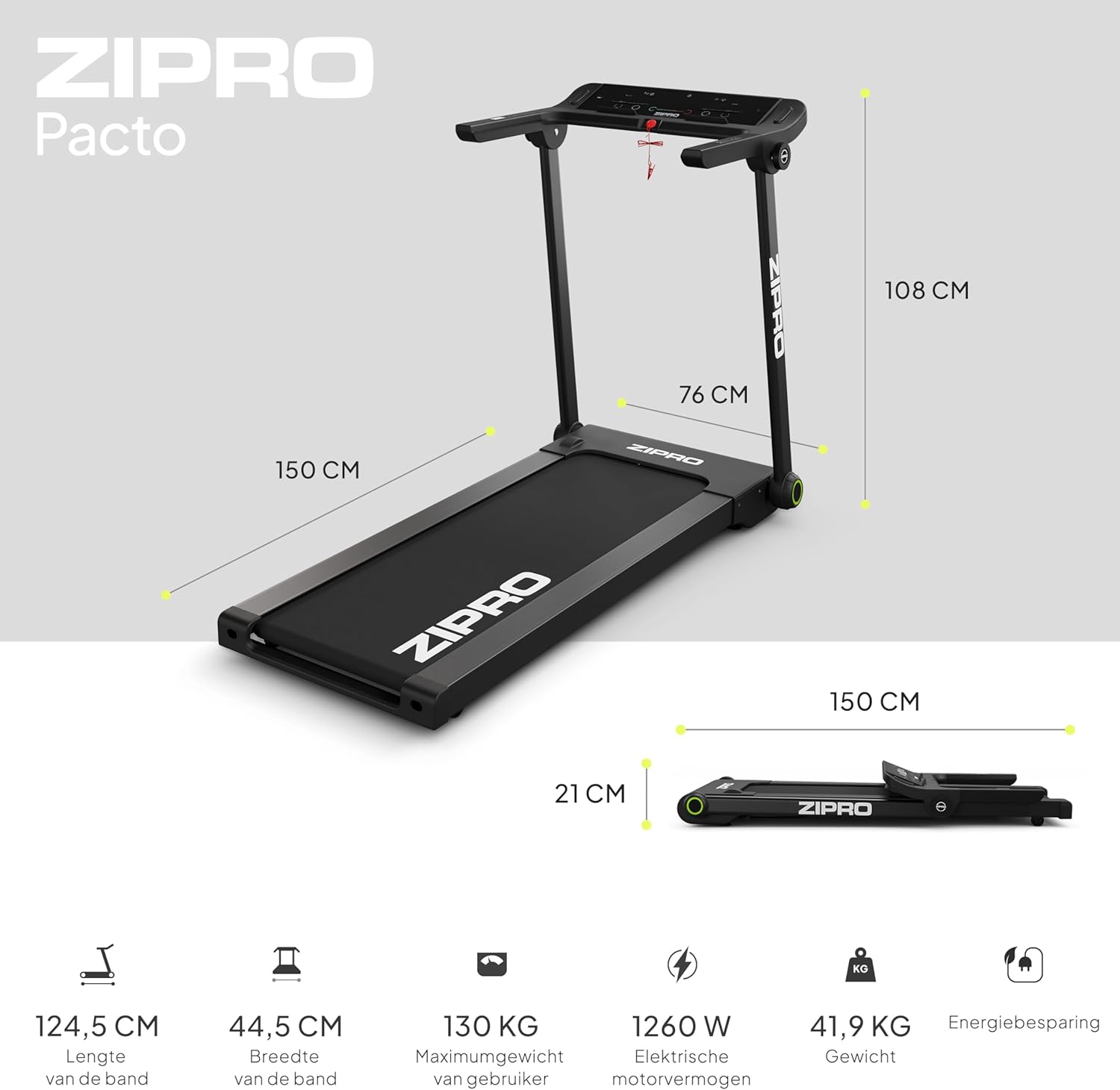
Image: A visual representation of the ZIPRO treadmill's dimensions when unfolded and folded, accompanied by key specifications such as belt length, width, maximum user weight, motor power, and item weight.

Paveikslėlis: detalus view of the ZIPRO treadmill's cushioning system, highlighting the shock absorbers designed to provide a comfortable and joint-friendly workout experience.
9. Garantija ir palaikymas
Your ZIPRO Treadmill is covered by a manufacturer's warranty against defects in materials and workmanship. Please refer to the warranty card included in your package for specific terms and conditions, including the warranty period and coverage details.
For technical assistance, troubleshooting beyond this manual, or to inquire about warranty claims, please contact ZIPRO customer support. Contact information can typically be found on the product packaging, the warranty card, or the official ZIPRO websvetainę.
When contacting support, please have your model number (5941329 L) and proof of purchase readily available to expedite the service process.


