
1. Įvadas
This manual provides essential information for the proper setup, operation, and maintenance of your Paulmann 950.73 Remote Control. Please read these instructions carefully before using the device to ensure safe and efficient functionality. Keep this manual for future reference.
2. Produktas baigtasview
The Paulmann 950.73 is a compact and modern remote control designed for wireless operation of compatible Paulmann lighting systems. It features a chrome finish and is constructed from durable plastic, offering a comfortable grip and intuitive control over your lighting.
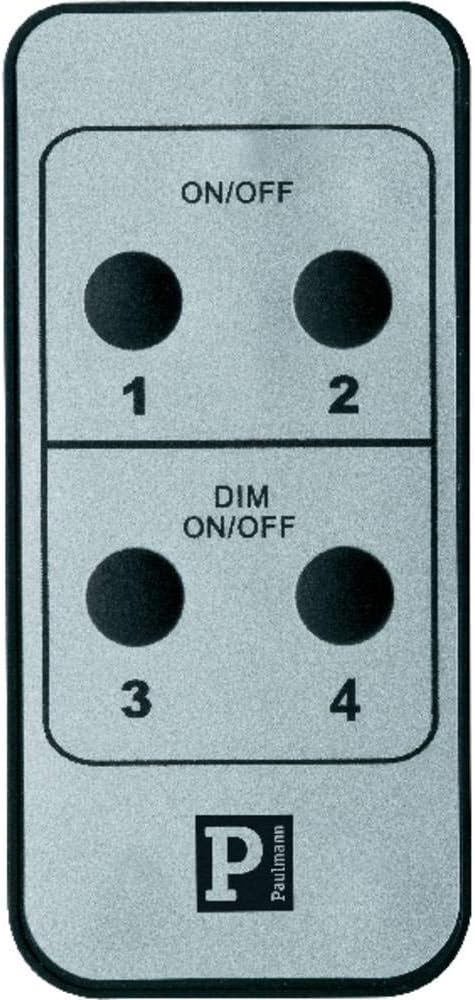
1 vaizdas: priekis view of the Paulmann 950.73 Remote Control, showing the ON/OFF and DIM ON/OFF buttons for four channels.
Pagrindinės funkcijos:
- Wireless control for Paulmann lighting systems.
- Dedicated ON/OFF functionality.
- Dimming control (DIM ON/OFF) for compatible fixtures.
- Four independent control channels (1, 2, 3, 4).
- Modern chrome design.
3. Sąranka
3.1 Akumuliatoriaus įdėjimas
The Paulmann 950.73 Remote Control requires batteries for operation. Batteries are not included with the product. Please refer to the energy label for the correct battery type (typically AAA or similar, as indicated by the 'Battery / Accu' symbol).
- Nuotolinio valdymo pulto gale raskite baterijų skyriaus dangtelį.
- Norėdami atidaryti skyrių, pastumkite arba atkabinkite dangtelį.
- Insert the required batteries, ensuring correct polarity (+ and -) as indicated inside the compartment.
- Saugiai uždėkite akumuliatoriaus skyriaus dangtelį.

Image 2: Energy label indicating battery or accumulator power source.
3.2 Pairing with Lighting System
Before first use, the remote control must be paired with your Paulmann lighting system. The exact pairing procedure may vary depending on your specific Paulmann receiver or light fixture. Generally, the steps involve:
- Ensure your Paulmann lighting system is powered on and in pairing mode (refer to your lighting system's manual for specific instructions).
- On the 950.73 remote, press and hold the desired channel button (1, 2, 3, or 4) for a few seconds until the light system responds (e.g., flashes or changes brightness).
- Release the button. The remote should now be paired with that channel.
- Repeat for other channels if you wish to control multiple lighting groups independently.
4. Operacija
The Paulmann 950.73 Remote Control offers straightforward operation for your connected lighting.
Mygtukų funkcijos:
- ON/OFF (Top Section): Press the respective channel button (1 or 2) in the top section to turn the connected light fixture ON or OFF.
- DIM ON/OFF (Bottom Section): Press the respective channel button (3 or 4) in the bottom section to turn the connected light fixture ON or OFF. For compatible dimmable fixtures, holding down the button may initiate dimming. Release the button at the desired brightness level.
Pastaba: The dimming function (DIM ON/OFF) will only work if the connected Paulmann lighting system and its light source are dimmable. If your system is not dimmable, these buttons will function as simple ON/OFF switches.
5. Priežiūra
5.1 Valymas
Nuotolinio valdymo pultą valykite minkšta, sausa šluoste. Įsisenėjusius nešvarumus lengvai nuvalykite.amp cloth with mild soap can be used, followed by immediate drying. Do not use abrasive cleaners, solvents, or harsh chemicals, as these can damage the surface.
5.2 Akumuliatoriaus keitimas
Replace batteries when the remote's range decreases or it becomes unresponsive. Follow the battery installation steps in Section 3.1. Always dispose of used batteries responsibly according to local regulations.
6. Problemų sprendimas
Dažnos problemos ir sprendimai:
- Nuotolinis nereaguoja:
- Patikrinkite, ar baterijos įdėtos teisingai ir ar jos neišsikrovusios. Jei reikia, pakeiskite.
- Ensure the remote is within range of the receiver.
- Re-pair the remote control with the lighting system (refer to Section 3.2).
- Dimming function not working:
- Verify that your Paulmann lighting system and the installed light source are dimmable.
- Ensure the remote is correctly paired to a dimmable channel.
- Trikdžiai:
- Avoid placing the remote near strong electromagnetic fields or other wireless devices that might cause interference.
7. Specifikacijos
| Atributas | Detalė |
|---|---|
| Modelio numeris | 950.73 |
| Prekės ženklas | Paulmannas |
| Spalva | Chrome |
| Medžiaga | Plastikiniai |
| Matmenys (plotis x gylis x aukštis) | 4 cm x 8.5 cm x 0.7 cm |
| Svoris | 60 g |
| Stilius | Modernus |
| Jungiklio tipas | Nuotolinio valdymo pultas |
| Maitinimo šaltinis | Baterija (į komplektą neįeina) |
| Naudojimo aplinka | Naudoti tik patalpose |
8. Garantija ir palaikymas
For information regarding warranty coverage, technical support, or spare parts availability for your Paulmann 950.73 Remote Control, please refer to the official Paulmann website or contact Paulmann customer service directly. This information is not provided within this manual.
Prašome išsaugoti pirkimo įrodymą bet kokiems garantiniams reikalavimams.


