1. Įvadas
This manual provides detailed instructions for the installation, operation, and maintenance of your Pioneer DEH-80PRS CD Receiver. Please read this manual thoroughly before using the product to ensure proper operation and to prevent damage.
The Pioneer DEH-80PRS is an advanced car audio CD receiver designed for superior sound quality, featuring a 3-Way Active Crossover Network, Auto EQ, Auto Time Alignment, Bluetooth connectivity, and HD Radio capabilities.

Figure 1: Pioneer DEH-80PRS CD Receiver
2. Saugos informacija
Svarbios saugos priemonės:
- Do not attempt to install or service this product yourself. Refer installation and service to qualified personnel.
- Do not operate this product in any way that distracts you from safe driving. Always observe traffic regulations.
- Garsumą palaikykite tokiu lygiu, kad vis tiek girdėtumėte išorinius garsus, pavyzdžiui, greitosios pagalbos automobilių sirenas.
- Saugokite įrenginį nuo drėgmės ar ekstremalių temperatūrų.
65 pasiūlymas Įspėjimas:
Šiame gaminyje yra cheminių medžiagų, kurios Kalifornijos valstijoje žinomos kaip sukeliančios vėžį ir apsigimimus arba kitokią žalą reprodukcijai.
3. Pakuotės turinys
Prieš tęsdami montavimą, patikrinkite, ar dėžutėje yra visi reikalingi daiktai:
- Pioneer DEH-80PRS CD Receiver
- Nuotolinio valdymo pultas
- External Microphone for Auto EQ/Time Alignment
- Laidų laidai
- USB prailginimo kabelis
- RCA Cables (for pre-outs)
- Installation Hardware (screws, mounting cage)
- Naudotojo vadovas (šis dokumentas)

Figure 2: Included accessories for the DEH-80PRS
4. Produktas baigtasview
4.1 Priekinio skydelio valdikliai
The front panel features a large rotary volume knob, various function buttons for source selection, menu navigation, and audio adjustments, and a multi-line display. The display provides information on the current source, track, radio station, and audio settings.

Figure 3: Front panel of the DEH-80PRS and remote control
4.2 Galinio skydelio jungtys
The rear panel provides connections for power, speakers, external amplifiers (RCA pre-outs), USB devices, and the external microphone. It also includes a fuse for protection.
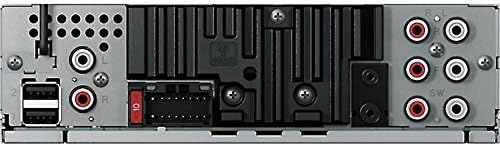
Figure 4: Rear panel showing power, speaker, and RCA connections
5. Sąranka ir diegimas
Professional installation is recommended for optimal performance and to avoid damage to your vehicle's electrical system. Ensure the vehicle's battery is disconnected before starting installation.
5.1 Laidų jungtys
- Connect the wiring harness to the vehicle's power, ground, and speaker wires according to the wiring diagram provided in the separate installation guide.
- Connect the RCA pre-out cables to your external ampPriekinių, galinių ir žemųjų dažnių garsiakalbio kanalų stiprintuvai.
- Connect the external microphone to the designated input for Auto EQ and Auto Time Alignment functions.
- Connect any USB devices or storage via the USB extension cable.
5.2 Pradiniai nustatymai
After installation, reconnect the vehicle's battery. The unit will power on. Follow the on-screen prompts for initial setup, including language selection and clock settings.
Svarbu: The DEH-80PRS features a switch on the chassis to select between Standard (STD) mode and Network (NW) mode for the 3-Way Active Crossover. Ensure this switch is set correctly for your speaker configuration before performing audio adjustments. Changing this switch requires a system reset.
6. Naudojimo instrukcijos
6.1 Pagrindinės operacijos
- Maitinimo įjungimas/išjungimas: Press the SRC (Source) button to turn the unit on. Press and hold SRC to turn it off.
- Garsumo valdymas: Norėdami reguliuoti garsumą, pasukite didelę sukamąją rankenėlę.
- Šaltinio pasirinkimas: Press the SRC button repeatedly to cycle through available sources (CD, Tuner, USB, SD, Bluetooth Audio, AUX).
6.2 CD atkūrimas
Insert a CD into the disc slot. Playback will begin automatically. Use the track skip buttons to navigate between tracks. Press the BAND button to switch between CD text display modes.
6.3 Tuner Operation (AM/FM/HD Radio)
Select the Tuner source. Press the BAND button to switch between FM1, FM2, FM3, and AM bands. Use the seek buttons to find stations. For HD Radio, the unit will automatically detect and tune to HD Radio broadcasts where available.
6.4 „Bluetooth“ ryšys
The DEH-80PRS supports Bluetooth for audio streaming and hands-free calling.
- Poravimas: Enable Bluetooth on your mobile device. On the DEH-80PRS, navigate to the Bluetooth menu and select 'Pairing'. Select 'Pioneer DEH-80PRS' from your device's Bluetooth list. Enter the PIN if prompted (default is '0000').
- Garso transliacija: Once paired, select 'Bluetooth Audio' as the source to stream music from your device.
- Skambinimas laisvų rankų įranga: When a call comes in, the unit will display the caller ID. Press the phone button to answer or end a call.
6.5 USB/SD atkūrimas
Insert a USB device into the USB port or an SD card into the SD card slot. The unit will automatically detect and begin playback of compatible audio files. Use the navigation buttons to browse folders and tracks.
6.6 Advanced Audio Settings
The DEH-80PRS offers extensive audio customization for audiophile-grade sound.
- 3-Way Active Crossover Network: This feature allows precise control over the frequency ranges sent to your tweeters, mid-range speakers, and subwoofers. Access this in the Audio menu to set crossover points and slopes for each channel. This is especially powerful in Network mode.
- Automatinis ekvalaizeris: Use the supplied microphone to automatically equalize the sound output to your vehicle's acoustics. Place the microphone in the listening position (e.g., driver's headrest), ensure the car is quiet with windows closed, and initiate the Auto EQ process from the Audio menu.
- Auto Time Alignment: This feature measures the distance from each speaker to the listening position and adjusts the sound output timing to ensure all sound reaches the listener simultaneously, creating a more focused soundstage. Use the same microphone placement as Auto EQ and initiate from the Audio menu.
- Manual EQ/Sound Adjustments: For further fine-tuning, the unit provides a 16-band graphic equalizer, listening position selector, and other manual sound controls.
7. Priežiūra
7.1 Įrenginio valymas
Wipe the front panel with a soft, dry cloth. Do not use harsh chemicals or abrasive cleaners. For stubborn dirt, lightly damplt audinį supilkite vandeniu.
7.2 Nuotolinio valdymo pulto baterija
If the remote control stops responding, replace the lithium coin cell battery (CR2025). Refer to the remote control's specific instructions for battery replacement.
8. Problemų sprendimas
Jei kyla problemų, dažniausiai pasitaikančias problemas ir jų sprendimus rasite toliau pateiktoje lentelėje.
| Problema | Galima priežastis | Sprendimas |
|---|---|---|
| Nėra galios | Perdegęs saugiklis; neteisingas laidų sujungimas | Check the fuse; verify wiring connections. |
| Nėra garso | Volume too low; incorrect source; speaker wiring issue | Padidinkite garsumą; pasirinkite tinkamą šaltinį; patikrinkite garsiakalbių jungtis. |
| Bluetooth neprisijungia | Device not in pairing mode; unit not discoverable | Įsitikinkite, kad abu įrenginiai veikia susiejimo režimu; ištrinkite ankstesnius susiejimus ir bandykite dar kartą. |
| CD error | Dirty or scratched disc; disc inserted incorrectly | Clean the disc; ensure it is inserted correctly. |
Jei problema išlieka ir išbandžius šiuos sprendimus, susisiekite su „Pioneer“ klientų aptarnavimo tarnyba arba kvalifikuotu techninės priežiūros specialistu.
9. Specifikacijos
- Gaminio matmenys: 11.7 x 6.4 x 8.9 colio
- Prekės svoris: 2.64 svaro (1.2 kilogramo)
- Prekės modelio numeris: DEH80PRS
- Baterijos: 1 Lithium Metal battery required (for remote)
- Belaidžio ryšio technologijos: Bluetooth
- Ryšio technologijos: Laidinis
- Ypatingos savybės: CD Player, 3-Way Active Crossover Network, Auto EQ, Auto Time Alignment
- Suderinami įrenginiai: Garsiakalbis, išmanusis telefonas
- Jungties tipas: 3.5 mm lizdas, USB
- Garso išvesties režimas: Stereo
- Erdvinio garso kanalo konfigūracija: 5.1 (via pre-outs)
- Gamintojas: Pionierius
- Pirmą kartą pasiekiama data: 16 m. sausio 2012 d
10. Garantija ir palaikymas
For warranty information, please refer to the separate warranty card included with your product or visit the official Pioneer website. For technical support, product registration, or to find authorized service centers, please contact Pioneer customer service directly.
You can typically find support contact details on the official Pioneer websvetainė: www.pioneerelectronics.com