Įvadas
This manual provides detailed instructions for the setup, operation, and maintenance of your Inland Pro Bluetooth Optical Mouse, Model 07349. This device offers reliable wireless connectivity and precise optical tracking for an enhanced computing experience. Its ergonomic design ensures comfortable use over extended periods.
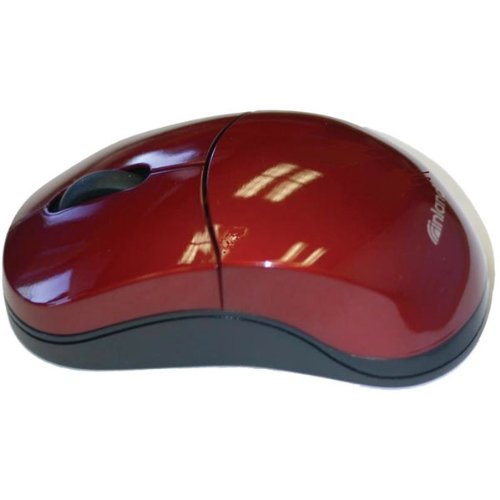
Figure 1: The Inland Pro Bluetooth Optical Mouse, Model 07349, featuring its ergonomic design and burgundy finish.
Sąranka
1. Akumuliatoriaus įdėjimas
The Inland Pro Bluetooth Optical Mouse requires batteries for operation. Batteries are not included with the mouse and must be purchased separately.
- Raskite baterijų skyriaus dangtelį pelės apačioje.
- Norėdami atidaryti skyrių, pastumkite arba pakelkite dangtelį.
- Insert the required batteries, ensuring correct polarity (+/-) as indicated inside the compartment.
- Saugiai uždėkite akumuliatoriaus skyriaus dangtelį.
2. „Bluetooth“ poravimas
Follow these steps to pair your mouse with a Bluetooth-enabled device:
- Ensure the mouse has fresh batteries installed and is powered on (if it has an on/off switch).
- Activate Bluetooth on your computer or device. Refer to your device's operating system instructions for specific steps.
- Put the mouse into pairing mode. This is typically done by pressing and holding a small button on the underside of the mouse, often labeled "Connect" or with a Bluetooth symbol, until an indicator light on the mouse begins to flash.
- On your device, search for new Bluetooth devices. The mouse should appear in the list, possibly as "Inland Mouse" or "Bluetooth Mouse 07349".
- Select the mouse from the list to complete the pairing process. Once paired, the indicator light on the mouse may stop flashing or turn solid.
If pairing fails, ensure the mouse is within range and not connected to another device. You may need to remove previous pairings from your device's Bluetooth settings and try again.
Naudojimo instrukcijos
Once successfully paired, your Inland Pro Bluetooth Optical Mouse is ready for use.
- Kairysis spustelėjimas: Paspauskite kairįjį mygtuką, kad pasirinktumėte elementus, atidarytumėte nuorodas arba suaktyvintumėte funkcijas.
- Dešiniuoju pelės mygtuku spustelėkite: Paspauskite dešinįjį mygtuką, kad atidarytumėte kontekstinius meniu arba pasiektumėte papildomas parinktis.
- Slinkties ratukas: Norėdami naršyti dokumentuose, sukite slinkties ratuką aukštyn arba žemyn ir web pages. The scroll wheel may also function as a middle click button for specific applications.
- Optinis sekimas: The mouse uses optical technology for precise cursor movement. For optimal performance, use the mouse on a clean, non-reflective surface.
Priežiūra
Tinkama priežiūra užtikrina pelės ilgaamžiškumą ir optimalų veikimą.
- Valymas: Pelės išorę valykite minkšta, sausa, nepūkuota šluoste. Jei nešvarumai sunkiai įveikiami, šiek tiek nuvalykite.ampNuvalykite šluostę vandeniu. Venkite naudoti stiprias chemines medžiagas ar abrazyvinius valiklius.
- Optinis jutiklis: Periodically check the optical sensor on the underside of the mouse for dust or debris. Gently clean it with a cotton swab if necessary.
- Baterijos keitimas: When the mouse's performance degrades or it stops responding, it is likely time to replace the batteries. Follow the battery installation steps outlined in the Setup section.
- Saugykla: When not in use for extended periods, consider removing the batteries to prevent leakage and store the mouse in a dry, dust-free environment.
Trikčių šalinimas
If you encounter issues with your Inland Pro Bluetooth Optical Mouse, refer to the following common problems and solutions:
| Problema | Galimas sprendimas |
|---|---|
| Pelė nereaguoja. |
|
| Erratic or no cursor movement. |
|
| Unable to pair the mouse. |
|
Specifikacijos
| Funkcija | Detalė |
|---|---|
| Prekės ženklas | Vidaus |
| Modelio numeris | 07349 |
| Ryšio technologija | Bluetooth |
| Judesio aptikimo technologija | Optinis |
| Mygtukų skaičius | 2 (kairė, dešinė) + slinkties ratukas |
| Belaidis tipas | 2.4 GHz Radio Frequency, 802.11abg |
| Ypatingos savybės | Bluetooth, Ergonomic Design, Optical Tracking |
| Prekės matmenys (IxPxH) | 20.3x6.4x18.3 cm |
| Prekės svoris | 109 g |
| Baterijos įtrauktos | Nr |
Garantija ir palaikymas
For warranty information and technical support, please refer to the documentation included with your product packaging or visit the official Inland websvetainėje. Išsaugokite pirkimo kvitą kaip pirkimo įrodymą garantiniams reikalavimams.


