1. Įvadas
1.1 Produktas baigtasview
The Triton TRA001 is a 3-1/4 HP dual mode precision plunge router designed for woodworking applications. It features a powerful motor capable of 8000 to 21000 RPM, allowing it to handle various materials and tasks. The router can operate in both plunge and fixed-base modes, offering versatility for different routing operations. Key design elements include a single-button mechanism for mode switching, a micro winder for fine depth adjustments, and an automatic spindle lock for simplified bit changes.
1.2 Pagrindinės savybės
- Single button switches between conventional plunge and fixed-base router modes with rack and pinion height adjustment.
- Single wrench bit change through the base, facilitated by an automatic spindle lock.
- Micro winder enables continuous fine depth adjustment throughout the full plunge range.
- Soft start and variable speed control for optimal performance across various cutter types.
- Easy-set, direct reading, 3-stage turret for precise preset cut depths.
- Safety switch shutter locks closed in bit change mode to prevent accidental power-on.
- Multi-Function fence provides control for handheld use and circle cutting.
- Removable plunge spring allows for easier bit adjustment when the router is table-mounted.
- Fully enclosed guarding provides protection from the cutting zone.
- Side air vents reduce dust intake into the motor casing when mounted upside-down in a router table.
- Quick access for changing worn motor brushes.
2. Saugos informacija
Naudodami elektrinius įrankius, visada laikykitės pagrindinių saugos priemonių, kad sumažintumėte gaisro, elektros smūgio ir sužalojimo riziką. Prieš naudodami perskaitykite ir supraskite visas instrukcijas.
2.1 Bendrieji elektrinių įrankių saugos įspėjimai
- Darbo zonos sauga: Darbo vieta turi būti švari ir gerai apšviesta. Netvarkingos arba tamsios vietos skatina nelaimingus atsitikimus. Nenaudokite elektrinių įrankių sprogioje aplinkoje, pavyzdžiui, ten, kur yra degių skysčių, dujų ar dulkių.
- Elektros sauga: Elektrinių įrankių kištukai turi atitikti lizdą. Niekada nekeiskite kištuko. Neperdirbkite laido. Laidą laikykite atokiau nuo karščio, alyvos, aštrių briaunų ar judančių dalių.
- Asmeninis saugumas: Always wear eye protection. Use hearing protection when operating loud tools. Wear a dust mask if operations create dust. Dress properly; avoid loose clothing or jewelry. Secure long hair.
- Įrankio naudojimas ir priežiūra: Nenaudokite elektrinio įrankio per jėgą. Naudokite savo darbui tinkamą elektrinį įrankį. Prieš atlikdami bet kokius pakeitimus, keisdami priedus ar padėdami elektrinius įrankius sandėliuoti, atjunkite kištuką nuo maitinimo šaltinio.
- Priežiūra: Prižiūrėkite elektrinius įrankius. Patikrinkite, ar judančios dalys nesutampa ar neprisiriša, ar jos nesulaužytos, ar nėra kitų sąlygų, kurios gali turėti įtakos elektrinio įrankio veikimui.
2.2 Specific Router Safety Warnings
- Visada įsitikinkite, kad ruošinys yra tvirtai pritvirtintasampprieš maršrutizavimą.
- Use sharp router bits. Dull bits can cause kickback and overheating.
- Ensure the router bit is correctly inserted and tightened in the collet before operation.
- Never start the router with the bit in contact with the workpiece.
- Keep hands clear of the cutting area and rotating bit.
- Always feed the router against the rotation of the bit to prevent the router from running away.
- When routing small workpieces, use a router table or appropriate jigs for safety.
3. Įtraukti komponentai
The Triton TRA001 Dual Mode Precision Plunge Router package includes the following items:
- Triton TRA001 Dual Mode Plunge Router
- Multi-Function Fence
- Collet veržliaraktis
- 1/2-inch Collet
- 1/4-inch Collet (reducer)
- Stalo aukščio vyniotuvas
4. Sąranka
4.1 bitų diegimas
- Įsitikinkite, kad maršrutizatorius yra atjungtas nuo maitinimo šaltinio.
- Press the spindle lock button. The automatic spindle lock engages when the power switch is closed.
- Insert the desired router bit into the appropriate collet (1/2-inch or 1/4-inch with reducer). Ensure the bit shank is fully seated.
- Use the provided collet wrench to tighten the collet nut securely. Do not overtighten.
- Atleiskite veleno užraktą.
4.2 Mode Selection (Plunge vs. Fixed-Base)
The TRA001 features a single button to switch between plunge and fixed-base modes.
- Susižadeti plunge mode, ensure the router is in the fully raised position, then press the mode selection button. The router will now plunge freely.
- Susižadeti fixed-base mode, depress the mode selection button while the router is at the desired depth. The rack and pinion system will lock the router at that depth.
4.3 Gylio reguliavimas
The router offers multiple methods for depth adjustment:
- Micro Winder: For fine adjustments, use the micro winder knob. This allows for continuous, precise depth changes throughout the plunge range.
- 3-Stage Turret: The easy-set, direct reading 3-stage turret allows for quick setting of precise preset cut depths for stepped routing operations.
- Table-Mounted Adjustment: When mounted in a router table, the included table height winder can be used for above-table bit height adjustments. The removable plunge spring facilitates this process.

Image 1: Triton TRA001 Dual Mode Precision Plunge Router, front view. This image shows the overall design of the router, highlighting its handles, motor housing, and clear base.

Image 2: Triton TRA001 Router with its height adjustment mechanism extended. This view illustrates the plunge mechanism and the depth setting components.
5. Naudojimo instrukcijos
5.1 Įjungimas / išjungimas ir greičio valdymas
- Connect the router to a suitable power outlet.
- The router features a soft start function, which gradually increases motor speed upon activation, reducing startup torque.
- Use the variable speed dial to select the appropriate RPM for your specific router bit and material. Refer to bit manufacturer recommendations.
- To turn on, press the power switch. To turn off, release or press the switch again, depending on the switch type.
5.2 Maršruto parinkimo metodai
- Įstrižinis frezavimas: With the router in plunge mode, position the router over the workpiece. Start the motor, then slowly plunge the bit into the material to the desired depth. Guide the router along the cut path.
- Fixed-Base Routing: With the router locked at a fixed depth, start the motor. Carefully bring the rotating bit into contact with the workpiece and guide the router along the desired path.
- Using the Multi-Function Fence: Attach the multi-function fence for straight edge routing or for cutting circles. Adjust the fence to the desired offset from the bit.
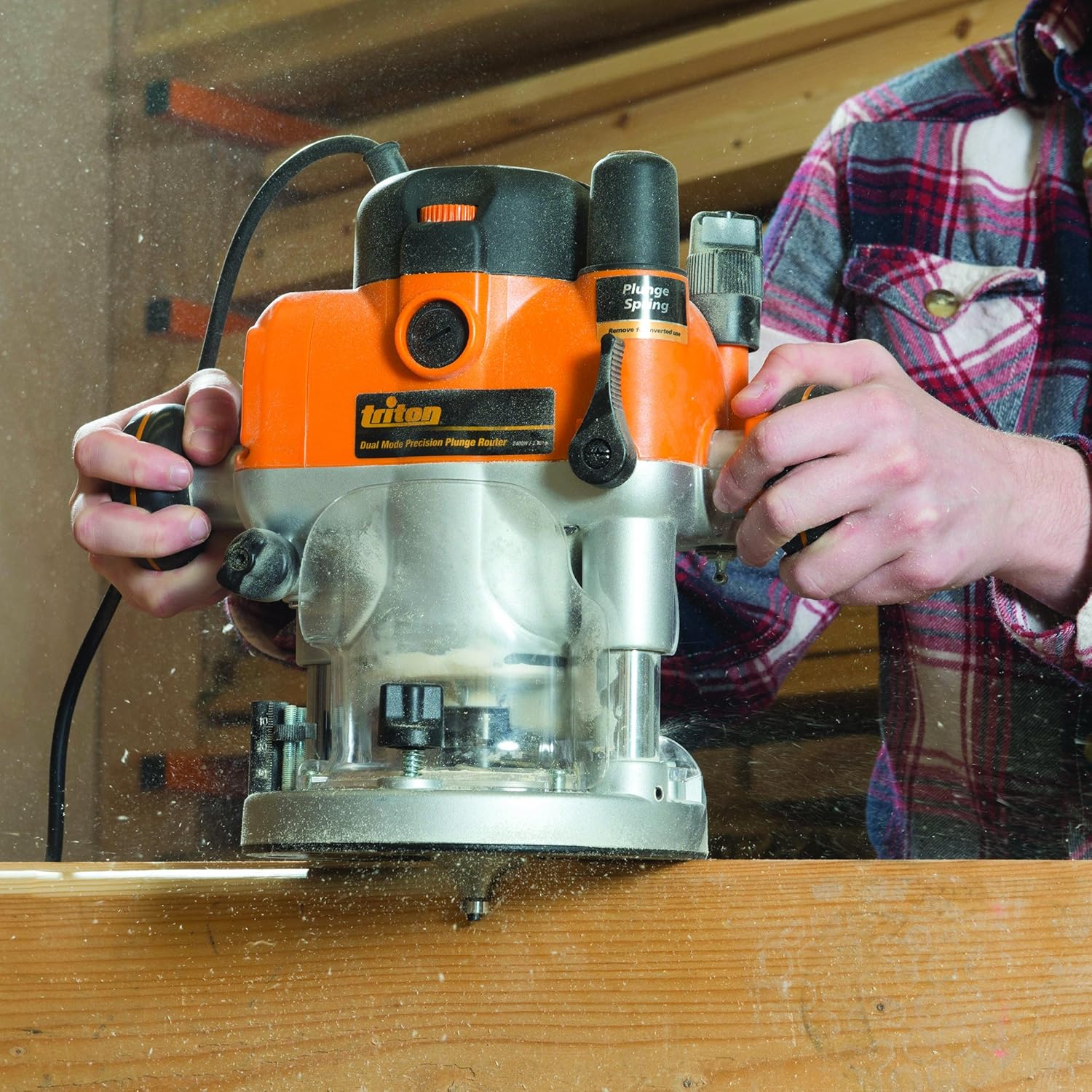
Image 3: A user operating the Triton TRA001 router on a wooden workpiece. This image demonstrates the router in use, highlighting proper hand placement and the dust generated during operation.

4 pav.: Stambus planas view of a user operating the Triton TRA001 router. This image provides a detailed look at the router's base and the bit engaging with the wood.
5.3 Dulkių surinkimas
The router is equipped with side air vents designed to reduce the intake of dust into the motor casing, particularly when the unit is mounted upside-down in a router table. For optimal dust management, connect a suitable dust extraction system to the router's dust port.
6. Priežiūra
Regular maintenance ensures the longevity and safe operation of your Triton TRA001 router.
6.1 Valymas
- Always disconnect the router from the power supply before cleaning.
- Use a soft brush or compressed air to remove dust and debris from the motor vents and around the collet area.
- Wipe down the exterior of the router with a clean, damp audinys. Nenaudokite stiprių cheminių medžiagų ar tirpiklių.
6.2 Anglies šepetėlių keitimas
The router features quick access points for carbon brush replacement. Refer to the specific instructions in the full manufacturer's manual for the correct procedure and replacement brush type. Worn brushes can lead to reduced performance or motor damage.
6.3 Bendra apžiūra
- Periodically inspect the power cord for damage. If damaged, have it replaced by a qualified technician.
- Patikrinkite visų varžtų ir tvirtinimo detalių tvirtumą.
- Ensure the plunge mechanism operates smoothly and is free of debris.
7. Problemų sprendimas
Šiame skyriuje aptariamos dažniausiai pasitaikančios problemos, su kuriomis galite susidurti naudodami maršrutizatorių.
| Problema | Galima priežastis | Sprendimas |
|---|---|---|
| Maršrutizatorius neįsijungia | Nėra maitinimo Pažeistas maitinimo laidas Dėvėti angliniai šepetėliai Įjungtas saugos jungiklis | Patikrinkite maitinimo jungtį ir lizdą Patikrinkite laidą, ar nėra pažeidimų; prireikus pakeiskite Pakeiskite anglinius šepetėlius Ensure safety switch is disengaged |
| Prasta pjovimo kokybė / Deganti mediena | Atšipusis frezos antgalis Neteisingas greičio nustatymas Per didelis padavimo greitis | Pakeiskite arba pagaląskite antgalį Adjust speed to suit material and bit Sumažinkite padavimo greitį |
| Per didelė vibracija | Loose bit in collet Bent or damaged bit Unbalanced bit | Įsitikinkite, kad antgalis yra tvirtai priveržtas Pakeiskite pažeistą antgalį Use a balanced, high-quality bit |
| Plunge mechanism stiff | Accumulated dust/debris Trūksta tepimo | Clean plunge columns thoroughly Apply a light lubricant to plunge columns (consult manufacturer's guide) |
8. Specifikacijos
Technical specifications for the Triton TRA001 Dual Mode Precision Plunge Router:
| Specifikacija | Detalė |
|---|---|
| Prekės ženklas | Tritonas |
| Modelio numeris | TRA001 (TRI-523504) |
| Arklio jėgos | 3.25 AG |
| Maksimalus sukimosi greitis | 21000 aps./min |
| Maitinimo šaltinis | Laidinis elektros (AC) |
| Pagrindo tipas | Pasinerti |
| Medžiaga | Metalas |
| Prekės svoris | 13 svaro |
| Gaminio matmenys | 12.9 colio pločio x 11.4 colio aukščio |
| Rankenų skaičius | 2 |
| Įtraukti komponentai | Router, Multi-Function Fence, Collet Wrench, 1/2" Collet, 1/4" Collet, Table Height Winder |
9. Garantija ir palaikymas
For detailed warranty information, technical support, or to purchase replacement parts, please refer to the official Triton Tools websvetainėje arba susisiekite su jų klientų aptarnavimo skyriumi. Išsaugokite pirkimo įrodymą garantiniams reikalavimams.


