1. Įvadas
This manual provides detailed instructions for the installation, operation, and maintenance of your Zenec ZE-NC3711D navigation device. Please read this manual thoroughly before using the device to ensure proper function and to maximize your user experience. The Zenec ZE-NC3711D is an advanced in-car navigation and multimedia system designed for specific vehicle models, offering a range of features for navigation, entertainment, and communication.
2. Produktas baigtasview
The Zenec ZE-NC3711D features a digital 6.5-inch WVGA TFT HD LCD screen with LED backlight, providing clear visuals at an 800 x 480 pixel resolution. Its animated ZENEC Graphical User Interface (GUI) supports 'slide-touch' operation for intuitive control. This device integrates navigation, multimedia playback, and Bluetooth hands-free functionality.
Pagrindinės funkcijos:
- Pre-loaded maps for 43 European countries, including Premium Points of Interest (POIs).
- 3D High-Definition satellite navigation with realistic terrain and object display.
- Integrated CD/DVD drive supporting various formats, including Xvid.
- USB, SD, iPod, and iPhone connectivity for music and video playback, with Apple album artwork support.
- Bluetooth for hands-free communication.
- Compatibility with Opel OE computer for date/time settings.
- Designed for specific vehicle models: FIAT Ducato III (250/251) 2006-2011 and FIAT Ducato III Euro 5 (250/251) from 2011.
Įrenginio išdėstymas:
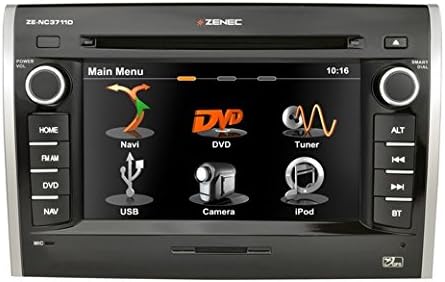
1 paveikslas: Priekyje view of the Zenec ZE-NC3711D navigation device, showing the main menu on its 6.5-inch touchscreen. The menu displays icons for Navi, DVD, Tuner, USB, Camera, and iPod. Physical buttons are visible on both sides for functions like Home, FM/AM, DVD, NAV, ALT, track controls, and Bluetooth.
3. Sąranka
The Zenec ZE-NC3711D is designed for integration into specific vehicle dashboards. Due to the complexity of vehicle electronics and the precise fit required, professional installation by a qualified technician is highly recommended. Incorrect installation can lead to damage to the device or the vehicle's electrical system.
Pradinė konfigūracija:
- Maitinimas: After installation, turn on your vehicle's ignition. The device should power on automatically.
- Kalbos pasirinkimas: Vykdykite ekrane pateikiamus nurodymus, kad pasirinktumėte pageidaujamą kalbą.
- Data ir laikas: Set the correct date and time. For compatible Opel vehicles, these settings can be synchronized via the E>GO device.
- Navigacijos nustatymai: Access the navigation menu to configure initial settings such as vehicle type (e.g., car, motorhome), dimensions (height, width, weight), and routing preferences. These settings are crucial for accurate route calculation, especially for larger vehicles.
- „Bluetooth“ susiejimas: Navigate to the Bluetooth menu to pair your mobile phone for hands-free calling.
4. Naudojimo instrukcijos
The device's main menu provides access to all primary functions. Use the touchscreen with 'slide-touch' gestures or the physical buttons on the side panels to navigate.
4.1 Navigacija
- Starting Navigation: Tap the 'Navi' icon on the main menu.
- Įėjimas į kelionės tikslą: Enter your destination using the on-screen keyboard. You can search by address, city, or Points of Interest (POIs).
- Maršruto apskaičiavimas: The system will calculate the optimal route based on your configured vehicle profile ir pageidavimus.
- 3D žemėlapis View: Enjoy realistic 3D high-definition map views with terrain and object rendering.
- Lankytinų vietų paieška: Utilize the extensive database of Premium POIs, including campsites and service areas.
4.2 Medijos atkūrimas
- CD/DVD diskas: Insert a CD or DVD into the slot. The device supports various audio and video formats, including Xvid.
- USB / SD: Connect a USB drive or insert an SD card into the designated slot. Select the 'USB' or 'iPod' (for USB devices) icon to browse and play media files (music, videos, AVI files).
- „iPod“ / „iPhone“: Connect your Apple device via USB. The system will display album artwork and allow control of your music library.
4.3 Radio (Tuner)
- Accessing Radio: Tap the 'Tuner' icon or press the 'FM/AM' button.
- Stoties paieška: Use the on-screen controls or physical buttons to scan for radio stations.
- Išankstiniai nustatymai: Išsaugokite mėgstamiausias stotis kaip iš anksto nustatytas vietas, kad galėtumėte jas greitai pasiekti.
NETURI „Bluetooth“
- Poravimas: Ensure your phone's Bluetooth is enabled and discoverable. On the device, go to the Bluetooth menu and search for available devices. Select your phone and confirm the pairing code.
- Skambinimas laisvų rankų įranga: Once paired, you can make and receive calls directly through the device.
4.5 Kamera
- Galinisview Kamera: Jei galinisview prijungus kamerą, ekranas automatiškai persijungs į kameros režimą. view kai transporto priemonė važiuoja atbuline pavara.
5. Priežiūra
Regular maintenance ensures the longevity and optimal performance of your Zenec ZE-NC3711D.
- Ekrano valymas: Jutiklinį ekraną švelniai nuvalykite minkšta, nepūkuota šluoste. Jei dėmės sunkiai įveikiamos, šiek tiek pamirkykite.ampNuvalykite šluostę vandeniu arba ekrano valymo tirpalu. Venkite abrazyvinių valiklių ar stiprių cheminių medžiagų.
- Programinės įrangos atnaujinimai: Periodically check the Zenec website or consult your dealer for available software and map updates. Keeping your software updated ensures access to the latest features and map data.
- Bendra priežiūra: Venkite įrenginio ilgalaikio laikymo tiesioginiuose saulės spinduliuose, itin aukštose temperatūrose ar drėgmės.
6. Problemų sprendimas
If you encounter issues with your Zenec ZE-NC3711D, refer to the following common problems and solutions:
- Įrenginys neįsijungia:
Veiksmas: Check the vehicle's ignition and the device's power connections. Ensure the vehicle's battery is adequately charged. If professionally installed, contact your installer. - Slow Touchscreen Response:
Veiksmas: Ensure the screen is clean. A system reset (refer to the device's specific reset procedure, usually a small reset button or a combination of buttons) may resolve temporary software glitches. - Long Boot-Up Time:
Veiksmas: This can be normal for complex multimedia systems. If the device consistently crashes during startup, ensure stable power supply. A factory reset might be necessary, but this will erase personal settings. - Prastas radijo ryšys:
Veiksmas: Check the antenna connection. Ensure the antenna is properly installed and not obstructed. In some cases, an external antenna booster may be required. - „Bluetooth“ ryšio problemos:
Veiksmas: Ensure both the device and your phone have Bluetooth enabled and are in pairing mode. Delete previous pairings on both devices and attempt to re-pair. Ensure your phone's software is up to date. - DVD Playback Restricted:
Veiksmas: For safety reasons, DVD video playback is typically restricted while the vehicle is in motion. Ensure the parking brake is engaged. If the issue persists while stationary, verify the parking brake signal wire connection. - Navigation Inaccurate or Not Working:
Veiksmas: Įsitikinkite, kad GPS antena turi laisvą view of the sky. Verify that map data is installed and up to date. Check navigation settings for correct vehicle profile (height, width, weight).
If these steps do not resolve the issue, contact Zenec customer support or your authorized dealer.
7. Specifikacijos
| Funkcija | Specifikacija |
|---|---|
| Prekės ženklas | zenec |
| Modelio pavadinimas | ZE-NC3711D |
| Modelio numeris | ZENC3711D |
| Ekrano dydis | 6.5 Inch (visible screen diagonal 7" / 16 cm) |
| Ekrano tipas | LCD |
| Rezoliucija | 800 x 480 pikselių |
| Krašto santykis | 16:9 |
| Atminties talpa | 8 GB |
| Suderinami įrenginiai | Išmanusis telefonas |
| Ypatingos savybės | Radijas |
| Ryšio technologija | USB |
| Įvesties įrenginys | Jutiklinis ekranas |
| Medijos tipas | CD |
| Montavimo tipas | Skydo tvirtinimas |
| Suderinamas su Bluetooth | Taip |
| Garso išvesties režimas | Skaitmeninis |
| Žemėlapio tipas | Europa |
| Transporto priemonės paslaugos tipas | Automobilis |
8. Garantija ir palaikymas
For warranty information, please refer to the documentation provided with your purchase or contact your authorized Zenec dealer. Warranty terms and conditions may vary by region and retailer.
For technical support, software updates, or service inquiries, please visit the official Zenec website or contact their customer service department. Keep your proof of purchase and model number (ZE-NC3711D) readily available when seeking support.


