1. Įvadas
Ačiū, kad pirkoteasing the GPX Portable Top-Loading CD Boombox, Model BC112B. This device offers versatile audio playback options including a top-loading CD player, AM/FM radio, and a 3.5mm auxiliary line-in for connecting external audio devices. Designed for portability and ease of use, this boombox can be powered by AC current or batteries, making it suitable for various environments. This manual provides comprehensive instructions to help you set up, operate, and maintain your new audio system.
2. Pakuotės turinys
Įsitikinkite, kad jūsų siuntinyje yra visi toliau išvardyti daiktai:
- GPX Portable Top-Loading CD Boombox (Model BC112B)
- Kintamosios srovės laidas
- Vartotojo vadovas
- Garantijos kortelė
Note: 6 "C" batteries are required for portable operation and are sold separately.
3. Produktas baigtasview
Familiarize yourself with the components and controls of your boombox.

3.1 pav.: priekis view of the GPX Portable CD Boombox, showing the top-loading CD compartment, control buttons, and dual speakers.

Figure 3.2: Labeled diagram of the GPX CD Boombox, highlighting the foldable handle, CD player, AM/FM radio, and program/shuffle/play controls.
Valdikliai ir funkcijos:
- Iš viršaus įkraunamas CD grotuvas: Supports CD and CD-R/RW discs with 20-track programmable memory.
- AM/FM radijas: Direct tune radio with telescopic FM antenna and built-in AM antenna.
- 3.5mm Audio Line Input: Connect external MP3 players or other audio devices.
- Integruoti garsiakalbiai: Integruoti stereo garsiakalbiai garso išvesčiai.
- 2-Digit Red LED Display: Shows track number or radio frequency.
- Sulankstoma rankena: Kad būtų lengviau pernešti.
- Maitinimo parinktys: Operates with included AC power cable or 6 "C" batteries (sold separately).
4. Sąranka
4.1 Maitinimo jungtis
- Įsitikinkite, kad įrenginys yra IŠJUNGTAS.
- Insert the included AC power cable into the AC power input jack on the back of the unit.
- Kitą kintamosios srovės maitinimo laido galą prijunkite prie standartinio sieninio lizdo.
Note: Disconnect the AC power cable when using batteries.
4.2 Akumuliatoriaus įdėjimas
For portable use, install 6 "C" size batteries (not included).
- Įrenginio apačioje raskite baterijų skyrių.
- Atidarykite akumuliatoriaus skyriaus dangtelį.
- Insert 6 "C" size batteries, ensuring correct polarity (+/-) as indicated inside the compartment.
- Saugiai uždarykite akumuliatoriaus skyriaus dangtelį.
Atsargiai: Do not mix old and new batteries. Do not mix alkaline, standard (carbon-zinc), or rechargeable (nickel-cadmium) batteries. Remove batteries if the unit is not used for an extended period.
Video 4.1: This video demonstrates the battery installation process and highlights the portability of the GPX CD Boombox. It also shows the AC power connection and the AM/FM switch on the back of the unit.
5. Operacija
5.1 CD atkūrimas
- Slide the function switch (located on the back) to the "CD/LINE IN" position.
- Open the top-loading CD compartment by gently lifting the lid.
- Place a CD or CD-R/RW disc onto the spindle with the label side facing up.
- Close the CD compartment lid securely. The display will show "00" or the number of tracks.
- Paspauskite Leisti / Pauzė (►⏸) mygtuką, kad pradėtumėte atkūrimą. LED ekrane pasirodys takelio numeris.
- Naudokite Skip Forward (►►) or Skip Back (◄◄) mygtukai, skirti naršyti tarp takelių.
- Paspauskite Stop (■) mygtuką sustabdyti atkūrimą.
- Norėdami užprogramuoti takelius, paspauskite Programa (P) button while the CD is stopped. Select tracks using the Skip buttons and press Program again to confirm each track. Press Play to start the programmed sequence.
5.2 AM/FM radijas
- Slide the function switch (located on the back) to the "FM" or "AM" position.
- Extend the telescopic FM antenna for optimal FM reception. For AM reception, the unit has a built-in antenna.
- Pasukite Derinimas dial (located on the side) to select your desired radio station.
- Sureguliuokite Apimtis dial to your preferred listening level.
5.3 Line-In (Auxiliary Input)
Connect an external audio device (e.g., MP3 player, smartphone) to play audio through the boombox speakers.
- Slide the function switch (located on the back) to the "CD/LINE IN" position.
- Connect a 3.5mm audio cable (not included) from the headphone jack or line-out of your external device to the LINE IN jack on the back of the boombox.
- Pradėkite grojimą išoriniame garso įrenginyje.
- Reguliuokite garsumą naudodami Apimtis dial on the boombox and/or the volume controls on your external device.
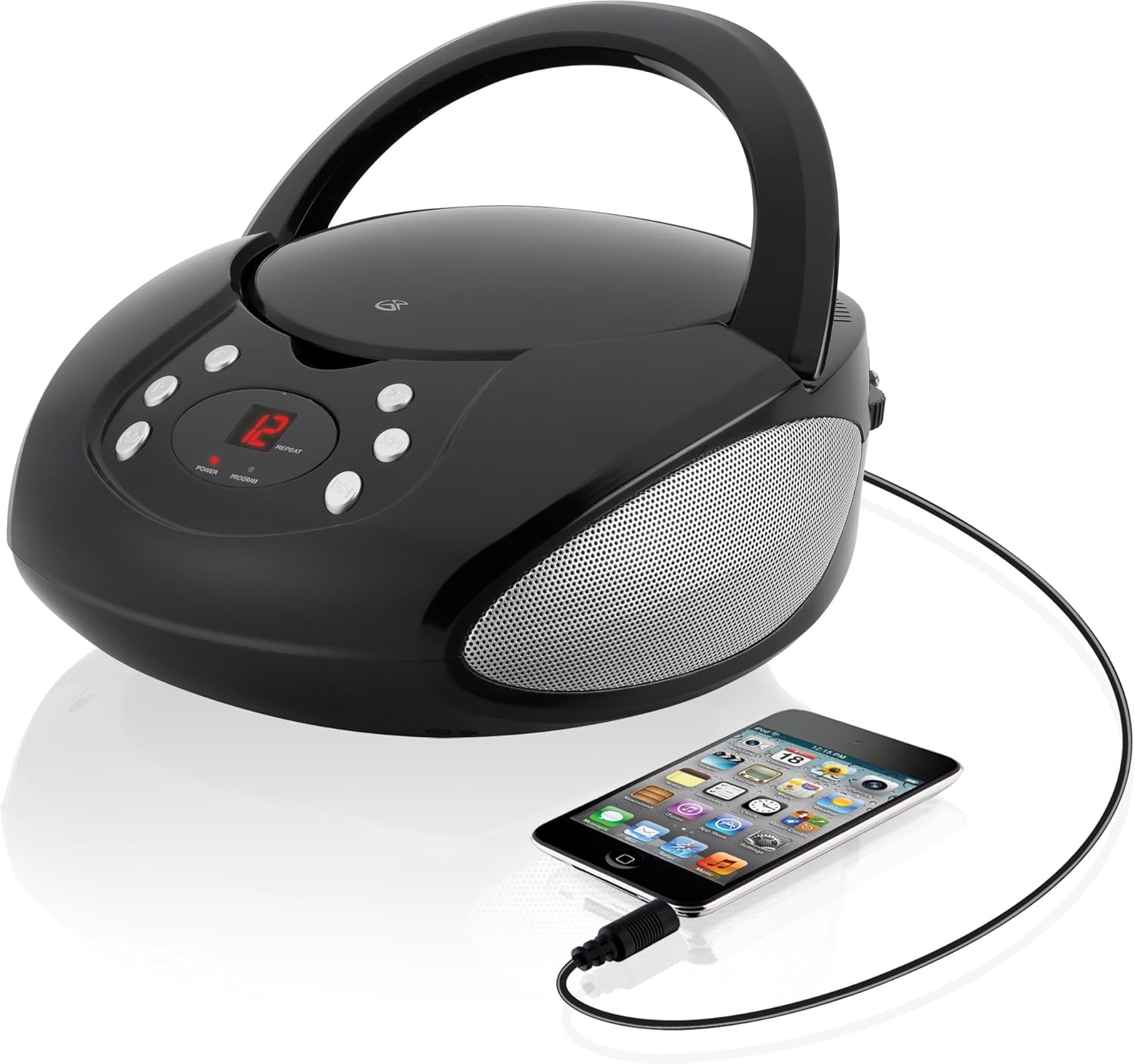
Figure 5.1: The GPX CD Boombox with a smartphone connected via the 3.5mm Line-In port, demonstrating auxiliary audio playback.
6. Priežiūra
- Valymas: Išorinį įrenginio paviršių valykite minkštu, sausu skudurėliu. Nenaudokite abrazyvinių valiklių ar tirpiklių.
- CD grotuvo priežiūra: Keep the CD compartment clean and free of dust. Avoid touching the lens inside the CD player.
- Saugykla: When not in use for extended periods, store the unit in a cool, dry place. Remove batteries if storing for a long time to prevent leakage.
- Antenos priežiūra: Handle the telescopic FM antenna gently to prevent damage.
7. Problemų sprendimas
| Problema | Galima priežastis | Sprendimas |
|---|---|---|
| Nėra galios | AC cable not connected; Batteries depleted or incorrectly installed. | Ensure AC cable is securely plugged in. If using batteries, check battery polarity and replace if necessary. |
| CD not playing / "ER" displayed | CD inserted incorrectly; Disc is dirty or scratched; Function switch not in CD/LINE IN mode. | Re-insert CD with label side up. Clean the disc. Set function switch to CD/LINE IN. |
| Prastas radijo priėmimas | FM antenna not extended; Unit too close to interference sources. | Fully extend the FM telescopic antenna. Reposition the unit away from other electronic devices. |
| No sound from Line-In | Audio cable not connected; Volume too low on boombox or external device. | Ensure 3.5mm audio cable is securely connected. Increase volume on both the boombox and the external device. |
8. Specifikacijos
- Modelis: BC112B
- Maitinimo šaltinis: AC 120V ~ 60Hz or 6 x "C" Batteries (DC 9V)
- CD suderinamumas: CD, CD-R / RW
- Radijo dažniai: AM, FM
- Įėjimai: 3.5 mm garso linijos įvestis
- Matmenys (P x P x A): 9.19 x 5.17 x 10.42 colio
- Svoris: 2.51 svaro
- Gamintojas: DPI
9. Garantija ir palaikymas
This product comes with a limited warranty. Please refer to the included warranty card for detailed terms and conditions, including warranty period and coverage. For technical support or service inquiries, please contact GPX customer service. Contact information can typically be found on the warranty card or the official GPX websvetainę.
65 pasiūlymas Įspėjimas: Šiame produkte gali būti chemikalų, kuriuos Kalifornijos valstija žino apie vėžį, apsigimimus ar kitokią žalą reprodukcijai.


