Įvadas
This manual provides comprehensive instructions for the setup, operation, maintenance, and troubleshooting of your DISH DISH211 4-Device Universal Remote. Designed for ease of use, this remote supports DISH TV receivers and can control up to four different devices, including TVs and other entertainment systems. Its ability to learn commands from original remotes makes it a versatile replacement.
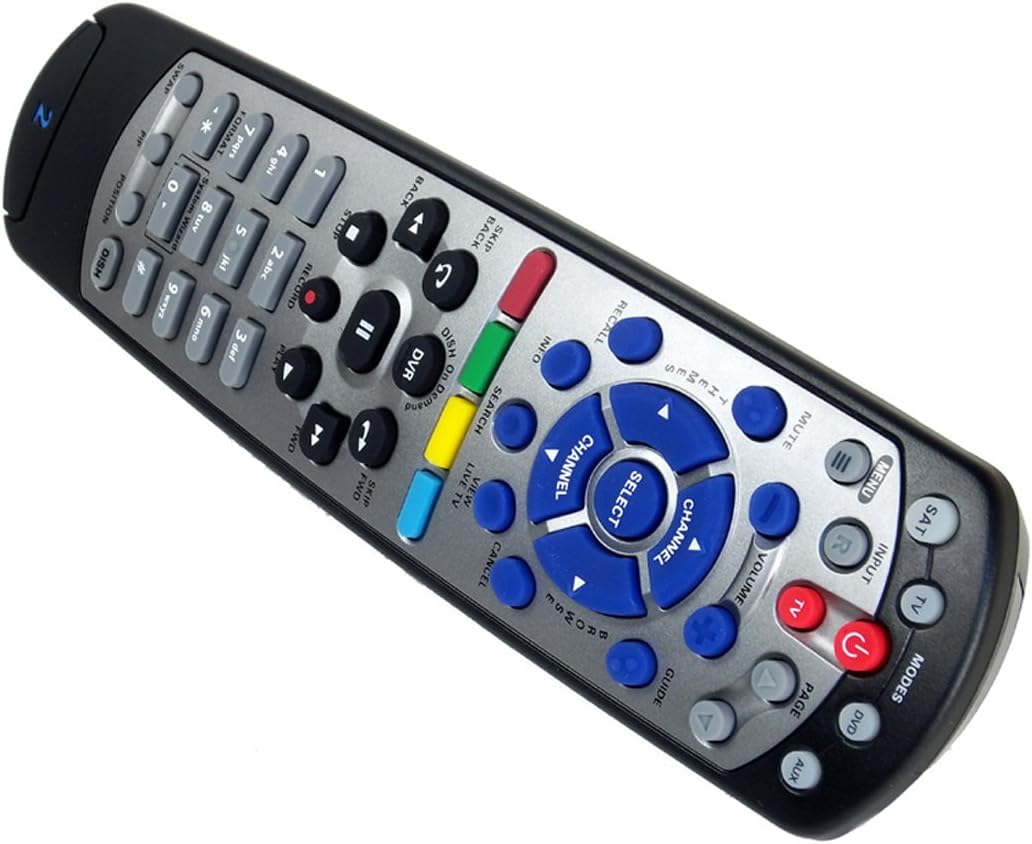
Figure 1: The DISH DISH211 4-Device Universal Remote, showcasindėl savo ergonomiško dizaino ir mygtukų išdėstymo.
Sąranka
1. Akumuliatoriaus įdėjimas
The DISH211 remote requires two (2) AA batteries for operation. To install:
- Nuotolinio valdymo pulto gale raskite baterijos skyrių.
- Slide the battery cover downwards and lift to open.
- Įdėkite dvi AA baterijas, užtikrindami, kad teigiamas (+) ir neigiamas (-) poliai sutaptų su indikatoriais skyriaus viduje.
- Uždėkite akumuliatoriaus dangtelį, stumdami jį aukštyn, kol jis užsifiksuos vietoje.
2. Device Pairing and Programming
The DISH211 remote can be programmed to control your DISH receiver and other devices. It supports both Infrared (IR) and Ultra High Frequency (UHF) communication, depending on your receiver model.

Figure 2: Cover of the official DISH Remote User Guide, which provides detailed programming instructions.
For DISH Receiver Pairing (UHF/IR):
Some DISH receivers may require setting the remote's address and communication type (UHF or IR). A small switch near the battery compartment may allow selection between UHF and IR modes. Ensure this switch is set correctly for your receiver type.
To address the remote to your receiver:
- Paspauskite Sistemos informacija button on the front of your receiver to access the system information screen.
- Paspauskite ir palaikykite SAT button on the remote until all mode lights illuminate.
- Enter a number between 1-15 on the remote keypad. This number corresponds to the TV-2 UHF address displayed on your receiver's screen.
- Paspauskite # (pound) button once.
- Paspauskite Įrašas mygtuką tris kartus.
- Pasirinkite Atlikta on the system info screen and test the remote's functionality.
For Other Devices (TV, DVD, AUX):
The remote has a large code library and can learn commands from your original remotes. Refer to the official DISH remote user guide (often included with the product or available online) for specific programming codes and learning instructions for various brands and device types.

Figure 3: The back of the DISH remote packaging, indicating compatible DISH receiver models for both IR and IR/UHF configurations.
Naudojimo instrukcijos
The DISH211 remote is designed for intuitive control of your entertainment system. It features backlit active MODE keys for visibility in low light conditions and dedicated DVR controls.
1. Režimo pasirinkimas
Press the desired mode button (e.g., SAT for DISH receiver, TV for television, DVD for DVD player, AUX for auxiliary device) at the top of the remote to select the device you wish to control. The selected mode button will illuminate.
2. Pagrindiniai valdikliai
- Galia: Paspauskite GALIA mygtuką, kad įjungtumėte arba išjungtumėte pasirinktą įrenginį.
- Apimtis: Naudokite GARSUM PAdidinti/ŽEMINTI buttons to adjust the audio level of your television.
- Kanalas: Naudokite KANALAS Į viršų / žemyn buttons to change channels on your DISH receiver or television.
- Nutildyti: Paspauskite Nutildyti mygtuką, kad nutildytumėte garsą.
- Įvestis: Paspauskite ĮVESTIS button to cycle through video inputs on your television.
3. DVR Controls
The remote includes dedicated buttons for DVR functionality:
- Įrašas: Pradeda dabartinės programos įrašymą.
- Leisti / pristabdyti: Starts or pauses playback of recorded content or live TV.
- Sustabdyti: Sustabdo atkūrimą.
- Atsukti atgal/greitai pirmyn: Controls playback speed and direction.
- Skip Forward (DISH Skip Forward): Allows quick skipping through commercials or segments.
- Praleisti atgal: Skips backward in recorded content.

4 pav. Iš arti view of the DISH DISH211 remote, highlighting the central navigation and DVR control buttons.
Priežiūra
1. Baterijos keitimas
When the remote's performance degrades or buttons become unresponsive, it is likely time to replace the batteries. Follow the battery installation steps outlined in the Setup section.
2. Valymas
To clean your remote, gently wipe the surface with a soft, dry cloth. For stubborn dirt, slightly dampen the cloth with water or a mild, non-abrasive cleaner. Avoid using excessive liquid or harsh chemicals, as these can damage the remote's electronics or finish.
Trikčių šalinimas
Nuotolinio valdymo pultas neatsako
- Patikrinkite baterijas: Įsitikinkite, kad baterijos tinkamai įdėtos ir yra pakankamai įkrautos. Jei reikia, pakeiskite.
- Regėjimo linija (IR): If using IR mode, ensure there is a clear line of sight between the remote and the device's IR receiver. Obstructions can block the signal.
- Režimo pasirinkimas: Verify that the correct mode button (e.g., SAT, TV) is selected for the device you are trying to control.
- Remote Address/UHF-IR Switch: For DISH receivers, confirm the remote's address is correctly set and the UHF/IR switch (if present) matches your receiver's configuration. Incorrect settings can prevent communication.
Pertraukiamas funkcionalumas
- Trikdžiai: Other electronic devices or strong light sources (like plasma TV IR interference) can sometimes interfere with IR signals. Try operating the remote from a different angle or location.
- DVR Directory Update: If experiencing lag or unresponsiveness with DVR functions, ensure your DVR's directory is updated. Consult your DISH receiver's manual for instructions on updating its software or directory.
Mygtukai neveikia
- Išvalyti nuotolinio valdymo pultą: Dirt or debris under buttons can cause them to stick or become unresponsive. Clean the remote as described in the Maintenance section.
- Reprogram: If specific buttons for a device are not working, the remote may need to be reprogrammed for that device.
Specifikacijos
| Funkcija | Detalė |
|---|---|
| Modelio numeris | DISH211 |
| Prekės ženklas | PATIEKAS |
| Gaminio matmenys | 1.75 x 4.81 x 11.38 colio |
| Prekės svoris | 9.6 uncijos |
| Reikalingos baterijos | 2 AA baterijos |
| Maksimalus palaikomų įrenginių skaičius | 4 |
| Suderinami įrenginiai | Television, DISH TV receivers (TV1 and TV2 locations) |
| Ryšio technologija | Infrared (IR), Ultra High Frequency (UHF) |
| Ypatingos savybės | Backlit keys, Universal compatibility, Learning capability |
Garantija ir palaikymas
Informacija apie garantiją
The DISH DISH211 Universal Remote typically comes with a Ribota 90 dienų garantija. Please refer to the documentation enclosed with your product for specific terms, conditions, and details regarding warranty claims.
Pagalba klientams
For further assistance with programming, troubleshooting, or general inquiries, it is recommended to consult the official DISH Network support resources. This may include their website, online user guides, or customer service contact information. The manufacturer of this product is Audiovox Accessories Corporation.


