1. Įvadas
This manual provides instructions for the Uniden DECT 6.0 Cordless Phone, model D1364. This phone features DECT 6.0 digital technology for enhanced clarity, security, and range. It includes Caller ID, Call Waiting, a phonebook, and an Eco-Mode for power management.
For optimal performance and to prevent damage, please read these instructions thoroughly before using your new phone.
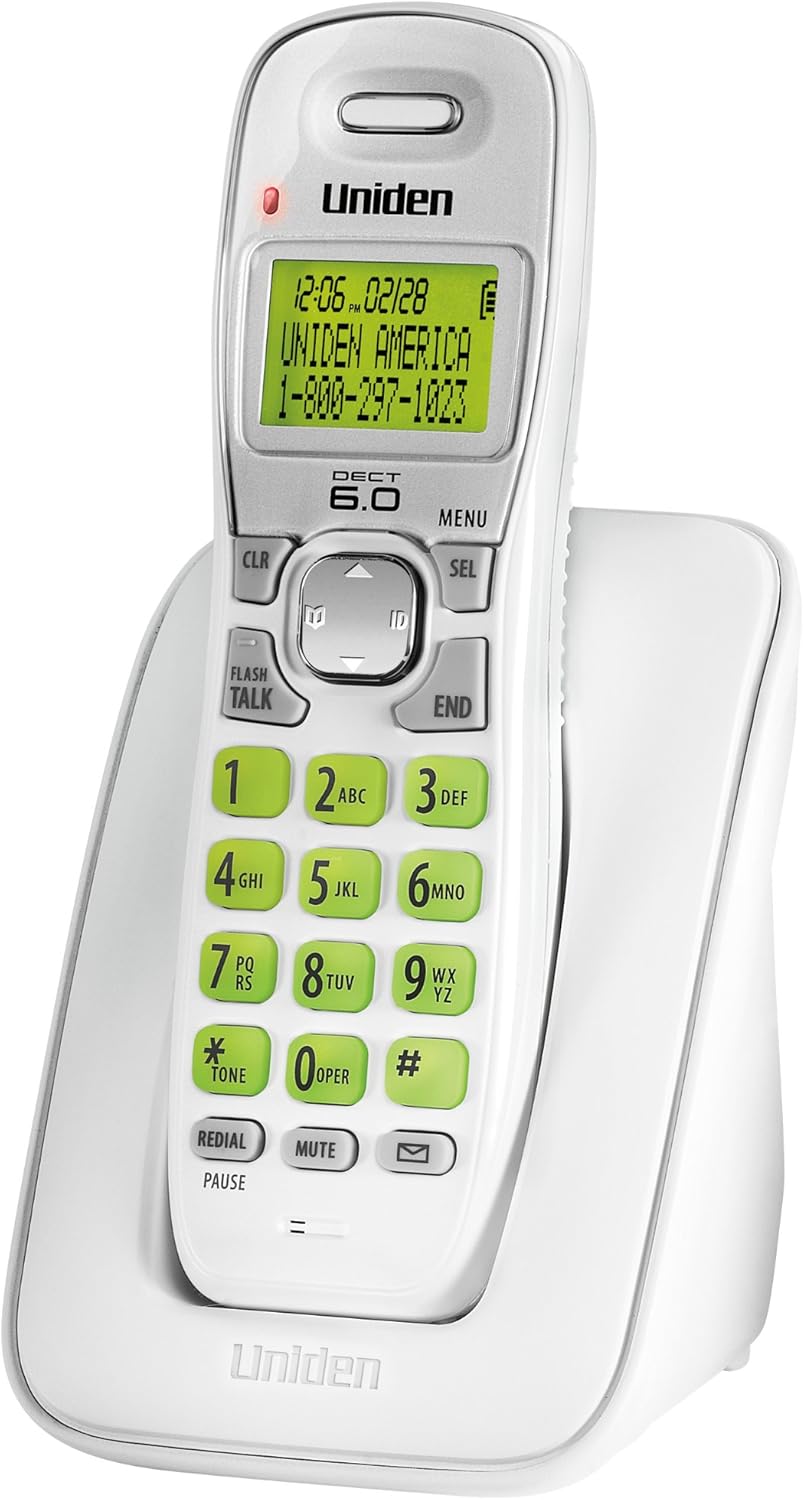
1 paveikslas: Uniden DECT 6.0 Cordless Phone D1364. This image shows the white cordless handset resting in its charging base. The handset features a green backlit LCD display showing time, date, and a sample caller ID entry. The keypad has large, green-backlit buttons for dialing and function keys like CLR, MENU, SEL, FLASH/TALK, END, REDIAL/PAUSE, MUTE, and a message indicator.
2. Pakuotės turinys
Patikrinkite, ar jūsų pakuotėje yra šie elementai:
- One (1) Cordless Handset (D1364)
- One (1) Handset Charging Base
- One (1) AC Adapter for the charging base
- Vienas (1) telefono linijos laidas
- One (1) Rechargeable Battery Pack (Product Specific, included)
- Šis vartotojo vadovas
3. Sąranka
3.1 Akumuliatoriaus įdėjimas
- Raskite baterijų skyriaus dangtelį, esantį ragelio gale.
- Slide the cover down and lift it off.
- Prijunkite akumuliatoriaus bloko jungtį prie lizdo skyriuje, užtikrindami teisingą poliškumą.
- Įdėkite baterijų bloką į skyrių.
- Replace the battery compartment cover, sliding it up until it clicks into place.
3.2 Pagrindinio įrenginio prijungimas
- Plug the small end of the AC adapter into the DC IN jack on the back of the charging base.
- Prijunkite didelį kintamosios srovės adapterio galą į standartinį elektros lizdą.
- Plug one end of the telephone line cord into the TEL LINE jack on the back of the charging base.
- Kitą telefono linijos laido galą prijunkite prie sieninio telefono lizdo.
3.3 Pradinis akumuliatoriaus įkrovimas
Place the handset on the charging base. The handset display will indicate charging. Allow the handset to charge for at least 15-20 valandas before initial use to ensure full battery capacity.
3.4 Tvirtinimas prie sienos (pasirinktinai)
The charging base includes a built-in wall mount feature. Consult the diagrams in the full manual for detailed wall mounting instructions, typically involving two screws spaced appropriately on the wall.
4. Naudojimo instrukcijos
4.1 Skambinimas ir skambučių priėmimas
- Norėdami paskambinti: Paspauskite FLASH/TALK, tada surinkite numerį. Arba pirmiausia surinkite numerį, tada paspauskite FLASH/TALK.
- Norėdami baigti skambutį: Paspauskite PABAIGA or place the handset back on the charging base.
- Norėdami atsiliepti į skambutį: Kai suskamba telefonas, paspauskite FLASH/TALK.
4.2 Garsumo reguliavimas
Pokalbio metu naudokite Rodyklių aukštyn/žemyn klavišai on the navigation pad to adjust the earpiece volume.
4.3 Telefonų knyga
Telefonų knygoje galima išsaugoti iki 30 vardų ir numerių.
- Norėdami pridėti įrašą: Paspauskite MENIU, navigate to "Phonebook," select "Add Entry," and follow the on-screen prompts to enter the name and number.
- Norėdami skambinti iš telefonų knygos: Paspauskite Rodyklių aukštyn/žemyn klavišai to browse the phonebook, then press FLASH/TALK , kad surinktumėte pasirinktą įrašą.
4.4 Skambinančiojo ID ir skambučio laukimas
This phone supports Caller ID and Call Waiting features (subscription required from your telephone service provider).
- The Caller ID list stores up to 30 incoming calls. Press the ID button (down arrow on navigation pad) to review the Caller ID list.
- During a call, if you hear a Call Waiting tone, press BLYKSTE to switch to the incoming call.
4.5 Perrinkimas
The phone stores the last 5 numbers dialed.
- Paspauskite SKAMBINTI PERSKAITYTI / PAUZĖ į view perrinkimo sąrašą.
- Naudokite Rodyklių aukštyn/žemyn klavišai to select a number, then press FLASH/TALK rinkti.
4.6 Nutildymo funkcija
Pokalbio metu paspauskite Nutildyti to temporarily disable your microphone. The other party will not hear you. Press Nutildyti dar kartą norėdami tęsti pokalbį.
4.7 Handset Locator
Jei pametėte ragelį, paspauskite RASTI button on the base unit. The handset will beep, allowing you to locate it.
4.8 Eko režimas
The phone features Eco-Mode, which automatically manages power consumption to extend battery life. This mode is active by default and does not require manual activation.
5. Priežiūra
5.1 Valymas
Nuvalykite telefoną ir bazinį įrenginį minkšta šluosteamp cloth. Do not use cleaning sprays or abrasive cleaners, as they may damage the finish or electrical components.
5.2 Akumuliatoriaus priežiūra
- Visada naudokite nurodytą įkraunamą baterijų paketą.
- If the phone will not be used for an extended period, remove the battery pack to prevent leakage.
- Dispose of old batteries according to local regulations. Do not dispose of them in fire.
5.3 Aplinkosaugos aspektai
Avoid placing the phone in direct sunlight, near heat sources, or in areas with high humidity. Ensure proper ventilation around the base unit.
6. Problemų sprendimas
| Problema | Galima priežastis | Sprendimas |
|---|---|---|
| Nėra rinkimo tono | Telefono linijos laidas atjungtas. | Įsitikinkite, kad telefono linijos laidas yra tvirtai prijungtas prie pagrindo ir sieninio lizdo. |
| Ragelis neįkraunamas | AC adapter is disconnected or handset is not seated correctly. | Verify the AC adapter is plugged into the base and a working outlet. Re-seat the handset firmly on the charging base. |
| Prasta garso kokybė / statinis triukšmas | Interference from other electronic devices or distance from base. | Move the handset closer to the base. Relocate the base away from other electronic devices (Wi-Fi routers, microwaves). |
| Skambinančiojo ID nerodomas | No subscription to Caller ID service. | Contact your telephone service provider to subscribe to Caller ID service. |
| Handset lost connection to base | Handset out of range or power interruption. | Move the handset closer to the base. Check power connections for the base. |
7. Specifikacijos
| Funkcija | Detalė |
|---|---|
| Modelis | D1364 |
| Technologijos | DECT 6.0 Digital |
| Spalva | Baltas |
| Skambintojo ID atmintis | 30 vardų / numerių |
| Telefonų knygos talpa | 30 vardų / numerių |
| Perskambinimo atmintis | Paskutiniai 5 skaičių |
| Ekranas | Green Backlit LCD |
| Klaviatūra | Žalias apšvietimas |
| Baterijos tipas | Rechargeable (Product Specific, included) |
| Pokalbio laikas (apytiksliai) | Iki 7 valandų |
| Budėjimo laikas (apytiksliai) | Iki 6 dienų |
| Maitinimo šaltinis | AC Adapter (Base), Battery Powered (Handset) |
| Matmenys (I x P x A) | 5.12 x 3.62 x 7.68 colio |
| Prekės svoris | 3.76 svaro |
| Energijos efektyvumas | Eco-Mode, Energy Star compliant |
8. Garantija ir palaikymas
For warranty information and technical support, please refer to the warranty card included with your product or visit the official Uniden website. You may also contact Uniden customer service directly.
Uniden America Customer Service: 1-800-297-1023
Pastaba: Produkto specifikacijos ir funkcijos gali būti keičiamos be įspėjimo.


